
Indledning
This manual provides essential information for the safe and efficient operation of your QFX SBX-213 12-inch Portable Bluetooth Speaker. Please read it thoroughly before using the product and retain it for future reference.
Sikkerhedsinstruktioner
For at sikre sikker drift og forhindre skader, bedes du overholde følgende sikkerhedsforanstaltninger:
- Udsæt ikke enheden for regn, fugt eller ekstreme temperaturer.
- Åbn ikke højttaleren casing. Overlad al service til kvalificeret personale.
- Hold højttaleren væk fra varmekilder, direkte sollys og åben ild.
- Use only the specified power adapter and charging cable provided with the unit.
- Sørg for tilstrækkelig ventilation omkring højttaleren for at forhindre overophedning.
- Undgå at placere tunge genstande på højttaleren.
Pakkens indhold
Ved udpakning skal du kontrollere, at alle nedenstående varer er til stede og i god stand:
- QFX SBX-213 Portable Bluetooth Speaker
- Strømkabel
- Fjernbetjening
- Brugervejledning (dette dokument)
Produkt overview
The QFX SBX-213 is a 12-inch portable speaker designed for versatile audio playback. It features Bluetooth connectivity for wireless streaming, an FM radio tuner, and a USB input for playing audio files fra et flashdrev.
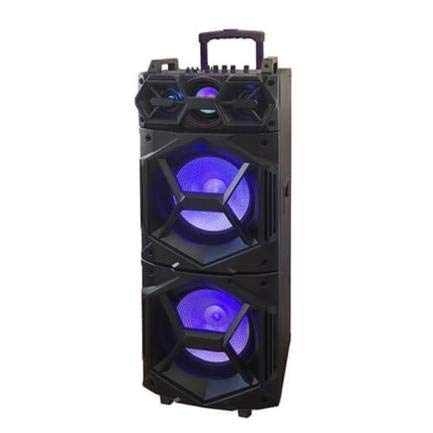
Billede: Forside view of the QFX SBX-213 Portable Bluetooth Speaker, showcasing its 12-inch driver and robust design. The speaker features a black finish and a protective grille over the main driver.
The speaker's control panel and ports typically include:
- Tænd/sluk-knap
- Mode Button (to switch between Bluetooth, FM, USB inputs)
- Volume Control Knobs or Buttons
- Play/Pause, Previous/Next Track Buttons
- USB-port til medieafspilning
- Charging Port for power cable connection
- LED Indicator Lights for power, charging, and Bluetooth status
Opsætning
- Opladning af højttaleren: Before first use, connect the provided power cable to the speaker's charging port and plug it into a standard electrical outlet. Allow the speaker to fully charge. The charging indicator light will typically change color or turn off when charging is complete.
- Placering: Place the speaker on a stable, flat surface. For optimal sound dispersion, avoid placing it in enclosed spaces or directly against walls.
Betjeningsvejledning
1. Tænd/sluk
To power on the speaker, locate the power switch, usually on the back or side panel, and slide it to the "ON" position. To power off, slide the switch to the "OFF" position.
2. Bluetooth-parring
- Tænd højttaleren. Den vil typisk automatisk gå i Bluetooth-parringstilstand, hvilket indikeres af et blinkende LED-lys og en hørbar meddelelse.
- Aktiver Bluetooth på din mobile enhed (smartphone, tablet osv.).
- Søg efter available Bluetooth devices. You should see "QFX SBX-213" or a similar name in the list.
- Select the speaker to pair. Once connected, you will hear a confirmation sound, and the LED indicator will stop flashing.
- Du kan nu afspille lyd fra din enhed via højttaleren.
3. Betjening af FM-radio
- Press the "MODE" button on the speaker or remote control until "FM" mode is selected.
- Press the "Play/Pause" button to initiate an automatic scan for FM stations. The speaker will save all found stations.
- Use the "Previous/Next Track" buttons to navigate between saved FM stations.
4. USB-afspilning
- Indsæt et USB-flashdrev med MP3-lyd files i USB-porten på højttaleren.
- Press the "MODE" button until "USB" mode is selected. The speaker will automatically begin playing audio files fra USB-drevet.
- Use the "Play/Pause" and "Previous/Next Track" buttons to control playback.
5. Lydstyrkekontrol
Adjust the master volume using the dedicated volume knob or buttons on the speaker. You can also control the volume from your connected Bluetooth device or the remote control.
Opretholdelse
- Rensning: Use a soft, dry cloth to clean the speaker's exterior. Do not use abrasive cleaners, waxes, or solvents, as these may damage the finish.
- Opbevaring: Når højttaleren ikke er i brug i længere perioder, skal den opbevares køligt og tørt, væk fra direkte sollys og ekstreme temperaturer.
- Batteripleje: To prolong battery life, avoid fully discharging the battery frequently. Charge the speaker regularly, even if not in use for long periods, to maintain battery health.
Fejlfinding
If you encounter any issues with your QFX SBX-213 speaker, please refer to the following table for common problems and solutions:
| Problem | Mulig årsag | Løsning |
|---|---|---|
| Ingen strøm | Battery discharged; Power cable not connected securely | Charge the speaker fully; Ensure power cable is securely connected to both the speaker and the power outlet. |
| Ingen Bluetooth-forbindelse | Bluetooth not enabled on device; Speaker not in pairing mode; Device too far from speaker | Enable Bluetooth on your device; Put the speaker into Bluetooth pairing mode; Move your device closer to the speaker (within 10 meters). |
| Ingen lydudgang | Volume too low; Incorrect mode selected; Device or speaker is muted | Increase the volume on both the speaker and your connected device; Press the MODE button to select the correct input (Bluetooth, USB, FM); Check if the speaker or device is muted. |
| FM radio static or poor reception | Svagt signal; Interferens | Relocate the speaker to an area with better reception; Perform an auto-scan for stations again; Avoid placing near other electronic devices that may cause interference. |
Specifikationer
- Mærke: QFX
- Model: SBX-213
- Højttalerstørrelse: 12 tommer
- Forbindelse teknologi: USB, Bluetooth
- Særlige funktioner: Lightweight, Portable, FM Radio
- Monteringstype: Floor, Table Mount
- Controller type: Fjernbetjening
- Strømkilde: El-kabel
- Dimensioner (H x B x D): Cirka 113 x 42 x 42 cm
- Vægt: Cirka 4 kg
- UPC: 606540036341
- ASIN: B08GL3SHQP
Garanti og support
QFX products are designed for reliability and performance. For detailed warranty information or technical support, please refer to the warranty card included with your purchase or visit the official QFX webwebsted. Gem din købsbevis i tilfælde af garantikrav.
For further assistance, please contact QFX customer service through their official channels.