
TecTake 402997-NL
tectake 402997 Denis Electric Desk Frame - User Manual
Model: 402997-NL
Indledning
Thank you for choosing the tectake 402997 Denis Electric Desk Frame. This manual provides essential information for the safe and efficient assembly, operation, and maintenance of your new desk frame. Please read this manual thoroughly before installation and keep it for future reference.

Billede: Overview of the tectake 402997 Denis Electric Desk Frame, showing the main frame components, control panel, power adapter, and cables. The image also illustrates the height and width adjustment capabilities.
Nøglefunktioner
- Continuously electrically height-adjustable for ergonomic working positions.
- Variable frame width to accommodate different tabletop sizes.
- High-quality robust steel construction ensures durability and stability.
- Powerful and quiet motors (<50 dB) for smooth height transitions.
- Equipped with memory function to save preferred height settings.
- Includes an alarm function for reminding position changes.
- Automatic stop on resistance (anti-collision system) for safety.
- Design allows for maximum legroom without a crossbar.
- Nem monteringsproces.

Image: Visual representation of the desk frame's key features, including adjustable height, variable width, high load capacity (up to 125 kg), quiet motors, sturdy steel frame, anti-collision system, and 100% stability with adjustable feet.
Opsætning og montering
The tectake 402997 desk frame is designed for easy assembly. Please follow the included assembly instructions carefully. Ensure all components are present before beginning.
Pakkeindhold:
- Desk frame components
- Kontrolpanel
- Strømadapter og kabler
- Assembly hardware (screws, tools if provided)
- Monteringsvejledning
Samlingstrin (generelt):
- Pak alle komponenter ud, og verificer dem i forhold til styklisten.
- Fastgør fødderne til løftesøjlerne.
- Connect the crossbars to the lifting columns, adjusting the width as needed for your tabletop.
- Securely attach your chosen tabletop (not included) to the frame using appropriate screws.
- Mount the control panel in an accessible location on the tabletop.
- Connect all motor and control cables, ensuring they are neatly routed, possibly using the integrated cable tray.
- Connect the power adapter to the frame and then to a power outlet.
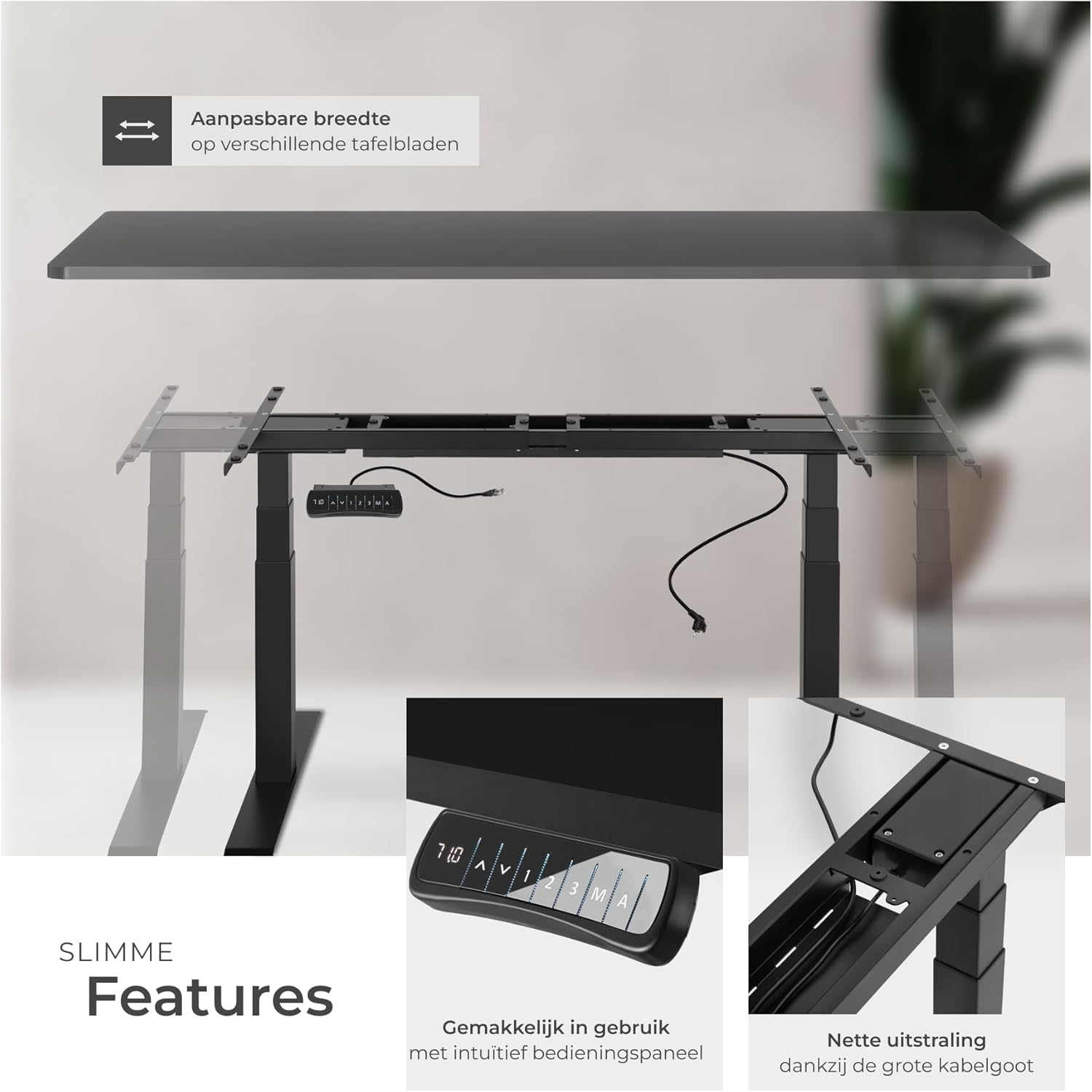
Image: Illustrates the adjustable width feature of the frame, allowing it to fit various tabletop sizes. Also shows the intuitive control panel and the large cable tray for organized cable management.

Billede: Detaljeret views of the control panel for height adjustment and memory functions, the practical and extra-large cable tray for secure cable storage, the durable powder-coated steel frame, and the adjustable screw feet for precise compensation on uneven surfaces.
Betjeningsvejledning
The tectake 402997 desk frame features an intuitive control panel for easy height adjustment and personalized settings.
Kontrolpanelets funktioner:
- Op/ned-pile (▲ / ▼): Tryk og hold nede for kontinuerligt at justere skrivebordets højde. Slip for at stoppe ved den ønskede højde.
- Digital skærm: Shows the current height of the desk in centimeters.
- Hukommelsesforudindstillinger (1, 2, 3): Press a numbered button to move the desk to a pre-saved height. To save a height, adjust the desk to the desired position, then press 'M' followed by the desired number (1, 2, or 3).
- Alarm Function (A): Activates a reminder to change your working position after a set period. Refer to the detailed assembly instructions for setting the alarm duration.
Sikkerhedsfunktioner:
- Antikollisionssystem: The desk will automatically stop and slightly reverse if it encounters an obstruction during height adjustment.

Image: Highlights the maximum flexibility of the desk frame, showing the two powerful motors within the frame, the spacious cable tray, and a detailed view of the control panel with exact height indication, intuitive arrow keys for stepless adjustment, alarm function for position changes, and three memory options for saving different table heights.
Opretholdelse
Regular maintenance ensures the longevity and optimal performance of your tectake desk frame.
- Rensning: Tør rammen af med en blød kludamp klud. Undgå slibende rengøringsmidler eller opløsningsmidler, der kan beskadige den pulverlakerede overflade.
- Kabelstyring: Periodically check that all cables are securely connected and neatly routed within the cable tray to prevent pinching or damage.
- Skruefasthed: Med tiden kan skruer løsne sig. Kontroller og spænd alle monteringsskruer med jævne mellemrum for at opretholde stabiliteten.
- Motorinspektion: Listen for any unusual noises during operation. If you notice any issues, refer to the troubleshooting section or contact customer support.
Fejlfinding
If you encounter any issues with your desk frame, please refer to the following common problems and solutions:
- Skrivebordet bevæger sig ikke:
- Kontroller, om strømkablet er korrekt tilsluttet stikkontakten og kontrolboksen.
- Sørg for, at alle motorkabler er korrekt tilsluttet til styreboksen.
- If an error code appears on the display, refer to the detailed assembly instructions for specific error meanings and solutions.
- Ujævn højdejustering:
- Perform a reset procedure (refer to your detailed assembly instructions for specific steps, usually involving holding down certain buttons).
- Ensure the desk is not overloaded beyond its maximum capacity.
- Desk stops unexpectedly:
- The anti-collision system may have been triggered. Check for any obstructions under or around the desk.
- The motor may have overheated from continuous use. Allow it to cool down for 20-30 minutes before attempting operation again.
For issues not covered here, please consult the comprehensive assembly instructions provided with your product or contact tectake customer support.
Specifikationer
Detailed technical specifications for the tectake 402997 Denis Electric Desk Frame:

Image: Provides a comprehensive overview of the product information, including maximum and minimum dimensions, suitable tabletop sizes, support plate dimensions, cable length, and a visual representation of the frame with key measurements. Also lists technical details such as load capacity, motor power, lifting speed, voltage, weight, and material.
| Feature | Detalje |
|---|---|
| Mærke | TecTake |
| Modelnummer | 402997-NL |
| Maximum Total Dimensions (LxWxH) | ca. 190 x 68 x 123 cm |
| Minimum Total Dimensions (LxWxH) | ca. 110 x 68 x 58 cm |
| Suitable Tabletop Sizes (LxW) | approx. 120 x 60 to 200 x 80 cm |
| Main Column (LxW) | ca. 7 x 7 cm |
| Extendable Columns | 2 |
| Support Plate (LxW) | ca. 3.2 x 58 cm |
| Foot (LxW) | ca. 9 x 68 cm |
| Elektriske motorer | 2 (<50 dB) |
| Løftehastighed | 38 mm/s |
| Power (per motor) | 40 W |
| Voltage | 100 - 240 V |
| Kabellængde | ca. 300 cm |
| Maksimal belastningskapacitet | 125 kg |
| Vægt | ca. 31 kg |
| Materiale | Pulverlakeret stål |
Garanti og support
For warranty information and customer support, please refer to the documentation included with your purchase or visit the official tectake webwebsted. Gem din købsbevis i tilfælde af garantikrav.
If you require assistance with assembly, operation, or troubleshooting, please contact tectake customer service. They can provide further guidance and support.
Ask a question about this manual
Ask about setup, troubleshooting, compatibility, parts, safety, or missing instructions. Manuals+ will review the question and use this page’s manual context to help answer it.