
1. Introduktion
Akasa AK-MX293 kabelkamsættet er designet til at organisere og håndtere kabler til pc-strømforsyninger (PSU), hvilket giver din computer et rent og professionelt udseende. Dette sæt hjælper med at forhindre kabler i at sno sig og bevarer deres pæne placering.
Denne manual indeholder instruktioner til korrekt brug og installation af Akasa kabelkamsættet.
2. Produktindhold
Akasa AK-MX293 kabelkamsættet indeholder i alt 24 kabelkamme, designet til kabler med en diameter på 3 mm:
- 4 stk af 24-bens kabelkamme
- 12 stk af 8-bens kabelkamme
- 8 stk af 6-bens kabelkamme

Billede 1: Overview af Akasa AK-MX293 kabelkamsættet, der viser alle 24 kamme i forskellige størrelser.

Billede 2: Diagram, der illustrerer de specifikke mængder af hver kamtype, der er inkluderet i sættet: 4x 24-bens, 12x 8-bens og 8x 6-bens.
3. Installationsvejledning
Akasa-kabelkammene er designet til hurtig og nem installation. De kan installeres, selv efter at dit pc-system er blevet bygget.
- Identificér kabeltype: Bestem den type kabel, du ønsker at organisere (f.eks. 24-bens ATX, 8-bens CPU/PCIe, 6-bens PCIe).
- Vælg den rigtige kam: Vælg den tilsvarende kabelkamstørrelse fra sættet (24-benet, 8-benet eller 6-benet). Sørg for, at kammen passer til antallet af individuelle ledninger i kablet.
- Juster kabler: Justér de enkelte ledninger i kablet pænt. For at opnå de bedste resultater skal du sørge for, at de er parallelle og ikke snoede.
- Klik på plads: Tryk forsigtigt kabelkammen over de justerede ledninger, indtil den klikker sikkert på plads. Det afrundede design hjælper med at beskytte kabelmuffen.
- Gentage: Installer ekstra kamme langs kablets længde efter behov for at opnå det ønskede niveau af organisering og æstetik.
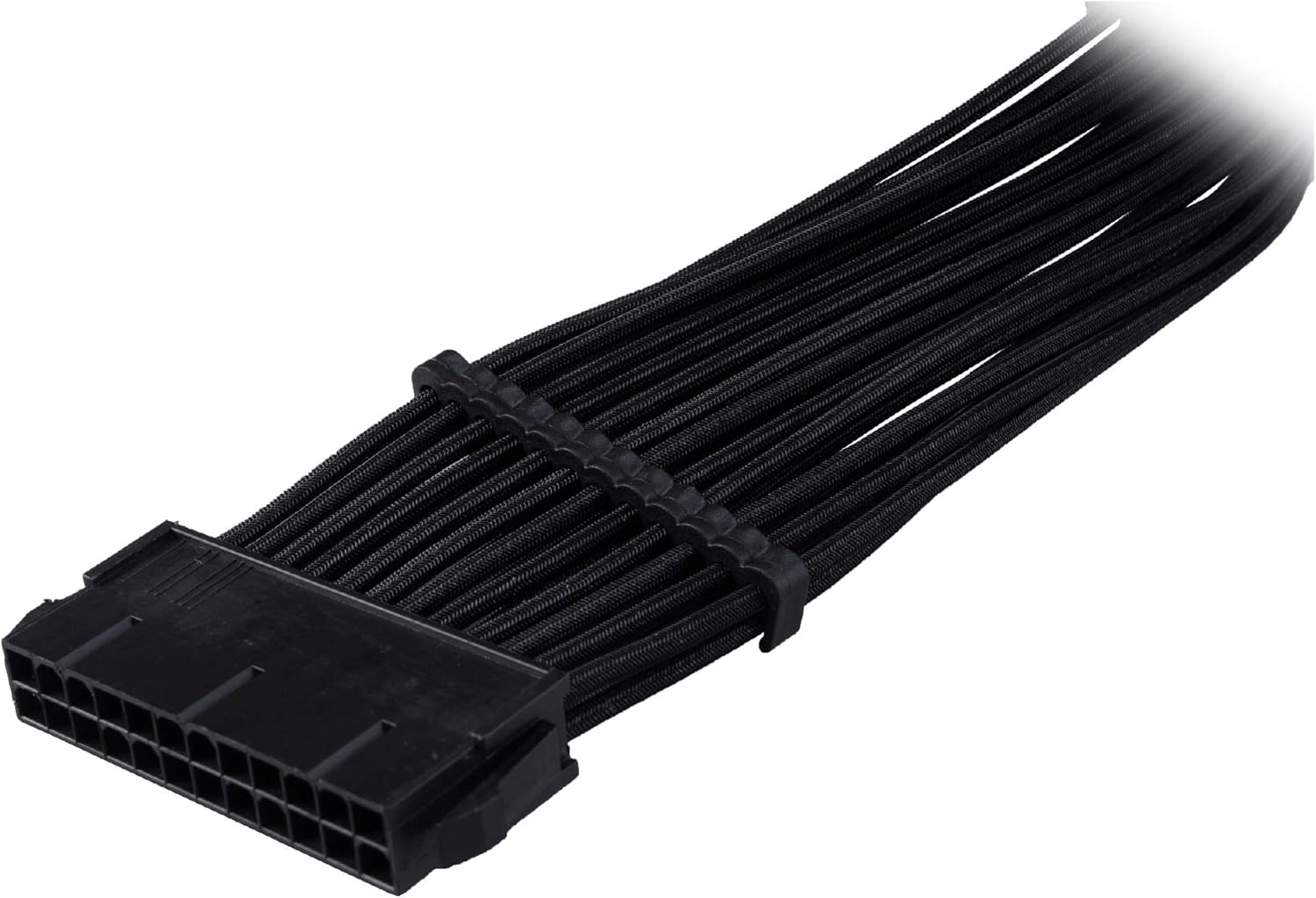
Billede 3: Et 24-bens ATX-strømkabel med flere Akasa-kabelkamme pænt installeret, hvilket demonstrerer organiseret kabelføring.

Billede 4: Et 8-bens PCIe-strømkabel med Akasa-kabelkamme, der illustrerer, hvordan de opretholder individuel ledningsadskillelse og et pænt udseende.

Billede 5: Et 6-bens PCIe-strømkabel med påsatte Akasa-kabelkamme, vistasing effektiv organisering til mindre strømtilslutninger.

Billede 6: Eks.ampEt par Akasa-kabelkamme i brug i et pc-kabinet, der organiserer flettede strømkabler for forbedret æstetik og luftgennemstrømning.
4. Betjeningsvejledning
Når de er installeret, styrer Akasa-kabelkammene passivt dine pc-kabler. Yderligere betjening er ikke nødvendig. De opretholder adskillelsen og justeringen af individuelle ledninger, hvilket bidrager til et pænt internt pc-miljø og potentielt forbedrer luftstrømmen.
5. Vedligeholdelse
Akasa kabelkamme kræver minimal vedligeholdelse.
- Rensning: Hvis der samler sig støv, skal du forsigtigt tørre kammene af med en blød, tør klud. Undgå at bruge skrappe kemikalier eller slibende materialer.
- Inspektion: Kontroller kammene med jævne mellemrum for at sikre, at de sidder sikkert på plads og ikke er beskadigede.
6. Fejlfinding
- Kamme passer ikke: Sørg for at bruge den korrekte kamstørrelse til dit kabel (24-bens, 8-bens eller 6-bens). Kammene er designet til kabler med en diameter på 3 mm. Hvis dine kabler er betydeligt tykkere eller tyndere, passer kammene muligvis ikke ordentligt.
- Kamme er løse: Hvis en kam føles løs, skal du sørge for, at alle individuelle ledninger er korrekt placeret i dens kanaler. Hvis kabeldiameteren er for lille til kammen, sidder den muligvis ikke sikkert fast.
- Kamme knækker under installationen: Selvom kammene er lavet af slidstærkt ABS, kan for meget kraft forårsage brud. Tryk forsigtigt og jævnt, når du klikker dem på plads.
7. Specifikationer
| Anvendelse | Håndtering af pc-kabler |
| Sættets indhold | 4 x 24-bens, 12 x 8-bens, 8 x 6-bens kamme (i alt 24 stk.) |
| Kabeldiameterstøtte | 3 mm kabler |
| Farve | Sort |
| Materiale | Holdbar præcisionsstøbt ABS (acrylonitrilbutadienstyren) |
| Produktdimensioner | 6.3 x 6.3 x 2.76 tommer (emballage) |
| Varens vægt | 0.704 ounce |
| Modelnummer | AK-MX293 |
| Fabrikant | Akasa |
8. Garanti og support
For garantioplysninger og teknisk support henvises til den officielle Akasa webwebstedet eller kontakt din forhandler. Gem din købsbevis i tilfælde af garantikrav.