
Aigital ZQ-JPWN532b01
Aigital N300 WiFi Repeater Brugermanual
Model: ZQ-JPWN532b01
Produkt overview
The Aigital N300 WiFi Repeater is a versatile networking device designed to extend your existing Wi-Fi coverage and enhance signal strength. It supports multiple operating modes including Repeater, Access Point, and Router, making it suitable for various network setups. Equipped with two high-gain external antennas, it aims to eliminate Wi-Fi dead zones and provide stable internet access throughout your home or office.

Figure 1: Aigital N300 WiFi Repeater, showing its compact design and indicator lights.
This device offers a Wi-Fi transmission speed of up to 300Mbps on the 2.4GHz frequency band, ensuring smooth web browsing and streaming. Its universal compatibility allows it to work with all internet boxes and Wi-Fi routers. Additionally, it features LAN/WAN ports for connecting wired devices, providing a more stable network environment for devices like smart TVs, game consoles, and PCs.

Figure 2: The repeater supports 2.4GHz and up to 300Mbps data transfer speeds.
Nøglefunktioner
- High-Speed Signal: Achieves Wi-Fi transmission speeds of up to 300Mbps on the 2.4GHz band, ideal for seamless internet use.
- 360° WiFi Coverage: Features 2 high-gain external antennas to effectively penetrate walls and obstacles, minimizing data loss and eliminating Wi-Fi dead zones.
- Nem opsætning: Supports one-button setup via the WPS button or a quick 1-minute configuration through a web browser interface, compatible with iOS and Android mobile platforms.
- Universal kompatibilitet: Works with all standard internet boxes and Wi-Fi routers. Includes LAN/WAN ports for connecting wired devices.
- Flere driftstilstande: Configurable as a Repeater, Access Point, or Router to suit different networking needs.

Figure 3: Two high-gain antennas improve signal coverage and stability.
Opsætningsvejledning
1. Pakkens indhold
Før du begynder, skal du sørge for at alle komponenter er til stede:
- Aigital N300 WiFi Repeater
- Ethernet kabel
- Hurtig installationsvejledning
2. Tænder
Plug the Aigital N300 WiFi Repeater into a standard electrical outlet. Wait for the Power LED indicator to light up, indicating the device is powered on.

Figure 4: The repeater plugged into a power outlet.
3. WPS (Wi-Fi Protected Setup) Configuration
WPS offers a quick and easy way to extend your Wi-Fi network without manual configuration.
- Plug the Aigital N300 WiFi Repeater into an electrical outlet near your existing router.
- Press the WPS button on the Aigital Repeater (refer to Figure 6 for location). The WPS LED will start blinking.
- Inden for 2 minutter skal du trykke på WPS-knappen på din primære Wi-Fi-router.
- Wait for the WPS LED on the repeater to become solid, indicating a successful connection. You can now unplug the repeater and move it to a desired location within your router's Wi-Fi range.

Figure 5: Easy setup using the WPS button on both the repeater and your main router.

Figure 6: Location of the WPS button on the Aigital N300 WiFi Repeater.
4. Web Browser konfiguration
If your router does not support WPS, or for more advanced settings, use the web browsermetode.
- Plug the Aigital N300 WiFi Repeater into an electrical outlet.
- Connect your computer or mobile device to the repeater's default Wi-Fi network (e.g., "Aigital_XXXX"). No password is required initially.
- Åbn a web browser (Chrome, Firefox, Safari, etc.) and enter the default IP address or domain name (usually found in the Quick Installation Guide, e.g., http://192.168.10.1 or http://aigitalwifi.com).
- Follow the on-screen instructions to select your desired operating mode (Repeater, Access Point, or Router) and configure network settings, including Wi-Fi name (SSID) and password.
- Once configured, the repeater will restart. You can then connect your devices to the new extended Wi-Fi network.
Driftstilstande
The Aigital N300 WiFi Repeater supports three primary operating modes:
1. Repeater-tilstand
In Repeater Mode, the device extends the coverage of your existing Wi-Fi network. It receives the wireless signal from your main router and re-transmits it, effectively expanding the range to areas with weak or no signal.

Figure 7: Three-in-one feature diagram, showing Repeater Mode (2).

Figure 8: Visual representation of Repeater Mode in action.
To optimize performance in Repeater Mode, place the device halfway between your router and the area where you need improved Wi-Fi coverage. Ensure the signal strength indicator on the repeater shows a strong or medium signal from your main router.

Figure 9: Signal strength indicators (WLAN LED) on the repeater.
2. Adgangspunktstilstand (AP)
In AP Mode, the device transforms a wired network connection into a wireless one. Connect the repeater to your router or modem using an Ethernet cable, and it will broadcast a new Wi-Fi network.

Figure 10: Wired LAN cable connection for Access Point mode.
This mode is useful for adding Wi-Fi capability to a wired-only network or for creating a separate Wi-Fi network in a specific area.
3. Routertilstand
In Router Mode, the device acts as a primary router, creating a new private wireless network from a modem connection. This is suitable for small homes or offices that need a basic router function.
Connect the modem's Ethernet cable to the WAN/LAN port of the Aigital N300, and it will establish a new Wi-Fi network for your devices.
Tilslutning af kablede enheder
The Aigital N300 WiFi Repeater is equipped with two Ethernet ports (LAN/WAN) that allow you to connect wired devices directly to your network. This provides a stable and high-speed connection for devices that benefit from a wired link, such as desktop computers, gaming consoles, smart TVs, and network printers.
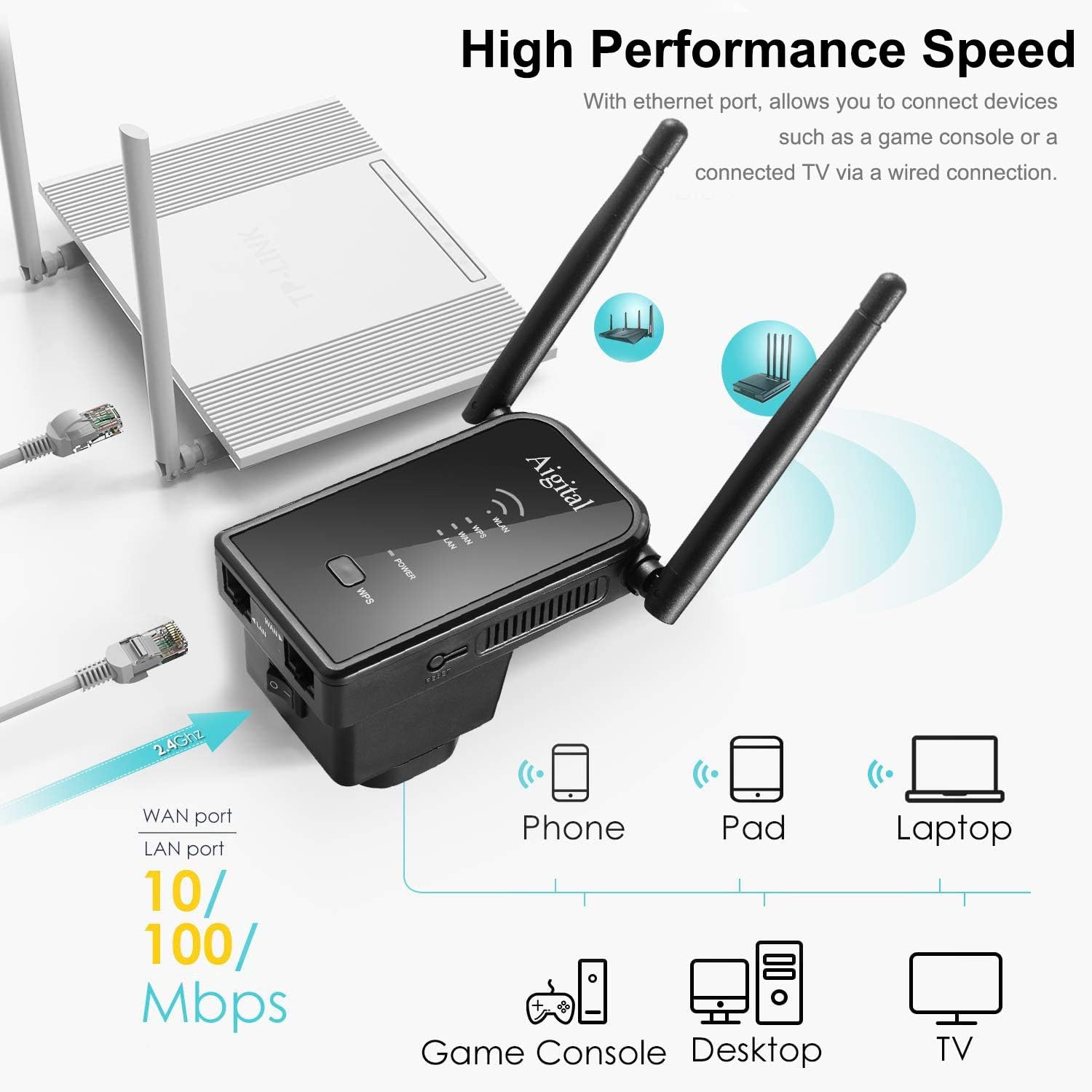
Figure 11: Connecting various devices via Ethernet ports.

Figur 12: Detaljeret view of LAN/WAN ports and compatible devices.
Opretholdelse
To ensure optimal performance and longevity of your Aigital N300 WiFi Repeater, follow these maintenance guidelines:
- Placering: Place the repeater in an open area, away from large metal objects, concrete walls, and other electronic devices that may cause interference.
- Rensning: Tør forsigtigt enheden af med en blød, tør klud. Brug ikke flydende rengøringsmidler eller aerosoler.
- Ventilation: Sørg for, at ventilationshullerne ikke er blokerede for at forhindre overophedning.
- Firmwareopdateringer: Kontroller jævnligt producentens website for firmware updates to ensure the best performance and security.
Fejlfinding
If you encounter issues with your Aigital N300 WiFi Repeater, refer to the following common problems and solutions:
| Problem | Mulig årsag | Løsning |
|---|---|---|
| Ingen Power LED | Device not plugged in or power outlet issue. | Ensure the repeater is securely plugged into a working electrical outlet. Try a different outlet. |
| Kan ikke oprette forbindelse til repeaterens Wi-Fi | Incorrect Wi-Fi password or repeater not broadcasting. | Verify the Wi-Fi password. If newly set up, ensure the repeater has restarted. Try resetting the repeater and reconfiguring. |
| Weak or unstable extended signal | Repeater placed too far from the main router or too close to interference sources. | Relocate the repeater closer to your main router, ideally halfway between the router and the desired coverage area. Avoid placing near large metal objects or appliances. |
| Kan ikke få adgang til web ledelsesside | Incorrect IP address, device not connected to repeater's Wi-Fi, or IP conflict. | Ensure your device is connected to the repeater's Wi-Fi. Double-check the IP address (http://192.168.10.1) eller domænenavn (http://aigitalwifi.com). Try clearing your browser's cache. |
| Internet connection drops frequently | Interference, channel overlap, or outdated firmware. | Try changing the Wi-Fi channel on your main router. Ensure the repeater has the latest firmware. Check for physical obstructions. |
Hvis disse løsninger ikke løser dit problem, bedes du kontakte kundesupport.
Specifikationer
| Mærke | digital |
| Modelnummer | ZQ-JPWN532b01 |
| Farve | Sort |
| Særlige funktioner | WiFi Amplifier, 2 Ethernet Ports, Access Point Mode, 360° Coverage, Universal Compatibility |
| Kompatible enheder | Any device capable of connecting to a WiFi network |
| Forbindelse | RJ45 (Ethernet) |
| Trådløs Standard | 802.11n (N300) |
| Frekvensbånd | 2.4 GHz |
| Maks. Datahastighed | 300 Mbps |
| Antenner | 2 x 3dBi High Gain External Antennas |
Garanti og support
Aigital provides technical support for its products. According to product features, 24/7 technical support is available.
For warranty information, please refer to the documentation included with your purchase or visit the official Aigital webOplysninger om tilgængelighed af reservedele og softwareopdateringer er ikke eksplicit angivet i produktdetaljerne.
For further assistance, please contact Aigital customer support through their official channels.
Ask a question about this manual
Ask about setup, troubleshooting, compatibility, parts, safety, or missing instructions. Manuals+ will review the question and use this page’s manual context to help answer it.