
Indledning
This manual provides instructions for the proper use and maintenance of your Wireless Gear True Wireless Bluetooth 5.0 Mini Earbuds. Please read this manual thoroughly before using the product to ensure optimal performance and longevity.
Hvad er der i æsken:
- True Wireless Mini Earbuds (Left and Right)
- USB-opladningsbase
Sikkerhedsoplysninger
- Do not expose the earbuds or charging base to extreme temperatures, moisture, or corrosive materials.
- Undgå at tabe eller udsætte enheden for kraftige stød.
- Forsøg ikke at skille produktet ad eller ændre det. Dette vil ugyldiggøre garantien og kan forårsage skade.
- Opbevares utilgængeligt for børn.
- Use only the provided charging base.
- Langvarig lytning ved høj lydstyrke kan forårsage høreskader. Juster lydstyrken til et sikkert niveau.
Produkt overview
Familiarize yourself with the components of your True Wireless Mini Earbuds.

Billede: Nærbillede view of a single Wireless Gear earbud, highlighting the touch control button on its outer surface.
- høretelefoner Left and Right earbuds with built-in microphones and touch controls.
- USB-opladerbase: Compact base for charging the earbuds, featuring an integrated USB plug.
Opsætning
1. Opladning af øretelefonerne
Before first use, fully charge the earbuds. The charging base provides additional hours of playback.
- Insert both earbuds into the charging base. Ensure they are seated correctly.
- Plug the integrated USB connector of the charging base into any standard USB power source (e.g., computer USB port, USB wall adapter).
- The indicator lights on the earbuds will show charging status (refer to product packaging for specific light behavior if available).
- A full charge provides approximately 1.5 hours of playtime from the earbuds, with the charging base offering an additional 8 hours.
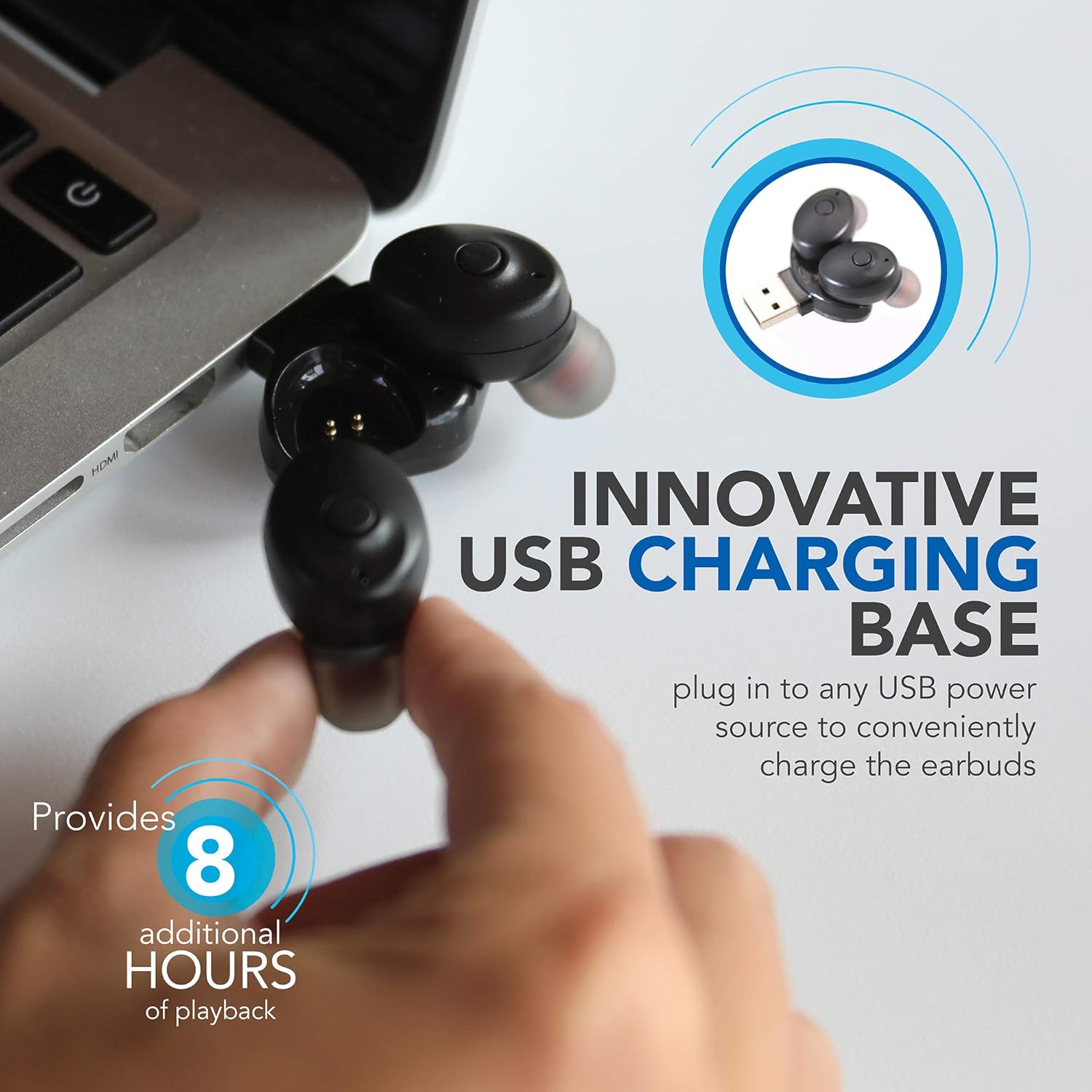
Image: Wireless Gear earbuds placed in their USB charging base, which is plugged into a laptop's USB port.
2. Parring med en enhed
The earbuds feature auto-pair and auto-power on functionality for seamless connection.
- Sørg for, at øretelefonerne er opladet.
- Remove both earbuds from the charging base. They will automatically power on and enter pairing mode.
- On your smartphone, MP3 player, tablet, or laptop, navigate to the Bluetooth settings.
- Søg efter available devices and select "Wireless Gear Earbuds" (or similar name) from the list.
- Once connected, you will hear an audible confirmation, and the indicator lights on the earbuds will change (refer to product packaging for specific light behavior if available).
- The earbuds will automatically reconnect to the last paired device when removed from the charging base, if Bluetooth is enabled on the device.

Image: Wireless Gear earbuds positioned next to a smartphone, illustrating the pairing process.
Betjeningsvejledning
Tænd/sluk
- Tænd: Remove the earbuds from the charging base. They will automatically power on.
- Sluk: Place the earbuds back into the charging base. They will automatically power off and begin charging.
Tryk på kontrolelementer
Each earbud features a touch-sensitive area for controlling various functions. The specific functions may vary slightly between left and right earbuds or depend on the operating system of your connected device.
- Afspil/sæt musik på pause: Et enkelt tryk på begge øretelefoner.
- Næste sang: Double tap on the right earbud (or specific earbud as per device).
- Forrige sang: Double tap on the left earbud (or specific earbud as per device).
- Besvar/afslut opkald: Enkelt tryk på en af øretelefonerne under et indgående opkald eller et aktivt opkald.
- Afvis opkald: Tryk og hold nede på en af øretelefonerne under et indgående opkald.
- Activate Voice Assistant (Siri for iOS): Tryk tre gange på en af øretelefonerne.

Image: A woman smiling while wearing a Wireless Gear earbud, demonstrating comfortable fit and discreet design.
Foretage og modtage opkald
The built-in microphone allows for hands-free calling. Intelligent noise reduction ensures clear communication.
- Når du modtager et opkald, skal du trykke én gang på en af øretelefonerne for at besvare.
- For at afslutte et opkald skal du trykke én gang på en af øretelefonerne.
- For at afvise et indgående opkald skal du trykke på en af øretelefonerne og holde dem nede.
Opretholdelse
Rensning
Regelmæssig rengøring hjælper med at opretholde lydkvalitet og hygiejne.
- Gently wipe the earbuds and charging base with a soft, dry, lint-free cloth.
- Brug ikke slibende rengøringsmidler, alkohol eller kemiske opløsningsmidler.
- Periodically check the speaker mesh for debris. Use a soft brush or cotton swab to carefully remove any buildup.

Billede: Nærbillede view of the speaker mesh on a Wireless Gear earbud, showing fine details.
Opbevaring
- When not in use, store the earbuds in their charging base to protect them and keep them charged.
- Opbevares på et køligt, tørt sted væk fra direkte sollys og ekstreme temperaturer.
Fejlfinding
Hvis du støder på problemer med dine ørepropper, kan du bruge følgende almindelige løsninger:
| Problem | Mulig løsning |
|---|---|
| Ørepropperne tænder ikke. | Ensure earbuds are charged. Place them in the charging base and connect to a USB power source for at least 30 minutes. |
| Øretelefoner parres ikke med enheden. |
|
| Kun én øretelefon virker. |
|
| Dårlig lydkvalitet eller uregelmæssig forbindelse. |
|
Specifikationer
| Feature | Detalje |
|---|---|
| Forbindelsesteknologi | Bluetooth 5.0 |
| Trådløs kommunikationsteknologi | Bluetooth |
| Inkluderede komponenter | Hovedtelefoner, oplader |
| Specifikke anvendelser af produktet | Home, Sports and Exercise, Travel |
| Kompatible enheder | Phones, MP3 players, Tablets, Laptops |
| Kontroltype | Tryk på kontrol |
| Kabelfunktion | Uden kabel |
| Batterilevetid (ørepropper) | Op til 1.5 timer |
| Additional Battery Life (Charging Base) | 8 timer |
| Samlet batterilevetid | 9.5 Hours (Earbuds + Charging Base) |
| Bluetooth rækkevidde | 10 meter (33 fod) |
| Ørestykke form | Afrundet spids |
| Varens vægt | 1.44 ounce |
| Fabrikant | ESI Wireless Accessories |
| ASIN | B08FF73J9X |
| GTIN/UPC | 680988106811 |
Garantioplysninger
No specific warranty information is provided in the product details. Please refer to the product packaging or contact the retailer/manufacturer directly for warranty terms and conditions.
Støtte
For further assistance or technical support, please contact Wireless Gear customer service. Contact details are typically found on the product packaging or the manufacturer's official webwebsted.