
Indledning
This manual provides essential information for setting up, operating, maintaining, and troubleshooting your Lenovo ThinkPad T470 laptop. Please read this guide thoroughly to ensure proper use and longevity of your device.
The Lenovo ThinkPad T470 is a 14-inch business laptop featuring an Intel Core i7-7600U processor, 8 GB RAM, and a 256 GB SSD, running Windows 10 Pro. This particular unit is a renewed product, professionally inspected and tested to function like new.
1. Opsætning
1.1 Udpakning og første inspektion
Carefully remove all components from the packaging. The box should contain the Lenovo ThinkPad T470 laptop and an AC adapter.

Image: Lenovo ThinkPad T470 laptop, open and viewed from an angle, displaying a desktop screen.
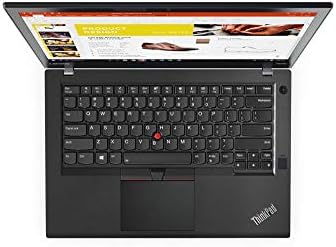
Image: AC power adapter for the Lenovo ThinkPad T470 laptop.
1.2 Tilslutning af strømadapteren
- Connect the AC adapter cable to the power port on your laptop.
- Plug the AC adapter into a functional electrical outlet.
- Lad batteriet oplade i mindst 30 minutter før første brug, eller indtil batteriindikatoren viser tilstrækkelig opladning.
1.3 Indledende tænding
- Åbn den bærbare computers låg.
- Tryk på tænd/sluk-knappen, som typisk er placeret over tastaturet eller på siden.
- Follow the on-screen instructions to complete the Windows 10 Pro setup process. This may include setting up user accounts, network connections, and basic preferences.

Image: Lenovo ThinkPad T470 laptop displaying the Windows 10 desktop.
1.4 Tilslutning af eksterne enheder
Your ThinkPad T470 supports various external devices:
- USB-enheder: Connect USB devices such as external drives, mice, or keyboards to the available USB ports.
- Ethernet: For a wired network connection, plug an Ethernet cable into the LAN port.
- Bluetooth: Enable Bluetooth in Windows settings to pair with Bluetooth-enabled devices like headphones or speakers.
- Eksternt display: Use the HDMI or DisplayPort outputs to connect to an external monitor.

Billede: Side view of the Lenovo ThinkPad T470 laptop showing various ports.
2. Betjeningsvejledning
2.1 Tænd og sluk
- Tænd: Tryk på tænd/sluk-knappen.
- Luk ned: Klik på Windows Start-knappen, og vælg derefter Strøm > Luk ned.
- Genstart: Klik på Windows Start-knappen, og vælg derefter Tænd/sluk > Genstart.
- Sove: Close the laptop lid or click the Windows Start button, then select Power > Sleep.
2.2 Tastatur og touchpad
The ThinkPad T470 features a Chiclet-style keyboard and a touchpad for navigation.

Billede: Top-down view of the Lenovo ThinkPad T470 laptop keyboard and touchpad.
- Tastatur: Standard QWERTY layout. Use function keys (Fn) in combination with F1-F12 for special features like volume control, brightness adjustment, and wireless toggling.
- Touchpad: Supports multi-touch gestures. Use it to move the cursor, click, scroll, and zoom. The TrackPoint (red dot in the center of the keyboard) can also be used for precise cursor control with its dedicated buttons below the spacebar.
2.3 Skærmindstillinger
- Lysstyrke: Adjust screen brightness using the dedicated function keys (usually F5 and F6) or through Windows Display settings.
- Opløsning: The native resolution is 1366 x 768 pixels, with a maximum display resolution of 1920x1080. You can change the display resolution in Windows Display settings.
2.4 Forbindelse
- Wi-Fi: Opret forbindelse til trådløse netværk via Wi-Fi-indstillingerne i Windows.
- Bluetooth: Pair Bluetooth devices through the Bluetooth & other devices settings.
- Ethernet: Provides a stable wired network connection up to 1000 Mbps.
3. Vedligeholdelse
3.1 Rengøring af din bærbare computer
- Skærm: Brug en blød, fnugfri klud lidt damprengøres med vand eller en skærmrens. Undgå skrappe kemikalier.
- Tastatur og kabinet: Brug en blød klud til at tørre overfladerne af. En dåse trykluft kan fjerne støv mellem tasterne.
- Sluk altid den bærbare computer og tag stikket ud, inden du rengør den.
3.2 Pleje af batterier
- For at forlænge batteriets levetid bør du undgå at aflade batteriet helt ofte.
- Opbevar den bærbare computer et køligt og tørt sted, hvis den ikke bruges i længere perioder.
- The laptop has a Lithium-Battery Energy Content of 45 Watt Hours.
3.3 Softwareopdateringer
Regularly update your Windows operating system and drivers to ensure optimal performance and security. You can check for updates via Windows Update in the Settings menu.
4. Fejlfinding
Dette afsnit omhandler almindelige problemer, du kan støde på.
4.1 Strømproblemer
- Bærbar computer tænder ikke: Ensure the AC adapter is securely connected and the power outlet is functional. Check if the battery has sufficient charge.
- Batteri oplades ikke: Verify the AC adapter and cable are not damaged. Try a different power outlet.
4.2 Skærmproblemer
- Ingen visning: Connect an external monitor to check if the issue is with the laptop's internal screen. Restart the laptop.
- Dæmp skærmen: Adjust brightness using function keys or Windows settings.
4.3 Forbindelsesproblemer
- Wi-Fi opretter ikke forbindelse: Sørg for, at Wi-Fi er aktiveret i Windows-indstillingerne. Genstart din router og bærbare computer.
- Bluetooth-enhed parres ikke: Ensure the device is in pairing mode and within range. Check Bluetooth settings on the laptop.
4.4 Generel ydeevne
- Langsom ydeevne: Close unnecessary applications. Check for malware. Ensure sufficient free disk space.
- Systemet fryser: Perform a hard shutdown by holding the power button for several seconds. Restart the laptop.
5. Specifikationer
Below are the key technical specifications for the Lenovo ThinkPad T470 laptop:
| Feature | Detalje |
|---|---|
| Mærke | Lenovo |
| Modelnavn | 20HD0057US |
| Skærmstørrelse | 14 tommer |
| CPU model | Core i7-7600U (7th Gen) |
| Processorhastighed | 2.8 GHz |
| Installeret RAM-hukommelsesstørrelse | 8 GB |
| Maksimal RAM-hukommelsesstørrelse | 32 GB |
| Harddisk størrelse | 256 GB SSD |
| Operativsystem | Windows 10 Pro |
| Beskrivelse af grafikkort | Integreret |
| Indfødt opløsning | 1366 x 768 pixels |
| Maksimal skærmopløsning | 1920x1080 |
| Forbindelsesteknologi | Ethernet, USB, Wireless, Bluetooth |
| Samlet USB-porte | 2 |
| Ethernet-porte | 1 (1000 Mbps) |
| Video output | HDMI, DisplayPort |
| Varens vægt | 5 pund |
| Lithium-Battery Energy Content | 45 wattimer |
| UPC | 786513207630 |
6. Garanti og support
6.1 Garantioplysninger
This renewed Lenovo ThinkPad T470 laptop comes with a 90 dages begrænset garanti. Please refer to your purchase documentation for specific terms and conditions regarding returns, replacements, or refunds under the Amazon Renewed Guarantee.
6.2 Kundesupport
For further assistance, technical support, or warranty claims, please contact the seller or refer to the official Lenovo support webwebsted for generel produktinformation og drivere.