
PowerPac PPFS212B 2-in-1 Dual-Usage Stand Fan Instruction Manual
Model: PPFS212B
1. Vigtige sikkerhedsoplysninger
Læs venligst alle instruktioner omhyggeligt, inden du bruger dette apparat, og gem dem til senere brug. Manglende overholdelse af disse instruktioner kan resultere i elektrisk stød, brand eller alvorlig personskade.
- Sørg for, at voltagDen strømstyrke, der er angivet på typeskiltet, stemmer overens med din strømforsyning.tage.
- Ventilatoren, stikket eller ledningen må ikke nedsænkes i vand eller andre væsker.
- Tag stikket til ventilatoren ud af stikkontakten, før du rengør, samler eller adskiller dele.
- Hold fingre, blyanter eller andre genstande væk fra ventilatorgitteret, når det kører.
- Brug ikke ventilatoren med en beskadiget ledning eller stik. Kontakt kvalificeret servicepersonale for reparation.
- This appliance is equipped with thermal fuse protection against overheating. If the fan stops working unexpectedly, unplug it and allow it to cool before attempting to restart.
- Dette apparat er ikke beregnet til brug af personer (inklusive børn) med nedsatte fysiske, sensoriske eller mentale evner, eller mangel på erfaring og viden, medmindre de er blevet under opsyn eller instruktion i brugen af apparatet af en person, der er ansvarlig for deres sikkerhed. .
2. Produktet er slutview
The PowerPac PPFS212B is a versatile 2-in-1 dual-usage stand fan designed for efficient cooling in indoor environments. It features 7 blades for maximum airflow, 3-speed settings, and an oscillation function for wider air distribution. The fan is equipped with thermal fuse protection for enhanced safety.
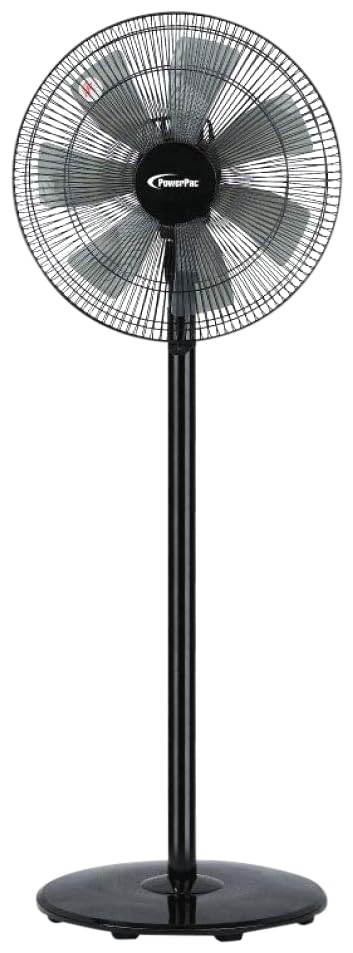
Image: PowerPac PPFS212B 2-in-1 Dual-Usage Stand Fan, showcasing its black finish and stand configuration.
3. Pakkens indhold
Please check the package contents upon opening to ensure all parts are present and undamaged:
- 1 x PowerPac PPFS212B Stand Fan (includes fan head, stand pole, and base)
4. Monteringsvejledning
Follow these steps to assemble your PowerPac PPFS212B fan:
- Pak forsigtigt alle komponenter ud af emballagen.
- Attach the stand pole to the fan base. Ensure it is securely fastened according to the markings or locking mechanism.
- Mount the fan head assembly onto the top of the stand pole. Align the connection points and secure it firmly.
- Ensure all screws and fasteners are tightened to prevent wobbling during operation.
- Placer den samlede ventilator på en stabil, plan overflade.
Image: Illustrative diagram of the PowerPac PPFS212B fan assembly, showing the base, stand, and fan head components.
5. Betjeningsvejledning
To operate your PowerPac PPFS212B fan:
- Sæt netledningen i en passende stikkontakt.
- Tænd/sluk: Press the 'ON/OFF' button (or corresponding button) on the control panel to turn the fan on or off.
- Hastighedstilpasning: Press the 'SPEED' button repeatedly to cycle through the 3 available speed settings (Low, Medium, High).
- Oscilleringsfunktion: Press the 'OSC' button (or corresponding button) to activate or deactivate the oscillation feature, which allows the fan head to sweep from side to side.
- When finished, press the 'ON/OFF' button to turn off the fan and unplug it from the power outlet.
6. Vedligeholdelse og rengøring
Regular cleaning and maintenance will help ensure optimal performance and longevity of your fan:
- Tag altid ventilatoren ud af strømforsyningen før rengøring.
- Brug en blød, damp cloth to wipe the exterior surfaces of the fan. Do not use abrasive cleaners, solvents, or harsh chemicals.
- To clean the fan blades, carefully remove the front grille (if detachable) according to the product design. Wipe the blades with a soft cloth. Ensure all parts are dry before reassembling.
- Lad ikke vand dryppe ind i motorhuset.
- Opbevar ventilatoren et køligt og tørt sted, når den ikke er i brug i længere perioder.
7. Fejlfinding
Hvis du støder på problemer med din ventilator, kan du se følgende tabel for almindelige problemer og løsninger:
| Problem | Mulig årsag | Løsning |
|---|---|---|
| Ventilatoren tænder ikke. | Ingen strømforsyning. Thermal fuse activated. | Kontroller, om stikket er sat ordentligt i stikkontakten. Sørg for, at stikkontakten fungerer. Unplug and allow the fan to cool down for 30 minutes before restarting. |
| Svag eller ingen luftstrøm. | Ventilatorhastigheden er indstillet for lavt. Ventilatorbladene er beskidte. | Øg ventilatorhastighedsindstillingen. Unplug the fan and clean the blades as per maintenance instructions. |
| Ventilatoren svinger ikke. | Oscillationsfunktionen er slået fra. | Press the 'OSC' button to activate oscillation. |
| Usædvanlig støj under drift. | Løse dele. Obstruktion. | Unplug the fan and check for any loose components or obstructions around the blades or motor. Tighten any loose parts. |
Hvis problemet fortsætter efter at have forsøgt disse løsninger, bedes du kontakte kundesupport.
8. Specifikationer
| Feature | Specifikation |
|---|---|
| Mærke | PowerPac |
| Modelnummer | PPFS212B |
| Type | 2-in-1 Dual-Usage Stand Fan |
| Antal blade | 7 |
| Antal hastigheder | 3 |
| Strømkilde | Elektrisk med ledning |
| Wattage | 50 watt |
| Kontrolmetode | Tryk knap |
| Særlige funktioner | Oscillating, Thermal Fuse Protection |
| Materiale | Plast |
| Indendørs/Udendørs brug | Indendørs |
| Farve | Sort |
9. Garanti og support
This PowerPac PPFS212B fan comes with a 2 års garanti fra købsdatoen. Denne garanti dækker fabrikationsfejl under normale brugsforhold.
For warranty claims, technical support, or any inquiries regarding your product, please contact PowerPac customer service. Keep your proof of purchase for warranty validation.