
Wireless Gear G0687
Brugermanual til Wireless Gear True Wireless-etui til øretelefoner
Model: G0687
Indledning
Thank you for choosing the Wireless Gear True Wireless Case Earbuds. These in-ear headphones are designed for comfort and convenience, offering a seamless audio experience with advanced features. This manual provides detailed instructions on how to set up, operate, maintain, and troubleshoot your new earbuds to ensure optimal performance.
Nøglefunktioner omfatter:
- Håndfri mikrofon: Integrated microphone for seamless transition between music and calls.
- Komfortabel pasform: Flexible Fit-Gel ear gels ensure a secure and comfortable fit for extended wear.
- Forlænget spilletid: Up to 8 hours of continuous play and talk time.
- Bærbar opladnings sag: The included charging case provides 4-5 full recharges, extending total playtime significantly.
- Extreme Bass Sound: High-performance wireless earbuds delivering rich, superior sound with ultra-deep bass.
Pakkens indhold
Markér venligst feltet for følgende elementer:
- Wireless Gear True Wireless Case Earbuds (Left and Right)
- Bærbart opladningsetui
- USB opladningskabel
- Brugermanual
- Multiple sizes of Fit-Gel ear tips
Produkt overview
Familiarize yourself with the components of your Wireless Gear True Wireless Case Earbuds.

Billede 1: The Wireless Gear True Wireless Earbuds resting inside their open charging case. The earbuds are black with a sleek design, and the case is also black with a translucent lid, showing the charging indicators.

Billede 2: Front view of the retail packaging for the Wireless Gear True Wireless Case Earbuds. The box prominently displays the product name, brand logo, and key features such as "8 HRS" playtime, "4-5 RECHARGES PER FULL CASE", and "EXTREME BASS".
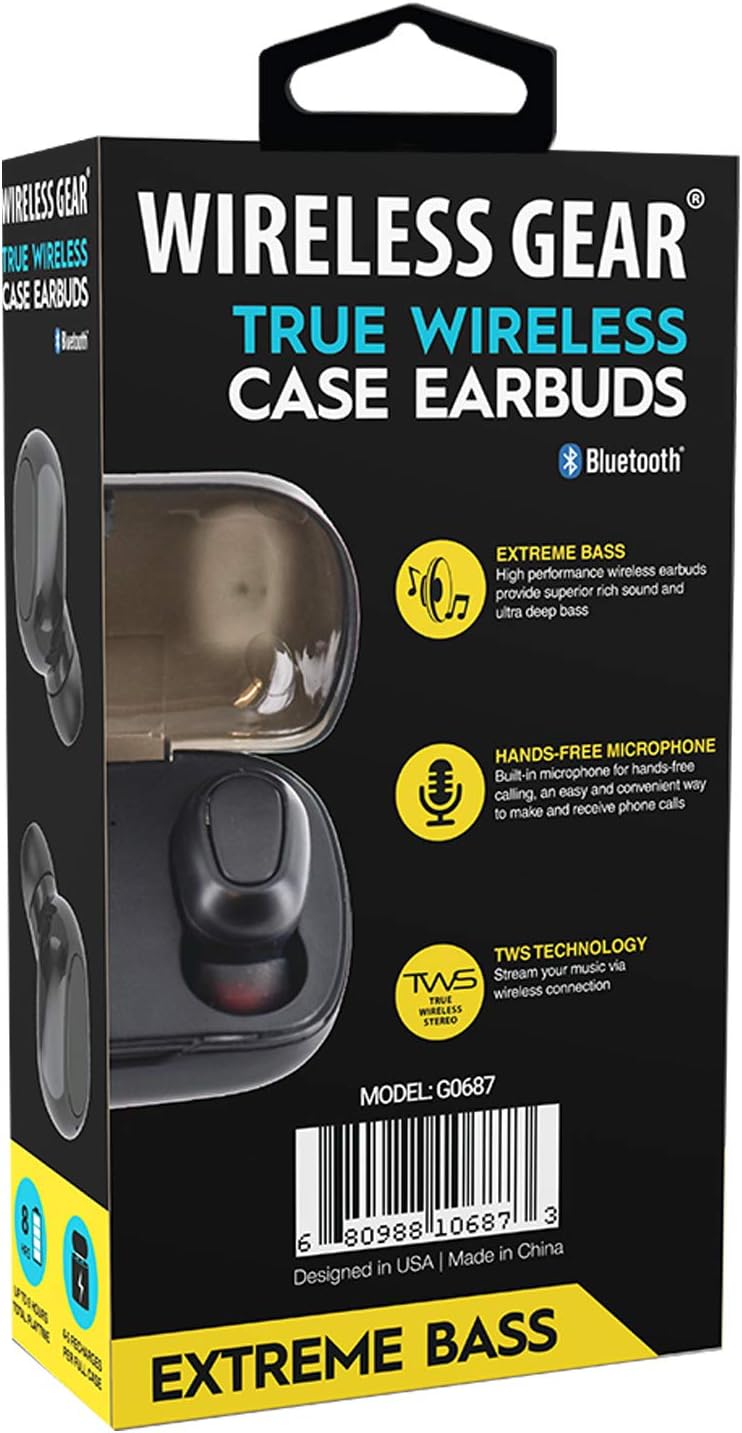
Billede 3: Tilbage view of the retail packaging, highlighting additional features like "Hands-Free Microphone" and "TWS Technology". The model number G0687 and UPC 0680988106873 are visible at the bottom.
Øreproppernes komponenter:
- Multi-function Touch/Button Area: Til styring af afspilning, opkald og stemmeassistent.
- Mikrofon: Til håndfri opkald.
- LED-indikator: Shows pairing status, charging status, and power.
- Opladningskontakter: Located at the bottom of each earbud.
Komponenter til opladningsetuiet:
- Opladningsstik til øretelefoner: Hold og oplad ørepropperne sikkert.
- LED-indikatorer for opladningsetuiet: Show the charging status of the case and earbuds.
- USB opladningsport: Til opladning af selve sagen.
Opsætning
1. Første opladning
- Place both earbuds into the charging case. Ensure they are properly seated so the charging contacts align.
- Connect the USB charging cable to the charging port on the case and the other end to a USB power source (e.g., wall adapter, computer USB port).
- The LED indicators on the earbuds and/or case will illuminate to show charging status. A full charge for the case and earbuds typically takes 1-2 hours.
- Once fully charged, disconnect the charging cable. The case holds enough power for 4-5 full earbud recharges.
2. Parring med din enhed
- Tænd: Open the charging case, or remove the earbuds from the case. They should automatically power on and enter pairing mode. The LED indicator on one earbud will flash, indicating it's ready to pair.
- Aktiver Bluetooth: Gå til Bluetooth-indstillingerne på din smartphone, tablet eller anden Bluetooth-aktiveret enhed, og tænd Bluetooth.
- Søg efter Enheder: Your device will scan for available Bluetooth devices. Look for "Wireless Gear Earbuds" or a similar name in the list.
- Forbinde: Select the earbuds from the list. Once connected, the LED indicator on the earbud will stop flashing or change color. You will hear an audible confirmation.
- Automatisk genforbindelse: Efter den første parring opretter ørepropperne automatisk forbindelse til den sidst parrede enhed, når de tages ud af etuiet, og Bluetooth er aktivt på din enhed.
Note: If pairing fails, turn off Bluetooth on your device, place earbuds back in the case, close and reopen, then try again.
Betjeningsvejledning
Basic Controls (Touch/Button Functions):
| Fungere | Handling |
|---|---|
| Tænd | Remove from charging case. |
| Sluk | Sæt tilbage i opladningsetuiet. |
| Afspil/pause musik | Et enkelt tryk på begge øretelefoner. |
| Næste spor | Dobbelttryk på den højre øreprop. |
| Forrige spor | Dobbelttryk på den venstre øreprop. |
| Besvar/afslut opkald | Enkelt tryk på begge øretelefoner under et indgående opkald. |
| Afvis opkald | Tryk og hold en af øretelefonerne nede i 2 sekunder under et indgående opkald. |
| Aktiver Voice Assistant | Tryk tre gange på en af øretelefonerne. |
| Lydstyrke op | Press and hold Right earbud. |
| Lydstyrke ned | Press and hold Left earbud. |
Note: Specific touch/button functions may vary slightly. Refer to the quick start guide included in your package for precise controls if different.
Opretholdelse
Cleaning Your Earbuds and Case:
- Brug en blød, tør og fnugfri klud til at tørre ørepropperne og opladningsetuiet af.
- Til genstridigt snavs, let dampda kluden med vand eller et mildt, ikke-slibende rengøringsmiddel.
- Brug ikke skrappe kemikalier, aerosoler eller slibende rengøringsmidler.
- Ensure the charging contacts on both the earbuds and the case are clean and free of debris to ensure proper charging.
- Remove ear tips and clean them separately with water and mild soap if necessary, then dry completely before reattaching.
Opbevaring:
- Når ørepropperne ikke er i brug, skal de altid opbevares i deres opladningsetui for at beskytte dem og holde dem opladede.
- Opbevar enheden et køligt, tørt sted, væk fra ekstreme temperaturer, fugtighed og direkte sollys.
Batteripleje:
- For at forlænge batterilevetiden bør du undgå at aflade ørepropperne og etuiet helt ofte.
- Oplad enheden regelmæssigt, selvom den ikke bruges hyppigt, for at forhindre dyb afladning.
Fejlfinding
If you encounter issues with your Wireless Gear True Wireless Case Earbuds, try the following solutions:
- Øretelefoner parrer ikke med enheden:
- Sørg for, at Bluetooth er aktiveret på din enhed.
- Sørg for, at øretelefonerne er opladet.
- Place earbuds back in the case, close the lid, wait a few seconds, then open the lid and try pairing again.
- Forget/delete the earbuds from your device's Bluetooth list and re-pair.
- Sørg for, at øretelefonerne er inden for Bluetooth-rækkevidde (typisk 10 meter/33 fod).
- Kun én øreprop virker:
- Sørg for, at begge øretelefoner er opladet.
- Place both earbuds back into the charging case, close the lid, and then remove them simultaneously. This often re-syncs them.
- Try resetting the earbuds (refer to specific reset instructions if available in the quick start guide, usually involves holding a button for a long time).
- Øretelefoner oplader ikke:
- Sørg for, at opladningskablet er korrekt tilsluttet til både etuiet og strømkilden.
- Kontroller, om opladningskontakterne på ørepropperne og inde i etuiet er rene og fri for snavs.
- Prøv et andet USB-kabel eller strømadapter.
- Sørg for, at selve opladningsetuiet har strøm.
- Dårlig lydkvalitet eller uregelmæssig forbindelse:
- Flyt tættere på din parrede enhed for at reducere interferens.
- Undgå forhindringer mellem ørepropperne og din enhed.
- Sørg for, at der ikke er andre stærke trådløse signaler i nærheden, der forårsager interferens.
- Clean the ear tips and earbud speakers.
Specifikationer
| Feature | Detalje |
|---|---|
| Modelnummer | G0687 |
| Trådløs kommunikationsteknologi | Bluetooth |
| Forbindelsesteknologi | Bluetooth |
| Formfaktor | In-Ear (Intraurale) |
| Farve | Sort |
| Spille-/taletid | Op til 8 timer |
| Opladningsetui genoplades | 4-5 full recharges |
| Batteritype | Lithium-ion (genopladelig) |
| Særlige funktioner | Bluetooth, Wireless, Microphone Included |
| Fabrikant | ESI Wireless Accessories |
| Produktdimensioner | 13.97 x 7.62 x 3.81 cm; 226.8 g (pakke) |
| ASIN | B08DCTH7DW |
| UPC | 0680988106873 |
Garanti og support
Garantioplysninger:
Wireless Gear products are manufactured to the highest quality standards. For specific warranty details, please refer to the warranty card included with your purchase or visit the official Wireless Gear website. Typically, products come with a limited warranty covering manufacturing defects from the date of purchase.
Kundesupport:
If you have any questions, require technical assistance, or need to report an issue, please contact Wireless Gear customer support. You can usually find contact information (phone number, email, or support portal) on the product packaging or the official brand webwebsted.
For yderligere hjælp, besøg venligst: Wireless Gear Support Page (Note: This is a placeholder link. Please refer to your product's official documentation for the correct support URL.)