
1. Introduktion
This manual provides comprehensive instructions for the setup, operation, and maintenance of your VocoPro Smart TV Stay-at-Home Karaoke Package. Please read this manual thoroughly before using the product to ensure proper function and longevity. This package is designed to integrate with your internet-enabled Smart TV for an enhanced home karaoke experience.
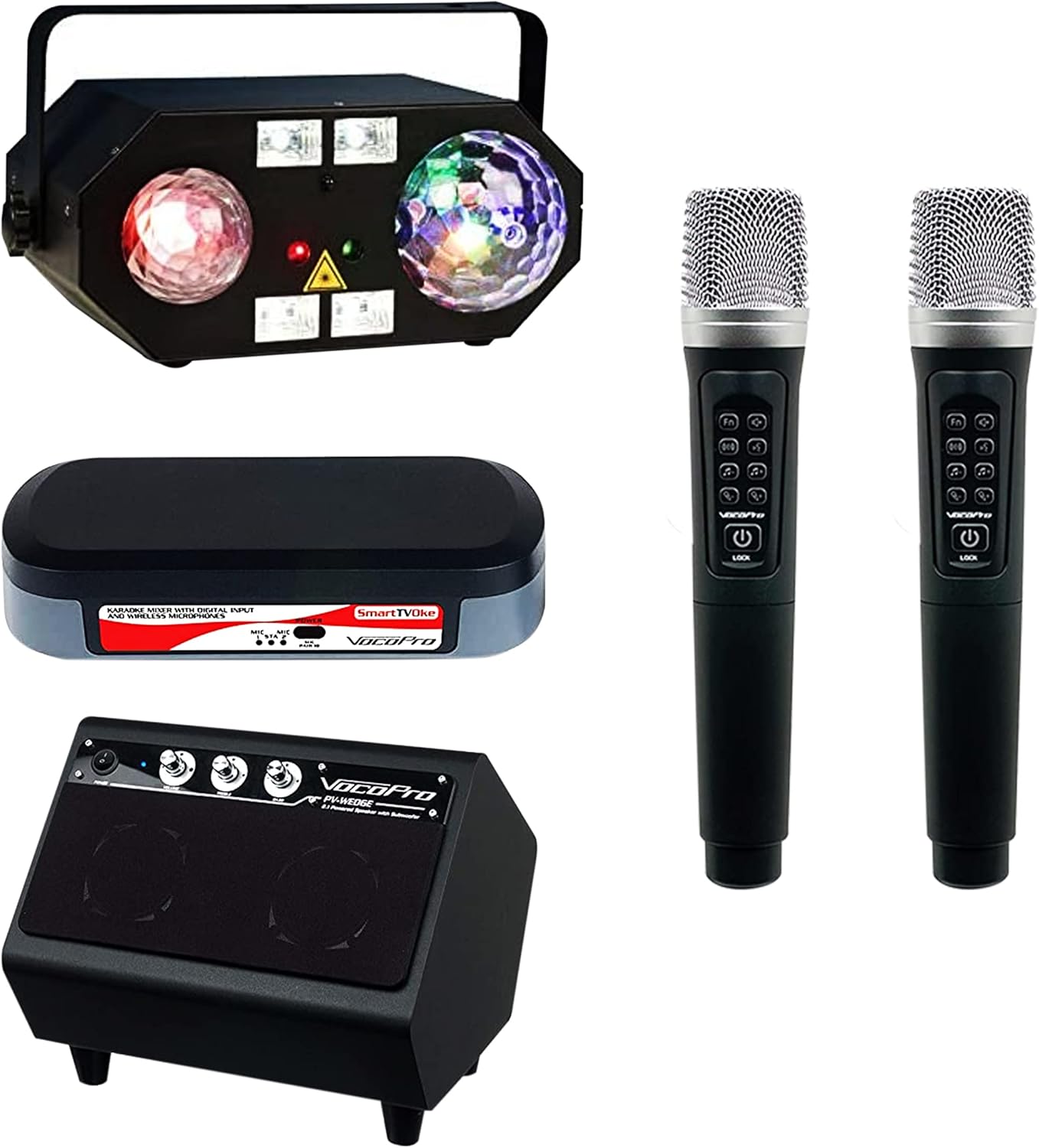
Billede 1.1: Overview of the VocoPro Smart TV Stay-at-Home Karaoke Package components. This includes the multi-effect DJ light, the SmartTVOke karaoke mixer, two wireless microphones, and the PV-Wedge powered monitor speaker.
2. Opsætning
- Udpakning: Fjern forsigtigt alle komponenter fra emballagen. Kontroller, at alle de dele, der er anført i afsnittet 'Medfølgende komponenter', er til stede.
- SmartTVOke Mixer Connection to TV:
- Connect the SmartTVOke mixer to your Smart TV's audio output. Use either the digital optical output (PCM Only) or the 1/8" headphone output.
- Ensure the TV's audio output settings are configured correctly for the chosen connection type.
- SmartTVOke Mixer Connection to PV-Wedge Speaker:
- Connect the audio output of the SmartTVOke mixer to the input of the PV-Wedge powered monitor speaker using a 1/8" stereo or RCA cable.
- Wireless Microphone Setup:
- Sæt nye batterier i hver trådløs mikrofon.
- The microphones are pre-paired with the SmartTVOke mixer. Power them on, and they should automatically connect.
- DJ Light Placement:
- Position the DJ light in a suitable location to achieve desired lighting effects. Ensure it is stable and secure.
- Strømforbindelser:
- Connect the power adapters to the SmartTVOke mixer, PV-Wedge speaker, and DJ light.
- Plug all power adapters into appropriate electrical outlets.
3. Betjeningsvejledning
3.1. SmartTVOke Karaoke Mixer
- Tænd/sluk: Brug afbryderknappen til at tænde eller slukke for enheden.
- Valg af input: Select between digital optical input or 1/8" analog input based on your TV connection.
- Lydstyrkekontrol: Adjust the master music volume and individual microphone volumes using the dedicated controls.
- Effektkontrol: Adjust echo and other vocal effects to enhance your singing.
3.2. Trådløse mikrofoner
- Tænd/sluk: Tryk og hold tænd/sluk-knappen på mikrofonen nede for at tænde eller slukke den.
- Lydstyrkekontrol: Use the volume buttons on the microphone to adjust your individual vocal level.
- Effektkontrol: Use the effect buttons on the microphone to apply or adjust vocal effects.
- Udskiftning af batteri: When the battery indicator is low, replace the batteries with new ones.
3.3. PV-Wedge Powered Monitor Speaker
- Tænd/sluk: Use the power switch on the speaker to turn it on or off.
- Volume/Tone Controls: Adjust the overall output volume and tone (bass/treble) of the speaker for optimal sound.
3.4. DJ Light
- Tænd/sluk: Use the power switch to activate or deactivate the light.
- Valg af tilstand: Select desired lighting effects such as Moonflower, Water Wave, Strobe, UV/Black Light, or Laser using the controls on the unit.
3.5. Using with Smart TV Karaoke Apps
- Access your preferred karaoke application (e.g., YouTube, dedicated karaoke apps) on your Smart TV.
- Select a song and ensure the TV's audio is routed through the SmartTVOke mixer and PV-Wedge speaker.
- Adjust microphone and music volumes for a balanced mix.
4. Vedligeholdelse
- Rensning: Use a soft, dry cloth to clean the exterior surfaces of all components. Avoid using liquid cleaners or abrasive materials.
- Opbevaring: When not in use for extended periods, store the package in a cool, dry place away from direct sunlight and extreme temperatures.
- Microphone Battery Care: Fjern batterierne fra de trådløse mikrofoner, hvis de ikke skal bruges i længere tid, for at forhindre lækage.
5. Fejlfinding
- Ingen lyd fra højttaleren:
- Sørg for, at alle strømkabler er korrekt tilsluttet, og at enhederne er tændt.
- Check audio cables between the TV, SmartTVOke, and PV-Wedge speaker.
- Verify TV audio output settings (PCM Only for optical).
- Increase volume levels on the TV, SmartTVOke, and PV-Wedge speaker.
- Microphones Not Working:
- Kontroller mikrofonens batterier, og udskift dem om nødvendigt.
- Sørg for, at mikrofonerne er tændt.
- Verify microphone volume levels on both the microphone and the SmartTVOke mixer.
- DJ Light Not Functioning:
- Ensure the DJ light is powered on and connected to a working outlet.
- Check for any obstruction to the light output.
- Forvrænget lyd:
- Reduce volume levels on the TV, SmartTVOke, or PV-Wedge speaker to prevent clipping.
- Check cable connections for any damage or loose connections.
6. Specifikationer
- Modelnummer: Smart TV Stay-at-Home Karaoke Package
- Pakkedimensioner: 38.5 x 22.5 x 16 tommer
- Varens vægt: 34.3 pund
- Strømkilde: Battery Powered (for microphones), AC Power (for mixer, speaker, light)
- Talertal: 1 (PV-Wedge 2.1 Monitor with Stereo Speaker and Subwoofer)
- Inkluderede komponenter: VocoPro - Home Karaoke Club system Package (VCOSmart TV Stay-At-Home)
- Mixer Compatibility: Digital optical output (PCM Only), 1/8" stereo or RCA input
- Højttaler output: 100W
- DJ Light Effects: Moonflower, Water Wave, Strobe, UV/Black Light, Laser
7. Garantioplysninger
For detailed warranty information regarding your VocoPro Smart TV Stay-at-Home Karaoke Package, please refer to the official VocoPro website or the warranty card included with your product packaging. Warranty terms and conditions may vary.
8. Support
If you require further assistance or have questions not covered in this manual, please visit the official VocoPro support website or contact their customer service department. Contact information can typically be found on the VocoPro webwebsted eller produktemballage.