
Indledning
Thank you for choosing the CHEREEKI Digital Alarm Clock. This manual provides detailed instructions for setting up, operating, and maintaining your new alarm clock. Please read it thoroughly to ensure optimal performance and to familiarize yourself with all its features.
This alarm clock features dual alarms, a nap timer, adjustable brightness and volume, 12/24-hour display, week display, 40 alarm sounds, snooze function, memory function, and both touch and voice control capabilities.
Pakkens indhold
- CHEREEKI Digital Alarm Clock (Model 8809-2)
- USB opladningskabel
- Brugermanual
Produkt overview
Gør dig bekendt med de forskellige dele og betjeningselementer på dit vækkeur.
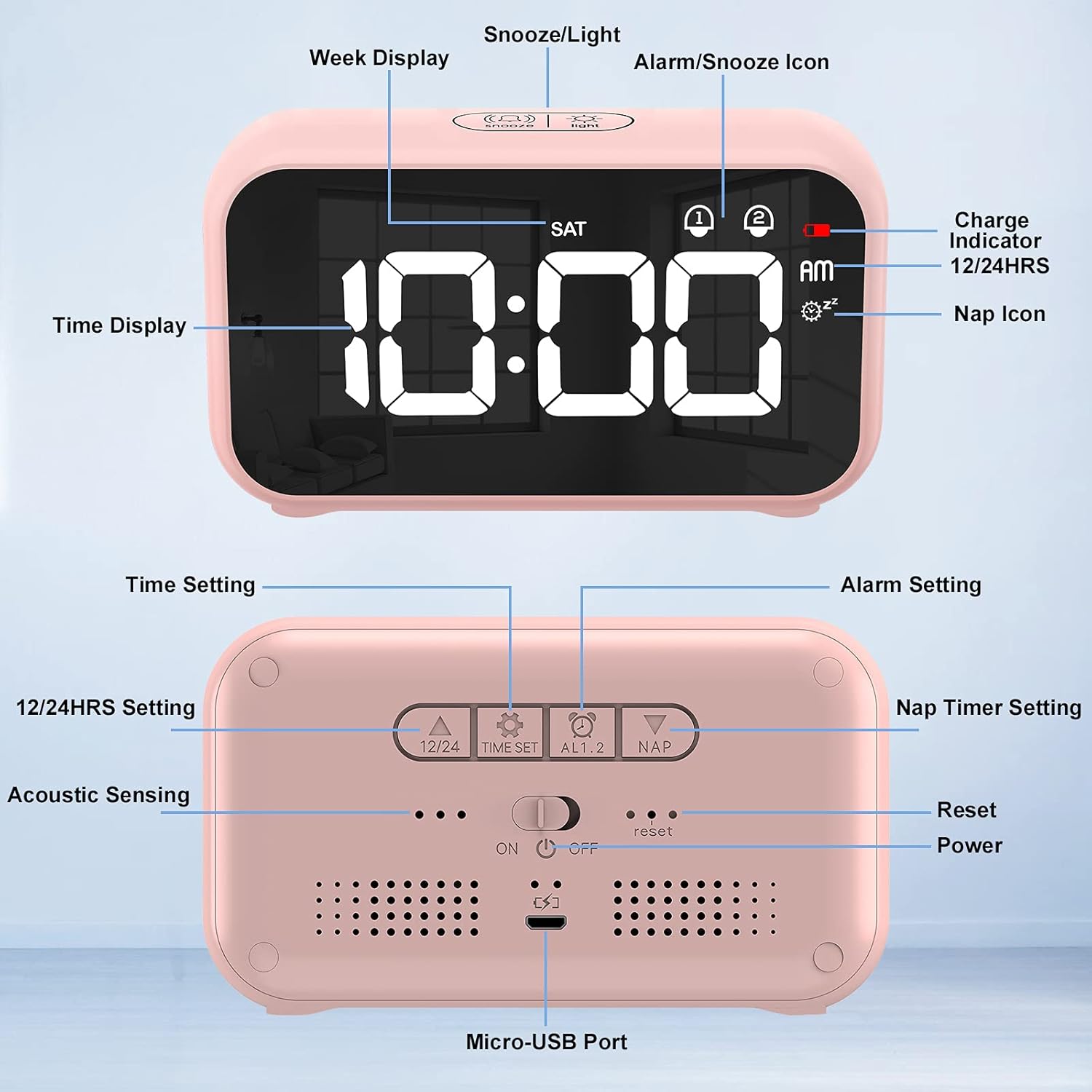
Billedbeskrivelse: This image displays both the front and back of the CHEREEKI Digital Alarm Clock. The front shows the digital time display, week display, AM/PM indicator, alarm icons (1 and 2), nap icon, and charge indicator. The back panel highlights the control buttons: 12/24HRS, TIME SET, ALARM 1, ALARM 2, NAP, Acoustic Sensing switch, Reset button, Power ON/OFF switch, and the Micro-USB Port.
Front Display Elements:
- Tidsvisning: Viser aktuel tid.
- Ugevisning: Indicates the current day of the week (e.g., SAT).
- AM/PM-indikator: For 12-hour format.
- Alarm Icons (1 & 2): Indicate active alarms.
- Nap Icon: Indicates active nap timer.
- Opladningsindikator: Viser opladningsstatus.
Kontrolelementer på bagpanelet:
- 12/24HRS Button: Skifter mellem 12-timers og 24-timers tidsformater.
- Knap til INDSTILLING AF TID: Går i tidsindstillingstilstand.
- ALARM 1-knap: Går i indstillingstilstand for alarm 1.
- ALARM 2-knap: Går i indstillingstilstand for alarm 2.
- NAP-knap: Activates and sets the nap timer.
- Acoustic Sensing Switch: Enables/disables voice control feature.
- Nulstil knap: Nulstiller uret til fabriksindstillingerne.
- Tænd / sluk-kontakt: Turns the clock on or off.
- Mikro-USB-port: Til opladning af enheden.
Øverste knap:
- SNOOZE/LIGHT-knap: Activates snooze during an alarm, or adjusts display brightness when not alarming.
Opsætning
1. Charging the Alarm Clock
Before first use, or when the battery is low, charge the alarm clock using the provided USB cable.
- Connect the Micro-USB end of the cable to the Micro-USB Port on the back of the alarm clock.
- Connect the standard USB end of the cable to a 5V/1A or 5V/2A USB power adapter (not included) or a USB port on a computer.
- The charge indicator on the display will show charging status.

Billedbeskrivelse: This image illustrates the charging process. It shows the alarm clock connected via a USB cable to both a laptop's USB port and a wall adapter. The text emphasizes using only 5V/1A or 5V/2A adapters for charging.
2. Første opstart
Slide the Power ON/OFF switch on the back of the clock to the 'ON' position to power on the device.
Betjeningsvejledning
1. Indstilling af tid
- Tryk på TIDSINDSTILLING button on the back. The hour digits will flash.
- Brug SNOOZE / LYS button on top to adjust the hour.
- Trykke TIDSINDSTILLING igen for at bekræfte timetallet og gå videre til minutindstilling. Minuttiffrene vil blinke.
- Brug SNOOZE / LYS knappen for at justere minutterne.
- Trykke TIDSINDSTILLING endnu en gang for at bekræfte og afslutte tidsindstillingstilstanden.
2. Changing 12/24 Hour Format
Tryk på 12/24HRS button on the back to switch between 12-hour (with AM/PM indicator) and 24-hour formats.

Billedbeskrivelse: This image highlights the multi-functionality of the alarm clock, including dual clocks, week display, 12/24 time display, 40 alarm sounds, 5-60 minutes snooze, adjustable brightness, adjustable volume, and memory function. The clock itself displays '10:00 AM' with 'SAT' for Saturday.
3. Indstilling af alarmer (Alarm 1 og Alarm 2)
Uret understøtter to uafhængige alarmer.
- Tryk på enten ALARM 1 or ALARM 2 button on the back. The alarm time will flash.
- Brug SNOOZE / LYS knappen for at justere timen.
- Press the respective alarm button again to confirm the hour and move to minute setting.
- Brug SNOOZE / LYS knappen for at justere minutterne.
- Press the alarm button again to confirm minutes and proceed to alarm sound selection (40 options available). Use SNOOZE / LYS to cycle through sounds.
- Press the alarm button again to confirm the sound and proceed to volume adjustment. Use SNOOZE / LYS for at justere lydstyrken.
- Press the alarm button one last time to confirm all settings and activate the alarm. The corresponding alarm icon (1 or 2) will appear on the display.
- To deactivate an alarm, press its respective ALARM knappen, indtil alarmikonet forsvinder fra displayet.

Billedbeskrivelse: This image shows two scenarios: 'Alarm clock 1 AM 07:30' with a person waking up, and 'Alarm clock 2 AM 08:00' with a child having breakfast. It highlights the dual alarm capability and the adjustable snooze function, which can be set from 5 to 60 minutes.
4. Snooze-funktion
Når en alarm lyder, skal du trykke på SNOOZE / LYS button on top to temporarily silence the alarm. The alarm will sound again after the set snooze duration (default is 5 minutes, adjustable between 5-60 minutes during alarm setup).
5. Nap Timer
The nap timer allows for short countdowns.
- Tryk på LUR button on the back. The nap icon will appear, and a default nap time will display.
- Tryk på LUR button repeatedly to cycle through available nap durations: 5, 15, 30, 45, 60, 75, or 90 minutes.
- The timer will start automatically after selecting a duration.
- For at annullere lurtimeren skal du trykke på LUR button until the nap icon disappears.

Billedbeskrivelse: This image shows a person taking a nap at a desk, with the alarm clock displaying '10:00 AM' and the nap icon active. The text explains that the nap timer can be used for countdowns of 5, 15, 30, 45, 60, 75, or 90 minutes for a short break.
6. Justering af skærmens lysstyrke
When the clock is displaying the time (not in setting mode or alarming), press the SNOOZE / LYS button on top to cycle through 4 levels of display brightness (0%, 25%, 50%, 100%).

Billedbeskrivelse: This image features the alarm clock on a white table with a plant. It highlights the adjustable brightness feature, indicating 4-level brightness options. A slider graphic shows the range from 0% to 100% brightness, with instructions to press the SNOOZE/LIGHT button to adjust.
7. Justering af lydstyrke
Volume for alarms is adjusted during the alarm setting process (refer to 'Setting Alarms' section).
8. Voice Control (Acoustic Sensing)
When the clock is running on battery power, the display will turn off after 6 seconds to conserve energy. If the Acoustic Sensing switch on the back is enabled, the LED display will light up for 6 seconds when an ambient sound of 90dB or higher is detected.
9. Tryk på Kontrol
Similar to voice control, when running on battery, the display will light up for 6 seconds if the clock is touched or moved.

Billedbeskrivelse: This image is divided into three sections. The top section shows 'Touch Control', indicating that the display turns off after 6 seconds when running on battery. The bottom left section shows 'Voice Control', where the LED display lights up if ambient sound is ≥ 90dB, depicted by people high-fiving. The bottom right section shows 'Power Supply', where the display is always on when connected to power, with an image of the clock plugged into a wall outlet.
10. Hukommelsesfunktion
The alarm clock is equipped with a memory function. Your time and alarm settings will be retained even if the battery is depleted and then recharged, or if the clock is turned off and on again.

Billedbeskrivelse: This image shows the alarm clock on a desk, illustrating its memory function. It depicts the clock being 'ON' (displaying 10:00), then 'OFF' (blank display), and then 'POWER ON' (displaying 11:00, one hour later), with the text stating 'No need to reset the clock when the battery is restored or the clock is turned on again'.
Opretholdelse
To ensure the longevity and proper functioning of your CHEREEKI Digital Alarm Clock, follow these maintenance guidelines:
- Rensning: Wipe the clock with a soft, dry cloth. Do not use abrasive cleaners, solvents, or harsh chemicals, as these can damage the surface.
- Undgå vand: This device is not waterproof. Keep it away from water, high humidity, and direct splashes.
- Temperatur: Avoid exposing the clock to extreme temperatures (hot or cold) or direct sunlight for extended periods.
- Opbevaring: If storing the clock for a long time, ensure it is fully charged and stored in a cool, dry place.
Fejlfinding
Hvis du støder på problemer med dit vækkeur, kan du se følgende almindelige problemer og løsninger:
| Problem | Mulig årsag | Løsning |
|---|---|---|
| Skærmen er tom eller svag. | Low battery; Not connected to power; Brightness set too low. | Charge the clock; Connect to a power source; Press SNOOZE/LIGHT to adjust brightness. |
| Alarmen lyder ikke. | Alarm is not activated; Alarm volume is too low; Incorrect alarm time set. | Ensure alarm icon (1 or 2) is visible; Adjust alarm volume during setup; Verify alarm time. |
| Tidspunktet er forkert. | Time not set correctly; 12/24 hour format issue. | Re-set the time using the TIME SET button; Check 12/24HRS setting. |
| Voice/Touch control not working. | Acoustic Sensing switch is OFF; Clock is connected to power. | Ensure Acoustic Sensing switch is ON; Note that these features only work when running on battery. |
| Clock is unresponsive. | Midlertidig softwarefejl. | Press the Reset button on the back using a thin object (e.g., paperclip). |
Specifikationer
- Mærke: CHEREEKI
- Model: 8809-2
- Skærmtype: Digital
- Strømkilde: Corded Electric (USB Rechargeable)
- Særlige funktioner: Dual Alarms, Nap Timer, Adjustable Brightness (4 levels), Adjustable Volume (8 levels), 12/24 Hour Display, Week Display, 40 Alarm Sounds, Snooze Function (5-60 minutes), Memory Function, Voice Control (Acoustic Sensing), Touch Control.
- Materiale: Acrylonitril-butadienstyren
- Farve: Lyserød
Garanti og support
This CHEREEKI product comes with a standard manufacturer's warranty. For specific warranty details, please refer to the documentation provided at the time of purchase or contact your retailer. If you require technical support or have questions not covered in this manual, please contact CHEREEKI customer service through the retailer's platform or the official brand webwebsted.