
Indledning
The ZVOX AccuVoice AV100 is a compact TV soundbar speaker designed to significantly improve dialogue clarity from your television. Utilizing patented AccuVoice technology, it lifts voices out of background noise, making every word easier to understand, even at low volumes. Its ultra-compact design allows for versatile placement without cluttering your space, while delivering rich, room-filling sound.

Image: The ZVOX AccuVoice AV100 soundbar and its accompanying remote control, showcasing its compact size and sleek black finish.
Hvad er der i æsken
Upon opening your ZVOX AccuVoice AV100 package, please verify that all the following components are included:
- AV100 Soundbar
- Remote Control (2x AAA batteries included)
- Mini-to-Mini cable
- Toslink Optical cable
- Mini-to-RCA cable
- Strømadapter

Image: A visual representation of all items included in the ZVOX AV100 product box, including the soundbar, remote, and various connecting cables.
Opsætning
Placering
The AV100's compact and lightweight design (10 inches wide, under 1 lb) allows for flexible placement. It can be positioned above or below your TV, mounted to a wall, or simply placed on a table. Ensure the front of the soundbar is unobstructed for optimal sound projection.

Image: The ZVOX AV100 soundbar positioned neatly under a television, demonstrating its suitability for small rooms and various placement options.
Tilslutning til dit TV
The AV100 offers versatile connectivity options. It does not include an HDMI connection and cannot be used as a center speaker. Please check your TV for compatibility with the following inputs:
- Optical Digital Input (Toslink): For the best digital audio quality. Connect one end of the Toslink Optical cable to your TV's optical output and the other end to the AV100's optical input.
- Analog Input (3.5mm Mini Jack): For older TVs or devices with a headphone jack output. Use the provided Mini-to-Mini cable or Mini-to-RCA cable to connect your TV's audio output to the AV100's 3.5mm input.
Once connected, ensure your TV's audio output settings are configured to send sound to the connected port (e.g., Optical Out or Headphone Out).
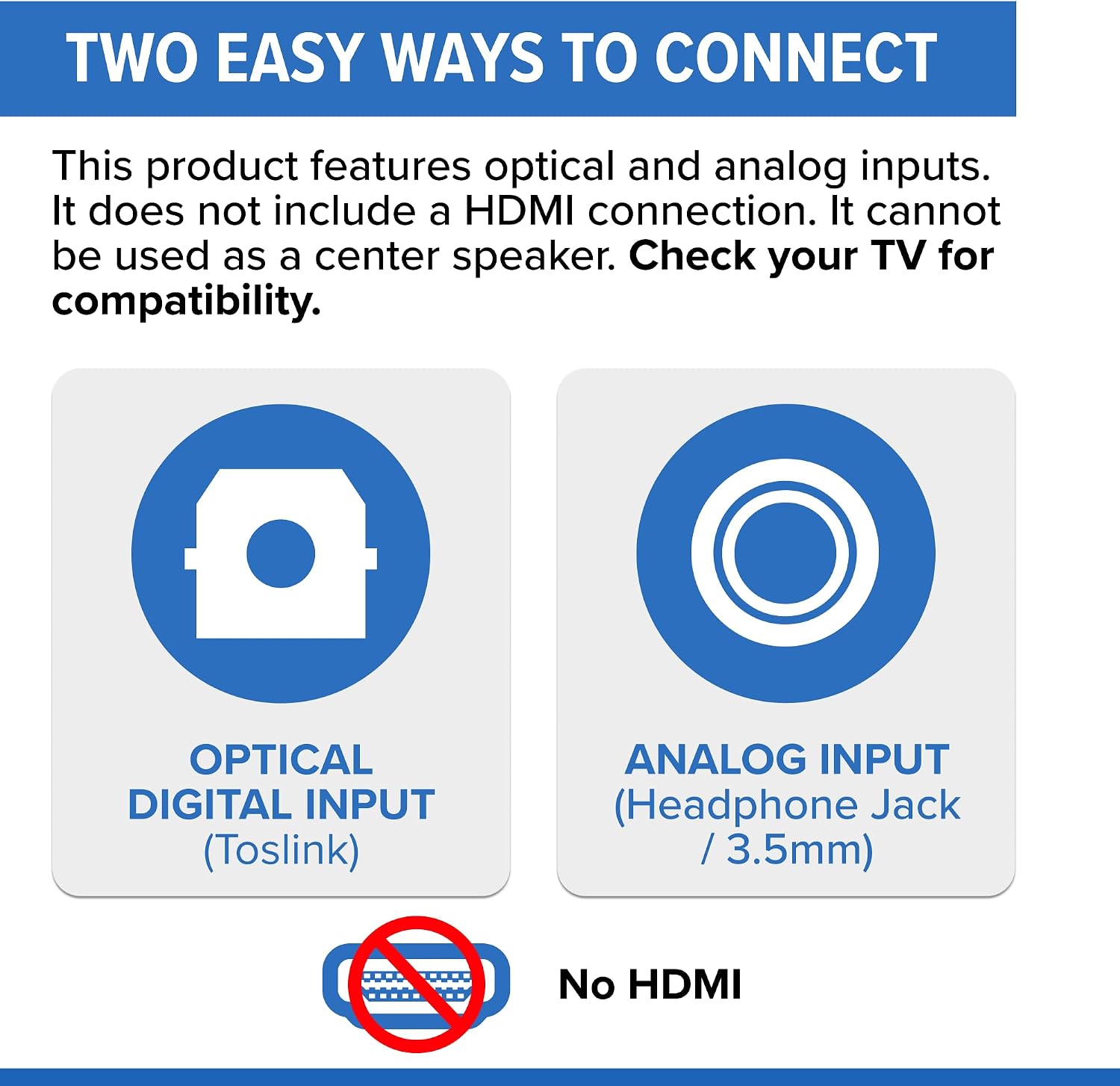
Image: A diagram illustrating the two primary connection methods for the ZVOX AV100: Optical Digital Input (Toslink) and Analog Input (3.5mm Headphone Jack), with a clear indication that HDMI is not supported.
Strømtilslutning
Connect the provided power adapter to the AV100's DC input and then plug it into a standard electrical outlet.
Betjeningsvejledning
Tænd/sluk
Tryk på MAGT button on the remote control to turn the AV100 on or off. The display on the soundbar will indicate its status.
Lydstyrkekontrol
Brug VOLUME ^ og VOLUME v buttons on the remote to adjust the overall sound level. For optimal performance, it is recommended to set your TV's internal speakers to zero or off, and control all volume through the AV100.
AccuVoice Boost
The AV100 features six levels of AccuVoice boost, designed to enhance dialogue clarity. Press the ACCUVOICE button on the remote repeatedly to cycle through the six levels. Each press will increase the voice clarity, making dialogue stand out more from background music and sound effects. Experiment to find the level that best suits your hearing and the content you are watching.

Image: A visual representation of the AccuVoice feature, showing sound waves emanating from a TV screen, illustrating how dialogue is lifted and enhanced with up to 6 levels of boost.
PhaseCue Surround Sound
The AV100 incorporates PhaseCue virtual surround sound technology to create an immersive, room-filling 3D audio experience from a single compact speaker. This feature is automatically active and contributes to the overall soundstage, providing depth and realism to movies, music, and shows.
Mute-funktion
Tryk på STUM button on the remote to instantly silence the soundbar. Press it again to restore the audio.
Funktioner
- AccuVoice Dialogue Boost: Patented hearing aid technology with six levels of voice boost for crystal-clear dialogue, even at low volumes.
- Ultra-kompakt design: Measuring only 10 inches wide and weighing under 1 lb, it fits effortlessly into any space.
- Rich, Room-Filling Sound: Equipped with dual high-output wide-range speakers and a passive radiator for deep, robust audio.
- Klasse D Digital Amplivligere: Delivers efficient, high-quality sound with minimal distortion.
- Dolby Digital-dekodning: Transforms your TV experience with cinema-quality sound.
- PhaseCue Virtual Surround: Creates an expansive 3D soundstage from a single speaker.
- Brugervenlig fjernbetjening: Redesigned remote with large, clear buttons for easy navigation.
- Durable, Acoustically Inert Cabinet: Injection-molded ABS cabinet minimizes resonances for pure, distortion-free audio.

Image: The ZVOX AV100 soundbar, highlighting its ultra-compact 10-inch width, designed to deliver world-class sound while emphasizing voices over music and sound effects.
Opretholdelse
To ensure the longevity and optimal performance of your ZVOX AccuVoice AV100, follow these simple maintenance guidelines:
- Rensning: Use a soft, dry cloth to wipe down the soundbar. Avoid using liquid cleaners, aerosols, or abrasive chemicals, as they may damage the finish or internal components.
- Ventilation: Ensure the soundbar's vents (if any) are not blocked to prevent overheating.
- Opbevaring: Hvis enheden opbevares i længere tid, skal den afbrydes fra strømmen og opbevares et køligt og tørt sted.
Fejlfinding
| Problem | Mulig årsag | Løsning |
|---|---|---|
| No sound from AV100 |
|
|
| Lyden er forvrænget eller uklar |
|
|
| Fjernbetjening virker ikke |
|
|
| Dialogue not clear enough |
|
|
Specifikationer
- Modelnavn: AV100
- Højttalertype: Soundbar
- Farve: Sort
- Materiale: Plast
- Produktdimensioner: 2.75" D x 10" B x 2.5" H
- Varens vægt: 1 pund
- Forbindelse teknologi: Wired (Optical, 3.5mm Analog)
- Lydudgangstilstand: Omgive
- Højttalers maksimale udgangseffekt: 25 watt
- Number of Power Levels (AccuVoice): 6
- Kontrolmetode: Fjern
- Kompatible enheder: Television
- Fabrikant: ZVOX lyd
- UPC: 882360009912
Garanti og support
The ZVOX AccuVoice AV100 comes with a Limited Warranty. For specific details regarding your warranty coverage, please refer to the documentation included with your product or visit the official ZVOX Audio website. For technical support, troubleshooting assistance, or any inquiries not covered in this manual, please contact ZVOX Audio customer service directly.
Du kan finde flere oplysninger og supportressourcer på ZVOX Store on Amazon.