
Plugable UD-3900Z
Stikbar USB 3.0 og USB-C universel laptop-dockingstation
Model: UD-3900Z | Brand: Plugable
Indledning
This Plugable USB 3.0 and USB-C Universal Laptop Docking Station (Model UD-3900Z) is designed to expand the connectivity of your laptop, providing dual HD HDMI video outputs, wired Gigabit Ethernet, a 3.5mm combination audio jack, two USB 3.0 ports, and four USB 2.0 ports. It includes both USB 3.0 and USB-C cables for flexible host connectivity across various systems.
Dockingstationen understøtter to skærme med opløsninger på op til 1920x1200, inklusive 1080p (1920x1080). Den er kompatibel med Windows 11, 10, 8.x og 7-systemer, macOS 10.14+ (driver kræves) og ChromeOS 100+. Bemærk venligst, at denne dock ikke oplader den tilsluttede computer og ikke understøtter HDCP, hvilket betyder, at den ikke kan afspille krypteret eller kopibeskyttet indhold.

Billede: Den plugable UD-3900Z universelle laptop-dockingstation, vistasing its sleek black design and compact form factor, alongside its included USB-A and USB-C host cables.
Opsætningsvejledning
Følg disse trin for at konfigurere din Plugable UD-3900Z Dockingstation:
- Udpak indhold: Carefully remove all items from the packaging. Verify that you have the docking station, power adapter, USB 3.0 cable, and USB-C cable.
- Tilslut strøm: Connect the included power adapter to the "12V/2A" port on the back of the docking station and then plug it into a wall outlet.
- Tilslut til værtens bærbare computer: Brug enten det medfølgende USB 3.0-kabel eller USB-C-kabel til at tilslutte dockingstationen til den tilsvarende port på din bærbare computer.
- Installer DisplayLink-driveren (macOS og nogle Windows/ChromeOS-systemer):
For macOS skal en DisplayLink-driver installeres manuelt for at skærme kan fungere. For Windows og ChromeOS installeres drivere typisk automatisk via Windows Update eller er indbyggede. Hvis ikke, kan manuel installation være nødvendig.
- Gå til plugable.com/displaylink.
- Vælg den tilsvarende driver til dit operativsystem.
- Download og installer driveren.
- For macOS only: Navigate to Security & Privacy settings, allow the DisplayLink driver, and ensure "Screen recording permission" is enabled for DisplayLink Manager.
- Tilslut ydre enheder: Tilslut dine skærme til HDMI-portene, og andre USB-enheder (tastatur, mus, flashdrev) til de tilgængelige USB 3.0- og USB 2.0-porte. Tilslut et Ethernet-kabel for at få adgang til et kabelbaseret netværk.

Billede: Indholdet af Plugable UD-3900Z-pakken, inklusive dockingstation, strømkabel, USB-C-kabel og USB 3.0-kabel.
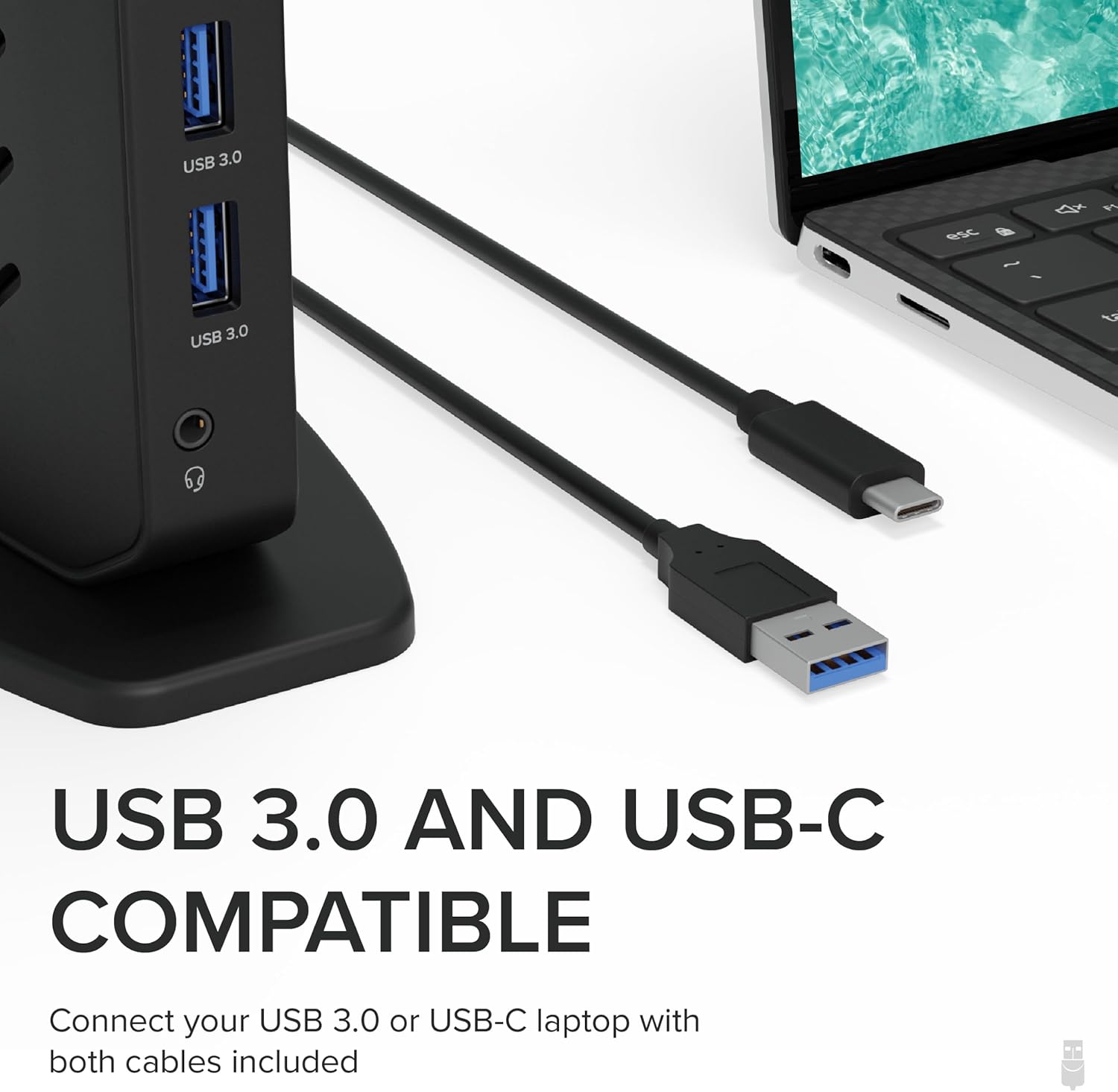
Billede: Nærbillede af USB 3.0- og USB-C-værtskablerne, der følger med dockingstationen, som fremhæver deres kompatibilitet med forskellige bærbare computerporte.

Billede: En visuel guide, der beskriver de fire trin til at downloade og installere DisplayLink-driveren, inklusive specifikke macOS-sikkerhedsindstillinger.

Billede: Detaljeret view af Plugable UD-3900Z dockingstationens porte, herunder USB 2.0, Ethernet, HDMI 1, HDMI 2, USB 3.0 (værtforbindelse), strømindgang og USB 3.0- og lydporte på forsiden.
Betjeningsvejledning
Opsætning af dobbelt skærm
Dockingstationen muliggør nem tilslutning af to eksterne HDMI-skærme. Når DisplayLink-driveren er installeret (hvis nødvendigt), burde dit operativsystem automatisk registrere og konfigurere skærmene. Du kan derefter justere skærmindstillingerne (opløsning, retning, udvidet/spejlet tilstand) via din computers skærmindstillinger.
- Tilslut din primære skærm til HDMI 1 og din sekundære skærm til HDMI 2.
- Supported resolutions for dual monitors are up to 1920x1200.

Billede: Et diagram, der illustrerer de forskellige porte på Plugable UD-3900Z, inklusive 2x USB 3.0, 4x USB 2.0, Ethernet, 2x HDMI, lyd ind/ud og tilslutninger til vært og strøm.
USB-forbindelse
Brug de seks USB-porte (to USB 3.0 på forsiden, fire USB 2.0 på bagsiden) til at tilslutte forskellige eksterne enheder såsom tastaturer, mus, eksterne harddiske og flashdrev. De forreste USB 3.0-porte er lettilgængelige for ofte tilsluttede enheder.
Network and Audio
- gigabit ethernet: Tilslut et Ethernet-kabel til RJ45-porten for en stabil og hurtig kabelbaseret netværksforbindelse.
- Lydstik: 3.5 mm-kombinationslydstikket på forsiden understøtter både hovedtelefoner og mikrofoner.
Vigtige overvejelser
- No Laptop Charging: Denne dockingstation leverer ikke strøm til opladning af din tilsluttede bærbare computer. Din bærbare computers originale strømadapter skal bruges til opladning.
- HDCP Not Supported: Dockingstationen understøtter ikke HDCP (High-bandwidth Digital Content Protection), hvilket betyder, at den ikke kan bruges til at afspille krypteret eller kopibeskyttet indhold fra kilder som Blu-ray-afspillere eller streamingtjenester, der kræver HDCP.
- Kompatibilitet: Dockingstationen er universelt kompatibel med en bred vifte af operativsystemer og enheder.

Image: A visual representation clarifying that the docking station does not charge the laptop, indicating that an external power supply is required for the host system.

Image: A chart detailing the compatibility of the docking station with various OS versions (macOS 11+, Windows 10+, ChromeOS 100+) and connection types (USB-A, Thunderbolt, USB-C, USB4), along with examples of compatible laptop models.
Opretholdelse
To ensure the longevity and optimal performance of your docking station, consider the following maintenance tips:
- Rensning: Brug en blød, tør og fnugfri klud til at rengøre dockingstationens yderside. Undgå at bruge slibende rengøringsmidler, opløsningsmidler eller aerosolspray.
- Ventilation: Sørg for, at dockingstationen er placeret et godt ventileret område for at forhindre overophedning. Ventilationsåbningerne må ikke blokeres.
- Opbevaring: Når dockingstationen ikke er i brug i længere perioder, skal den opbevares køligt og tørt, væk fra direkte sollys og ekstreme temperaturer.
- Kabelstyring: Undgå skarpe bøjninger eller for stor spænding på kablerne, der er tilsluttet dockingstationen, for at forhindre skader.
Fejlfinding
Hvis du støder på problemer med din dockingstation, skal du se følgende almindelige fejlfindingstrin:
- Ingen skærmoutput:
- Sørg for, at dockingstationen er tændt, og at strømadapteren er tilsluttet korrekt.
- Verify that the host cable (USB 3.0 or USB-C) is firmly connected to both the docking station and your laptop.
- Kontroller, at HDMI-kablerne er korrekt tilsluttet til både dockingstationen og dine skærme.
- For macOS users, confirm that the DisplayLink driver is installed and that "Screen recording permission" is enabled for DisplayLink Manager in Security & Privacy settings.
- Prøv at genstarte din bærbare computer og dockingstationen.
- USB-enheder genkendes ikke:
- Sørg for, at USB-enheden er korrekt isat i dockingstationens USB-port.
- Prøv at tilslutte USB-enheden til en anden USB-port på dockingstationen eller direkte til din bærbare computer for at isolere problemet.
- Kontroller, at dockingstationen modtager strøm.
- Problemer med netværksforbindelse:
- Kontroller Ethernet-kabelforbindelsen mellem dockingstationen og din router/modem.
- Sørg for, at dine netværksdrivere på din bærbare computer er opdaterede.
- Lyd virker ikke:
- Kontroller, at dine hovedtelefoner/højttalere er korrekt tilsluttet 3.5 mm lydstikket.
- Kontrollér computerens lydindstillinger for at sikre, at den korrekte lydudgangsenhed (DisplayLink Audio) er valgt.
For mere detaljeret fejlfinding henvises til den officielle Fejlfindingsvejledning (PDF) leveret af Plugable.
Specifikationer
| Feature | Detalje |
|---|---|
| Modelnummer | UD-3900Z |
| Mærke | Stikbar |
| Produktdimensioner | 5.31 x 2.76 x 7.48 tommer |
| Varens vægt | 11.7 ounces (333 gram) |
| Farve | Sort |
| Hardware-interface | USB 3.1 type A, USB 3.1 type C, USB-dockingstation, USB type C |
| Samlet USB-porte | 6 (2x USB 3.0, 4x USB 2.0) |
| Total HDMI-porte | 2 |
| Max opløsning | 1920x1200 (dobbelt skærm) |
| Ethernet | Gigabit Ethernet |
| Lyd | 3.5mm Combination Audio Jack |
| Strømindgang | 12V/2A (24W) |
| Kompatible enheder | macOS (with DisplayLink driver installation) 10.14+, Windows 7/8/8.1/10/11, ChromeOS 100+ |
Garanti og support
Alle Plugable-produkter, inklusive UD-3900Z-dockingstationen, er dækket af en 2-års dækning mod defekter fra købsdatoen.
Plugable tilbyder også Lifetime Support for deres produkter. Hvis du har spørgsmål, har brug for hjælp til opsætning eller støder på problemer, kan du kontakte deres nordamerikanske supportteam. For kontaktoplysninger og yderligere oplysninger, besøg venligst den officielle Plugable webwebstedet eller se den hurtigstartvejledning, der følger med dit produkt.
Ask a question about this manual
Ask about setup, troubleshooting, compatibility, parts, safety, or missing instructions. Manuals+ will review the question and use this page’s manual context to help answer it.