
HyperGear 14294
HyperGear Sport True Wireless-øretelefoner Brugermanual
Model: 14294 | Brand: HyperGear
Indledning
This manual provides detailed instructions for the HyperGear Sport True Wireless Earbuds, designed for an active lifestyle. Learn how to set up, operate, and maintain your earbuds for optimal performance and longevity.
Produkt overview
The HyperGear Sport True Wireless Earbuds offer immersive HD stereo sound, quick-pair technology, and a noise-cancelling microphone for clear calls. Their ergonomic secure-fit ear hooks ensure stability during intense workouts, and the sweatproof design provides durability for active use.

Image: HyperGear Sport True Wireless Earbuds shown with their retail packaging, highlighting the secure-fit design.

Image: Close-up of a HyperGear earbud with callouts for HD Stereo Sound, Quick-Pair Technology, Crystal Clear Conversations, Control at Your Fingertips, and Superior Battery Life.
Hvad er der i æsken
Your HyperGear Sport True Wireless Earbuds package includes:
- HyperGear Sport True Wireless Earbuds
- Opladningsetui
- Ladekabel
- Brugermanual
- S | M | L Ear Gels
- Travel Pouch & Carabiner

Image: The earbuds connected to a charging cable, alongside a travel pouch, carabiner, and different sized ear gels, illustrating the included accessories.
Opsætning
Opladning af øretelefoner
Before first use, fully charge your earbuds. Connect the charging cable to the earbuds and a power source. A full charge takes approximately 2 hours. A quick 10-minute charge provides an extra hour of playtime.
Image: The HyperGear Sport True Wireless Earbuds connected via their charging cable, indicating the charging process.
Parring med din enhed
- Sørg for, at ørepropperne er opladet og tændt.
- Aktiver Bluetooth på din enhed (smartphone, tablet osv.).
- Søg efter "HyperGear Sport X2" or similar in your device's Bluetooth settings.
- Vælg de ørepropper, der skal parres. En stemmemeddelelse bekræfter, at forbindelsen er oprettet.
The quick-pair technology ensures a stable connection up to 33 feet.

Image: A smartphone screen displaying Bluetooth settings, showing the HyperGear Sport X2 earbuds as connected, illustrating the pairing process.
Betjeningsvejledning
Tænd/sluk
Press and hold the On/Off button on the earbud for approximately 3 seconds to power on or off.
Musikafspilning
- Afspil/pause: Tryk enkelt gang på multifunktionsknappen.
- Næste nummer: Dobbelttryk på multifunktionsknappen på den højre øreprop.
- Forrige nummer: Dobbelttryk på multifunktionsknappen på den venstre øreprop.
- Lydstyrke op: Tryk på '+'-knappen.
- Skrue ned for lyden: Tryk på '-' knappen.
Opkaldsstyring
- Besvar/afslut opkald: Tryk enkelt gang på multifunktionsknappen.
- Afvis opkald: Tryk og hold multifunktionsknappen nede i 2 sekunder.
The built-in noise-cancelling microphone ensures clear conversations.
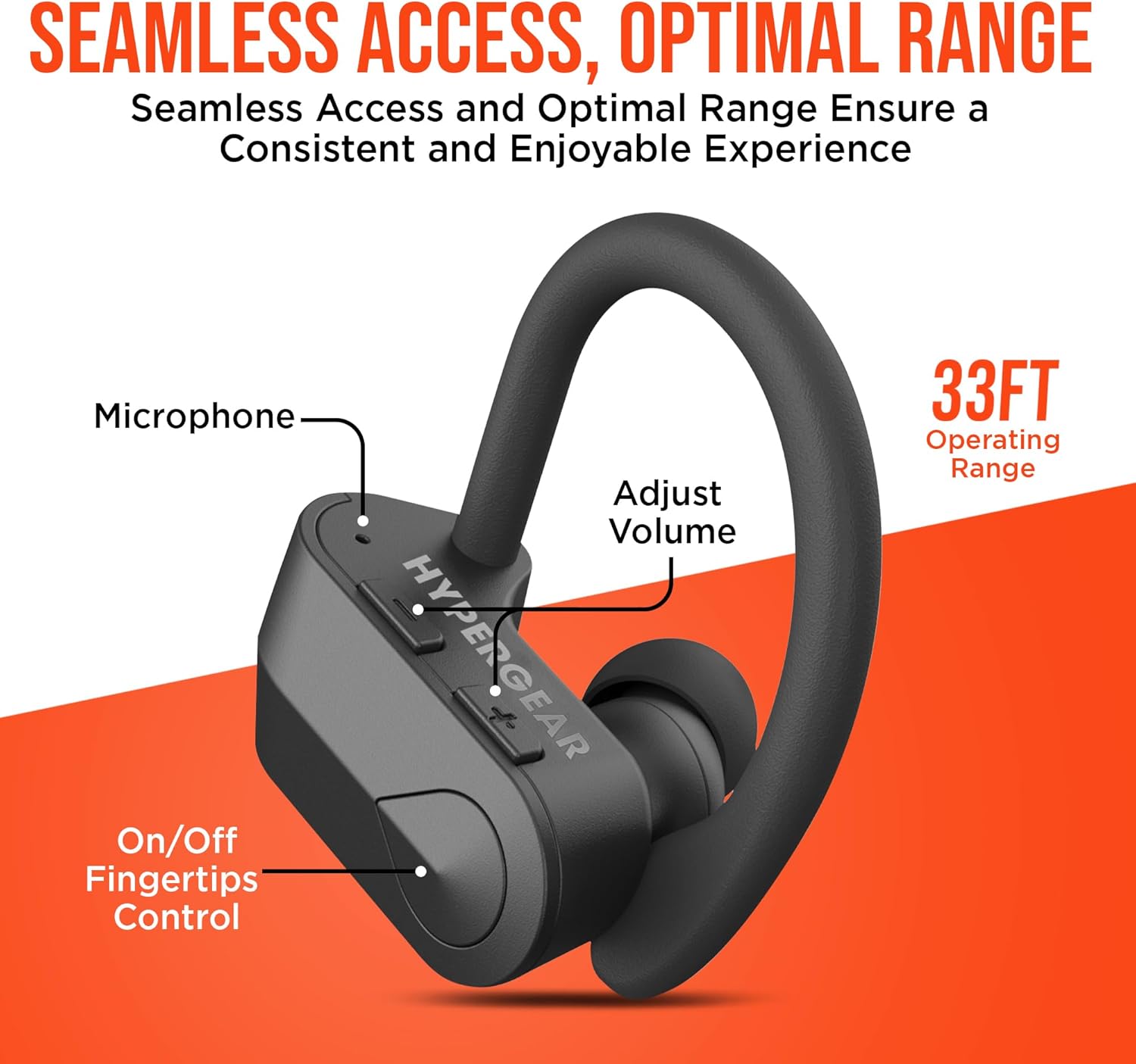
Billede: En detaljeret view of the earbud showing the microphone, volume adjustment buttons, and on/off fingertip control, along with an operating range of 33 feet.
Opretholdelse
- Rengør øretelefonerne regelmæssigt med en blød, tør klud.
- Undgå at bruge slibende rengøringsmidler eller opløsningsmidler.
- Opbevar øretelefonerne i deres opladningsetui, når de ikke er i brug for at beskytte dem og holde dem opladet.
- Holdes væk fra ekstreme temperaturer og fugtighed.
- The earbuds are sweatproof and water-resistant, but not fully waterproof. Do not submerge them in water.
Fejlfinding
| Problem | Løsning |
|---|---|
| Øretelefonerne tænder ikke. | Ensure earbuds are fully charged. Press and hold the power button for 3-5 seconds. |
| Kan ikke parres med enheden. | Make sure Bluetooth is enabled on your device and the earbuds are in pairing mode. Move closer to the device (within 33 ft). Forget the device in Bluetooth settings and re-pair. |
| Lyden er forvrænget eller afbrydes. | Check the distance between earbuds and device. Ensure no obstacles are blocking the signal. Recharge earbuds if battery is low. |
| Mikrofon virker ikke. | Ensure the earbuds are properly connected. Check device's audio input settings. |
Specifikationer
- Forbindelse teknologi: Bluetooth
- Trådløs kommunikationsteknologi: Bluetooth
- Bluetooth version: 5.0
- Bluetooth Range: 33 fod
- Batterilevetid: Up to 4 Hours playtime
- Opladningstid: 2 Hours (10 min quick charge for 1 hour playtime)
- Kontroltype: Mediekontrol (berøring/knap)
- Støjkontrol: Active Noise Cancellation (for mic)
- Vandmodstandsniveau: Vandafvisende (svedtæt)
- Frekvensområde: 20 Hz - 20,000 Hz
- Varens vægt: 4.6 ounce
- Produktdimensioner: 2.36 x 1.18 x 1.18 tommer
- Modelnummer: 14294
Garanti og support
HyperGear products are designed for quality and performance. For warranty information or technical support, please visit the official HyperGear website or contact their customer service. Details can typically be found on the product packaging or the brand's official online store.
Online support: Visit the HyperGear Store on Amazon
Ask a question about this manual
Ask about setup, troubleshooting, compatibility, parts, safety, or missing instructions. Manuals+ will review the question and use this page’s manual context to help answer it.