
1. Introduktion
Thank you for choosing the CREATE SILKAIR CONNECT 3-in-1 Mobile Air Conditioner. This versatile appliance is designed to provide cooling, dehumidification, and fan functions for your living space. With its Wi-Fi connectivity, you can conveniently control the unit via a mobile application. Please read this manual thoroughly before operation to ensure safe and efficient use.
Model: 64274_145198
Mærke: SKABE
2. Sikkerhedsoplysninger
Følg altid grundlæggende sikkerhedsforanstaltninger, når du bruger elektriske apparater, for at mindske risikoen for brand, elektrisk stød og personskade.
- Sørg for, at strømforsyningen matcher voltage angivet på mærkatet.
- Betjen ikke enheden med en beskadiget ledning eller stik.
- Hold enheden væk fra varmekilder og direkte sollys.
- Bloker ikke luftindtag eller -udtag.
- Tag altid stikket ud af enheden før rengøring eller vedligeholdelse.
- Dette apparat bruger kølemiddel R290. Undgå at punktere kølemiddelkredsløbet.
- Hold øje med børn, og sørg for, at de ikke leger med apparatet.
3. Pakkens indhold
Carefully unpack your air conditioner and check that all items are present and in good condition.
- CREATE SILKAIR CONNECT Mobile Air Conditioner Unit
- Udstødningsslange
- Window Sealing Kit (Adjustable window slider, hose adapter)
- Fjernbetjening
- Brugermanual

Figure 1: The CREATE SILKAIR CONNECT Mobile Air Conditioner unit shown alongside a smartphone displaying its control application interface.
4. Produktet er slutview
4.1 Kontrolpanel

Figure 2: Close-up of the top-mounted control panel, featuring an LED display and touch-sensitive buttons for various functions such as power, mode selection, fan speed, and timer.
4.2 Komponenter og dimensioner
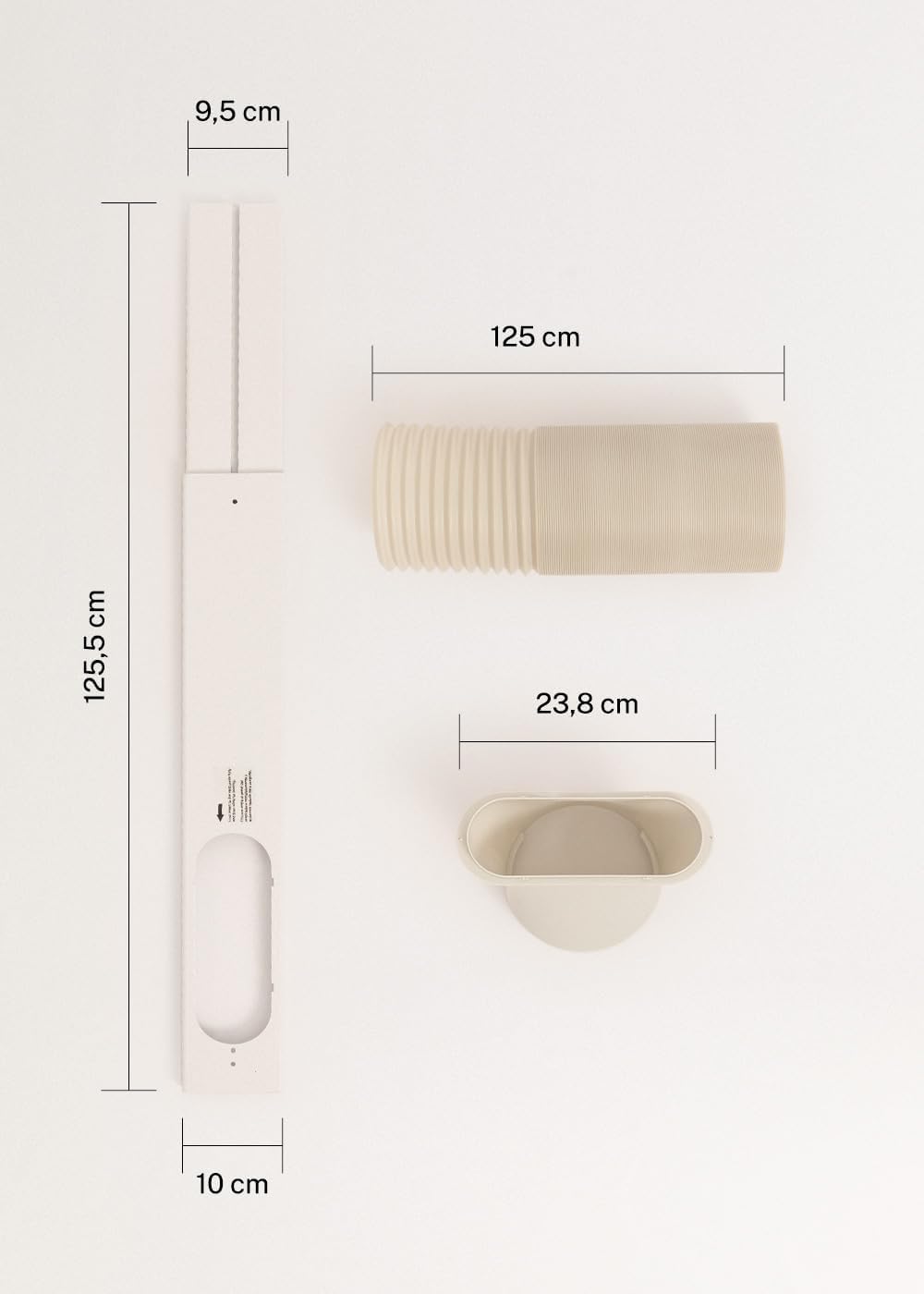
Figure 3: Detailed diagram illustrating the dimensions of the window sealing plate (125.5 cm length, 10 cm width, 9.5 cm adjustable width) and the exhaust hose (125 cm length) with its adapter (23.8 cm diameter).
5. Opsætning og installation
Proper installation is crucial for the efficient operation of your mobile air conditioner.
5.1 Placering af enheden
- Placer enheden på en flad, stabil overflade.
- Sørg for, at der er mindst 30 cm plads omkring enheden for korrekt luftgennemstrømning.
- Placer enheden i nærheden af et vindue eller en åbning til udstødningsslangen.
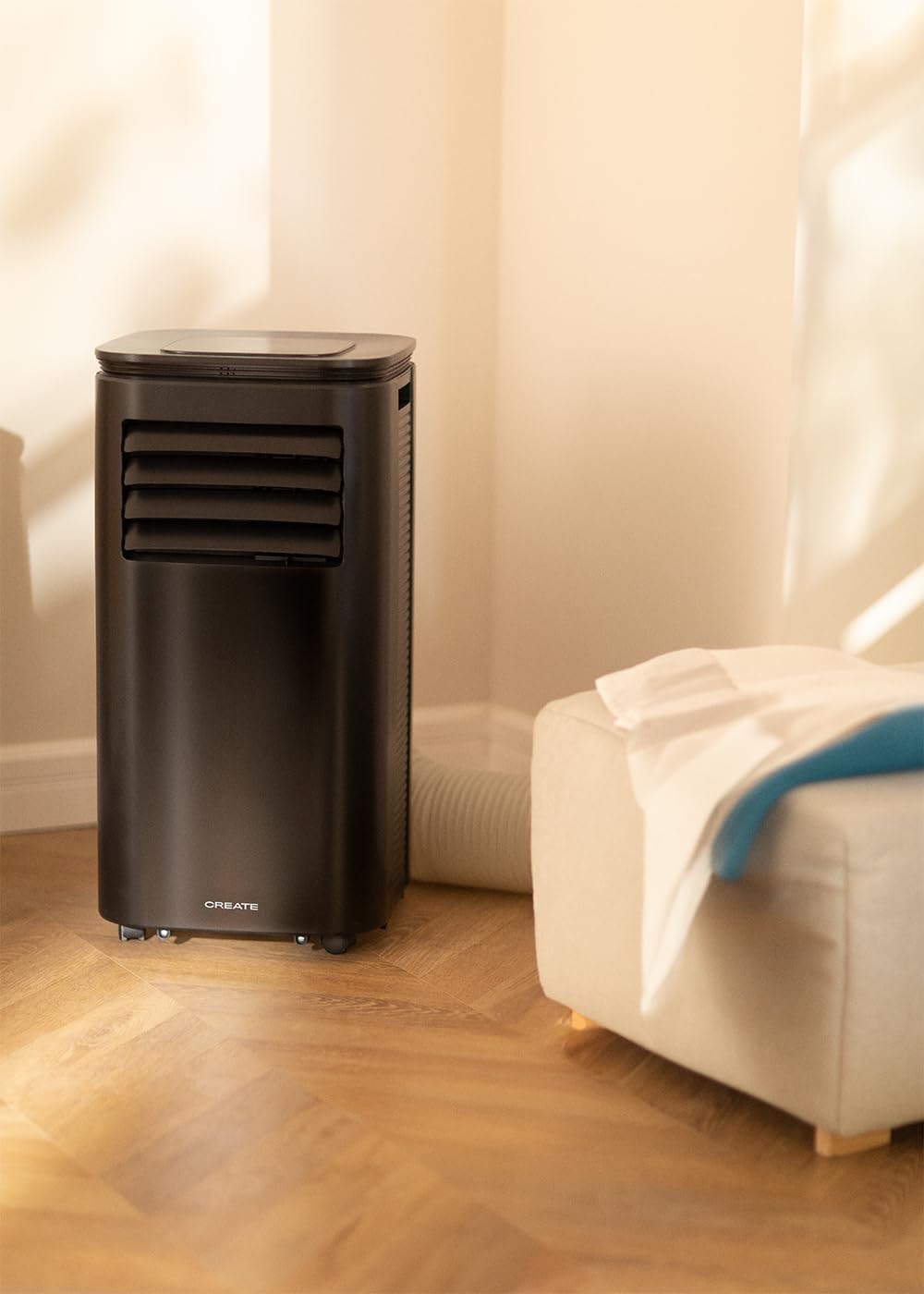
Figure 4: The air conditioner unit positioned in a room, demonstrating the typical setup with the exhaust hose directed towards a window for heat expulsion.
5.2 Installing the Exhaust Hose and Window Kit
- Fastgør slangeadapteren til den ene ende af udstødningsslangen.
- Tilslut den anden ende af udstødningsslangen til luftudløbet på bagsiden af enheden.
- Install the adjustable window sealing kit in your window opening. Extend it to fit the window frame.
- Insert the hose adapter into the opening of the window sealing kit.

Figure 5: Illustrates the secure connection of the flexible exhaust hose to the designated port at the rear of the air conditioning unit.
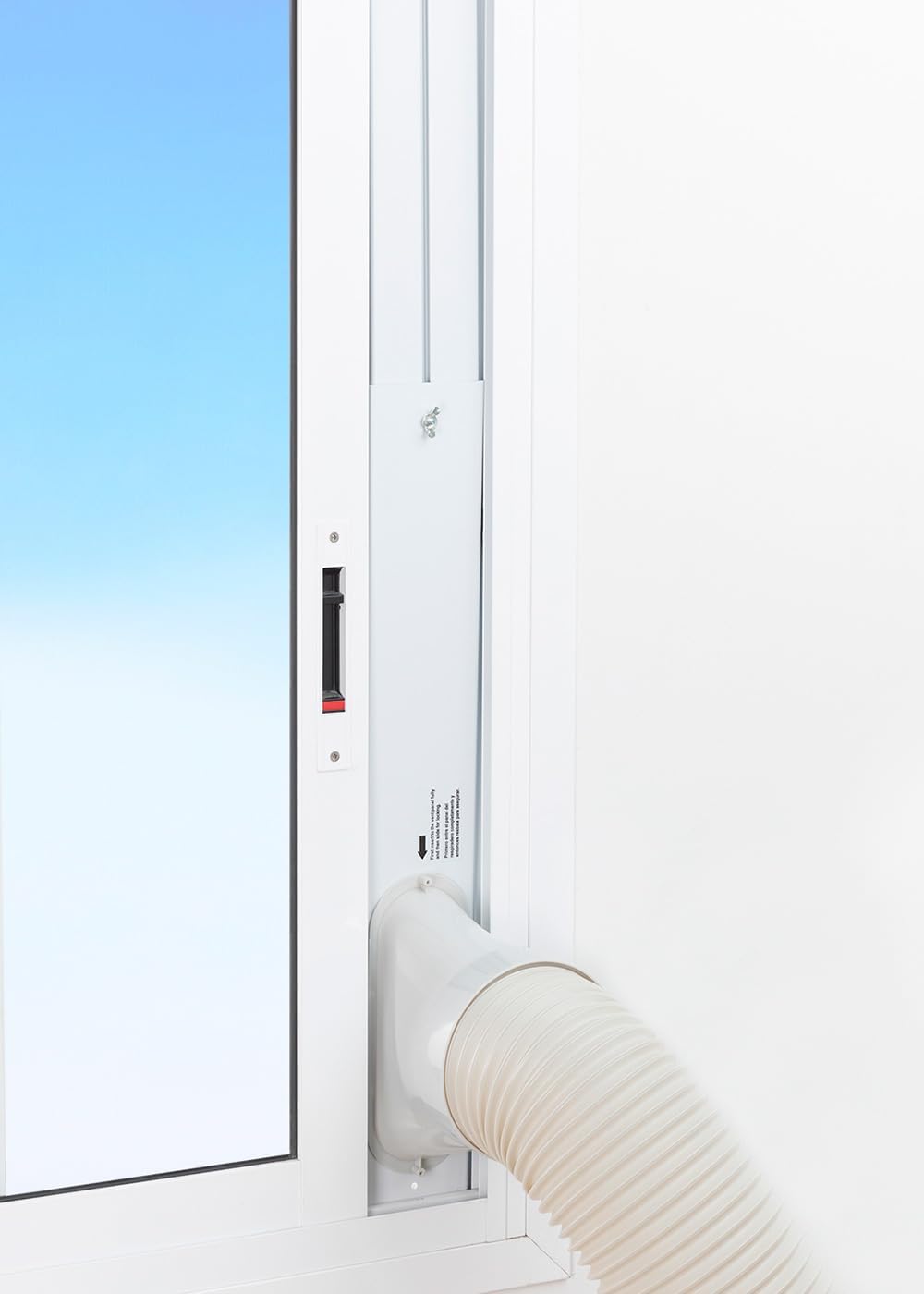
Figure 6: The window sealing kit is shown properly installed in a window frame, with the exhaust hose securely fitted into the kit's opening to vent hot air outside.
6. Betjeningsvejledning
6.1 Brug af kontrolpanelet
The control panel on top of the unit allows direct operation.
- Power knap: Tryk for at tænde eller slukke enheden.
- Mode knap: Cycle through Cooling, Fan, and Dehumidifier modes.
- Ventilatorhastighedsknap: Adjust fan speed (Low, High).
- Temperaturknapper (+/-): Adjust desired temperature in Cooling mode.
- Timer knap: Set the auto-on or auto-off timer (up to 24 hours).
- Dvaletilstandsknap: Activates a quieter operation mode for nighttime use.
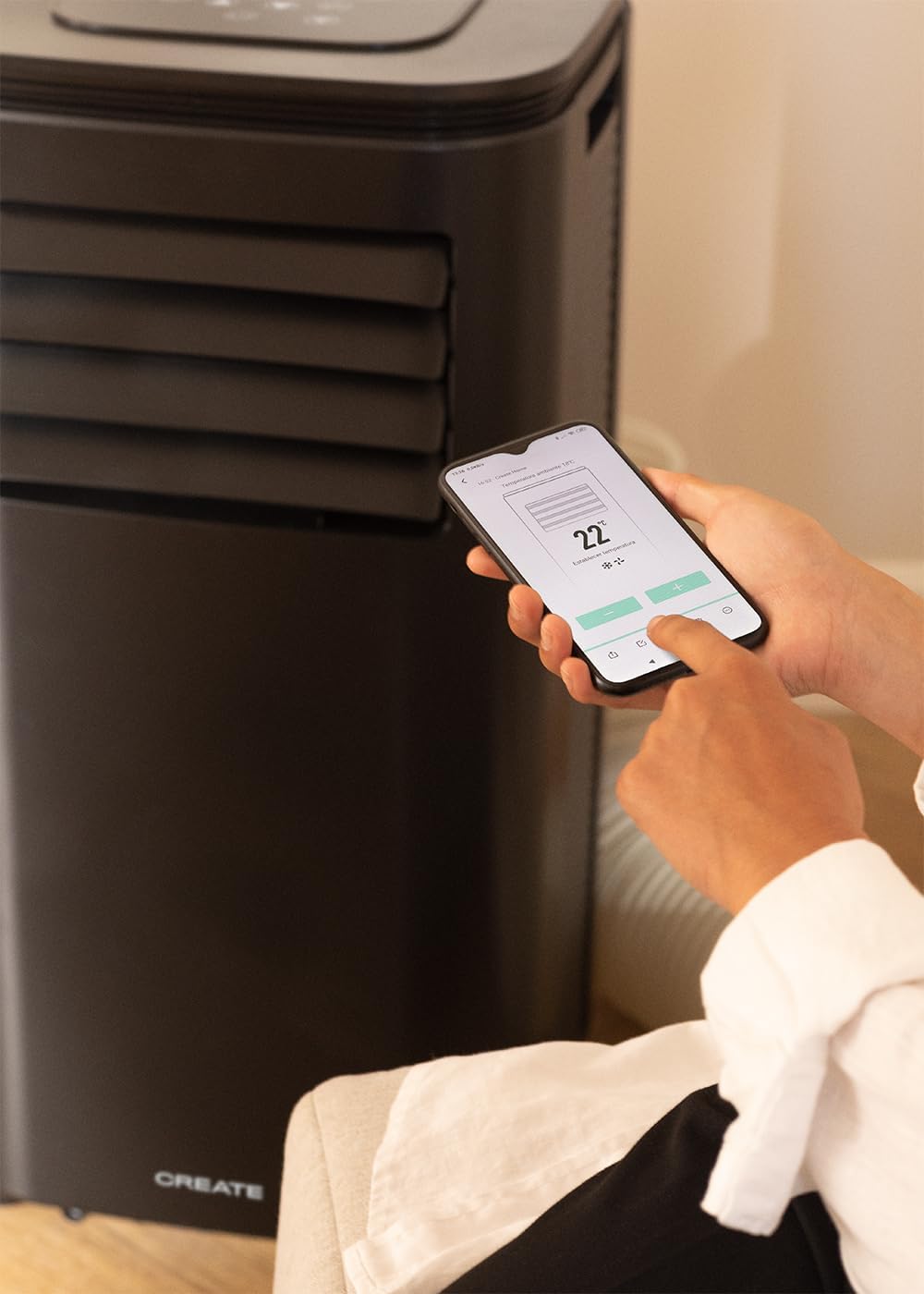
Figure 7: A user's hand interacting with the touch-sensitive control panel located on the top surface of the air conditioner, demonstrating direct manual operation.
6.2 Brug af fjernbetjeningen
Fjernbetjeningen giver bekvem betjening på afstand.

Figure 8: A hand holding the dedicated remote control for the air conditioner, illustrating its use for convenient operation from a distance.
6.3 Wi-Fi og app-styring
Download the CREATE Home app from your smartphone's app store. Follow the in-app instructions to connect your air conditioner to your home Wi-Fi network. Once connected, you can control all functions of the unit from your smartphone, including mode selection, temperature adjustment, fan speed, and timer settings.
Figure 9: A user interacting with the mobile application on a smartphone to remotely control the air conditioner, showcasing the Wi-Fi connectivity feature.
7. Vedligeholdelse
Regelmæssig vedligeholdelse sikrer optimal ydeevne og forlænger levetiden på din enhed.
7.1 Rengøring af luftfilteret
Luftfilteret bør rengøres hver anden uge eller oftere afhængigt af brug og luftkvalitet.
- Sluk for enheden, og tag stikket ud af stikkontakten.
- Find luftfilterpanelet på bagsiden af enheden.
- Fjern forsigtigt filteret.
- Clean the filter with warm, soapy water or a vacuum cleaner. Rinse thoroughly and allow it to air dry completely before reinserting.

Figure 10: Demonstrates the process of removing the air filter from the rear of the air conditioner unit for cleaning or replacement.
7.2 Aftapning af vand
In Dehumidifier mode or high humidity conditions, the internal water tank may fill up. The unit will stop operating when the tank is full. Drain the water from the drainage port at the bottom rear of the unit.
8. Fejlfinding
| Problem | Mulig årsag | Løsning |
|---|---|---|
| Enheden tænder ikke | No power; Power cord not plugged in; Water tank full. | Check power outlet; Plug in power cord; Drain water tank. |
| Enheden køler ikke effektivt | Luftfilter snavset; Udstødningsslange ikke korrekt installeret; Rum for stort; Døre/vinduer åbne. | Clean air filter; Ensure hose is sealed; Use in recommended room size (14-25 m²); Close doors/windows. |
| Høj støj | Enheden står ikke på en plan overflade; Blokering i ventilatoren. | Place on flat surface; Check for obstructions. |
| Problemer med Wi-Fi-forbindelse | Forkert Wi-Fi-adgangskode; Router for langt væk; App-problemer. | Verify password; Move unit closer to router; Restart app/unit. |
9. Specifikationer
| Feature | Specifikation |
|---|---|
| Modelnummer | 64274_145198 |
| Kølekapacitet | 9000 BTU / 2270 Watt |
| Affugtningskapacitet | 24 liter/dag |
| Luftstrøm | Op til 350 m³/t |
| Anbefalet rumstørrelse | 14-25 m² |
| Støjniveau | 65 dB |
| Kølemiddel | R290 (ECO-friendly) |
| Voltage | 240 volt |
| Wattage | 2600 watt |
| Dimensioner (L x B x H) | 35.5 x 36.5 x 71.3 cm |
| Materiale | ABS |
| Energieffektivitetsklasse | A |

Figure 11: The energy efficiency label for the CREATE SILKAIR CONNECT, indicating an A-class energy rating, 2.6 kW cooling capacity, and a noise level of 65 dB. More details can be found at eprel.ec.europa.eu/qr/1580267.
10. Garanti og support
For warranty information and technical support, please refer to the warranty card included with your product or visit the official CREATE webwebstedet. Behold din købskvittering som købsbevis.
Fabrikant: SKABE
Kontakte: Refer to CREATE's official support channels.


