
1. Produktet er slutview
This manual provides instructions for the MoKo Magnetic Case, designed to protect and enhance the functionality of your Samsung Galaxy Tab S6 Lite 10.4 Inch. The case features a magnetic attachment system, a built-in S Pen slot, and supports auto wake/sleep functionality.
1.1 Kompatibilitet
This case is exclusively designed for the Samsung Galaxy Tab S6 Lite 10.4 Inch 2022/2020 models (SM-P613/P619/P610/P615). It is not compatible with Samsung Galaxy Tab S6 2019 or any other tablet models.

Image 1.1: This image illustrates the compatibility of the MoKo Magnetic Case, showing it is designed for Samsung Galaxy Tab S6 Lite 10.4 Inch (2022/2020 models SM-P613/P619/P610/P615) and not for the Samsung Galaxy Tab S6 2019.
2. Installationsvejledning
2.1 Attaching the Case
The MoKo Magnetic Case utilizes strong magnets for secure attachment. Align your Samsung Galaxy Tab S6 Lite with the back panel of the case. The tablet will magnetically snap into place, ensuring a firm and precise fit without protruding edges.
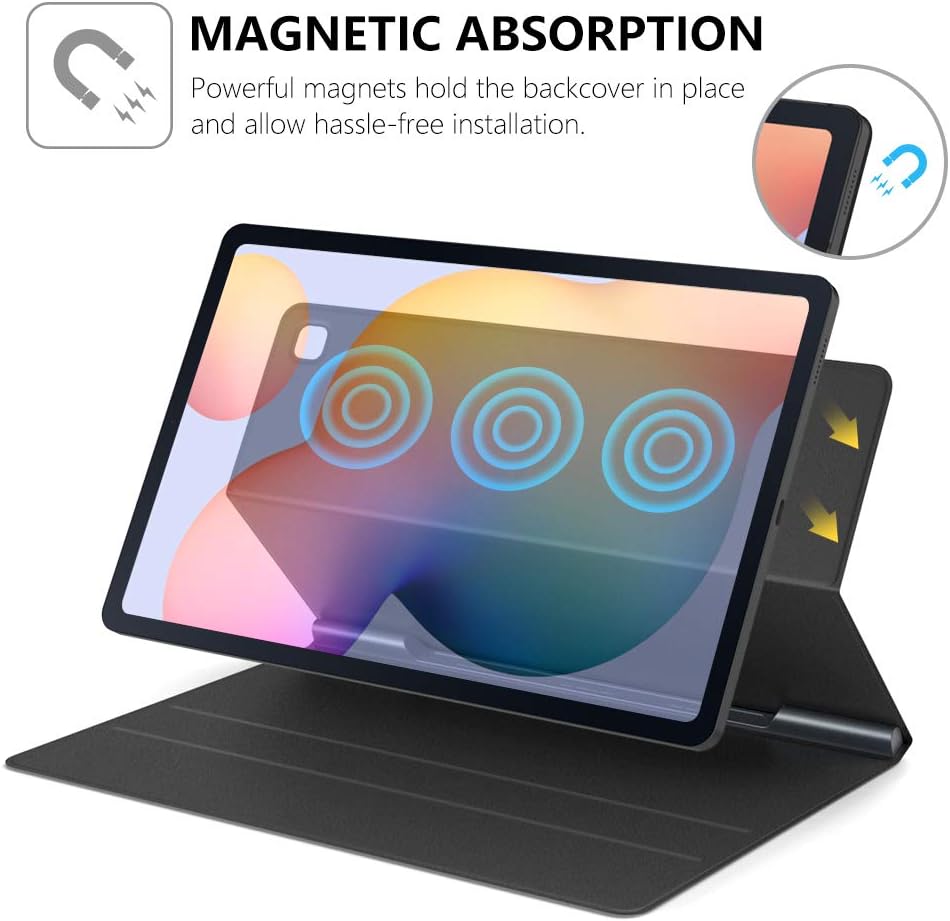
Image 2.1: This diagram illustrates the magnetic absorption mechanism, showing how the tablet is securely held in place by powerful magnets within the case.
2.2 Built-in S Pen Slot
The case features a built-in S Pen slot on the interior spine. This slot magnetically absorbs your S Pen, keeping it securely in place and easily accessible. To store, simply place the S Pen into the designated slot. To retrieve, gently pull the S Pen from the slot.

Image 2.2: This image shows the built-in S Pen slot, demonstrating how the S Pen is magnetically secured within the case's spine.
2.3 Visuel installationsvejledning
Video 2.3: This video demonstrates the installation process of the MoKo Magnetic Case for the Samsung Galaxy Tab S6 Lite 2020, including how to attach the tablet, secure the S Pen, and utilize the magnetic stand feature.
3. Betjeningsvejledning
3.1 Automatisk opvågning/dvalefunktion
The case supports the auto wake/sleep feature. Opening the lid will automatically wake your tablet, and closing the lid will put it to sleep, conserving battery life. This function operates seamlessly and quickly.

Image 3.1: This image visually explains the auto wake/sleep function, showing arrows indicating the tablet waking upon opening the cover and sleeping upon closing it.
3.2 Magnetic Trifold Stand
The front cover of the case can be folded into a trifold stand, providing multiple viewing angles. This allows for comfortable hands-free viewing or typing. Simply fold the cover into the desired triangular shape to prop up your tablet.

Image 3.2: This image shows the MoKo case configured as a trifold stand, supporting the tablet at an angle suitable for vieweller at skrive.
4. Pleje og vedligeholdelse
To ensure the longevity and appearance of your MoKo Magnetic Case, follow these maintenance guidelines:
- Rengøring af ydersiden: The premium PU leather exterior can be wiped clean with a soft, damp klud. Undgå at bruge skrappe kemikalier eller slibende rengøringsmidler, da disse kan beskadige materialet.
- Rengøring af interiøret: The soft microfiber interior can be gently wiped with a dry, lint-free cloth to remove dust or smudges.
- Undgå ekstreme forhold: Udsæt ikke etuiet for ekstreme temperaturer, direkte sollys i længere perioder eller overdreven fugtighed.
- Magnetisk integritet: Keep the magnetic areas free from metallic debris that could interfere with the magnetic connection.
5. Fejlfinding
5.1 Tablet Not Staying Securely Attached
- Tjek justering: Ensure the tablet is perfectly aligned with the magnetic back panel of the case.
- Fjern affald: Verify that there is no dust, dirt, or other foreign objects between the tablet and the case that could weaken the magnetic connection.
- Case Condition: Inspect the case for any damage or wear that might affect the magnetic strength.
5.2 S Pen Not Staying in Slot
- Korrekt indsættelse: Ensure the S Pen is fully inserted into the designated magnetic slot on the case's spine.
- Magnetisk interferens: Check for any metallic objects near the S Pen slot that might interfere with its magnetic hold.
5.3 Auto Wake/Sleep Not Functioning
- Låg lukning: Confirm that the case lid is fully closed and making proper contact with the tablet screen.
- Tabletindstillinger: Check your tablet's display settings to ensure the 'Smart Cover' or 'Auto Wake/Sleep' feature is enabled.
6. Produktspecifikationer
| Feature | Detalje |
|---|---|
| Mærke | MoKo |
| Modelnummer | P840034653632 |
| Kompatible enheder | Samsung Galaxy Tab S6 Lite 2022/2020 (Models: SM-P613/P619/P610/P615) |
| Compatible Device Size Maximum | 10.4 tommer |
| Farve | Sort |
| Formfaktor | Sag |
| Skaltype | Blød |
| Indkapslingsmateriale | Faux Leather, Polycarbonate, Microfiber |
| Yderligere funktioner | Auto Sleep/Wake, Lightweight, Built-in S Pen Slot, Magnetic Absorption, Trifold Stand |
| Emnedimensioner | 9.69 x 6.54 x 0.43 tommer |
| Varens vægt | 9.52 ounce |
7. Garanti og support
7.1 Garantioplysninger
MoKo products are typically covered by a manufacturer's warranty against defects in materials and workmanship. For specific warranty terms and conditions, please refer to the product packaging or contact MoKo customer support directly. Keep your proof of purchase for warranty claims.
7.2 Kundesupport
If you encounter any issues or have questions regarding your MoKo Magnetic Case, please contact MoKo customer support. You can typically find contact information on the official MoKo webhjemmeside eller gennem den forhandler, hvor produktet blev købt.
For further assistance, visit the MoKo Store on Amazon: MoKo-butik