
Indledning
The PWAY PW-HT226P2 is a 1x2 Port HDMI Splitter Extender designed to distribute a single HDMI source to two remote displays over Cat5/5e/6/7 Ethernet cables, extending the signal up to 50 meters (165 feet). It supports Full HD 1080P resolution at 60Hz and features Power over Cable (POC) for simplified power management and EDID copy functionality for enhanced compatibility.

Image: The PWAY PW-HT226P2 HDMI Splitter Extender system, showing the main transmitter unit and two receiver units.
Produktegenskaber
- Udvidet transmission: Transmits HDMI video and audio signals without latency up to 50 meters (165 feet) over a single Cat5/5e/6/7 Ethernet cable.
- Dual Local Outputs: The transmitter unit includes two local HDMI outputs for connecting displays directly, in addition to the two RJ45 ports for extended connections.
- Høj opløsning support: Supports resolutions up to 1920x1080P at 60Hz, and is backward compatible with 1080i, 720P, and 720i.
- Strøm via kabel (POC): Only one power adapter is required to power both the transmitter and receiver units, simplifying installation and reducing cable clutter.
- EDID Copy Function: Equipped with EDID (Extended Display Identification Data) copy functionality to ensure optimal compatibility between the source device and connected displays.
- HDMI 1.3 Compliant: Ensures compatibility with a wide range of HDMI devices.

Billede: Overview of the PWAY HDMI Extender Splitter 1x2, highlighting key features such as 3D support, 1080P resolution, 50m extension, and POC.
Pakkens indhold
Kontroller venligst pakkens indhold ved udpakning. Hvis der mangler eller er beskadigede dele, skal du kontakte din forhandler.
- 1x HDMI Splitter Extender Transmitter (TX)
- 2x HDMI Splitter Extender Receiver (RX)
- 1x DC 5V strømadapter
- 1x Brugermanual (dette dokument)

Image: The complete packing list, including the transmitter, two receivers, and the power adapter.
Produktdiagram
Senderenhed (TX)
The transmitter unit connects to your HDMI source and distributes the signal.
- DC 5V: Strømindgangsport.
- HDMI IN: Connect to your HDMI source (e.g., DVD player, game console).
- HDMI OUT (Loop): Two local HDMI outputs for connecting displays directly to the transmitter.
- Cat5/6/7: Two RJ45 output ports for connecting to the receiver units via Ethernet cable.
- STATUS LED: Angiver driftsstatus.
- EDID LED: Indicates EDID status.
- STRØM-LED: Indikerer strømstatus.
Modtagerenhed (RX)
The receiver units connect to your displays and receive the extended HDMI signal.
- Cat5/6/7: RJ45 input port for connecting to the transmitter unit via Ethernet cable.
- HDMI OUT: Tilslut til din skærmenhed (f.eks. tv, skærm).
- STA LED: Indicates signal status.
- PWR LED: Indikerer strømstatus.

Image: A detailed connection diagram illustrating how to connect the video source, transmitter, Cat5e/6 cables, receivers, and multiple display devices.
Opsætningsinstruktioner
- Sluk for enheder: Ensure all devices, including the HDMI source, displays, and the PWAY extender units, are powered off before beginning installation.
- Tilslut HDMI-kilde: Connect your HDMI source device (e.g., Blu-ray player, PC, game console) to the HDMI-IN porten på senderenheden (TX) ved hjælp af et HDMI-kabel af høj kvalitet.
- Tilslut lokale skærme (valgfrit): Hvis du ønsker at bruge lokale skærme, skal du tilslutte dem til HDMI OUT (Loop) ports on the Transmitter (TX) unit using HDMI cables.
- Tilslut Ethernet-kabler: Connect Cat5e/6/7 Ethernet cables from the Cat5/6/7 output ports on the Transmitter (TX) unit to the Cat5/6/7 input ports on each Receiver (RX) unit. Ensure the cables are properly terminated and meet the specified length requirements for your desired resolution (up to 50m for 1080P).
- Tilslut fjernskærme: Connect your remote display devices (e.g., TV, monitor) to the HDMI OUT port on each Receiver (RX) unit using HDMI cables.
- Anvend strøm: Tilslut den medfølgende DC 5V strømadapter til DC 5V port on the Transmitter (TX) unit. Due to the POC function, the receiver units will be powered via the Ethernet cable.
- Tænd enheder: Power on the HDMI source device, then the displays, and finally the PWAY extender units.
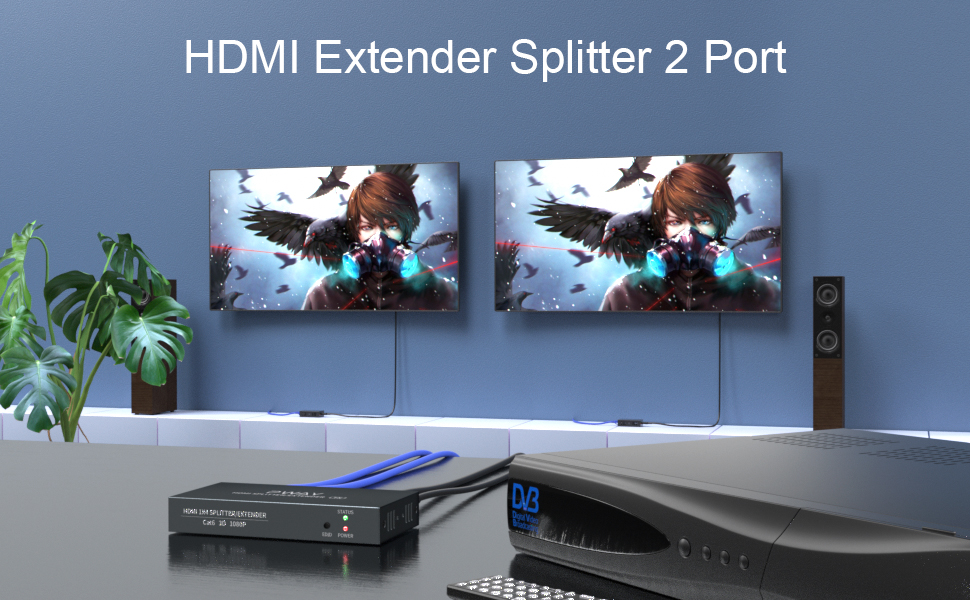
Billede: En eksample setup showing the transmitter connected to a source and two remote displays via receiver units.

Image: A chart indicating the maximum transmission distances based on the type of network cable used: Cat5 up to 40m, Cat5e up to 45m, and Cat6/7 up to 50m.
Betjeningsvejledning
Once all connections are made and power is applied, the system should operate automatically.
- Signaldetektion: The extender units will automatically detect the HDMI input signal and transmit it to the connected displays.
- LED-indikatorer:
- Senderen (TX): The POWER LED should be lit when power is supplied. The STATUS LED and EDID LED will indicate active signal and EDID status respectively.
- Modtager (RX): The PWR LED should be lit, indicating power received via POC. The STA LED will indicate active signal reception.
- EDID Management: The EDID copy function ensures the source device outputs a compatible resolution and audio format for the connected displays. No manual configuration is typically required.
Opretholdelse
To ensure optimal performance and longevity of your PWAY HDMI Splitter Extender, follow these maintenance guidelines:
- Rensning: Use a soft, dry cloth to clean the units. Do not use liquid or aerosol cleaners.
- Ventilation: Sørg for, at enhederne er placeret et godt ventileret område for at forhindre overophedning. Ventilationsåbningerne må ikke blokeres.
- Kabelstyring: Hold kablerne organiseret, og undgå skarpe bøjninger eller overdreven spænding, da dette kan beskadige kabler og porte.
- Miljøforhold: Undgå at udsætte enhederne for ekstreme temperaturer, fugtighed eller direkte sollys.
Fejlfinding
If you encounter issues with your HDMI Splitter Extender, refer to the following common problems and solutions:
| Problem | Mulig årsag | Løsning |
|---|---|---|
| Ingen video eller lyd på skærmen. |
|
|
| Dårlig billedkvalitet eller flimmer. |
|
|
| Receiver unit not powering on. |
|
|
Specifikationer
| Model | PW-HT226P2 |
| Mærke | PWAY |
| HDMI overensstemmelse | HDMI 1.3 |
| HDCP-overholdelse | HDCP 1.2 |
| Understøttede opløsninger | Up to 1080P@60Hz (1920x1080), 1080i, 720P, 720i |
| Transmissionsafstand | Up to 50m (165ft) over Cat5e/6/7 cable |
| Krav til Ethernet-kabel | Cat5/5e/6/7 (UTP/STP) |
| Strømforsyning | DC 5V (via medfølgende adapter) |
| Funktioner | POC (Power over Cable), EDID Copy, Dual Local HDMI Outputs |
Sikkerhedsoplysninger
- Enheden må ikke skilles ad eller modificeres.
- Brug kun den medfølgende strømadapter.
- Hold enheden væk fra vand, fugt og ekstreme temperaturer.
- Undgå at tabe eller udsætte enheden for kraftige stød.
- Sørg for korrekt ventilation for at forhindre overophedning.
Garanti og support
PWAY products are designed for reliability and performance. For warranty information or technical support, please refer to the warranty card included with your product or visit the official PWAY webDu kan også kontakte din forhandler for at få hjælp.
Gem venligst dit købsbevis for garantikrav.