
FLINQ 8720168680396
FlinQ mobil klimaanlæg brugermanual
Model: 8720168680396
1. Vigtige sikkerhedsinstruktioner
Læs venligst alle instruktioner omhyggeligt, inden du bruger dette apparat, og gem dem til senere brug. Manglende overholdelse af disse instruktioner kan resultere i elektrisk stød, brand eller alvorlig personskade.
- Tilslut altid enheden til en jordforbundet stikkontakt.
- Betjen ikke enheden med en beskadiget ledning eller stik.
- Hold enheden væk fra brandfarlige materialer og åben ild.
- Sørg for tilstrækkelig ventilation omkring enheden under drift.
- Stik ikke genstande ind i luftindtaget eller -udtaget.
- Tag stikket ud af enheden, før du rengør eller udfører vedligeholdelse.
- Dette apparat er ikke beregnet til brug af personer (inklusive børn) med nedsatte fysiske, sensoriske eller mentale evner, eller mangel på erfaring og viden, medmindre de har fået opsyn eller instruktion i brugen af apparatet af en person, der er ansvarlig for deres sikkerhed.
2. Produktet er slutview
FlinQ Mobile Air Conditioner er en alsidig enhed designet til at levere køling, affugtning og ventilatorfunktioner til dit opholdsrum. Den er udstyret med et energieffektivt design og leveres med et vindueskit for nem installation.

Figur 2.1: Forside view af FlinQ Mobile Airconditionanlægget, der viser hovedluftudløbet og kontrolpanelområdet.

Figur 2.2: Den mobile klimaanlægsenhed, der viser dens energimærke (klasse A) og den medfølgende fjernbetjening for nem betjening.
3. Komponenter og dele
Sæt dig bekendt med hovedkomponenterne i dit mobile klimaanlæg:
- Hovedenhed (med kontrolpanel)
- Udstødningsslange
- Vinduespakningssæt (justerbar vinduesskyder/plade)
- Fjernbetjening
- Afløbsslange (til kontinuerlig dræning i affugtningstilstand)
- Luftfiltre (placeret på bagsiden/siden)
Figur 3.1: Fjernbetjeningen og en visuel repræsentation af enhedens nøglefunktioner, herunder støjniveau (65 dB), 24-timers timer, kølekapacitet (12000 BTU/t), rumtermostat, kulfilter, selvdiagnose, dvaletilstand, fjernbetjeningsfunktion, timerfunktion, automatisk køling/ventilator/affugtning og affugtningsfunktion.
4. Opsætning og installation
4.1 Udpakning
Tag forsigtigt klimaanlægget og alt tilbehør ud af emballagen. Undersøg for eventuelle skader under transporten. Gem den originale emballage til senere opbevaring eller transport.
4.2 Placering
Placer enheden på en plan, stabil overflade. Sørg for, at der er mindst 30 cm (12 tommer) fri plads omkring enheden for korrekt luftgennemstrømning. Placer den ikke i nærheden af varmekilder eller i direkte sollys.
4.3 Montering af vinduessæt
For at sikre effektiv køling skal den varme luft, der udsuges af enheden, udluftes udenfor. Brug det medfølgende vinduestætningssæt til dette formål.
- Fastgør udstødningsslangens tilslutningsstykke til luftudløbet på bagsiden af enheden.
- Forlæng udstødningsslangen, og fastgør vinduesadapteren til den anden ende.
- Juster vinduesskyderen/pladen, så den passer til din vinduesåbning.
- Indsæt vinduesadapteren i åbningen på vinduesskyderen/pladen.
- Luk vinduet så meget som muligt for at forsegle åbningen omkring sættet og minimere luftlækage.

Figur 4.1: Side view af det mobile klimaanlæg, der illustrerer tilslutningspunktet for udstødningsslangen, som udstøder varm luft fra rummet.
5. Betjeningsvejledning
5.1 Kontrolpanel
Kontrolpanelet er placeret øverst på enheden og har forskellige knapper og et LED-display til indstilling af tilstande, temperatur og timerfunktioner.
5.2 Fjernbetjening
Fjernbetjeningen giver dig mulighed for at betjene alle klimaanlæggets funktioner på afstand. Sørg for, at batterierne i fjernbetjeningen er isat korrekt.
5.3 driftstilstande
Tryk på knappen 'Tilstand' for at gennemgå de tilgængelige driftstilstande:
- Køletilstand: Til afkøling af rummet. Indstil den ønskede temperatur ved hjælp af temperaturjusteringsknapperne.
- Affugtningstilstand: Fjerner overskydende fugt fra luften. Ventilatorhastigheden er typisk fast i denne tilstand. Overvej at tilslutte en afløbsslange for kontinuerlig dræning.
- Ventilatortilstand: Cirkulerer luften uden at køle. Du kan justere ventilatorhastigheden (Lav, Mellem, Høj).

Figur 5.1: Nærbillede view af de justerbare lameller på klimaanlæggets frontpanel, som styrer luftstrømmen.
6. Vedligeholdelse
Regelmæssig vedligeholdelse sikrer optimal ydeevne og forlænger levetiden på dit klimaanlæg.
6.1 Rengøring af luftfiltre
Luftfiltrene bør rengøres hver anden uge eller oftere afhængigt af brug og luftkvalitet. Snavsede filtre reducerer effektiviteten og kan beskadige enheden.
- Tag klimaanlæggets stik ud af stikkontakten.
- Find og fjern luftfiltrene (normalt på bagsiden eller siden af enheden).
- Vask filtrene under rindende vand (varmt, ikke hedt), eller brug en støvsuger til at fjerne støv.
- Lad filtrene lufttørre helt, før de sættes i igen. Udsæt dem ikke for direkte sollys.

Figur 6.1: Illustration af, hvordan man fjerner luftfilteret fra det mobile klimaanlæg til rengøring, med fremhævelse af det tilgængelige filterpanel.
6.2 Aftapning af vand
Enheden opsamler kondensvand under afkøling og affugtning. Den interne tank vil fyldes op, og enheden kan stoppe med at fungere, når den er fuld. Tøm vandet regelmæssigt.
- Placer en lav gryde eller bakke under afløbsporten (normalt nederst bag på enheden).
- Fjern aftapningsproppen, så vandet kan løbe ud.
- For kontinuerlig dræning i affugtningstilstand skal den medfølgende afløbsslange fastgøres til afløbsporten.
6.3 Opbevaring
Ved opbevaring af enheden i længere tid:
- Tøm alt vand ud af enheden.
- Rengør luftfiltrene.
- Tag netledningen ud, og rul den pænt op.
- Opbevar enheden et tørt og køligt sted, helst i originalemballagen.
7. Fejlfinding
Før du kontakter kundesupport, bedes du se følgende tabel for almindelige problemer og løsninger på disse:
| Problem | Mulig årsag | Løsning |
|---|---|---|
| Enheden tænder ikke | Ingen strøm; Strømkabel ikke sat i; Fuld vandtank | Kontroller stikkontakten; Sæt netledningen i; Tøm vandtanken |
| Enheden køler ikke tilstrækkeligt | Beskidte luftfiltre; Udstødningsslange blokeret/lækkende; Rum for stort; Døre/vinduer åbne | Rengør filtre; Kontroller slangen for blokeringer/korrekt tætning; Sørg for, at rummets størrelse er inden for kapaciteten; Luk døre/vinduer |
| Enheden er støjende | Enheden står ikke på en plan overflade; luftfiltrene er snavsede | Placer på en plan overflade; Rengør luftfiltre |
| Vand lækker fra enheden | Afløbsproppen er ikke ordentligt forseglet; Enheden er vippet | Sørg for, at afløbsproppen er fastgjort; Placer enheden på en plan overflade |
8. Specifikationer
Tekniske detaljer for FlinQ mobil klimaanlæg:
| Feature | Værdi |
|---|---|
| Modelnummer | 8720168680396 |
| Produktdimensioner | 74 x 48 x 31 cm |
| Varens vægt | 29 g (Bemærk: Denne vægt virker usædvanlig lav for en AC-enhed. Se venligst produktemballagen for den nøjagtige vægt) |
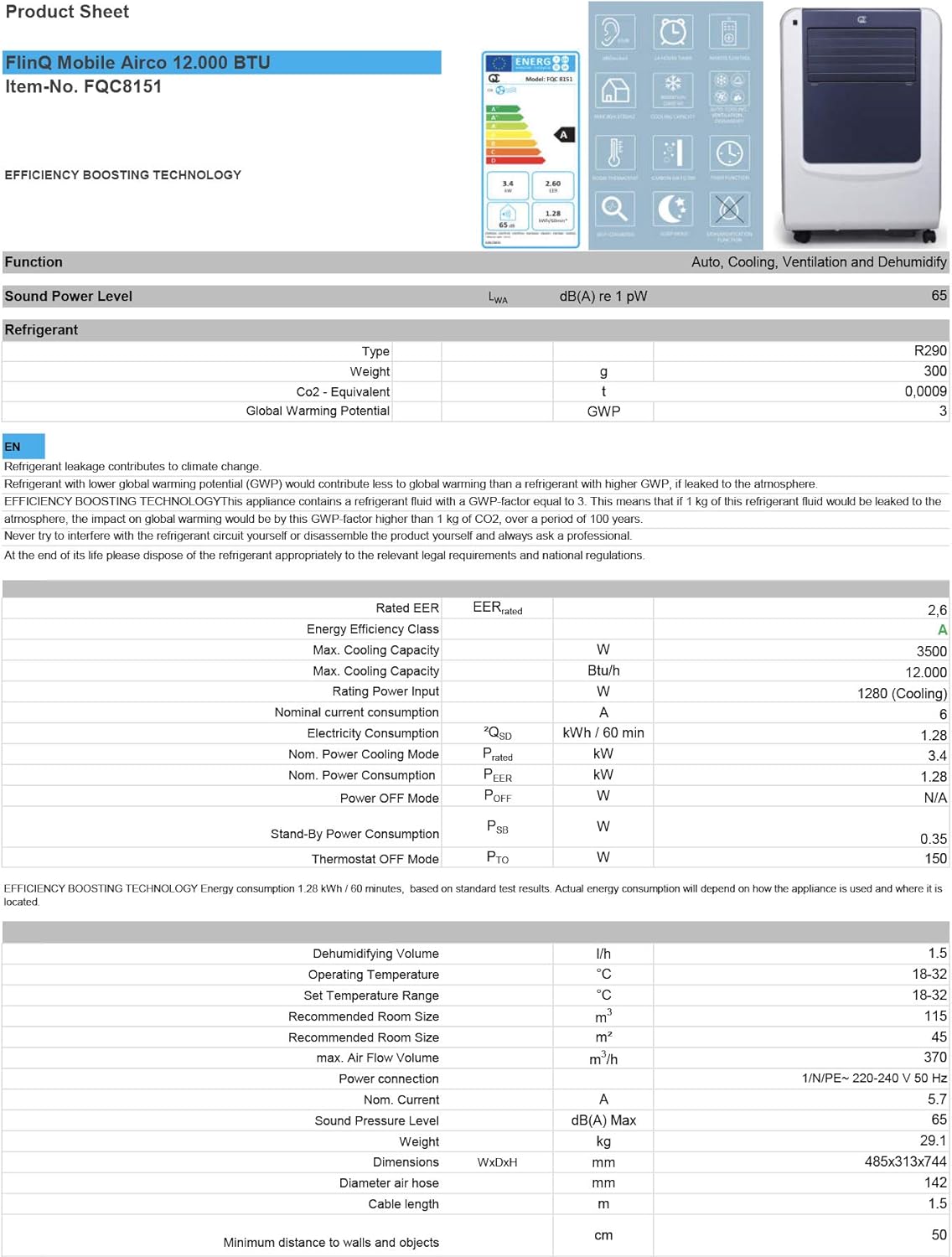
| Støjniveau | 65 dB |
| Kølekapacitet | 12000 BTU/t |
| Anbefalet rumstørrelse | Op til 45 m² |
| Særlige funktioner | Fjernbetjening |
| Energiklasse | A |

Figur 8.1: Officielt produktblad med detaljerede tekniske specifikationer, energiforbrug, kølekapacitet og dimensioner for FlinQ Mobile Airconditionanlægget.
9. Garanti og support
Dette mobile FlinQ-klimaanlæg leveres med en begrænset garanti. Se venligst garantikortet, der fulgte med dit køb, for specifikke vilkår og betingelser.
For teknisk support, service eller garantikrav bedes du kontakte din forhandler eller producenten direkte. Gem din købsbevis for at validere garantien.
Kontaktoplysninger:
- Mærke: FLINQ
- Webwebsted: www.flinq.nl (EksampSe venligst den faktiske produktdokumentation for korrekt webwebsted)
- E-mail: support@flinq.nl (Eksamp(se venligst den faktiske produktdokumentation for korrekt e-mail)
Ask a question about this manual
Ask about setup, troubleshooting, compatibility, parts, safety, or missing instructions. Manuals+ will review the question and use this page’s manual context to help answer it.