
1. Introduktion
Thank you for choosing the HTW PC-041P31 Portable Air Conditioner. This manual provides essential information for the safe and efficient operation, installation, and maintenance of your appliance. Please read this manual thoroughly before using the product and retain it for future reference.
The HTW PC-041P31 is a cooling-only portable air conditioner designed for rooms up to 30 square meters, offering 3,500 frig/h (4.1 kW) of cooling capacity with a low noise level of 53 dB.
2. Sikkerhedsoplysninger
Please observe the following safety precautions to reduce the risk of electric shock, fire, or injury.
- Sørg for, at strømforsyningen matcher voltage angivet på mærkatet.
- Betjen ikke enheden med en beskadiget strømledning eller stik.
- Tag altid stikket ud af stikkontakten før rengøring eller servicering.
- Bloker ikke luftindtag eller -udtag. Hold en minimumsafstand på 20 cm fra vægge eller andre genstande.
- Do not insert fingers or objects into the air outlet grille.
- Keep the unit on a flat, stable surface to prevent tipping.
- Dette apparat er ikke beregnet til brug af personer (inklusive børn) med nedsatte fysiske, sensoriske eller mentale evner, eller mangel på erfaring og viden, medmindre de har fået opsyn eller instruktion i brugen af apparatet af en person, der er ansvarlig for deres sikkerhed.
- Brug ikke enheden i våde omgivelser såsom badeværelser eller vaskerum.
- Brug ikke kemiske opløsningsmidler til at rengøre enheden.
3. Produktet er slutview
Familiarize yourself with the components of your HTW PC-041P31 Portable Air Conditioner.
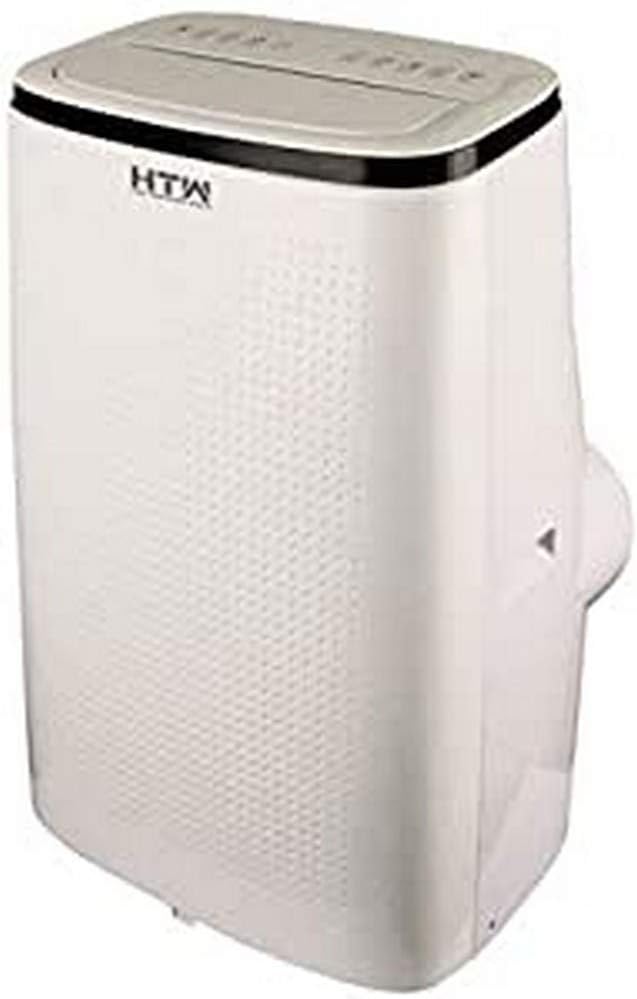
Figur 3.1: Forside og side view of the HTW PC-041P31 Portable Air Conditioner. This image shows the main body of the unit, including the control panel on top and the air outlet louvers.

Figur 3.2: Side view of the HTW PC-041P31 Portable Air Conditioner. This image highlights the compact design and the handle for easy portability.

Figur 3.3: Bagside view of the HTW PC-041P31 Portable Air Conditioner. This view displays the air intake grille, exhaust air outlet, and drainage port.
Komponenter:
- Kontrolpanel
- Luftudtagslameller
- Air Filter (behind intake grille)
- Udstødningsluftudtag
- Afløbshavn
- Strømledning
- Hjul (hjul)
- Fjernbetjening
- Window Kit (Exhaust hose, window slider kit, adapters)
4. Opsætning og installation
4.1 Udpakning
- Tag forsigtigt klimaanlægget ud af emballagen.
- Fjern alt emballagemateriale, og sørg for, at der ikke mangler nogen komponenter.
- Gem emballagen til senere opbevaring eller transport.
4.2 Placering
- Placer enheden på en fast, plan overflade i det ønskede rum.
- Sørg for, at der er mindst 20 cm plads omkring enheden for korrekt luftgennemstrømning.
- Placer enheden i nærheden af et vindue eller en dør til installation af udstødningsslangen.
4.3 Montering af vinduessæt
The included window kit is essential for exhausting hot air outside, ensuring efficient cooling.
- Attach the exhaust hose to the exhaust air outlet on the back of the unit. Twist clockwise until secure.
- Tilslut den anden ende af udstødningsslangen til adapteren til vinduesskydersættet.
- Adjust the window slider kit to fit your window opening. Secure it in place.
- Insert the window slider kit adapter into the opening of the window slider kit.
- Ensure the window is sealed around the kit to prevent hot air from re-entering the room.
5. Betjeningsvejledning
The HTW PC-041P31 features a user-friendly control panel and a remote control for convenient operation.
5.1 Kontrolpanel
The control panel is located on the top of the unit. It typically includes buttons for Power, Mode, Fan Speed, Timer, and Temperature Adjustment.
5.2 Fjernbetjening
The remote control allows you to operate the unit from a distance. Ensure batteries are correctly inserted.
5.3 Grundlæggende betjening
- Tænd/sluk: Tryk på MAGT knappen for at tænde eller slukke for enheden.
- Valg af tilstand: Tryk på MODE button to cycle through available modes. This model is cooling-only, so the primary mode will be Cooling. Other modes may include Fan-only and Dehumidify (Dry).
- Temperaturjustering: I køletilstand skal du bruge UP og NED pilene til at indstille den ønskede temperatur.
- Blæserhastighed: Tryk på BLÆSERHASTIGHED -knappen for at vælge mellem lav, mellem og høj ventilatorhastighed.
- Timer funktion: Brug TIMER button to set a delay for the unit to turn on or off. Refer to the remote control section for detailed timer settings.
This unit features an auto-restart system, which means it will automatically resume operation with the previous settings after a power outage.
6. Vedligeholdelse
Regelmæssig vedligeholdelse sikrer optimal ydeevne og forlænger levetiden på dit klimaanlæg.
6.1 Rengøring af luftfilteret
Luftfilteret bør rengøres hver anden uge eller oftere afhængigt af brug og luftkvalitet.
- Tag klimaanlæggets stik ud af stikkontakten.
- Locate the air filter, typically behind the intake grille on the rear of the unit.
- Fjern forsigtigt filteret.
- Vask filteret med lunkent vand og et mildt rengøringsmiddel. Skyl grundigt.
- Lad filteret lufttørre helt, før det monteres igen. Udsæt det ikke for direkte sollys.
6.2 Tømning af ophobet vand
The unit collects condensation during operation. When the internal water tank is full, the unit will stop operating and display an indicator. You will need to drain the water.
- Træk stikket til klimaanlægget ud.
- Position a shallow pan or container under the drainage port at the bottom rear of the unit.
- Fjern aftapningsproppen. Vandet vil begynde at løbe ud.
- Når alt vandet er løbet ud, skal du sætte aftapningsproppen ordentligt på igen.
For continuous drainage in Dehumidify (Dry) mode, you can connect a drain hose (not included) to the drainage port.
6.3 Rengøring af enhedens yderside
- Tør ydersiden af med en blød, damp klæde.
- Brug ikke skrappe kemikalier, slibemidler eller opløsningsmidler, da disse kan beskadige overfladen.
7. Fejlfinding
Før du kontakter kundesupport, bedes du læse følgende fejlfindingsvejledning for almindelige problemer.
| Problem | Mulig årsag | Løsning |
|---|---|---|
| Enheden tænder ikke. | No power, power cord loose, water tank full. | Check power connection, plug firmly, drain water tank. |
| Unit cools insufficiently. | Window kit not properly sealed, room too large, air filter dirty, air intake/outlet blocked. | Ensure window kit is sealed, clean air filter, clear obstructions, verify room size is within unit capacity. |
| Enheden er støjende. | Enheden står ikke på en plan overflade, ventilatorhastigheden er for høj. | Place on a level surface, select a lower fan speed. |
| Vand lækker fra enheden. | Drain plug loose, unit tilted. | Sørg for, at aftapningsproppen er fastgjort, og placer enheden på en plan overflade. |
8. Specifikationer
Technical specifications for the HTW PC-041P31 Portable Air Conditioner.
| Feature | Specifikation |
|---|---|
| Modelnummer | HTW-PC-041P31 |
| Kølekapacitet | 3,500 frig/h (4.1 kW) |
| Anbefalet rumstørrelse | Op til 30 m² |
| Støjniveau | 53 dB |
| Antal blæserhastigheder | 3 |
| Energieffektivitetsklasse | A |
| Voltage | 220V |
| Dimensioner (B x D x H) | 47 x 38.2 x 75.2 cm |
| Vægt | 28.5 kg |
| Særlige funktioner | Programmable, Auto Restart, Water Tank Full Indicator |
9. Garanti og support
HTW products are manufactured to high-quality standards. For warranty information and customer support, please refer to the warranty card included with your purchase or contact your local HTW dealer or service center. Keep your purchase receipt as proof of purchase.
For technical assistance or inquiries, please visit the official HTW webwebsted eller kontakt deres kundeserviceafdeling.