
1. Introduktion
Tak for købetasing the CHEREEKI Digital LED Alarm Clock Model 8808. This manual provides detailed instructions for the proper use, setup, and maintenance of your new alarm clock. Please read this manual thoroughly before use and retain it for future reference.
2. Sikkerhedsoplysninger
- Keep the clock away from heat sources and high humidity environments.
- Use only a 5V/1A or 5V/2A adapter for charging via the USB port.
- Forsøg ikke selv at skille enheden ad eller reparere den. Kontakt kvalificeret personale for service.
- Ensure the power switch is OFF when the clock is not in use for extended periods.
3. Pakkens indhold
- 1 x CHEREEKI Digital LED Alarm Clock
- 1 x USB-opladerkabel (adapter medfølger ikke)
- 1 x brugermanual
4. Produktet er slutview
The CHEREEKI Digital LED Alarm Clock Model 8808 features a large LED display, dual alarms, temperature display, adjustable brightness, sound activation, and a USB charging port. It is designed for clear visibility and ease of use.

Figur 4.1: Forside view of the CHEREEKI Digital LED Alarm Clock highlighting its key features and dimensions.
Nøglefunktioner:
- Dobbeltalarmer med snooze: Set two separate alarms with a 5-minute snooze function.
- USB Charging & Built-in Battery: Powered via USB cable (adapter not included) with an integrated rechargeable battery for settings backup during power outages.
- Temperature Display & Adjustable Brightness: Displays temperature in Celsius. Features automatic 3-level brightness adjustment and manual adjustment.
- Sound Activated Display: The LED screen activates with sound (e.g., clap, tap) or by pressing the SNOOZE/LIGHT button, turning off automatically after 6 seconds when not connected to power.
- 10 Music Options & 4 Volume Levels: Choose from 10 different ringtones and adjust the alarm volume.
- 12/24 timers format: Supports both 12-hour and 24-hour time display.
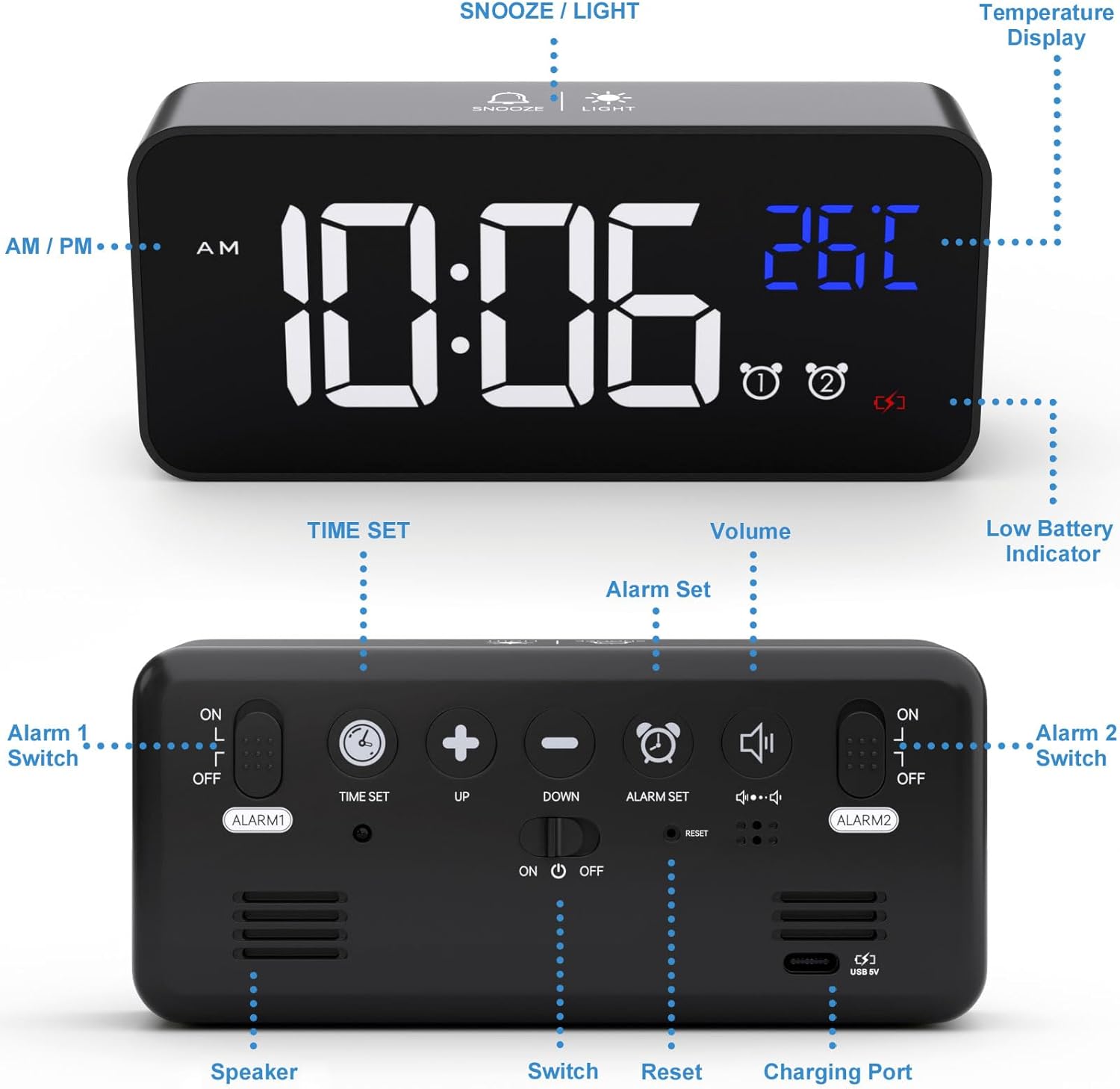
Figur 4.2: Betjeningselementer og porte på bagpanelet på vækkeuret.
5. Opsætning
5.1 Tænd/sluk uret
Connect the provided USB charging cable to the clock's charging port and to a 5V/1A or 5V/2A USB adapter (not included) or a USB port. The clock has a built-in rechargeable battery that saves your settings during power outages.

Figure 5.1: Powering the alarm clock via USB.
Note: When powered by USB, the display remains continuously on. When running on battery power, the display will turn off after 6 seconds to conserve energy. It can be reactivated by sound or by pressing any button.
5.2 Initial Setup (Removing Protective Film)
For optimal display clarity, please remove the protective film from the screen when using the clock for the first time.
6. Betjening
6.1 Indstilling af klokkeslæt
- Tryk og hold på TIDSINDSTILLING knappen på bagsiden af uret. Timecifrene vil begynde at blinke.
- Brug UP og NED knapper for at justere timen.
- Trykke TIDSINDSTILLING again to switch to minute adjustment. The minute digits will flash.
- Brug UP og NED knapper for at justere minutterne.
- Trykke TIDSINDSTILLING endnu en gang for at bekræfte og afslutte tidsindstillingstilstanden.
Video 6.1: Demonstration of how to set the time on the alarm clock (0:00-0:18 in video).
6.2 Indstilling af alarmer (Alarm 1 og Alarm 2)
The clock supports two independent alarms. Use the ALARM 1 TIL/FRA og ALARM 2 TIL/FRA switches on the back to enable or disable each alarm.
- To set Alarm 1, slide the ALARM 1 TIL/FRA switch to 'ON'.
- Tryk og hold på ALARM SÆT knappen. Alarmtimecifrene blinker.
- Brug UP og NED knapper for at justere alarmtiden.
- Trykke ALARM SÆT again to switch to minute adjustment. The alarm minute digits will flash.
- Brug UP og NED knapper til at justere alarmens minutter.
- Trykke ALARM SÆT endnu en gang for at bekræfte og afslutte alarmindstillingstilstand.
- Repeat the process for Alarm 2 using the ALARM 2 TIL/FRA skifte.
Video 6.2: Demonstration of how to set the alarms on the clock (0:19-1:04 in video).
6.3 Adjusting Alarm Volume and Ringtones
The clock offers 10 different ringtones and 4 adjustable volume levels.
- While in alarm setting mode (after setting the time for an alarm), press the ALARM SÆT button to cycle through the 10 ringtones.
- Tryk på for at justere lydstyrken BIND button repeatedly until the desired volume level (L01-L04) is displayed.

Figure 6.3: Available ringtones and volume levels.
Video 6.3: Demonstration of how to adjust the alarm volume (1:05-1:19 in video).
6.4 Snooze Function and Stopping Alarms
Når en alarm lyder, kan du aktivere snooze-funktionen for yderligere 5 minutters søvn.
- To activate snooze: Press the SNOOZE / LYS button on the top of the clock. The alarm will pause and sound again after 5 minutes.
- To stop the alarm: Press any other button on the clock (except SNOOZE / LYS) to turn off the alarm for the day.

Figure 6.4: Dual alarms and snooze function in use.
Video 6.4: Demonstration of snooze and stopping alarms (1:20-1:37 in video).
6.5 Justering af skærmens lysstyrke
The clock features both automatic and manual brightness adjustment.
6.5.1 Automatisk lysstyrkejustering
When connected to power, the LED display automatically adjusts its brightness:
- 7:00 - 6:59: Høj lysstyrke.
- 7:00 - 11:59: Middel lysstyrke.
- 12:00 - 6:59: Lav lysstyrke.
Video 6.5: Demonstration of automatic brightness adjustment throughout the day (2:07-2:38 in video).
6.5.2 Manuel lysstyrkejustering
You can manually adjust the brightness to your preference:
- Tryk på SNOOZE / LYS button on the top of the clock to cycle through 4 levels of brightness.
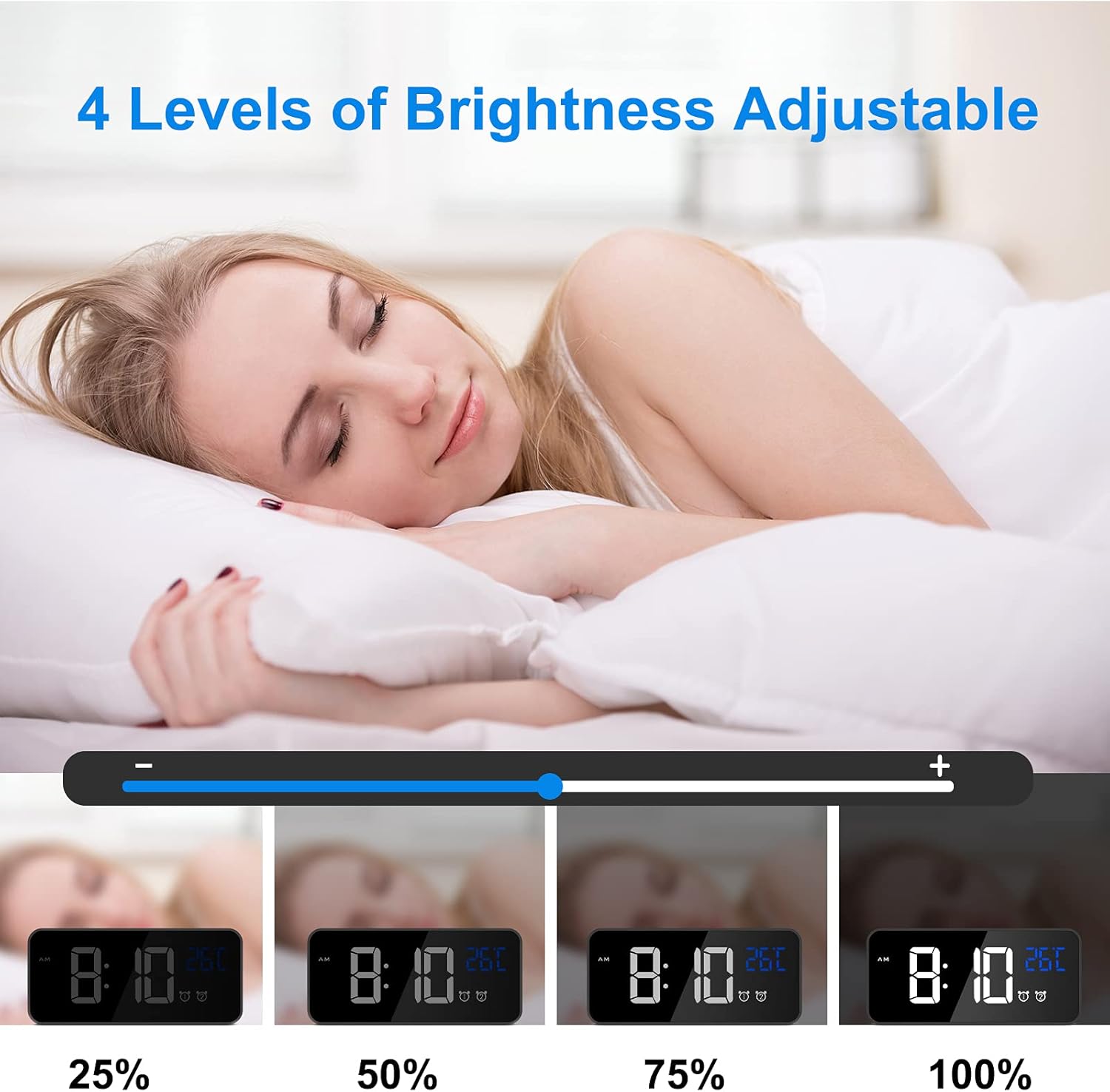
Figure 6.5: Manual brightness adjustment levels.
Video 6.6: Demonstration of manual brightness adjustment (1:38-2:06 in video).
6.6 Sound Activated Display (Battery Mode)
When the clock is running on battery power (not connected to USB), the display will turn off after 6 seconds to save energy. You can activate the display by making a sound (e.g., clapping, tapping the table) louder than 90dB, or by pressing the SNOOZE / LYS knap.

Figure 6.6: Sound activated display feature.
6.7 12/24 timers format
For at skifte mellem 12-timers og 24-timers tidsformater skal du trykke på 12/24H knap på bagsiden af uret.

Figure 6.7: Switching between 12-hour and 24-hour display formats.
6.8 Temperaturvisning
The clock automatically displays the ambient temperature in Celsius.

Figure 6.8: Temperature display feature.
7. Vedligeholdelse
- Rengør uret med en blød, tør klud. Brug ikke slibende rengøringsmidler eller opløsningsmidler.
- Undgå at udsætte uret for direkte sollys eller ekstreme temperaturer.
- If the clock will not be used for a long period, turn off the main power switch to preserve battery life.
8. Fejlfinding
| Problem | Løsning |
|---|---|
| Display shows disordered code or incorrect information. | Use a pin to press the NULSTIL button on the back of the clock. This will restore the clock to its normal operating state. |
| Display turns off quickly when not connected to power. | This is normal behavior to conserve battery. The display is sound-activated or can be turned on by pressing any button. For a continuously lit display, keep the clock connected to a USB power source. |
| Alarmen lyder ikke. | Ensure the corresponding alarm switch (ALARM 1 TIL/FRA or ALARM 2 TIL/FRA) is set to 'ON'. Check that the alarm time is correctly set. |
| Clock not charging or holding charge. | Verify that the USB cable is securely connected and that the power adapter is 5V/1A or 5V/2A. Ensure the main power switch is 'ON' for charging. |
9. Specifikationer
- Mærke: CHEREEKI
- Modelnummer: 8808
- Farve: Sort
- Skærmtype: Digital LED
- Strømkilde: Battery Powered (rechargeable Lithium-polymer) / USB 5V
- Særlige funktioner: Temperature Display, Dual Alarms, Snooze, Adjustable Brightness, Sound Activated, 12/24 Hour Format, 10 Ringtones
- Produktdimensioner: 14.5 cm (L) x 6.5 cm (H)
- Varens vægt: 290 gram
- Materiale: ABS (Acrylonitrile Butadiene Styrene) Plastic
- Monteringstype: Bordplade
10. Garanti og support
This product comes with a lifetime warranty. For any questions, issues, or support needs, please contact CHEREEKI customer service. Please refer to your purchase documentation for specific contact details.