
Indledning
Thank you for choosing the ALLIMITY COV31736202 Remote Control. This remote is a direct replacement designed for seamless operation with LG DVD Player models DP132, DP132NU, and DP132-NU. It offers all essential functions for controlling your DVD player without the need for complex programming.
Opsætning
The ALLIMITY COV31736202 remote control requires no programming. Simply insert the batteries, and it is ready for use with your compatible LG DVD player.
Installation af batteri
- Find batterirummet på bagsiden af fjernbetjeningen.
- Slide the battery compartment cover downwards or in the direction indicated by the arrow to open it.
- Insert two AAA alkaline batteries (not included), ensuring the positive (+) and negative (-) terminals match the diagrams inside the compartment.
- Sæt batteridækslet på igen ved at skubbe det tilbage på plads, indtil det klikker sikkert.

Billede: Bagside view of the ALLIMITY COV31736202 remote control, showing the battery compartment.
Once batteries are installed, the remote is ready to operate your LG DVD player. Ensure there are no obstructions between the remote control and the DVD player's infrared receiver.
Betjeningsvejledning
This remote control utilizes infrared technology and has an effective range of up to 10 meters. Point the remote directly at your DVD player for optimal performance. Below is a guide to the main functions:
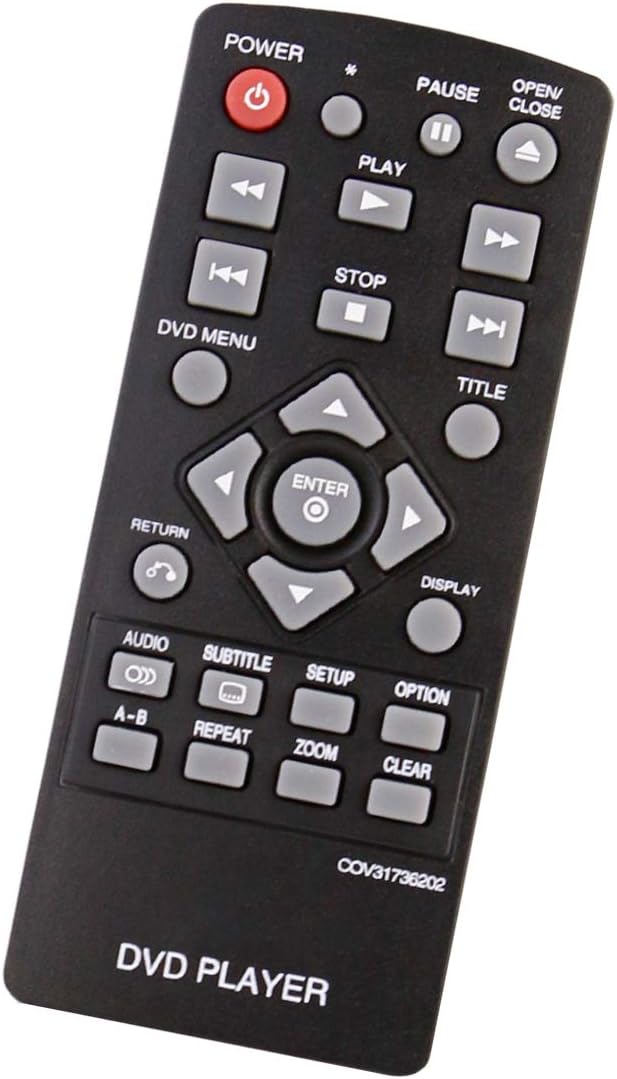
Billede: Forside view of the ALLIMITY COV31736202 remote control, displaying all buttons and their labels.
- MAGT (⑉): Turns the DVD player on or off.
- ÅBN/LUK (▲): Opens or closes the disc tray.
- SPIL (▶): Starts playback of a disc.
- PAUSE (⏸): Pauses playback. Press again to resume.
- STOP (■): Stops playback.
- TIDLIGERE (⏮): Skips to the beginning of the current track/chapter or the previous track/chapter.
- NÆSTE (⏭): Skips to the next track/chapter.
- HURTIG TILBAGE (⏪): Rewinds playback.
- HURTIG FREM (⏩): Fast forwards playback.
- DVD MENU: Accesses the main menu of the DVD.
- TITEL: Accesses the title menu of the DVD.
- NAVIGATIONSKNAPPER (▲ ▼ ◄ ►): Used to navigate through menus and options.
- ENTER: Confirms a selection in menus.
- TILBAGE (↶): Returns to the previous menu or screen.
- VISE: Shows on-screen display information.
- LYD: Changes the audio track or language.
- SUBTITLE: Toggles or selects subtitle options.
- OPSÆTNING: Accesses the DVD player's setup menu.
- VALGMULIGHED: Displays additional options during playback.
- AB: Repeats a specific section between point A and point B.
- GENTAGE: Repeats the current track, chapter, or disc.
- ZOOM: Zooms in or out on the video.
- KLAR: Clears an entry or cancels a function.
Opretholdelse
Proper care will ensure the longevity and reliable performance of your remote control.
Rensning
- Tør fjernbetjeningen af med en blød, tør klud.
- Til genstridigt snavs, let dampRengør kluden med vand eller en mild rengøringsopløsning, og tør derefter straks efter.
- Do not use abrasive cleaners, alcohol, or solvents, as these can damage the surface and buttons.
Udskiftning af batteri
Replace batteries when the remote's response becomes sluggish or it stops functioning. Always replace both batteries at the same time with new alkaline batteries of the same type (AAA). Do not mix old and new batteries, or different types of batteries.
Opbevaring
Hvis fjernbetjeningen ikke skal bruges i længere tid, skal du fjerne batterierne for at forhindre lækage og potentiel beskadigelse af enheden.
Fejlfinding
Hvis du oplever problemer med din fjernbetjening, kan du bruge følgende almindelige løsninger:
- Fjernbetjeningen svarer ikke:
- Kontroller, om batterierne er isat korrekt med den korrekte polaritet.
- Udskift batterierne med nye.
- Ensure there are no obstructions between the remote control and the DVD player's infrared sensor.
- Make sure you are within the effective operating range (up to 10 meters) and pointing the remote directly at the DVD player.
- Knapper virker ikke:
- Clean the remote control surface and buttons to remove any dirt or residue that might be interfering with button presses.
- If only specific buttons are not working, it might indicate a hardware issue.
- Intermitterende drift:
- Dette indikerer ofte lav batteristrøm. Udskift batterierne.
- Ensure consistent line of sight to the DVD player.
Specifikationer
| Mærke | ALLIMITET |
| Modelnavn | COV31736202 |
| Kompatible enheder | LG DVD Player models DP132, DP132NU, DP132-NU |
| Forbindelsesteknologi | Infrarød |
| Antal knapper | 20 |
| Maksimal rækkevidde | 10 meter |
| Batteritype | Alkalisk (AAA) |
| Speciel funktion | Ingen programmering påkrævet |