
Indledning
This manual provides instructions for the UBay RM-YD075 replacement remote control. It is designed to operate various Sony LCD LED HDTV television models without requiring complex programming. Please read this manual thoroughly to ensure proper use and to maximize your remote control's functionality.
Produkt overview
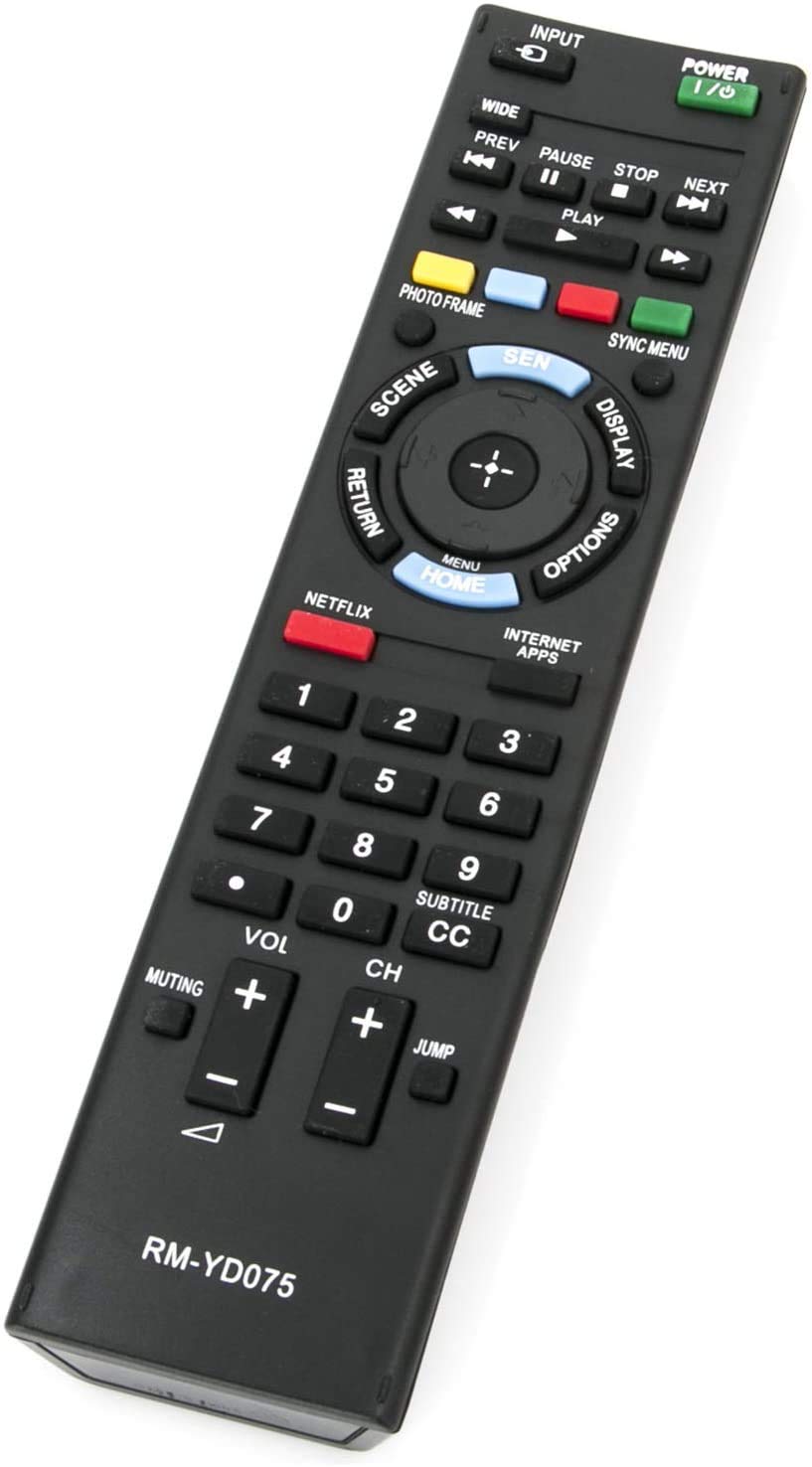
Billede: The UBay RM-YD075 remote control, a black rectangular device with various buttons. The top features a green POWER button and an INPUT button. Below are media playback controls (PREV, PAUSE, STOP, NEXT, PLAY). A central navigation pad with a HOME/MENU button is surrounded by SCENE, DISPLAY, RETURN, and OPTIONS buttons. Dedicated NETFLIX and INTERNET APPS buttons are present. A numeric keypad (0-9) is located in the middle, along with SUBTITLE/CC. Volume (VOL) and Channel (CH) controls are at the bottom, along with MUTING and JUMP buttons. The model number RM-YD075 is printed at the bottom.
The UBay RM-YD075 remote control is a direct replacement for original Sony TV remotes, offering a familiar layout and functionality. It features dedicated buttons for common functions, including power, input selection, channel and volume control, media playback, and quick access to streaming services like Netflix and Internet Apps.
Opsætning
1. Batteriinstallation
- Find batterirummet på bagsiden af fjernbetjeningen.
- Skub batterirummets dæksel op.
- Insert two (2) 1.5V AAA alkaline batteries, ensuring the positive (+) and negative (-) terminals match the diagrams inside the compartment.
- Luk batterirummets dæksel forsvarligt.
Note: This remote control is pre-programmed and does not require any additional setup or pairing. It is ready for use immediately after battery installation.
Betjeningsvejledning
Point the remote control directly at your Sony TV's infrared sensor. Ensure there are no obstructions between the remote and the TV.
- TÆND/SLUK (Grøn knap): Tænder eller slukker for tv'et.
- INPUT: Skifter gennem tilgængelige inputkilder (HDMI, AV, komponent osv.).
- Nummerknapper (0-9): Selects channels directly or enters numerical values.
- VOL (+/-): Øger eller sænker fjernsynets lydstyrke.
- CH (+/-): Ændrer tv-kanalen op eller ned.
- MUTE: Slår fjernsynets lyd fra eller til.
- Navigationstastatur (op, ned, venstre, højre, enter): Navigerer gennem menuer og vælger muligheder.
- HOME / MENU: Åbner tv'ets hovedmenu eller smart-tv'ets startskærm.
- RETURNERING: Går tilbage til den forrige skærm eller menu.
- SKÆRM: Viser oplysninger på skærmen om det aktuelle program eller den aktuelle indgang.
- MULIGHEDER: Viser kontekstafhængige indstillinger for den aktuelle skærm.
- NETFLIX: Direct access button for the Netflix application.
- INTERNET APPS: Direct access button for other internet applications.
- Playback Controls (PREV, PAUSE, STOP, NEXT, PLAY): Controls media playback functions for compatible devices or content.
- SUBTITLE / CC: Slår undertekster eller tekstning til/fra.
- HOPPE: Quickly switches between the current channel and the last channel viewudg.
Opretholdelse
- Udskiftning af batteri: Replace batteries when the remote's range decreases or buttons become unresponsive. Always replace both batteries simultaneously with new ones.
- Rensning: Tør fjernbetjeningen af med en blød, tør klud. Brug ikke flydende rengøringsmidler eller slibende materialer.
- Opbevaring: Hvis fjernbetjeningen ikke skal bruges i længere tid, skal batterierne tages ud for at forhindre lækage og beskadigelse. Opbevares køligt og tørt.
Fejlfinding
| Problem | Løsning |
|---|---|
| Fjernbetjeningen virker ikke. |
|
| Nogle knapper reagerer ikke. |
|
Specifikationer
- Model: UBay RM-YD075
- Strømforsyning: 2 x 1.5V AAA alkaliske batterier (medfølger ikke)
- Forbindelse teknologi: Infrarød (IR)
- Kompatible enheder: Sony LCD LED HDTV Televisions
- Produktdimensioner: 8 x 2 x 0.7 tommer (cirka)
- Varens vægt: 2 ounces (cirka uden batterier)
Compatible Sony TV Models
This remote control is compatible with a wide range of Sony LCD LED HDTV models, including but not limited to:
- KDL-40EX640
- KDL-40EX645
- KDL-46EX640
- KDL-46EX641
- KDL-46EX645
- KDL-50EX645
- KDL-55EX640
- KDL-55EX645
- KDL-60EX645
- KDL-40W590B
- KDL-40W600B
- KDL-48W600B
- KDL-55EX645
- KDL-60EX645
- KDL-70X830B
- KDL-55HX855
- RM-YD075 (original model it replaces)
- RMYD103 (original model it replaces)
Garanti og support
For any questions regarding the UBay RM-YD075 remote control, or if you encounter issues not covered in this manual, please contact the seller or manufacturer directly through your purchase platform. Please retain your proof of purchase for any warranty claims.