
1. Vigtige sikkerhedsoplysninger
Læs og forstå altid alle sikkerhedsadvarsler, instruktioner, illustrationer og specifikationer, der følger med dette elværktøj. Manglende overholdelse af alle nedenstående instruktioner kan resultere i elektrisk stød, brand og/eller alvorlig personskade.
- Hold arbejdsområdet rent og godt oplyst. Rodede eller mørke områder inviterer til ulykker.
- Brug ikke elværktøj i eksplosive atmosfærer, såsom i nærheden af brændbare væsker, gasser eller støv. Elværktøj danner gnister, som kan antænde støv eller dampe.
- Hold børn og omkringstående væk, mens du betjener et elværktøj. Distraktioner kan få dig til at miste kontrollen.
- Brug øjenbeskyttelse. Brug altid sikkerhedsbriller eller beskyttelsesbriller.
- Gå ikke for langt. Hold altid ordentligt fodfæste og balance. Dette giver bedre kontrol over elværktøjet i uventede situationer.
- Klæd dig ordentligt på. Bær ikke løstsiddende tøj eller smykker. Hold dit hår og tøj væk fra bevægelige dele. Løst tøj, smykker eller langt hår kan blive fanget i bevægelige dele.
- Tag stikket ud af strømkilden og/eller fjern batteripakken, hvis den kan aftages, fra elværktøjet, før du foretager justeringer, skifter tilbehør eller opbevarer elværktøj. Sådanne forebyggende sikkerhedsforanstaltninger reducerer risikoen for at starte elværktøjet ved et uheld.
- Opbevar inaktivt elværktøj utilgængeligt for børn, og lad ikke personer, der ikke er bekendt med elværktøjet eller disse instruktioner, betjene elværktøjet. Elværktøj er farligt i hænderne på utrænede brugere.
- Vedligehold elværktøj og tilbehør. Kontroller for fejljustering eller fastklæbning af bevægelige dele, brud på dele og enhver anden tilstand, der kan påvirke elværktøjets funktion. Hvis det er beskadiget, skal elværktøjet repareres før brug. Mange ulykker skyldes dårligt vedligeholdt elværktøj.
- Brug elværktøjet, tilbehøret og værktøjsbits osv. i overensstemmelse med disse instruktioner, under hensyntagen til arbejdsforholdene og det arbejde, der skal udføres. Brug af elværktøjet til andre operationer end dem, der er beregnet til, kan resultere i en farlig situation.
- Genoplad kun med den oplader, der er specificeret af producenten. En oplader, der er egnet til én type batteripakke, kan skabe en brandrisiko, når den bruges sammen med en anden batteripakke.
- Brug kun elværktøj med specielt beregnede batteripakker. Brug af andre batteripakker kan skabe risiko for skader og brand.
2. Produktet er slutview and What's Included
The DEWALT DCF008 is an 8V Lithium-Ion cordless screwdriver designed for various fastening applications. It features a compact design, an ergonomic handle, and multiple settings for versatile use.
Pakkeindhold:
- 1x DEWALT DCF008 Cordless Screwdriver
- 33x Short Screw Bits
- 3x Long Screw Bits
- 8x Hex Socket Drivers
- 1x Magnetic Guide
- 1x oplader

Image: The DEWALT DCF008 cordless screwdriver and its 45-piece accessory set, including various screw bits, hex socket drivers, and a magnetic guide, neatly organized within a durable black carrying case.

Image: A visual representation of the DEWALT DCF008 package contents, clearly listing the cordless screwdriver, 33 short screw bits, 3 long screw bits, 8 hex socket drivers, and 1 magnetic guide.
3. Dele diagram
Familiarize yourself with the components of your DEWALT DCF008 cordless screwdriver:

Image: A detailed diagram of the DEWALT DCF008 cordless screwdriver, highlighting key components such as the Speed Switch, Rotation Lock, Screw Settings Selector, Trigger Switch, and Ergonomic Handle.
- Hastighedskontakt: Controls the operating speed (Speed 1 or Speed 2).
- Rotationslås: Button to adjust the handle's angle.
- Screw Settings Selector: Adjusts torque settings (1-21) and drill mode.
- Udløserkontakt: Activates the screwdriver.
- Ergonomisk håndtag: Provides comfortable grip and control.
- LED lys: Oplyser arbejdsområdet.
- LED -switch: Tænder eller slukker LED-lyset.
- Opladningsport: Used to connect the charger.
- Frem/Baglæns kontakt: Ændrer omdrejningsretningen.
4. Opsætning
4.1 Opladning af batteriet
The DEWALT DCF008 is powered by an integrated 8V Lithium-Ion battery. Before first use, fully charge the battery. To charge:
- Ensure the screwdriver handle is in the inline (straight) position.
- Locate the charging port on the tool.
- Tilslut opladeren til opladningsporten.
- Sæt opladeren i en almindelig stikkontakt.
- Allow the battery to charge until the charging indicator shows a full charge.

Image: The DEWALT DCF008 cordless screwdriver, its charger, and a selection of screw bits and hex socket drivers, illustrating the complete kit.

Image: The DEWALT DCF008 cordless screwdriver, its charger, and a selection of screw bits and hex socket drivers, illustrating the complete kit.
4.2 Indsætning og fjernelse af bits
To insert a bit:
- Ensure the tool is off and the forward/reverse switch is in the center (locked) position.
- Push the desired screw bit or hex socket driver firmly into the chuck until it clicks into place.
- Pull on the bit to ensure it is securely seated.
To remove a bit, pull the bit firmly out of the chuck.

Billede: Et nærbillede view of the DEWALT DCF008's chuck, demonstrating how a screw bit is inserted, with the torque setting ring visible around the chuck.
5. Betjeningsvejledning
5.1 Adjusting the Handle Position
The DEWALT DCF008 features a 3-position rotating handle for optimal access in various work environments. To adjust the handle:
- Locate the rotation lock button near the handle pivot point.
- Press and hold the rotation lock button.
- Adjust the handle to one of the three positions: straight (inline), 20-degree angle, or 33-degree angle.
- Slip knappen for at låse håndtaget på plads.

Image: The DEWALT DCF008 screwdriver demonstrating its 3-position rotating handle, allowing adjustment from a straight configuration to angled positions of 20 and 33 degrees for improved access.

Image: The DEWALT DCF008 cordless screwdriver shown in its fully extended, straight operating position.
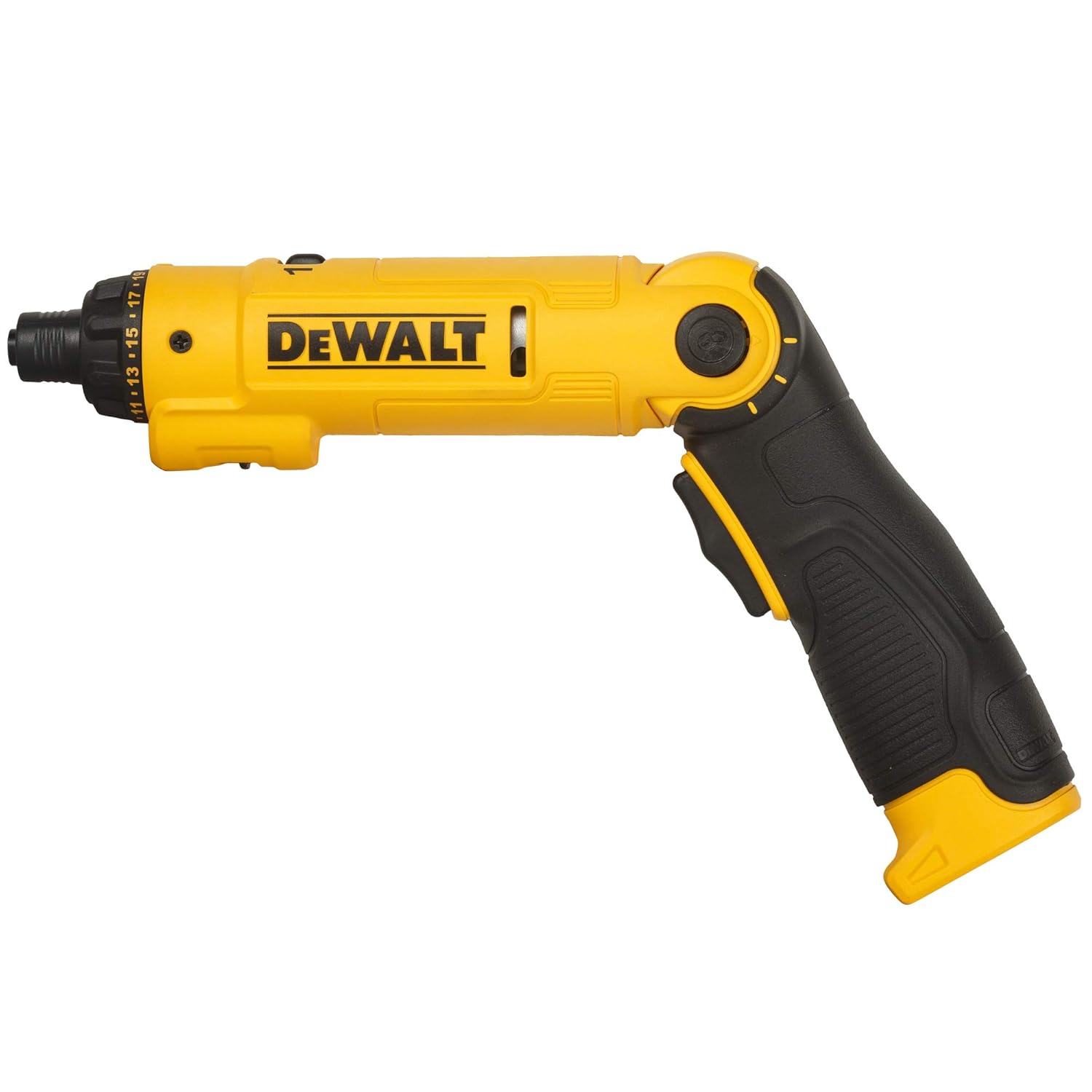
Image: The DEWALT DCF008 cordless screwdriver with its handle adjusted to an angled position, providing an ergonomic grip for various tasks.
5.2 Powering On/Off and Forward/Reverse
To operate the screwdriver:
- Set the forward/reverse switch to the desired direction (forward for tightening, reverse for loosening). The center position locks the tool.
- Press the trigger switch to activate the screwdriver. Release to stop.

Image: A close-up of the DEWALT DCF008's handle, clearly showing the trigger switch for activation and the forward/reverse switch for controlling rotation direction.
5.3 Justering af hastighedsindstillinger
The screwdriver has two speed settings:
- Hastighed 1: Lower speed for higher torque applications or delicate work.
- Hastighed 2: Higher speed for faster driving.
To change the speed, slide the speed switch located on the top of the tool to the desired setting (1 or 2).

Image: A close-up of the DEWALT DCF008's upper body, highlighting the speed switch with its '1' and '2' settings, and the adjacent screw settings selector.
5.4 Adjusting Torque Settings (Clutch) and Drill Mode
The torque setting selector allows you to adjust the amount of torque applied, preventing overtightening or stripping screws. There are 21 screw settings and one drill mode.
- Rotate the screw settings selector ring, located near the chuck, to the desired torque setting (1-21). Lower numbers are for smaller screws or softer materials; higher numbers are for larger screws or harder materials.
- For drilling applications, rotate the selector to the drill icon (no clutch engagement).

Image: A collection of various screw bits and hex socket drivers, emphasizing the 21 available screw settings for precise torque control.
5.5 Brug af LED-lyset
The integrated LED light illuminates your work area. To activate or deactivate the LED light, use the LED switch located on the side of the tool.
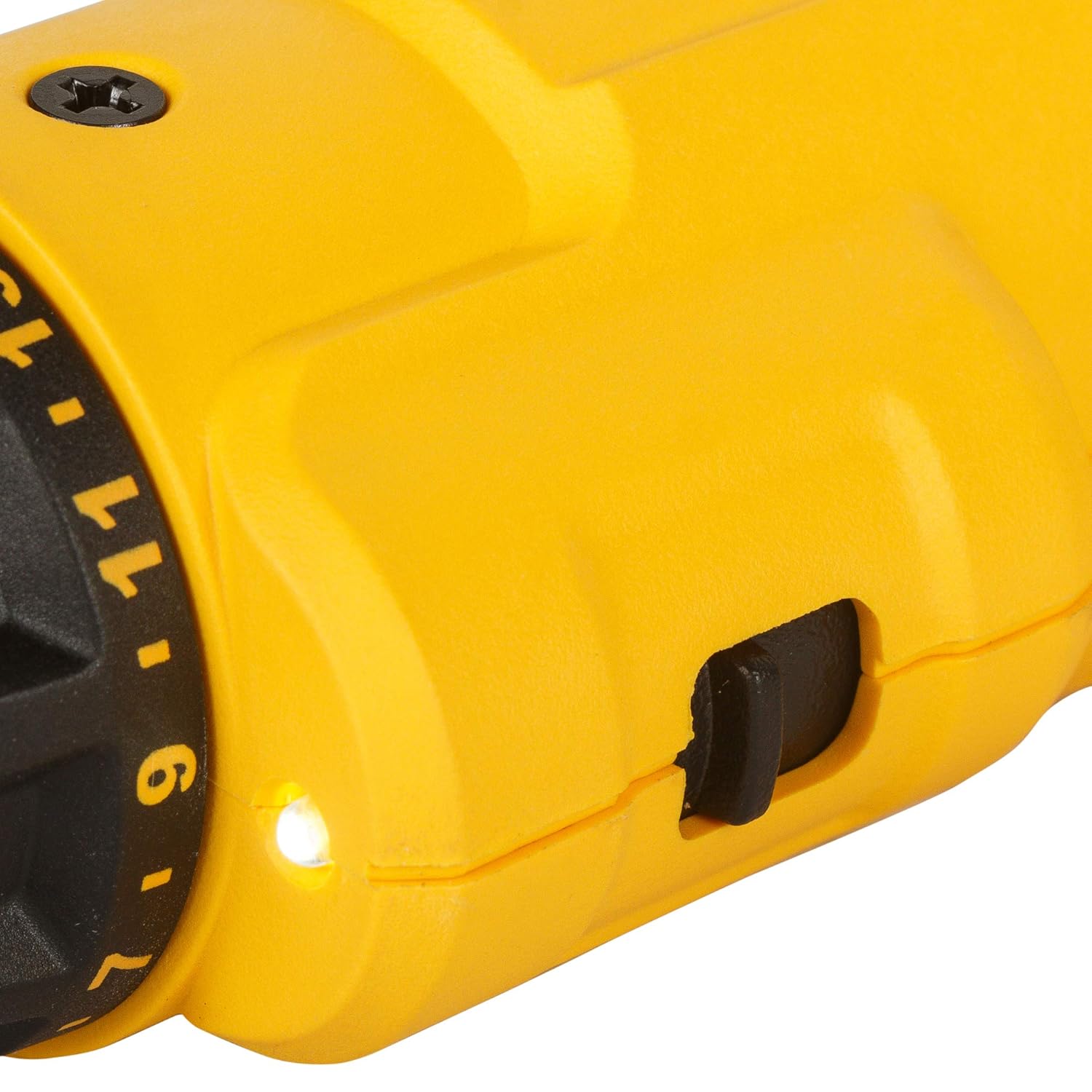
Billede: Et nærbillede view of the DEWALT DCF008, highlighting the bright LED light illuminating the work area and the adjacent switch for controlling its operation.
6. Vedligeholdelse
Regelmæssig vedligeholdelse sikrer optimal ydeevne og forlænger levetiden på dit værktøj.
- Rensning: Hold værktøjet rent og fri for støv og snavs. Brug en blød, tøramp klud til rengøring. Brug ikke skrappe kemikalier eller slibende rengøringsmidler.
- Opbevaring: Store the tool and accessories in a dry, secure location, out of reach of children.
- Batteripleje: Recharge the battery regularly, even if not in frequent use, to maintain its lifespan. Avoid storing the tool with a completely discharged battery.
- Inspektion: Periodically inspect the tool for any signs of damage, loose parts, or wear. If any issues are found, contact customer support for assistance.
7. Fejlfinding
If you encounter issues with your DEWALT DCF008, refer to the following common troubleshooting steps:
| Problem | Mulig årsag | Løsning |
|---|---|---|
| Værktøjet tænder ikke. | Batteriet er afladet. Forward/Reverse switch is in the locked (center) position. | Oplad batteriet. Move the switch to forward or reverse. |
| Screws are stripping or not tightening enough. | Torque setting is too low. Forkert bitstørrelse. | Øg momentindstillingen. Brug det korrekte bor til skruehovedet. |
| Tool stops unexpectedly during use. | Batteriet er lavt. Overbelastningsbeskyttelse aktiveret. | Genoplad batteriet. Reducer trykket på værktøjet; lad det køle af. |
If the problem persists after trying these solutions, please contact DEWALT customer support.
8. Specifikationer
| Feature | Specifikation |
|---|---|
| Modelnummer | DCF008 |
| Voltage | 8 volt |
| Batteritype | Lithium-ion |
| Batteriets energiindhold | 12 wattimer |
| Number of Screw Settings | 21 + 1 Drill Mode |
| Håndter positioner | 3 (0°, 20°, 33°) |
| Hastigheder | 2 |
| Varens vægt | 500 g |
| Produktmål (LxBxH) | 29 x 10 x 10 cm |
9. Garanti og support
9.1 Garantioplysninger
This DEWALT DCF008 cordless screwdriver comes with a 1-year warranty provided by the manufacturer from the date of purchase. Please retain your proof of purchase for warranty claims.
9.2 Kundesupport
For any warranty-related issues, product feedback, or technical assistance, please contact DEWALT customer care:
- Kundeservicenummer: 1860-425-1111
- Driftstider: Mandag til fredag, kl. 10 til 5 (undtagen helligdage)
- Fabrikant: DEWALT (Stanley Black & Decker India Pvt Limited)
10. Produktvideo overview
Se denne officielle produktvideo for et visuelt overblikview of the DEWALT DCF008 8V Lithium-Ion Screwdriver's features and operation.
Video: En officiel produktvideoasing the DEWALT DCF008 8V Lithium-Ion Screwdriver. It demonstrates the 3-position button for handle adjustment, the rubber handle design, the 8V battery, LED light, LED switch, 21 screw settings plus drill mode, forward/reverse switch, 2 speeds, and the charging port. The video also shows the screwdriver in various application scenarios, highlighting its compact size and ease of use.