
1. Introduktion
The OWC Mercury Elite Pro is a high-performance external hard drive enclosure designed for 3.5-inch SATA drives, offering versatile connectivity and robust data storage solutions. This manual provides essential information for setting up, operating, maintaining, and troubleshooting your device.
Nøglefunktioner:
- Top Tier Performance: Achieve real-world data transfer speeds of 252MB/s, ideal for professional video editing, backups, and data storage.
- Alsidig kompatibilitet: Compatible with Mac, Windows, and Linux systems, as well as PlayStation, Xbox, and Smart TVs.
- Hurtig forbindelse: Features USB 3.2 Gen 1 Type-B for up to 5Gb/s transfer speeds and supports both USB-C (Thunderbolt) and USB-A connections.
- Fleksible opsætningsmuligheder: Position vertically using the included stand or horizontally with non-skid feet. Multiple units can be stacked for expanded storage.
2. Opsætning
2.1 Hvad er der i æsken
- OWC Mercury Elite Pro External Storage Solution
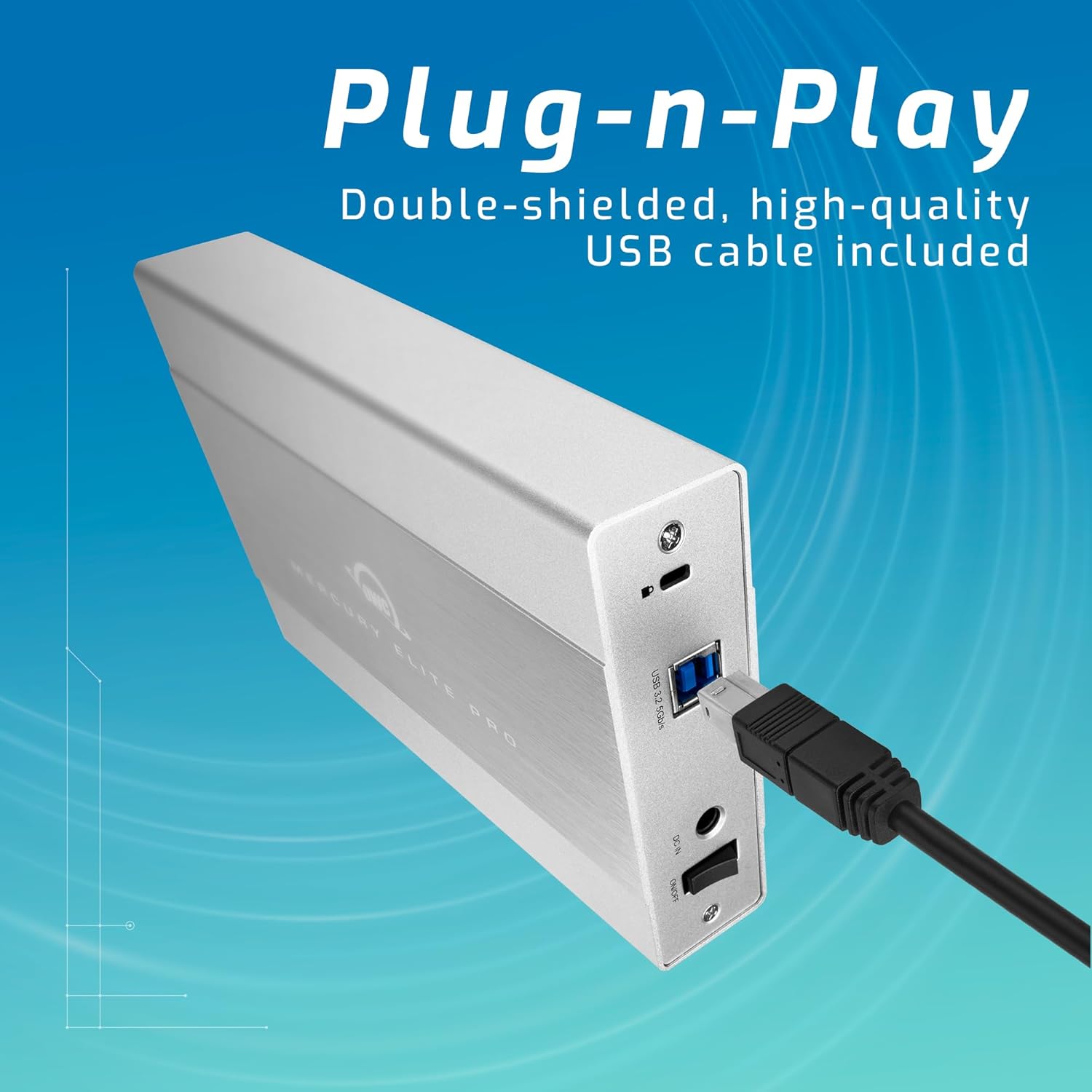
- USB 3.2 (5Gb/s) Type-B to Type-A Cable
- Ekstern strømforsyning
- US Power Cable
- Hurtig startvejledning
- Monteringsvejledning og brugervejledning
- AC Adapter
2.2 Installation af drev
- Sørg for, at kabinettet er slukket og frakoblet din computer.
- Se den medfølgende Monteringsvejledning og brugervejledning for detailed instructions on opening the enclosure and securely installing your 3.5-inch SATA drive.
- Once the drive is installed, close the enclosure according to the manual.
2.3 Tilslutning til din computer
- Connect the external power supply to the enclosure's power input and then to a power outlet.
- Connect one end of the USB 3.2 Type-B to Type-A cable to the enclosure and the other end to an available USB-A port on your computer. For USB-C/Thunderbolt connections, use an appropriate adapter or cable (not included unless specified).
- Power on the OWC Mercury Elite Pro enclosure. The device should be recognized by your operating system.
3. Betjening
3.1 Kompatibilitet
The OWC Mercury Elite Pro is compatible with a wide range of operating systems and devices:
- Mac (macOS)
- Windows
- Linux
- PlayStation (PS4, PS5)
- Xbox
- Smart TV

3.2 Dataoverførsel og ydeevne
The enclosure supports USB 3.2 Gen 1 (5Gb/s) for fast data transfer. Actual speeds may vary based on the installed drive, system configuration, and data type. It is designed to achieve real-world data transfer speeds of up to 252MB/s.
3.3 Flexible Placement
The OWC Mercury Elite Pro can be positioned either vertically using the included stand or horizontally using its non-skid feet. This allows for optimal placement in your workspace. Multiple units can be stacked for efficient use of space when expanding your storage.

4. Vedligeholdelse
4.1 Varmeafledning
The aluminum enclosure acts as a large heat sink, helping to keep the internal hard drive cool during operation. This passive cooling design minimizes thermal throttling and ensures stable performance.
4.2 Rengøring
To maintain optimal performance, periodically clean the exterior of the enclosure with a soft, dry cloth. Ensure that the ventilation areas are free from dust and debris. For internal cleaning or drive replacement, refer to the Monteringsvejledning og brugervejledning.
5. Fejlfinding
- Enhed ikke genkendt: Ensure all cables (USB and power) are securely connected. Try connecting to a different USB port or computer to rule out port-specific issues. Verify the drive is properly seated within the enclosure.
- Langsom ydeevne: Check that your computer's USB port supports USB 3.2 Gen 1 (5Gb/s) or Thunderbolt for optimal speeds. Ensure the internal hard drive is functioning correctly. Large file transfers or intensive tasks can sometimes cause temporary slowdowns.
- Hyppige afbrydelser: Ensure the power adapter is providing stable power. Check the USB cable for damage and try a different cable if necessary. Ensure the enclosure is placed on a stable surface.
- Drive Noise: While the enclosure is designed for quiet operation, some mechanical hard drives may produce audible noise during activity. If the noise is excessive or unusual, consult the hard drive manufacturer's documentation.
6. Specifikationer
| Feature | Detalje |
|---|---|
| Mærke | OWC |
| Serie | Mercury Elite Pro |
| Modelnummer | ME3NH7T02 |
| Harddiskkapacitet | 2 TB mekanisk harddisk |
| Harddisk interface | Seriel ATA-600 |
| Forbindelsesteknologi | USB |
| USB interface | USB 3.2 Gen 1 Type-B (5Gb/s) |
| Kompatible enheder | Mac, Windows, Linux, Gaming Consoles, Smart TVs |
| Hardware platform | Mac |
| Varens vægt | 2.97 pund |
| Produktdimensioner | 7.7 x 1.4 x 4.6 tommer |
| Farve | Sort |
| Speciel funktion | LED lys |
7. Garanti og support
The OWC Mercury Elite Pro External Storage Solution includes a 3 års begrænset OWC-garanti. For technical support, warranty claims, or additional assistance, please refer to the contact information provided in your Quick Start Guide or visit the official OWC webwebsted.