
1. Produktet er slutview
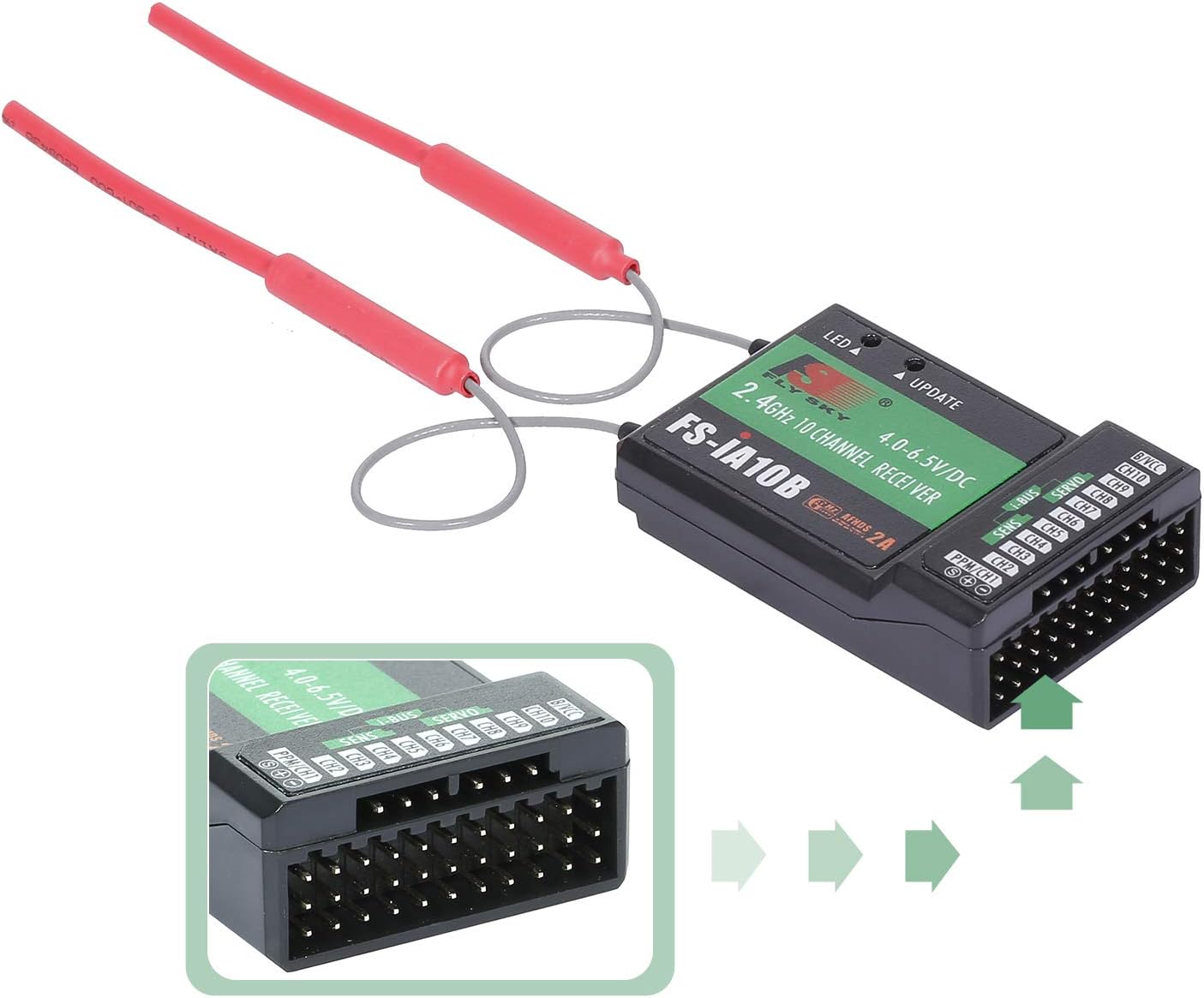
The GoolRC FS-iA10B is a high-performance 10-channel 2.4G receiver designed for remote control aircraft. It utilizes the advanced AFHDS 2A (Automatic Frequency Hopping Digital System Second Generation) protocol, ensuring reliable and interference-free communication between your transmitter and model. This receiver is suitable for a wide range of RC applications, including airplanes, gliders, and helicopters.

2. Kompatibilitet
The FS-iA10B receiver is compatible with a variety of Flysky transmitters that support the AFHDS 2A protocol. It is designed for use with various RC models.
2.1 Kompatible sendere
- Flysky FS-i6
- Flysky FS-i6S
- Flysky FS-i6X
- Flysky FS-i10
- Flysky FS-GT2E
- Flysky FS-GT2F
- Flysky FS-GT2G
- Flysky FS-it4S
- Flysky FS-GT5
- Flysky FS-i8
- Flysky FS-TM10
2.2 Suitable Model Types
- Flyvemaskiner
- Svævefly
- Helikoptre

3. Specifikationer
Below are the detailed technical specifications for the GoolRC FS-iA10B receiver:
| Feature | Specifikation |
|---|---|
| Produkt model | FS-iA10B |
| PWM kanaler | 10 |
| Trådløs frekvens | 2.4G |
| Trådløs protokol | AFHDS 2A |
| Fjernbetjening afstand | 500-1500m (in the air) |
| Antenne type | Dual copper tube antenna (150mm * 2) |
| Strømindgang | 4.0-6.5V |
| RSSI-understøttelse | Understøttet |
| Datagrænseflade | PWM / PPM / i.bus / s.bus |
| Temperaturområde | -10℃ til +60℃ |
| Fugtighedsområde | 20%-95% |
| Online opdatering | Understøttet |
| Dimensioner | 5 * 3.2 * 1.5 cm |

4. Opsætning
Proper setup is crucial for safe and reliable operation of your RC model. Follow these steps to connect and bind your FS-iA10B receiver.
4.1 Tilslutning af modtageren
Connect the receiver to your flight controller or servos according to your model's wiring diagram. Ensure correct polarity for power connections (4.0-6.5V). The receiver supports PWM, PPM, i.bus, and s.bus interfaces for data communication.
4.2 Bindingsproces
To establish communication between the receiver and your Flysky transmitter, a binding process is required. Refer to your specific Flysky transmitter's manual for detailed binding instructions, as the procedure may vary slightly between models. Generally, the steps involve:
- Power on the transmitter in binding mode.
- Connect power to the FS-iA10B receiver while holding the bind button (if present) or inserting a bind plug into the designated port.
- The receiver's LED indicator will change, signifying successful binding.
- Power cycle both the transmitter and receiver to confirm the connection.
5. Betjening
The FS-iA10B operates on the 2.4G frequency band using the AFHDS 2A digital system. This system automatically hops frequencies to maintain a robust and stable connection, minimizing interference.

Once bound, the receiver will continuously communicate with the transmitter. Ensure that the transmitter is always powered on before the receiver and powered off after the receiver to prevent unintended control inputs.
6. Vedligeholdelse
To ensure the longevity and optimal performance of your FS-iA10B receiver, follow these maintenance guidelines:
- Hold tør: Avoid exposing the receiver to moisture or liquids, as this can cause damage to internal electronics.
- Temperaturkontrol: Operate and store the receiver within its specified temperature range of -10℃ to +60℃. Extreme temperatures can affect performance and lifespan.
- Renhed: Hold modtageren fri for støv, snavs og affald. Brug en blød, tør børste eller trykluft til rengøring.
- Antennepleje: Ensure the dual copper tube antennas are not bent, cut, or damaged. Proper antenna placement is critical for signal reception.
- Firmwareopdateringer: The receiver supports online updates. Periodically check the manufacturer's website for available firmware updates to improve performance or add new features.
7. Fejlfinding
If you encounter issues with your FS-iA10B receiver, consider the following troubleshooting steps:
- Ingen strøm: Check the power supply (4.0-6.5V) and all connections to ensure they are secure and correctly polarized.
- No Signal/Binding Failure:
- Ensure the transmitter is powered on and in range.
- Re-attempt the binding process carefully, following the transmitter's instructions.
- Verify that the transmitter is set to the correct protocol (AFHDS 2A).
- Check for any physical damage to the receiver's antennas or internal components.
- Intermitterende signal/reduceret rækkevidde:
- Ensure antennas are positioned correctly and not obstructed by carbon fiber or metal parts of the model.
- Check for sources of interference (e.g., other 2.4G devices, high-power electronics).
- Verify the power supply to the receiver is stable.
- Incorrect Channel Output: Confirm that the receiver is correctly bound to the transmitter and that the channel assignments on your transmitter match your model's requirements.
Hvis problemerne fortsætter efter at have forsøgt disse trin, bedes du kontakte kundesupport.
8. Garanti og support
GoolRC provides a warranty for this product. In case of any issues, please contact the seller or GoolRC customer support within the warranty period for assistance. We are committed to providing a 100% satisfactory solution to any problems you may encounter.
For further support, please refer to the contact information provided with your purchase or visit the official GoolRC webwebsted.