
Indledning
This manual provides comprehensive instructions for the proper use, installation, and maintenance of your Gigastone 8GB Micro SD Card 2-Pack. Designed for Full HD video recording and high-speed data transfer, these Micro SDHC Class 10 cards are suitable for a variety of compatible devices. Please read this manual thoroughly to ensure optimal performance and longevity of your product.
Produkt overview
Nøglefunktioner
- Kapacitet: 8GB per card, ideal for Full HD video recording and high-resolution images.
- Hastighed: Read speeds up to 80 MB/s and write speeds up to 10 MB/s, supporting smooth Full HD video capture.
- Class 10 / SDHC: Ensures reliable performance for continuous recording and fast data transfer.
- Holdbarhed: Engineered to be waterproof, shockproof, temperature-proof, and X-Ray proof, protecting your data in various environments.
- Kompatibilitet: Widely compatible with devices such as laptops, tablets, PCs, smartphones, cameras, e-readers, security cameras, dash cameras, and action cameras.
Hvad er der i æsken
- 2 x Gigastone 8GB Micro SD Cards
- 2 x SD Adapters

Image: Two Gigastone 8GB Micro SD cards and two standard SD card adapters are included in the package.
Opsætning
Isætning af Micro SD-kort
- Locate the Micro SD card slot on your device (e.g., smartphone, camera, drone). Refer to your device's manual for exact location.
- Orient the Micro SD card with the gold contacts facing down or as indicated by your device's slot design.
- Skub forsigtigt kortet ind i åbningen, indtil det klikker på plads. Tving ikke kortet.
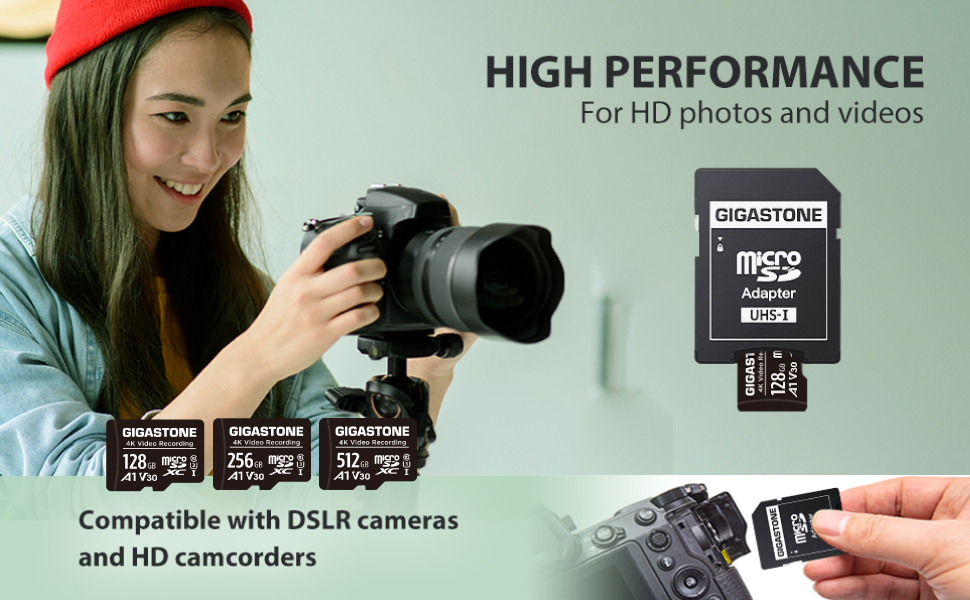
Image: A Gigastone Micro SD card is shown being inserted into an SD adapter, which can then be used in devices with a standard SD card slot.
Using the SD Adapter
The included SD adapter allows you to use your Micro SD card in devices that only accept standard SD cards (e.g., some laptops, older cameras).
- Slide the Micro SD card into the designated slot on the SD adapter until it locks.
- Insert the SD adapter into the standard SD card slot of your device.
- To remove, gently pull the SD adapter out of the slot, then press the Micro SD card to release it from the adapter.
Formatering af Micro SD-kortet
It is recommended to format the Micro SD card before first use or if you encounter issues. Formatting erases all data on the card.
- Insert the Micro SD card into your device or a computer using the SD adapter.
- Access the storage settings or disk management utility on your device/computer.
- Select the Gigastone Micro SD card and choose the 'Format' option.
- Vælg det relevante file system (e.g., FAT32 for general compatibility, exFAT for larger files/capacities if supported by your device).
- Bekræft formateringsprocessen.
Betjeningsvejledning
Datalagring og -overførsel
Once inserted and recognized by your device, the Micro SD card functions as external storage. You can save photos, videos, documents, and other fileer direkte til det.
- Indspilning: For cameras, drones, and dash cams, ensure the Micro SD card is inserted before starting recording. The device will automatically save media to the card.
- Gemmer Files: On smartphones, tablets, or PCs, you can typically select the Micro SD card as the save location for new files or move existing files til det.
- Transferring to Computer: Insert the Micro SD card (or adapter with card) into your computer's card reader. The card will appear as a removable drive, allowing you to drag and drop files.

Image: The Gigastone Micro SD card is compatible with DSLR cameras for capturing high-definition photos and videos.

Image: The Gigastone Micro SD card is frequently used with surveillance cameras for continuous recording.

Image: The Gigastone Micro SD card is suitable for dash cameras, drones, and action cameras, providing reliable storage for various applications.
Opretholdelse
Pleje og håndtering
- Avoid bending or dropping the Micro SD card.
- Hold guldkontakterne rene og fri for støv eller snavs. Brug en blød, tør klud, hvis rengøring er nødvendig.
- Opbevar kortet i dets beskyttende etui, når det ikke er i brug, for at forhindre skader.
- Always safely eject the card from your device before physical removal to prevent data corruption.
Miljøbeskyttelse
Your Gigastone Micro SD card is designed with enhanced durability features:
- Vandtæt: Protects against accidental water exposure.
- Stødsikker: Modstår skader fra fald og stød.
- Temperaturbestandig: Fungerer pålideligt i ekstreme temperaturer.
- X-Ray proof: Sikker til røntgenscannere i lufthavne.
While durable, it is always best practice to minimize exposure to harsh conditions to prolong the card's lifespan.
Fejlfinding
Fælles problemer og løsninger
| Spørgsmål | Mulig årsag | Løsning |
|---|---|---|
| Card not recognized by device | Improper insertion, incompatible device, dirty contacts, card error. | Reinsert the card correctly. Try the card in another compatible device. Clean contacts with a soft cloth. If issues persist, try formatting (data will be lost). |
| Langsomme læse-/skrivehastigheder | Device limitations, fragmented data, card nearing end of life, insufficient buffer memory. | Ensure your device supports Class 10 speeds. Transfer files to a computer and reformat the card. Consider the buffer memory explanation below. |
| Data corruption or loss | Improper removal, power loss during write, physical damage, card error. | Always safely eject the card. Avoid removing the card during data transfer. If data is lost, recovery software may be an option, but success is not guaranteed. |
| Card shows less capacity than advertised | Operating system calculation differences, reserved space for firmware/buffer memory. | This is normal. A portion of the card's capacity is used for system files and buffer memory. For an 8GB card, usable capacity is typically around 7.4GB. |
Understanding Buffer Memory
All Micro SD cards reserve a portion of their total capacity for firmware, application data, and buffer memory. This buffer memory is crucial for the card's performance and longevity. A larger buffer memory generally contributes to a longer lifespan and more stable performance, especially during continuous write operations like video recording. Therefore, the actual usable storage capacity will be slightly less than the advertised capacity.
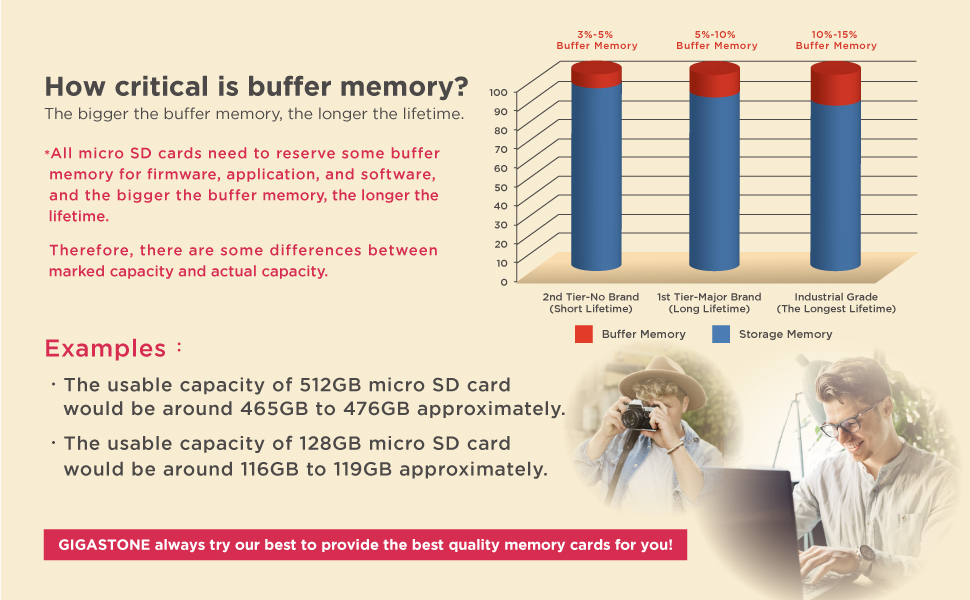
Image: This chart explains how buffer memory impacts the usable capacity and lifespan of Micro SD cards, with examples for 128GB and 512GB cards.
Specifikationer
| Feature | Detalje |
|---|---|
| Mærke | Gigastone |
| Modelnavn | MSD-Full-HD-Video-8GB-2PK |
| Flash-hukommelsestype | Micro SDHC |
| Hukommelseslagringskapacitet | 8 GB |
| Kompatible enheder | Camera, Dash Cam, Security Camera, Laptop, Tablet, PC, Smartphones, e-Reader, Action Camera |
| Læs Speed | Op til 80 MB/s |
| Media Speed (Write Speed) | 10 MB/s |
| Sikker digital associations hastighedsklasse | Klasse 10 |
| Yderligere funktioner | Waterproof, Shockproof, Temperature-proof, X-Ray proof |
| UPC | 804272755060 |
Garanti og support
Garantioplysninger
Gigastone provides a 5 års begrænset garanti for this Micro SD card. This warranty covers manufacturing defects and ensures replacement for eligible issues. Please retain your proof of purchase for warranty claims.

Image: The Gigastone 5-year global manufacturer warranty ensures product reliability and customer support.
Kundesupport
For technical assistance, warranty claims, or further inquiries, please visit the official Gigastone website or contact their customer support channels. Refer to the product packaging or Gigastone's official webhjemmeside for de seneste kontaktoplysninger.