
Indledning
The EVOLVEO EASYPHONE FM is a user-friendly mobile phone designed for straightforward communication. It features large, separated keys, a clear display, and essential functions to ensure ease of use. This manual provides instructions for setting up, operating, and maintaining your device.
1. Pakkens indhold
Tjek venligst pakken for følgende varer:
- EVOLVEO EASYPHONE FM Mobile Phone
- Opladningsdock
- AC Adapter
- Li-ion 1000 mAh Battery
- Brugermanual
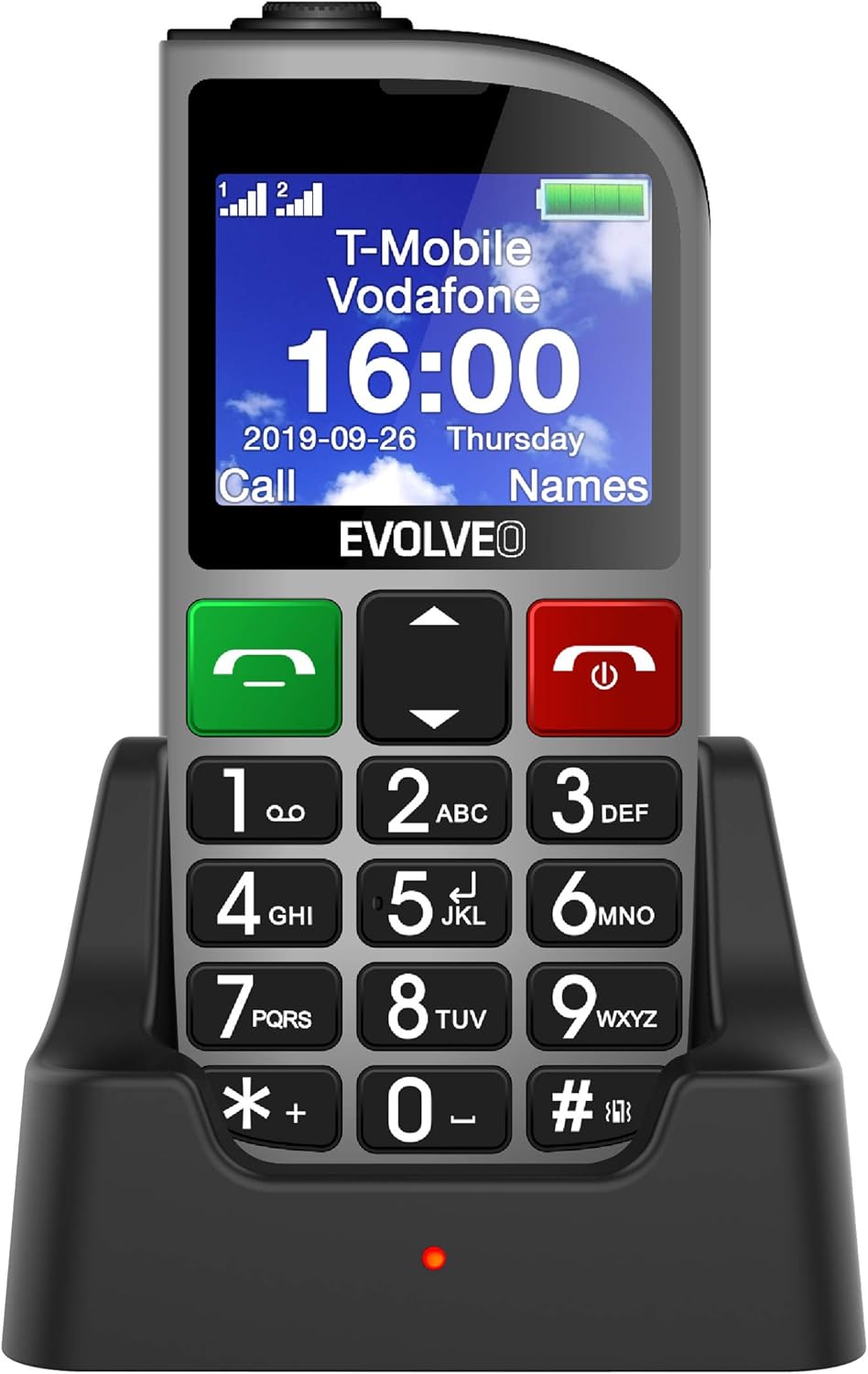
Figur 1.1: EVOLVEO EASYPHONE FM placed in its charging dock. The phone features a large display showing time and network information, with prominent green call and red end call buttons, and a numeric keypad below.
2. Opsætning
2.1. Batteriinstallation og opladning
- Fjern bagcoveret på telefonen.
- Insert the Li-ion 1000 mAh battery, ensuring the contacts align correctly.
- Sæt bagdækslet på igen.
- Connect the AC adapter to the charging dock.
- Place the phone into the charging dock. The charging indicator light will illuminate.
- Lad telefonen oplade helt, inden den tages i brug første gang.
2.2. Isætning af SIM-kort
The phone supports two SIM cards (Dual SIM) for GSM/GPRS 850/900/1800/1900 MHz networks.
- Sørg for, at telefonen er slukket.
- Fjern bagdækslet og batteriet.
- Find SIM-kortpladserne.
- Insert your SIM card(s) into the designated slots, ensuring correct orientation.
- Sæt batteriet og bagdækslet i igen.
2.3. Inserting a MicroSDHC Card
You can expand the phone's storage for music, photos, and other files by inserting a MicroSDHC card.
- Sørg for, at telefonen er slukket.
- Fjern bagdækslet og batteriet.
- Locate the MicroSDHC card slot.
- Gently insert the MicroSDHC card until it clicks into place.
- Sæt batteriet og bagdækslet i igen.
3. Betjeningsvejledning
3.1. Tænd/sluk
- For at tænde: Tryk og hold nede Rød Afslut opkald/Tænd/sluk knappen, indtil skærmen lyser.
- For at slukke: Tryk og hold nede Rød Afslut opkald/Tænd/sluk button until the power off options appear, then confirm.

Figur 3.1: Front view of the EVOLVEO EASYPHONE FM, highlighting the large display, call buttons, and numeric keypad for easy dialing.
3.2. Foretage og modtage opkald
- Foretag et opkald: Dial the number using the numeric keypad and press the Grønt opkald knap.
- Hurtigopkald: The phone supports quick access to 8 popular contacts. Assign numbers to keys 2-9 for speed dialing. Press and hold the assigned key to dial.
- Modtagelse af et opkald: Tryk på Grønt opkald knappen for at besvare et indgående opkald.
- Afslutning af et opkald: Tryk på Rød Afslut opkald/Tænd/sluk button to end an active call.
3.3. Afsendelse og modtagelse af SMS-beskeder
The separated keyboard keys facilitate easy writing of SMS messages.
- Navigate to the Messaging menu.
- Vælg "Skriv besked" for at skrive en ny SMS.
- Indtast modtagerens nummer, eller vælg fra kontakter.
- Indtast din besked ved hjælp af tastaturet.
- Tryk på "Send" for at sende beskeden.
3.4. Lydstyrkekontrol
Adjust the call and ringtone volume using the dedicated volume control button located on the left side of the phone.

Figur 3.2: Left side of the phone, showing the volume control buttons and the FM radio activation button.
3.5. SOS-nødknap
The SOS button, located on the back of the device, allows for quick emergency calls and messages.
- Before use, configure up to five emergency contact numbers in the phone settings.
- I en nødsituation skal du trykke på og holde SOS knap.
- The phone will automatically dial the predefined emergency numbers sequentially and send an emergency message to these contacts.

Figur 3.3: Bag view of the EVOLVEO EASYPHONE FM, showing the prominent red SOS emergency button and the camera lens.
3.6. FM Radio
The phone includes an FM radio with a dedicated activation button.
- To turn on the FM radio, press the independent FM button on the side of the device.
- The radio can play in the background, allowing you to use other phone functions.
- During an incoming or outgoing call, the radio will automatically mute and resume playback after the call ends.
3.7. Lommelygte
A powerful flashlight is integrated into the phone, activated by a dedicated button.
- Press the dedicated flashlight button on the side of the phone to turn the flashlight on or off.

Figur 3.4: Right side of the phone, showing the dedicated flashlight button.
3.8. Andre funktioner
- Kamera: The phone includes a VGA camera for basic photo capture.
- Musik afspiller: Spil musik files stored on your MicroSDHC card.
- Digital Recorder (Dictaphone): Optag stemmenotater.
- Kalender: Hold styr på vigtige datoer og begivenheder.
- Vækkeur: Indstil alarmer for påmindelser.
- Lommeregner: Udfør grundlæggende beregninger.
- Forstørrelsesglas: Utilize the screen as a magnifying glass.
4. Vedligeholdelse
4.1. Rengøring af enheden
- Use a soft, dry cloth to clean the phone's surface and screen.
- Undgå at bruge flydende rengøringsmidler eller slibende materialer, da de kan beskadige enheden.
- Sørg for, at der ikke kommer fugt ind i opladningsporten eller andre åbninger.
4.2. Batteripleje
- For at forlænge batteriets levetid bør du undgå at udsætte telefonen for ekstreme temperaturer.
- Charge the battery regularly, but avoid overcharging or letting it completely drain for extended periods.
- If the phone will not be used for a long time, charge the battery to about 50% before storing it.
5. Fejlfinding
If you encounter issues with your EVOLVEO EASYPHONE FM, refer to the following common problems and solutions:
5.1. Telefonen tænder ikke
- Sørg for, at batteriet er korrekt installeret og opladet.
- Connect the phone to the charger and wait a few minutes before attempting to power it on again.
- Kontroller om batteriets kontakter er rene.
5.2. Kan ikke foretage eller modtage opkald
- Check if the SIM card(s) are correctly inserted and activated.
- Ensure you have network coverage.
- Verify that the phone is not in airplane mode (if applicable).
- Check your account balance or subscription status with your service provider.
5.3. FM Radio Not Working
- Ensure you are in an area with good FM signal reception.
- Check if the FM radio is properly activated using its dedicated button.
5.4. Problemer med skærm
- If the display is dim, check the brightness settings.
- If the screen is unresponsive, try restarting the phone.
6. Specifikationer
| Mærke | Evolveo |
| Model | EASYPHONE FM |
| Skærmstørrelse | 1.8 tommer |
| Skærmopløsning | 320 x 240 px |
| Cellulær teknologi | 2G (GSM/GPRS 850/900/1800/1900 MHz) |
| SIM-understøttelse | Dobbelt SIM |
| Forbindelse | Bluetooth, 3.5 mm jackstik |
| Batteri | Li-ion 1000 mAh |
| Dimensioner | 130 × 61 × 16.5 mm |
| Vægt | 105 g (med batteri) |
| Kamera | VGA |
| Udvidelse af lager | MicroSDHC kortslot |
Bemærk: Specifikationerne kan ændres uden forudgående varsel.
7. Garanti og support
For warranty information and technical support, please refer to the warranty card included in your package or visit the official Evolveo webwebsted. Gem din købsbevis til garantikrav.