
1. Introduktion
The Sequential Pro 3 is a powerful hybrid multi-filter synthesizer designed for professional performance. It features a premium Fatar 37-note semi-weighted keyboard, three oscillators (two voltage-controlled oscillators and one wavetable oscillator), and three classic analog filters (Prophet-6, OB-6, and ladder). This instrument also includes a 16-track sequencer and extensive connectivity options for modular synthesizers through its four control voltage inputs and outputs. The Pro 3 offers a 3-voice paraphonic mode, allowing for triad playing on a monosynth, alongside three LFOs, four envelopes, an arpeggiator, a white noise generator, hard sync, per-oscillator glide, oscillator slop, dual digital effects, tuned feedback, and analog distortion. This manual provides essential information for setting up, operating, and maintaining your Pro 3 synthesizer.
2. Sikkerhedsoplysninger
- Strømforsyning: Brug kun den angivne strømadapter. Sørg for, at lydstyrkentage matcher din lokale strømforsyning.
- Ventilation: Bloker ikke ventilationsåbningerne. Sørg for tilstrækkelig luftgennemstrømning omkring enheden for at forhindre overophedning.
- Fugtighed: Keep the unit away from water or excessive moisture. Do not operate with wet hands.
- Placering: Place the unit on a stable, level surface. Avoid extreme temperatures, direct sunlight, or heat sources.
- Service: Forsøg ikke selv at udføre service på enheden. Overlad al service til kvalificeret servicepersonale.
3. Hvad er der i æsken
Upon unpacking your Sequential Pro 3, please ensure all components are present:
- Sequential Pro 3 Multi-filter Monosynth with Fatar 37-note semi-weighted keyboard
- Strømadapter
- Brugervejledning (dette dokument)
4. Produktet er slutview
The Sequential Pro 3 features a comprehensive control panel and robust connectivity. Familiarize yourself with the layout and connections before operation.
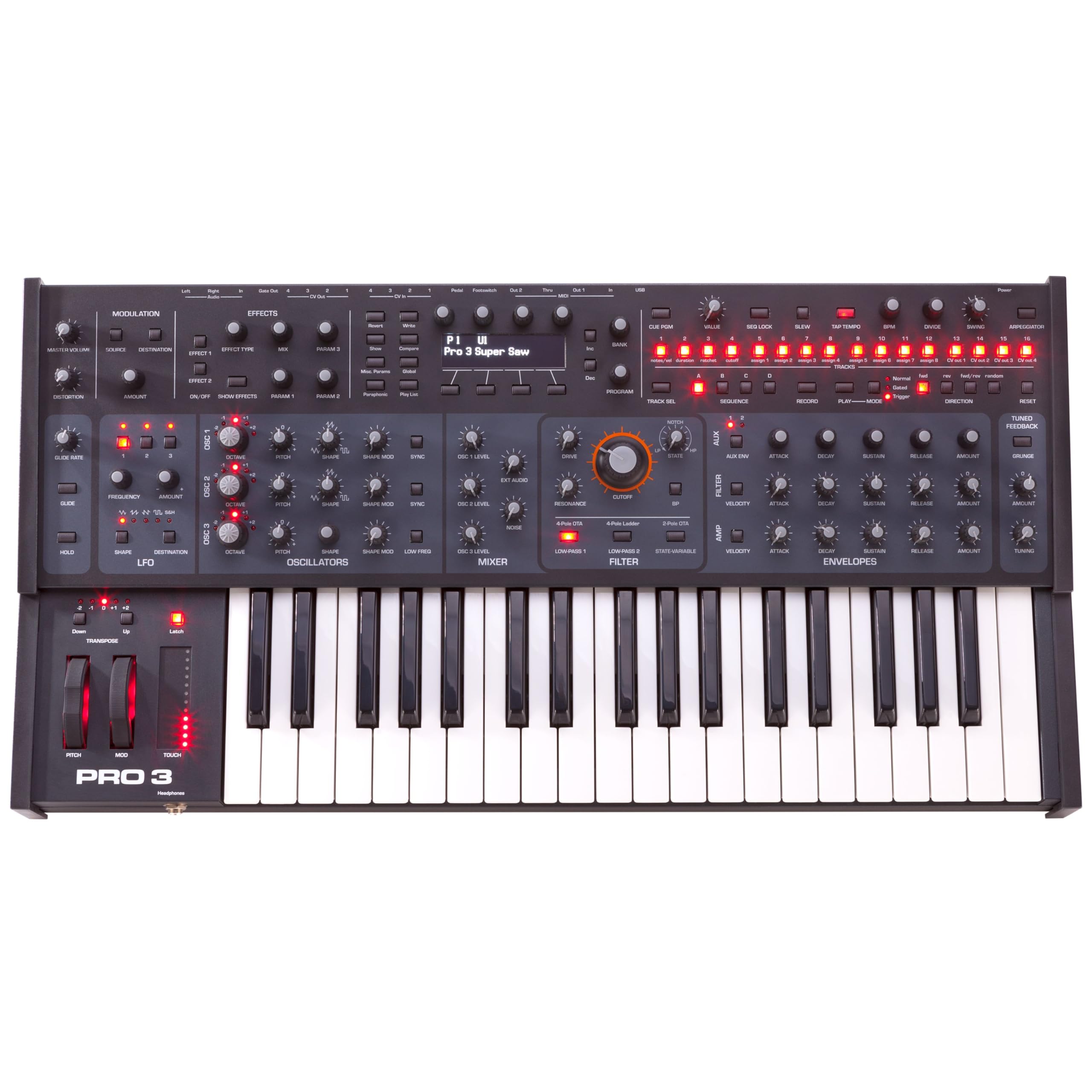
Figur 4.1: Front view of the Sequential Pro 3 Multi-filter Monosynth. This image displays the 37-note semi-weighted keyboard, the main control panel with various knobs and buttons for oscillators, filters, envelopes, and effects, and the central display screen.
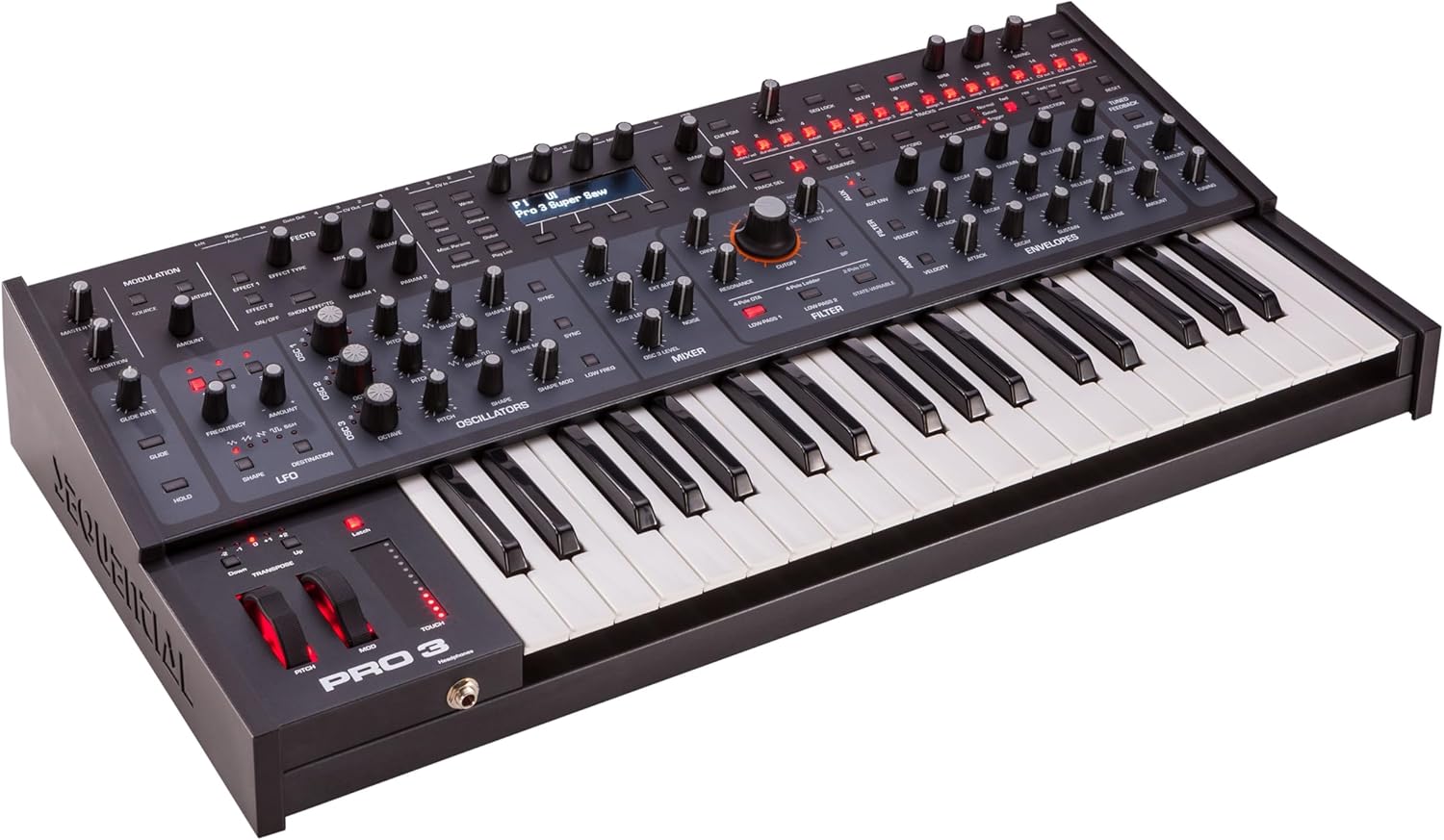
Figur 4.2: Vinklet view of the Sequential Pro 3, showcasing the depth and profile of the synthesizer. This perspective highlights the ergonomic design of the control surface and keyboard.

Figur 4.3: Rear panel of the Sequential Pro 3, illustrating all input and output connections. This includes power input, USB, MIDI In/Out/Thru, Pedal input, CV In/Out, Gate Out, and Audio Out (Left/Right).
5. Opsætning
5.1. Strømtilslutning
- Ensure the Pro 3 is powered off.
- Connect the provided power adapter to the '100-240V AC' input on the rear panel of the Pro 3.
- Sæt strømadapteren i en passende stikkontakt.
- Tryk på afbryderknappen for at tænde for enheden.
5.2. Lydforbindelser
Connect the audio outputs to your mixer, audio interface, or amplivligere.
- AUDIO OUT (LEFT/RIGHT): Use standard 1/4-inch TS cables to connect these outputs to your audio system. For mono operation, use the LEFT output.
- HOVEDTELEFONER: Connect stereo headphones to the 1/4-inch jack on the front left side of the unit for private monitoring.
5.3. MIDI-forbindelser
The Pro 3 supports MIDI for integration with other instruments and computers.
- MIDI IN: Connect a MIDI cable from the MIDI OUT of another device (e.g., MIDI controller, sequencer) to the Pro 3's MIDI IN.
- MIDI OUT: Connect a MIDI cable from the Pro 3's MIDI OUT to the MIDI IN of another device to send MIDI data.
- MIDI TIL: Passes incoming MIDI data directly to another device without processing.
- USB: Connect a USB cable from the Pro 3's USB port to your computer for MIDI communication and firmware updates.
5.4. Control Voltage (CV) Connections
The Pro 3 offers extensive modular integration.
- CV IN 1-4: Connect external control voltage sources (e.g., from a modular system) to these inputs to modulate various parameters on the Pro 3.
- CV OUT 1-4: Send kontrol voltages from the Pro 3's modulation matrix or sequencer to external modular gear.
- PORT UD: Provides gate signals for triggering external envelopes or events in a modular system.
5.5. Pedal Input
- PEDAL: Connect an expression pedal or footswitch to this input for real-time control over assignable parameters.
6. Betjeningsvejledning
6.1. oscillatorer
The Pro 3 features three oscillators for sound generation:
- OSC 1 & 2 (VCOs): These are analog voltage-controlled oscillators, offering classic waveforms and rich harmonic content. Adjust their shape, frequency, and mix levels.
- OSC 3 (Wavetable): A digital wavetable oscillator providing a wide range of complex and evolving timbres.
- Hard Sync: Synchronizes the phase of one oscillator to another, creating distinct harmonic effects.
- Glide (Portamento): Controls the time it takes for the pitch to slide from one note to the next.
- Oscillator Slop: Introduces subtle pitch variations for a more organic, vintage analog feel.
- Støjgenerator: Provides white noise for percussive sounds or adding texture.
6.2. filtre
The Pro 3 includes three distinct analog filter types, selectable via the filter section:
- Prophet-6 Filter: A classic 4-pole resonant low-pass filter.
- OB-6 Filter: A 2-pole state-variable filter with continuously variable low-pass, notch, and high-pass modes.
- Ladder Filter: En vintage-style 4-pole resonant low-pass filter, known for its distinct character.
- Juster Skære af, Resonans, og Konvolutbeløb to shape your sound.
6.3. Kuverter
Four dedicated ADSR (Attack, Decay, Sustain, Release) envelopes are available for shaping the amplitude, filter cutoff, and other parameters.
6.4. LFOs (Low Frequency Oscillators)
Three LFOs provide modulation sources for adding movement and complexity to your patches. Assign LFOs to various destinations using the modulation matrix.
6.5. Modulationsmatrix
The 32-slot modulation matrix allows for extensive routing of modulation sources (LFOs, envelopes, sequencer, CV inputs) to a wide array of destinations (oscillator parameters, filter cutoff, effects, etc.).
6.6. Sekvenser
The Pro 3 features a powerful 16-track sequencer for creating complex melodic and rhythmic patterns. Each track can control different parameters, including notes, velocity, and modulation.
6.7. Effekter
The dual digital effects engines include various algorithms such as delays, reverbs, and modulation effects. Additionally, the Pro 3 offers tuned feedback and analog distortion for further sound sculpting.
6.8. Paraphonic Mode
Engage the 3-voice paraphonic mode to play up to three notes simultaneously, with individually gated envelopes per oscillator, effectively turning the monosynth into a polyphonic instrument for chords.
6.9. Arpeggiator
The arpeggiator generates rhythmic patterns from held notes, offering various modes and settings for creative performance.
7. Vedligeholdelse
- Rensning: Brug en blød, tør klud til at rengøre enhedens yderside. Brug ikke slibende rengøringsmidler eller opløsningsmidler.
- Opbevaring: When not in use, store the Pro 3 in a clean, dry environment, away from direct sunlight and extreme temperatures.
- Firmwareopdateringer: Periodically check the Sequential webwebsted for firmwareopdateringer for at sikre optimal ydeevne og adgang til nye funktioner.
8. Fejlfinding
| Problem | Mulig årsag | Løsning |
|---|---|---|
| Ingen lydudgang | Volume low; incorrect audio connections; patch issue | Check master volume and individual oscillator/mixer levels. Verify audio cables are correctly connected to AUDIO OUT. Try a different patch. |
| MIDI virker ikke | Incorrect MIDI settings; cable issues | Check MIDI IN/OUT connections. Verify MIDI channel settings on both the Pro 3 and the external device. Ensure USB MIDI drivers are installed if using USB. |
| Enheden tændes ikke | Power adapter issue; power outlet issue | Ensure power adapter is securely connected. Try a different power outlet. Verify the power adapter is the correct one for the unit. |
9. Specifikationer
- Model: SEQ-3400
- Tastatur: Fatar 37-note semi-weighted
- Oscillatorer: 2 VCOs, 1 Wavetable Oscillator
- Filtre: Prophet-6, OB-6, Ladder (3 types)
- Konvolutter: 4 ADSR
- LFO'er: 3
- Sekvenser: 16-sporet
- Modulation Matrix: 32-slot
- Effekter: Dual Digital Effects, Tuned Feedback, Analog Distortion
- Paraphonic Mode: 3 stemmer
- Forbindelse: MIDI In/Out/Thru, USB, 4x CV In, 4x CV Out, Gate Out, Audio Out (L/R), Pedal Input
- Varens vægt: 22.2 pund
- Produktdimensioner: 34 x 21 x 11 tommer
- Kropsmateriale: Træ
- Farve: Sort
- Dato først tilgængelig: 6. februar 2020
10. Garanti og support
For warranty information and technical support, please refer to the official Sequential webwebstedet eller kontakt din autoriserede forhandler. Gem din købsbevis til garantikrav.
Officiel Webwebsted: www.sequential.com


