1.Overview
Thank you for choosing the HONGXING HX-168AH 2.1ch Hi-Fi Stereo Audio Amplifier. Det her amplifier is an enhanced version designed to deliver high-quality audio performance in a compact form factor. Its robust aluminum alloy body ensures efficient heat dissipation, contributing to stable and reliable operation. This manual provides essential information for setting up, operating, and maintaining your amplivligere.
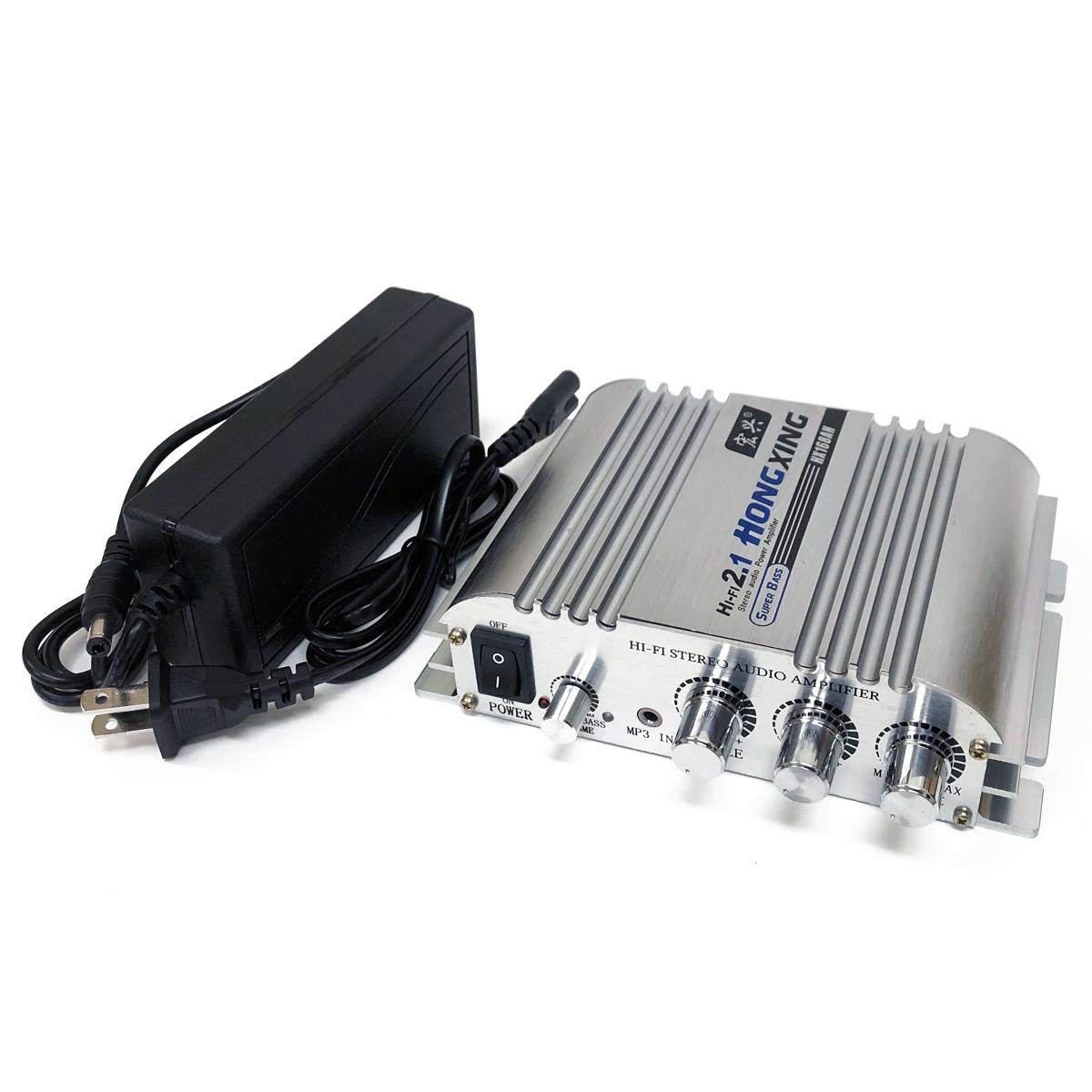
Figur 1: Forside view of the HONGXING HX-168AH amplivligere.
2. Produktfunktioner
- Høj effekt: Delivers a maximum effective output of 300W + 300W + 150W (2.1ch).
- Premium konstruktion: Features a durable aluminum alloy body for excellent heat dissipation.
- Lyd af høj kvalitet: Advanced power circuit design and signal processing ensure clear, high-quality bass and overall sound.
- Stabil drift: Includes a 12V/5A AC adapter for consistent and stable performance.
- Alsidig tilslutning: Supports RCA audio input and 2.1 channel speaker output, including a dedicated subwoofer output.
3. Pakkens indhold
Tjek venligst pakken for følgende varer:
- HONGXING HX-168AH 2.1ch Hi-Fi Stereo Audio Amplivligere
- 12V/5A AC Power Adapter
- Direct Connection Power Cable
Figur 2: Amplifier and included accessories.
4. Kontroller og indikatorer
Familiarize yourself with the controls and indicators on your amplivligere:

Figure 3: Labeled front and rear panels of the amplivligere.
Frontpanel:
- Tænd/sluk-knap (tænd/sluk): Drejer amplivligere til eller fra.
- Input Selector (RCA/BT/OFF): Switches between RCA input, Bluetooth mode, or turns the unit off.
- Baskontrol: Justerer lavfrekvensudgangen.
- Mellem kontrol: Adjusts the mid-range frequency output.
- Diskantkontrol: Justerer højfrekvent udgang.
- Volume Control (MIN/MAX): Justerer den samlede udgangslydstyrke.
Bagside:
- AUDIO IN (RCA L/R): Connect your audio source (e.g., CD player, computer) using RCA cables.
- LINE OUT (3.5mm AUX): Output for connecting to active devices like other amplifiers, active subwoofers, or active speakers.
- SPK OUT (L/R): Connect your passive stereo speakers. Ensure correct polarity (+/-).
- SUB UD: Connect to an active subwoofer for enhanced bass.
- POWER (DC 12-24V): Connect the provided AC power adapter.
- RF-antenne: Til Bluetooth-forbindelse.
5. Forbindelser
Follow these steps to connect your amplifier to your audio system:
- Tilslut lydkilde: Use an RCA audio cable to connect your audio source (e.g., computer, smartphone with adapter) to the AUDIO IN (RCA L/R) ports on the rear panel. Ensure red connects to red (right channel) and white connects to white (left channel).
- Connect Passive Speakers: Tilslut dine passive højttalere til SPK OUT (L/R) terminals. Pay close attention to polarity: connect the positive (+) terminal of the amptil den positive (+) terminal på højttaleren, og den negative (-) terminal på amptil højttalerens negative (-) terminal.
- Connect Active Subwoofer (Optional): If you are using an active subwoofer, connect it to the SUB UD port using an appropriate cable. This will create a 2.1 channel amplifier system.
- Tilslut strøm: Connect the provided 12V/5A AC power adapter to the POWER (DC 12-24V) input on the rear panel. If the included 5A adapter does not provide sufficient output for your setup, please use a higher output adapter (sold separately) or connect the included power cord directly to a compatible power source.
- Tilslut Bluetooth-antenne: If using Bluetooth, screw the provided antenna into the RF port on the rear panel and adjust its position for optimal signal reception.

Figur 4: Tilslutninger på bagpanel.
Connection Demonstration Video (AIYIMA A01 Pro)
This video demonstrates the setup and connection methods for a similar 2.0/2.1 channel amplifier, including RCA input, speaker output, and power connection. It also highlights the internal components and tone controls.
Subwoofer and Bluetooth Connection Demonstration Video (AIYIMA A03)
This video illustrates the connection of a subwoofer amplifier to a subwoofer speaker and the process of connecting via Bluetooth for a 2.1 channel audio system.
6. Betjening
- Tænd: Flip the Power Switch to the 'ON' position. The power indicator will illuminate.
- Vælg inputtilstand: Use the Input Selector switch to choose between 'RCA' for wired audio input or 'BT' for Bluetooth.
- Bluetooth-parring: If selecting 'BT' mode, the amplifier will enter pairing mode. On your mobile device, search for Bluetooth devices and select "BT HIFI AUDIO" to connect. Once connected, you can play audio from your device.
- Juster lyd: Use the Bass, Middle, Treble, and Volume control knobs to fine-tune your sound preferences.
- Sluk: When finished, flip the Power Switch to the 'OFF' position.
7. Specifikationer
Below are the technical specifications for the HONGXING HX-168AH amplivligere:
| Feature | Specifikation |
|---|---|
| Fabrikant | HONGXING |
| Mærke | FOCUSMART |
| Modelnummer | HX168A5 |
| Kropsmateriale | Aluminiumslegering |
| Nominel voltage | DC 12V |
| Rated Output (2.1ch) | 40W + 40W + 50W |
| Maximum Effective Output (2.1ch) | 300W + 300W + 150W |
| SNR | >80dB |
| Frekvensrespons | 20-20KHz |
| Impedans | 4-8Ω |
| Forvrængningshastighed | 0.4 % |
| Driftskraft | DC 12-15V, 2-10A |
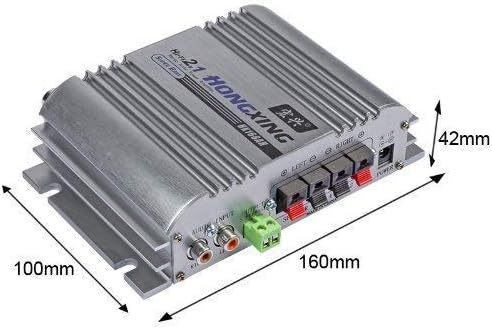
| Udvendige dimensioner | Ca. 16.1 × 13.6 × 4.8 cm |
| Vægt | Ca. 395 g |

Figur 5: Ampløfter dimensioner.
8. Fejlfinding
- Ingen strøm: Sørg for, at strømadapteren er korrekt tilsluttet til begge ampog en fungerende stikkontakt. Kontroller tænd/sluk-knappens position.
- Ingen lyd: Verify all audio cables are correctly connected. Check the input mode selector. Ensure the volume is turned up on both the amplifier and your audio source. Confirm speakers are properly connected and functional.
- Low Output Volume/Distortion: If you experience low volume or distortion, especially at higher levels, and are using the included 5A adapter, consider using a higher output power adapter (DC 12-15V, 2-10A) to provide sufficient power.
- Problemer med Bluetooth-forbindelse: Sørg for amplifier is in 'BT' mode and the antenna is properly attached. Turn off and on Bluetooth on your mobile device and try re-pairing.
9. Sikkerhedsoplysninger
- Udsæt ikke ampudsat for vand, fugt eller ekstreme temperaturer.
- Sørg for tilstrækkelig ventilation omkring enheden for at forhindre overophedning.
- Use only the specified power adapter or a compatible higher-output adapter.
- Do not attempt to open or repair the unit yourself. Refer to qualified personnel for service.
- Opbevares utilgængeligt for børn.
10. Garanti og support
This product is provided with this user manual for guidance. Please note that specific support for connection and handling methods beyond the scope of this manual is not provided by the manufacturer. For any issues not covered in this manual, please contact your retailer.