
GLIDiC TW-5000s
GLIDiC Sound Air TW-5000s True Wireless Earbuds Instruction Manual
Model: TW-5000s
1. Introduktion
Tak for købetasing the GLIDiC Sound Air TW-5000s True Wireless Earbuds. This manual provides essential information for the safe and effective use of your device. Please read it thoroughly before use and retain it for future reference.
2. Sikkerhedsoplysninger
- Udsæt ikke ørepropperne eller opladningsetuiet for ekstreme temperaturer, direkte sollys eller høj luftfugtighed.
- Undgå at tabe, støde eller skille enheden ad. Dette kan forårsage skade og ugyldiggøre garantien.
- Keep the device away from water and liquids. While sweatproof, immersion can cause damage.
- Brug kun det medfølgende opladningskabel eller et tilsvarende certificeret kabel.
- Langvarig lytning ved høj lydstyrke kan forårsage høreskader. Juster lydstyrken til et sikkert niveau.
- Be aware of your surroundings when using earbuds, especially in traffic or hazardous environments.
3. Pakkens indhold
Bekræft at alle varer er til stede i din pakke:
- GLIDiC Sound Air TW-5000s True Wireless Earbuds (Left and Right)
- Opladningsetui
- USB-opladerkabel (Type A til Micro-USB)
- Ørespidser i flere størrelser (S, M, L)
- Instruktionsmanual (dette dokument)
4. Produktet er slutview
Familiarize yourself with the components of your GLIDiC Sound Air TW-5000s earbuds and charging case.

Figure 4.1: GLIDiC Sound Air TW-5000s Earbuds and Charging Case. The image displays the black charging case with the GLIDiC logo on top, positioned next to the two black earbuds.
Øreproppernes komponenter
- Multifunktionsknap: Located on the outer surface of each earbud, used for playback control, call management, and voice assistant activation.
- LED-indikator: Provides status information (pairing, charging, power).
- Mikrofon: For voice calls and voice assistant commands.
- Opladningskontakter: Located on the underside of each earbud, for charging within the case.
- Øreprop: Silicone tip for in-ear comfort and sound isolation.
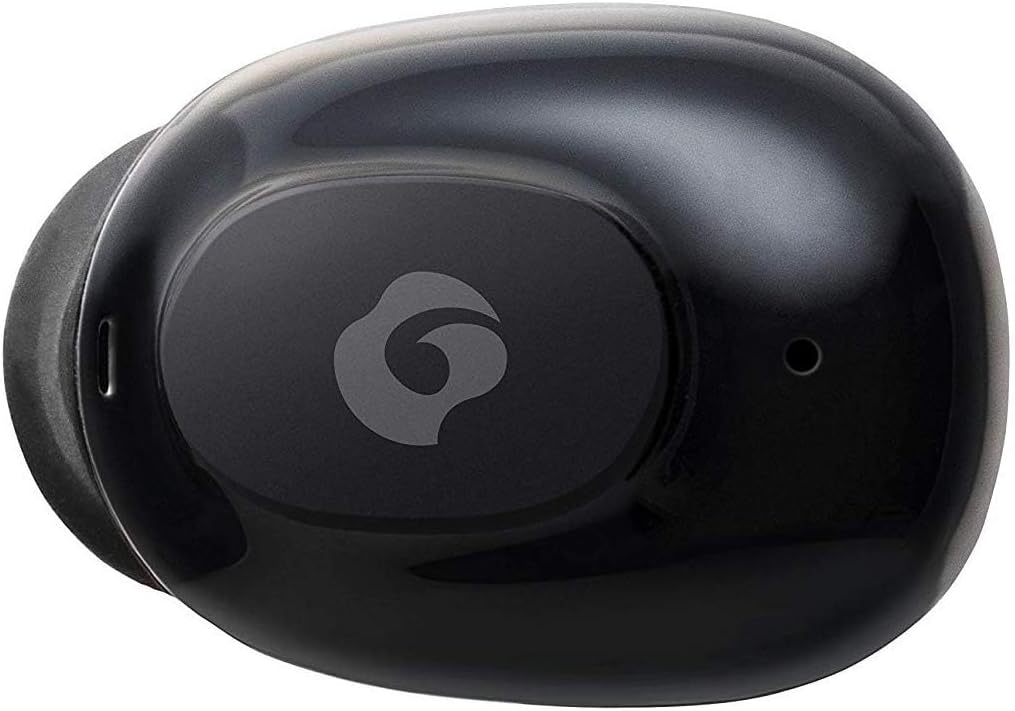
Figur 4.2: Nærbillede view of a single GLIDiC earbud, highlighting the multifunction button with the GLIDiC logo and the microphone opening.
Komponenter til opladningsetuiet
- Opladningsporte: Internal contacts for earbuds, external port for case charging.
- Etui LED-indikator: Viser etuiets opladningsstatus.
- Låg: Protects earbuds and secures them during charging.
5. Opsætning
5.1 Indledende opladning
- Place both earbuds into the charging case. Ensure they are correctly seated, and the LED indicators on the earbuds illuminate.
- Tilslut USB-opladerkablet til opladningsporten på etuiet, og sæt den anden ende i en USB-strømkilde (f.eks. computer, vægadapter).
- The case LED indicator will show charging status. Allow approximately 2 hours for a full charge of both earbuds and the case.
- Once fully charged, disconnect the charging cable. The earbuds offer up to 60 days of standby time when stored in the fully charged case.
5.2 Parring med en Bluetooth-enhed
- Sørg for, at øretelefonerne er opladet.
- Åbn opladningsetuiet. Ørepropperne går automatisk i parringstilstand, og deres LED-indikatorer blinker.
- Gå til Bluetooth-indstillingerne på din Bluetooth-aktiverede enhed (smartphone, tablet osv.).
- Søg efter available devices. Select "GLIDiC TW-5000s" from the list.
- Once connected, the earbud LED indicators will stop flashing and may show a solid light or turn off, depending on the model. A voice prompt may also confirm the connection.
- If pairing fails, place the earbuds back in the case, close the lid, wait a few seconds, and then repeat the steps.
6. Betjeningsvejledning
6.1 Tænd/sluk
- Tænd: Open the charging case, or press and hold the multifunction button on each earbud for approximately 3 seconds.
- Sluk: Place the earbuds back into the charging case and close the lid, or press and hold the multifunction button on each earbud for approximately 5 seconds.
6.2 Musikafspilning
- Afspil/pause: Tryk én gang på multifunktionsknappen på begge øretelefoner.
- Næste nummer: Double-press the multifunction button on the right earbud.
- Forrige nummer: Double-press the multifunction button on the left earbud.
- Lydstyrke op: Triple-press the multifunction button on the right earbud.
- Skrue ned for lyden: Triple-press the multifunction button on the left earbud.
6.3 Opkaldshåndtering
- Besvar/afslut opkald: Tryk én gang på multifunktionsknappen på begge øretelefoner.
- Afvis opkald: Press and hold the multifunction button on either earbud for approximately 2 seconds.
6.4 Stemmeassistent
- Aktiver stemmeassistent: Press and hold the multifunction button on either earbud for approximately 2 seconds (when not on a call).
6.5 Multi-Communication Mode
The GLIDiC Sound Air TW-5000s features a multi-communication mode that allows select ambient sounds to be heard without compromising audio quality. This enhances user awareness and safety.
- Activate/Deactivate Multi-Communication Mode: Consult the specific instructions provided with your device, as activation methods can vary. Typically, this involves a specific press sequence on the multifunction button or an option within a companion app if available.
7. Vedligeholdelse
7.1 Rengøring
- Tør ørepropperne og opladningsetuiet af med en blød, tør og fnugfri klud.
- Brug ikke slibende rengøringsmidler, alkohol eller kemiske opløsningsmidler.
- Gently remove ear tips and clean them with mild soap and water if necessary. Ensure they are completely dry before reattaching.
- Brug en tør vatpind til forsigtigt at rengøre opladningskontakterne på både ørepropperne og etuiet.
7.2 Opbevaring
- Når ørepropperne ikke er i brug, skal de opbevares i deres opladningsetui for at beskytte dem og sikre, at de forbliver opladede.
- Opbevar enheden et køligt, tørt sted, væk fra direkte sollys og ekstreme temperaturer.
8. Fejlfinding
If you encounter issues with your GLIDiC Sound Air TW-5000s, refer to the following common problems and solutions:
| Problem | Mulig løsning |
|---|---|
| Ørepropperne tænder ikke. | Ensure earbuds are charged. Place them in the charging case and connect the case to a power source. |
| Øretelefonerne parres ikke med enheden. |
|
| Kun én øretelefon har lyd. |
|
| Opladningsetuiet oplader ikke. |
|
| Lydkvaliteten er dårlig eller uregelmæssig. |
|
9. Specifikationer
| Feature | Detalje |
|---|---|
| Modelnavn | TW-5000s |
| Forbindelsesteknologi | Trådløs (Bluetooth) |
| Bluetooth rækkevidde | 10 meter |
| Frekvensområde | 20 Hz - 20,000 Hz |
| Battery Life (Carrying Case Standby) | Op til 60 dage |
| Vandmodstandsniveau | Vandafvisende (svedtæt) |
| Kontroltype | Mediekontrol, berøring, stemme |
| Særlige funktioner | Microphone Included, Noise Cancellation, Multi-communication mode |
| Materiale | Plastic, TPE, and Silicone |
| Dimensioner (ørepropper) | 0.98 x 0.67 x 0.91 tommer (ca.) |
| Varens vægt | 9.6 ounces (pakkevægt i alt) |
| UPC | 811559030024 |
10. Garanti og support
GLIDiC products are designed for reliability and performance. For specific warranty details, please refer to the warranty card included with your purchase or visit the official GLIDiC website. If you require technical support or have questions not covered in this manual, please contact GLIDiC customer service through their official channels.
Gem venligst dit købsbevis for garantikrav.