
Docooler H300
Docooler HXSJ H300 USB Wired Gaming Mouse User Manual
Model: H300
1. Produktet er slutview
The Docooler HXSJ H300 is a high-performance USB wired gaming mouse designed for an enhanced gaming experience. It features 7 programmable buttons, adjustable DPI settings, and dynamic breathing lights.

Billede: Forside view of the Docooler HXSJ H300 gaming mouse, showcasing its ergonomic design and vibrant breathing light patterns.
Nøglefunktioner:
- Åndende lys: Features 7-color breathing light effects for an immersive gaming atmosphere.
- 7 Knapper: Equipped with 7 buttons for versatile control, including a dedicated fire key for rapid triple attacks.
- Holdbart kabel: Woven nylon cable with anti-static electromagnetic ring ensures durability and anti-interference performance.
- Justerbar DPI: Offers 5 adjustable DPI settings (1000/1600/2400/3200/5500 DPI) for precise control.
- Ergonomisk design: Contoured surface designed for comfortable hand feeling, reducing fatigue during extended use.
2. Opsætningsvejledning
Follow these steps to set up your Docooler HXSJ H300 gaming mouse:
- Pakker ud: Tag forsigtigt musen ud af emballagen.
- Forbinde: Locate an available USB 2.0 port on your computer (PC or Laptop). Insert the USB connector of the mouse firmly into the USB port.
- Driver installation: The mouse is plug-and-play. Your operating system (Windows 7/8/10/2000/XP/Vista, Mac OS or later) will automatically detect and install the necessary drivers. No additional software installation is typically required.
- Verificere: Once connected, the breathing lights on the mouse should illuminate, indicating it is powered on and ready for use.
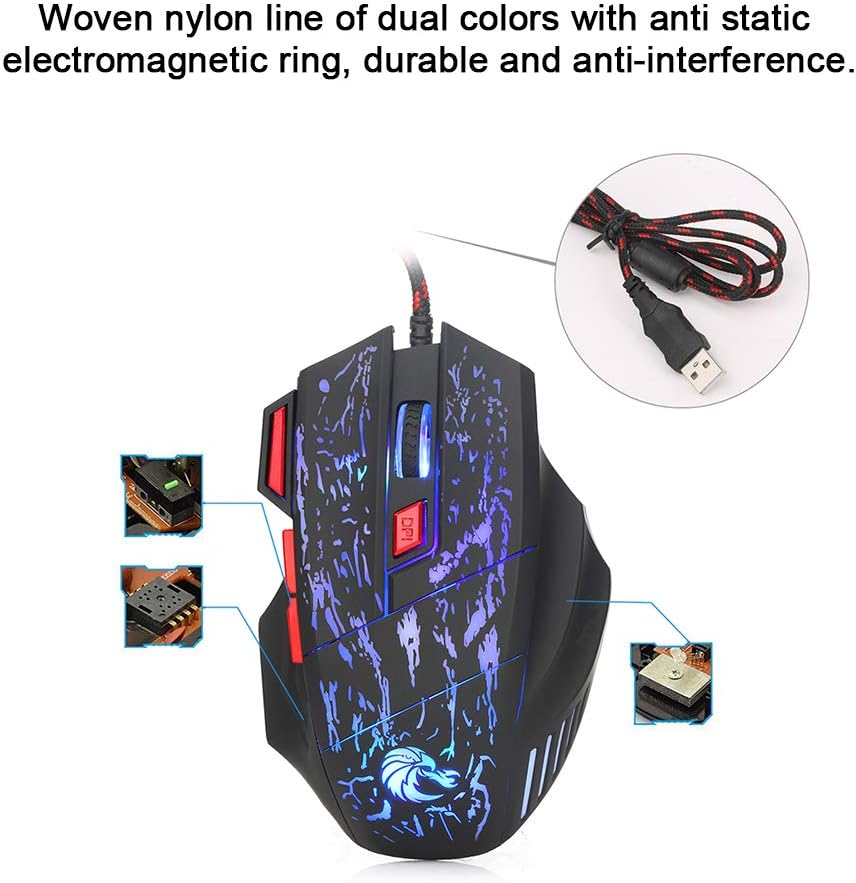
Image: The mouse's durable woven nylon cable with an anti-static electromagnetic ring, designed for reliable connection and reduced interference.
3. Betjeningsvejledning
The HXSJ H300 mouse features 7 buttons for various functions and adjustable sensitivity.
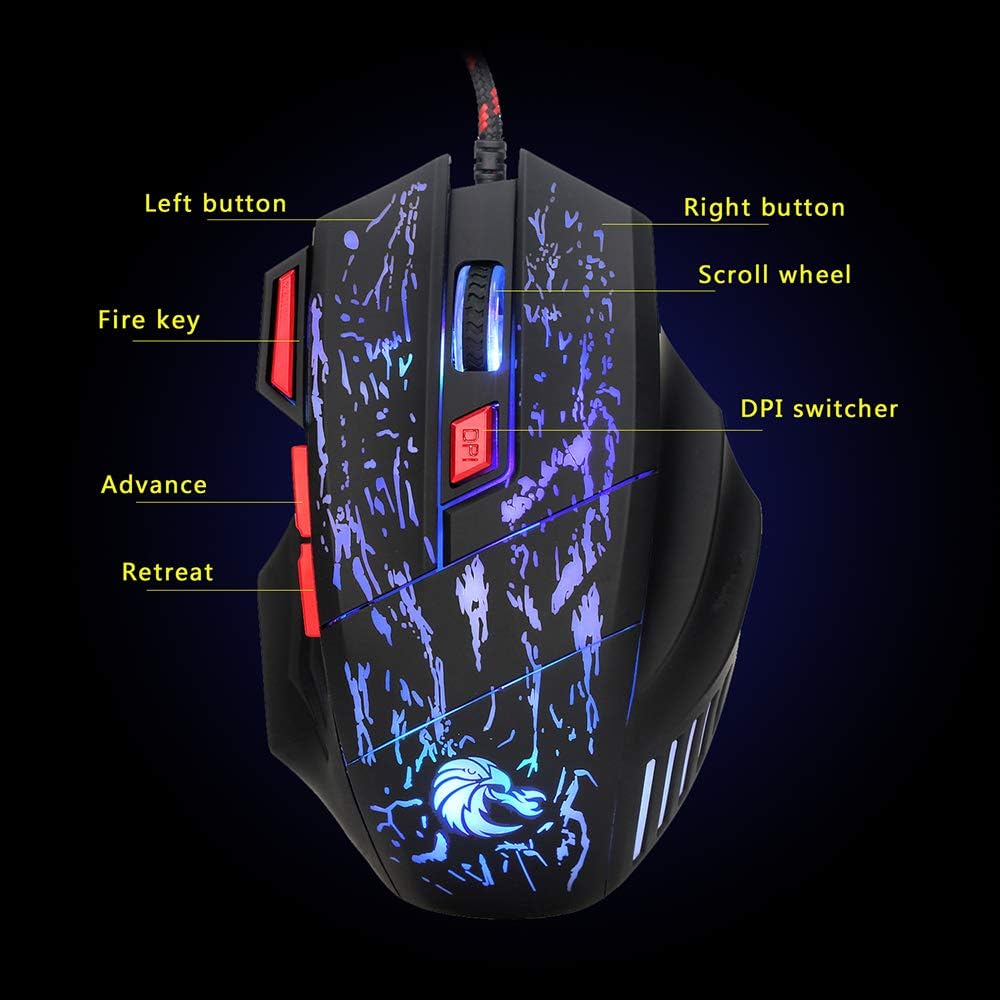
Image: Diagram illustrating the layout and labeling of the seven buttons on the Docooler HXSJ H300 gaming mouse.
Knap funktioner:
- Venstre knap: Standard venstreklikfunktion.
- Højre knap: Standard højreklikfunktion.
- Scrollhjul: Rul indhold op eller ned. Kan også trykkes ned for at bruge midterklik.
- DPI Switcher: Cycles through the 5 adjustable DPI settings (1000/1600/2400/3200/5500 DPI). Press to change sensitivity.
- Brandnøgle: Provides a rapid triple-click action, useful in gaming.
- Advance (Forward): Navigerer fremad i web browsere eller file opdagelsesrejsende.
- Retreat (Back): Navigerer baglæns i web browsere eller file opdagelsesrejsende.
DPI-justering:
The mouse offers 5 levels of DPI (Dots Per Inch) sensitivity. Press the DPI Switcher button, located behind the scroll wheel, to cycle through the available settings. Each press will change the mouse's tracking speed, allowing you to select the optimal sensitivity for your task or game.
Åndedrætslyseffekt:
The mouse features a dynamic 7-color breathing light effect that automatically cycles through colors. This provides visual feedback and enhances the aesthetic appeal during use.

Billede: Museshowetasing its vibrant breathing light feature, cycling through multiple colors.
4. Vedligeholdelse
Korrekt vedligeholdelse sikrer din gamingmus' lange levetid og optimale ydeevne.
- Rensning: Brug en blød, tør klud til at tørre musens overflade af. Ved genstridigt snavs, tør let afampRengør kluden med vand eller et mildt, ikke-slibende rengøringsmiddel. Undgå at bruge skrappe kemikalier eller slibende materialer.
- Sensorpleje: Hold den optiske sensor i bunden af musen ren og fri for støv eller snavs for at sikre nøjagtig sporing.
- Kabelstyring: Undgå skarpe bøjninger eller for meget træk i USB-kablet for at forhindre skader.
- Opbevaring: Når musen ikke er i brug i længere perioder, skal den opbevares et rent, tørt sted væk fra direkte sollys og ekstreme temperaturer.
5. Fejlfinding
If you encounter issues with your Docooler HXSJ H300 gaming mouse, refer to the following common solutions:
| Problem | Mulig årsag | Løsning |
|---|---|---|
| Mouse not responding / No light | Løs USB-forbindelse, defekt USB-port, driverproblem. |
|
| Unøjagtig sporing / Markøren er uregelmæssig | Beskidt optisk sensor, uegnet overflade på musemåtten. |
|
| DPI-indstillingen ændres ikke | Knappen er ikke trykket korrekt ned, midlertidig softwarefejl. |
|
6. Specifikationer
Detailed technical specifications for the Docooler HXSJ H300 Gaming Mouse:
| Mærke | Docooler |
| Model | HXSJ H300 |
| Nøglemængde | 7 |
| Opløsning (DPI) | 1000, 1600, 2400, 3200, 5500 (Adjustable) |
| Nøgleliv | 10 millioner klik |
| Voltage-klassificering / strøm | DC 5V / 100mA |
| USB-version | 2.0 |
| Knapper | Left, Right, Scroll Wheel, DPI, Fire Key, Advance, Retreat |
| Lyseffekt | Colorful Breathing Light |
| Kompatibilitet | Windows 7 / 8 / 10 / 2000 / XP / Vista, Mac OS eller nyeste |
| Farve | Black + Red accents |
| Materiale | ABS |
| Kabellængde | 140 cm |
| Varens dimensioner (L*B*H) | 13.0 * 8.5 * 4.0 cm |
| Varens vægt | 139.0 g |

Image: Technical drawing of the Docooler HXSJ H300 gaming mouse with key dimensions (length, width, height) indicated.
7. Garanti og support
For warranty information and technical support, please refer to the documentation provided with your purchase or contact Docooler customer service.
While specific warranty details are not provided in this manual, Docooler products typically come with a standard manufacturer's warranty covering defects in materials and workmanship. Please retain your proof of purchase for any warranty claims.
For further assistance, visit the official Docooler webwebstedet eller kontakt deres supportkanaler.