
1. Produktet er slutview
The Wendry I8 Plus is a compact 2.4GHz wireless mini QWERTY keyboard featuring an integrated touchpad and LED backlighting. Designed for convenience, it offers a versatile input solution for various devices, allowing for comfortable operation from a distance.
This device combines the functionality of a keyboard and a mouse, making it ideal for controlling smart TVs, PCs, Android TV boxes, and other compatible systems. Its plug-and-play design ensures easy setup without the need for additional software installation.

Image 1.1: The Wendry I8 Plus keyboard demonstrating compatibility with multiple devices.
2. Pakkens indhold
- Wendry I8 Plus Mini LED Backlit Keyboard
- USB Receiver (located in the battery compartment)
- Rechargeable Lithium-ion Battery (if included, or compartment for AAA batteries)
- USB-opladningskabel (hvis relevant)
- Brugervejledning (dette dokument)
3. Opsætningsvejledning
3.1 Batteriinstallation
- Find batterirummet på bagsiden af tastaturet.
- Skub batteridækslet op.
- Insert the provided rechargeable battery or two AAA batteries, ensuring correct polarity (+/-).
- Luk batteridækslet forsvarligt.
3.2 USB-modtagertilslutning
- Åbn batterirummets dæksel.
- Carefully remove the USB receiver, which is magnetically stored inside.
- Plug the USB receiver into an available USB port on your device (e.g., PC, Smart TV, Android TV Box).
- The device will automatically detect and install the necessary drivers. No additional software is required.
- Tastaturet er nu klar til brug.

Image 3.1: Location of the USB receiver and battery compartment.
4. Betjeningsvejledning
4.1 Basic Keyboard and Touchpad Use
- Indtastning: Brug QWERTY-layoutet til tekstinput.
- Touchpad: The central area functions as a high-sensitivity touchpad for mouse cursor control.
- Tryk med en enkelt finger: Fungerer som venstre museklik.
- To-finger tryk: Functions as a right mouse click.
- Two Finger Drag: Til at scrolle op og ned.

Image 4.1: Using the high-sensitivity touchpad for navigation.
4.2 LED Backlighting Control
The keyboard features colorful LED backlighting for improved visibility in low-light conditions. To control the backlighting:
- Tryk på Fn nøglen samtidig med F2 key to toggle the backlight on/off or change its color.

Image 4.2: The keyboard displaying its colorful LED backlighting.
4.3 DPI-justering
The touchpad's sensitivity (DPI) can be adjusted to suit your preference and screen size. There are 3 levels of DPI available:
- For at justere DPI'en skal du trykke på Fn nøglen samtidig med Mellemrumstast. Repeat to cycle through the DPI levels.
4.4 multimedietaster
The keyboard includes dedicated multimedia control keys for easy access to functions like volume control, play/pause, and track navigation.
- Lydstyrke op/ned: Brug V+ og V- knapper.
- Play/Pause, Next/Previous Track: Use the dedicated media control buttons on the left side.
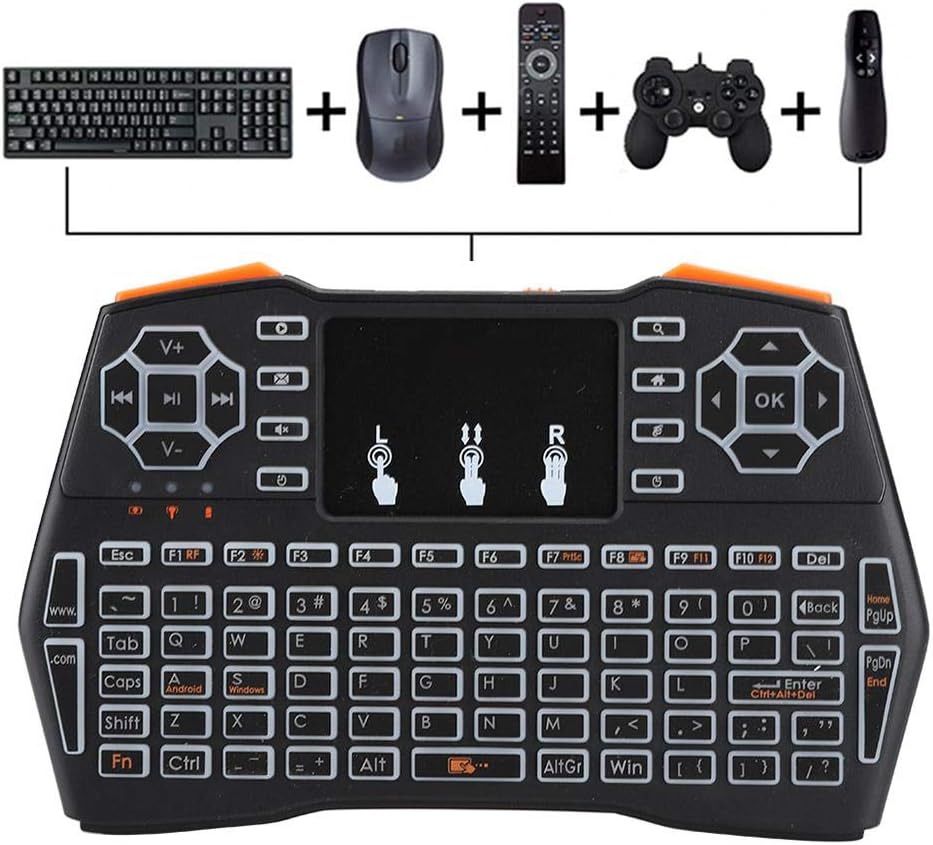
Image 4.3: Using the keyboard for multimedia control and gaming.
5. Vedligeholdelse
- Rensning: Brug en blød, tør klud til at rengøre tastaturoverfladen. Ved genstridigt snavs, brug en let tør klud.amp En klud kan bruges, men sørg for, at der ikke trænger fugt ind i enheden.
- Opbevaring: Når tastaturet ikke er i brug i længere perioder, skal det opbevares et køligt og tørt sted.
- Batteripleje: If using a rechargeable battery, ensure it is charged regularly. If using AAA batteries, remove them if the device will not be used for a long time to prevent leakage.
- USB-modtager: Always store the USB receiver in its designated magnetic slot within the battery compartment to prevent loss.
6. Fejlfinding
- Tastaturet reagerer ikke:
- Ensure the battery is charged or replaced.
- Kontroller, at USB-modtageren er korrekt tilsluttet enheden.
- Prøv at sætte USB-modtageren i en anden USB-port.
- Ensure the keyboard is within the 20-meter operating range of the receiver.
- Genstart den tilsluttede enhed.
- Touchpad not working or erratic:
- Sørg for, at dine fingre er rene og tørre, når du bruger touchpad'en.
- Adjust the DPI settings (Fn + Space Bar) to see if sensitivity improves.
- Rengør touchpad-overfladen.
- Baggrundsbelysningen virker ikke:
- Sørg for, at batteriet har tilstrækkelig opladning.
- Press Fn + F2 to toggle the backlight.
- Kort driftsområde:
- Ensure there are no significant obstructions between the keyboard and the USB receiver.
- Avoid using the keyboard near strong electromagnetic interference sources.
7. Specifikationer
| Feature | Detalje |
|---|---|
| Modelnummer | I8 Plus (Wendryng7y53ptgu) |
| Forbindelsesteknologi | 2.4 GHz radiofrekvens, USB |
| Speciel funktion | Touchpad, LED Backlighting |
| Kompatible enheder | Gaming Console, Personal Computer, Television |
| Tastaturbeskrivelse | QWERTY Mini Keyboard |
| Driftsafstand | Op til 20 meter (ca. 65 fod) |
| Strømkilde | 1 Nonstandard Battery (rechargeable) or AAA batteries |
| Varens vægt | 6.3 ounce (ca. 178 gram) |
| Fabrikant | Wendry |
8. Garanti og support
For warranty information and technical support, please refer to the documentation provided at the time of purchase or contact your retailer. General support inquiries can often be directed to the manufacturer's official webwebsted eller kundeservicekanaler.
Gem venligst din købsbevis i tilfælde af garantikrav.