
MCombo 6160-7516
MCombo stor el-løftestol brugermanual
Model: 6160-7516
This manual provides detailed instructions for the assembly, operation, maintenance, and troubleshooting of your MCombo Power Lift Recliner Chair. Please read thoroughly before use.
1. Sikkerhedsoplysninger
Consult your doctor before use if you have any health concerns. The maximum reclining angle is 140°.
Always ensure the chair is placed on a stable, level surface. Keep children and pets away from the moving parts of the chair.
2. Pakkens indhold
Your MCombo Power Lift Recliner Chair package includes the following components:
- Ryglæn
- Tilbehør boks
- Brugsanvisning
- Grundlag
- Højre armlæn
- Venstre armlæn

Image: All parts of the MCombo recliner chair neatly packed in three separate boxes for convenient transport and assembly.
3. Opsætning og montering
Assembly of your MCombo Power Lift Recliner Chair is designed to be straightforward and typically takes about 20 minutes for a novice, with no tools needed. Follow these steps:
3.1. Udpakning og første opsætning
Carefully remove all components from their packaging. Ensure all foam and protective materials are removed from the base and armrest connection points.
3.2. Armrest Assembly
Insert both armrests onto the base. Ensure the brackets on the armrests align with the corresponding slots on the chair base. Press down firmly to secure them in place.
3.3. Ryglænssamling
Align the backrest with the brackets on the chair base. Slide the backrest downwards until it securely locks into position. Press down to ensure a firm connection.
3.4. Ledningsforbindelser
Connect all necessary wiring for the chair's functions. This includes the main power adapter, massage remote, and USB charging wire. Ensure all connections are secure. Use the provided ties to manage excess wiring.
Video: A step-by-step guide demonstrating the assembly process of the MCombo Power Lift Recliner Chair, including attaching armrests, backrest, and connecting all electrical wires.
4. Betjeningsvejledning
Your MCombo Power Lift Recliner Chair offers multiple features for enhanced comfort and convenience. Use the remote controls to operate the chair.
4.1. Power Lift Assistance
The counter-balanced lift mechanism gently pushes the entire chair up, assisting you in standing up easily without straining your back or knees. Use the two-button remote control to smoothly adjust to your preferred lift or reclining position.

Image: Close-up of the two-button remote control for the power lift and recline functions, illustrating its simple and intuitive design.
4.2. Massage- og varmefunktioner
Enjoy personalized relaxation with 8 vibration nodes, offering 3 massage modes and 3 intensity levels. The lumbar heating zone operates independently of the vibration function. Both features include 10/20/30 minute auto-off timers for safety and convenience.

Image: Diagram showing the placement of 8 vibration nodes and the lumbar heating zone within the recliner chair, alongside the massage remote control.
4.3. USB- og Type-C-opladningsporte
The built-in USB and Type-C charging ports allow you to power your devices conveniently without leaving your seat. The armrest loop securely holds the remote to prevent drops.

Billede: Detalje view of the chair's armrest, highlighting the integrated USB and Type-C charging ports, cup holders, and side pockets.
4.4. Reclining Positions
The chair offers multiple reclining positions, including upright, TV viewing, and full recline (up to 140 degrees). Adjust the position using the remote control to find your optimal comfort.
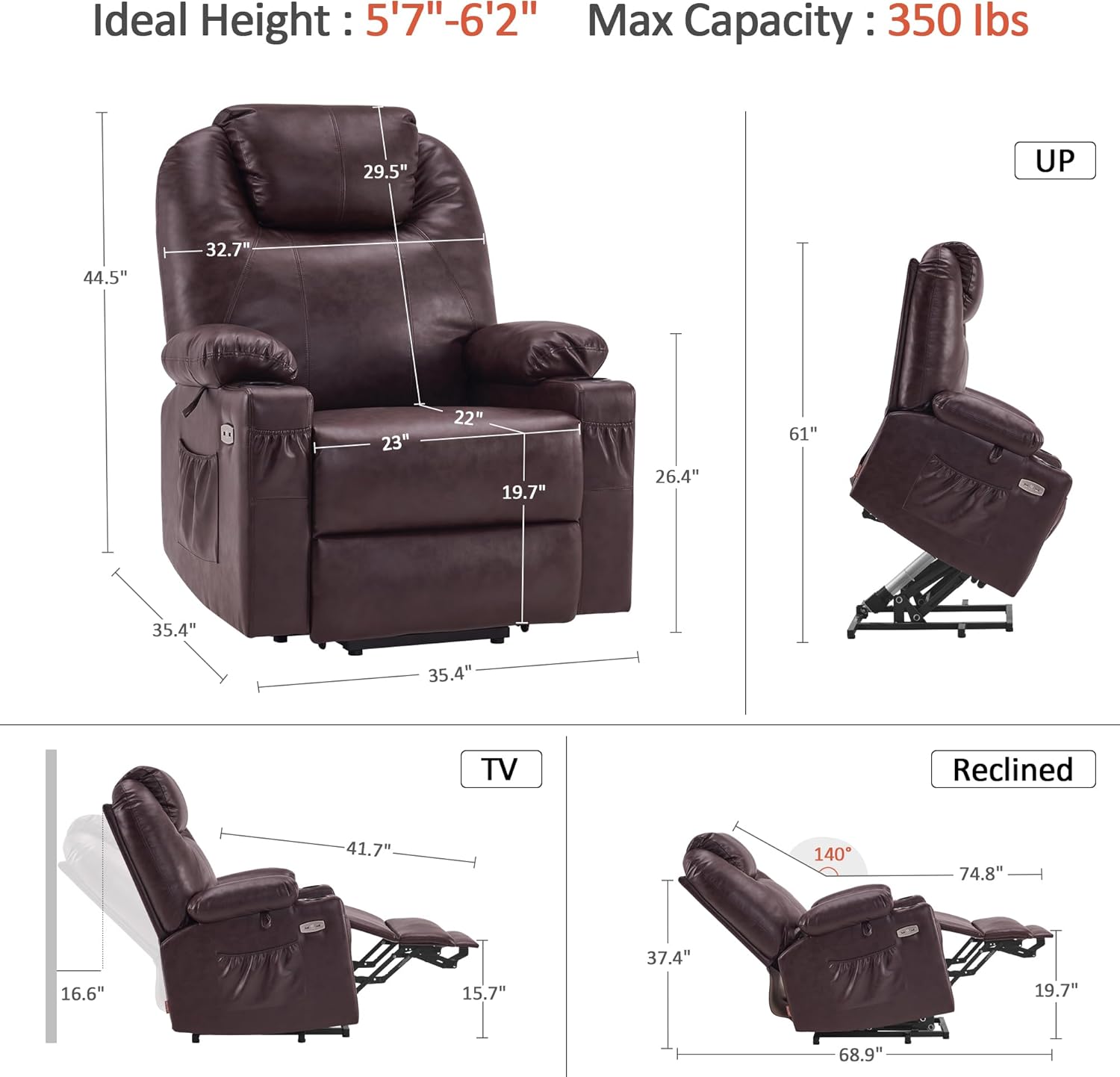
Image: Technical diagram illustrating the chair's dimensions in upright, TV, and fully reclined positions, including the 140-degree maximum recline angle.
Video: Demonstrates the power lift assistance, USB ports, massage, and lumbar heat features of the MCombo Electric Power Lift Recliner Chair in action.
5. Vedligeholdelse
To ensure the longevity and optimal performance of your MCombo Power Lift Recliner Chair, follow these simple maintenance guidelines:
- Produktplejeinstruktioner: Tør rent.
- Regularly inspect all electrical cords and connections for any signs of damage.
- Hold stolen væk fra direkte sollys og varmekilder for at forhindre materialenedbrydning.
- Avoid spilling liquids on the chair. In case of spills, wipe immediately with a dry cloth.
6. Fejlfinding
If you encounter any issues with your MCombo Power Lift Recliner Chair, please refer to the following general troubleshooting tips:
- Chair not responding: Ensure the power cord is securely plugged into both the chair and a working electrical outlet. Check if the power switch on the chair's base is in the 'ON' position.
- Usædvanlige lyde: Check for any obstructions around the chair's mechanism. Ensure all assembly connections are tight.
- Massage/varme virker ikke: Verify the remote control is properly connected and the power is on. Check the timer settings on the massage remote.
- Ved vedvarende problemer bedes du kontakte kundesupport.
7. Produktspecifikationer
| Feature | Specifikation |
|---|---|
| Mærke | MCombo |
| Modelnavn | 6160-7516 |
| Farve | Mørkebrun |
| Størrelse | Stor |
| Produktdimensioner | 35.4" D x 35.4" B x 44.5" H |
| Varens vægt | 117.1 pund |
| Maksimal vægtanbefaling | 350 pund |
| Materiale | Kunstlæder, Skum |
| Speciel funktion | Power Recliner, High Back, Heated, Power Lift, Adjustable Backrest |
| Tilbagelænet Position Tæl | 3 eller mere |
| Antal kopholdere | 2 |
| USB & Type C Ports | Ja |
8. Garanti og support
8.1. Garantioplysninger
Your MCombo Power Lift Recliner Chair is backed by a 2-year limited warranty. This warranty protects your investment with free replacements for Reclining/Lifting Mechanisms, Electrical Systems, Upholstery & Cushions, and Wood/Metal Frame Structures. Please refer to the user manual for complete details and terms.
8.2. Kundesupport
For any questions, assistance with assembly, troubleshooting, or warranty claims, please contact MCombo Customer Support. Refer to the contact information provided on the product packaging or the official MCombo webwebsted.
Ask a question about this manual
Ask about setup, troubleshooting, compatibility, parts, safety, or missing instructions. Manuals+ will review the question and use this page’s manual context to help answer it.