
Star Micronics 39651110
Brugermanual til Star Micronics mC-Print3 termisk POS-printer
Model: 39651110
1. Introduktion
This manual provides comprehensive instructions for the setup, operation, maintenance, and troubleshooting of your Star Micronics mC-Print3 3-inch Ethernet (LAN) / USB / Lightning Thermal POS Printer. Designed for efficiency and reliability, the mC-Print3 is a compact and fast thermal printer suitable for various point-of-sale environments.
The mC-Print3 features a printing speed of 250 mm/sec and incorporates Print-Flat Technology for consistent receipt quality. It offers extensive software compatibility across Windows, iOS, Android, web, and cloud platforms. Connectivity options include USB and Ethernet LAN, with advanced features like CloudPRNT and a peripheral hub. Its splash-proof enclosure ensures durability in demanding settings.
2. Sikkerhedsoplysninger
Please read all safety instructions carefully before operating the printer. Failure to do so may result in injury or damage to the device.
- Ensure the printer is connected to a power source that matches the specified voltage krav.
- Do not expose the printer to excessive moisture or extreme temperatures. The splash-proof design offers protection against splashes, but it is not fully waterproof.
- Undgå at blokere ventilationsåbningerne for at forhindre overophedning.
- Do not attempt to disassemble or repair the printer yourself. Refer all servicing to qualified personnel.
- Use only recommended paper types and sizes to prevent paper jams and ensure optimal print quality.
- Keep hands clear of the paper cutter during operation.

3. Hvad er der i æsken
Upon unboxing your Star Micronics mC-Print3 printer, verify that all the following items are included:
- mC-Print3 Printer
- Test Paper Roll
- USB kabel
- Strømforsyning
4. Opsætning
4.1. Fysisk opsætning
Before connecting the printer, ensure it is placed on a stable, flat surface.

4.2. Ilægning af papir
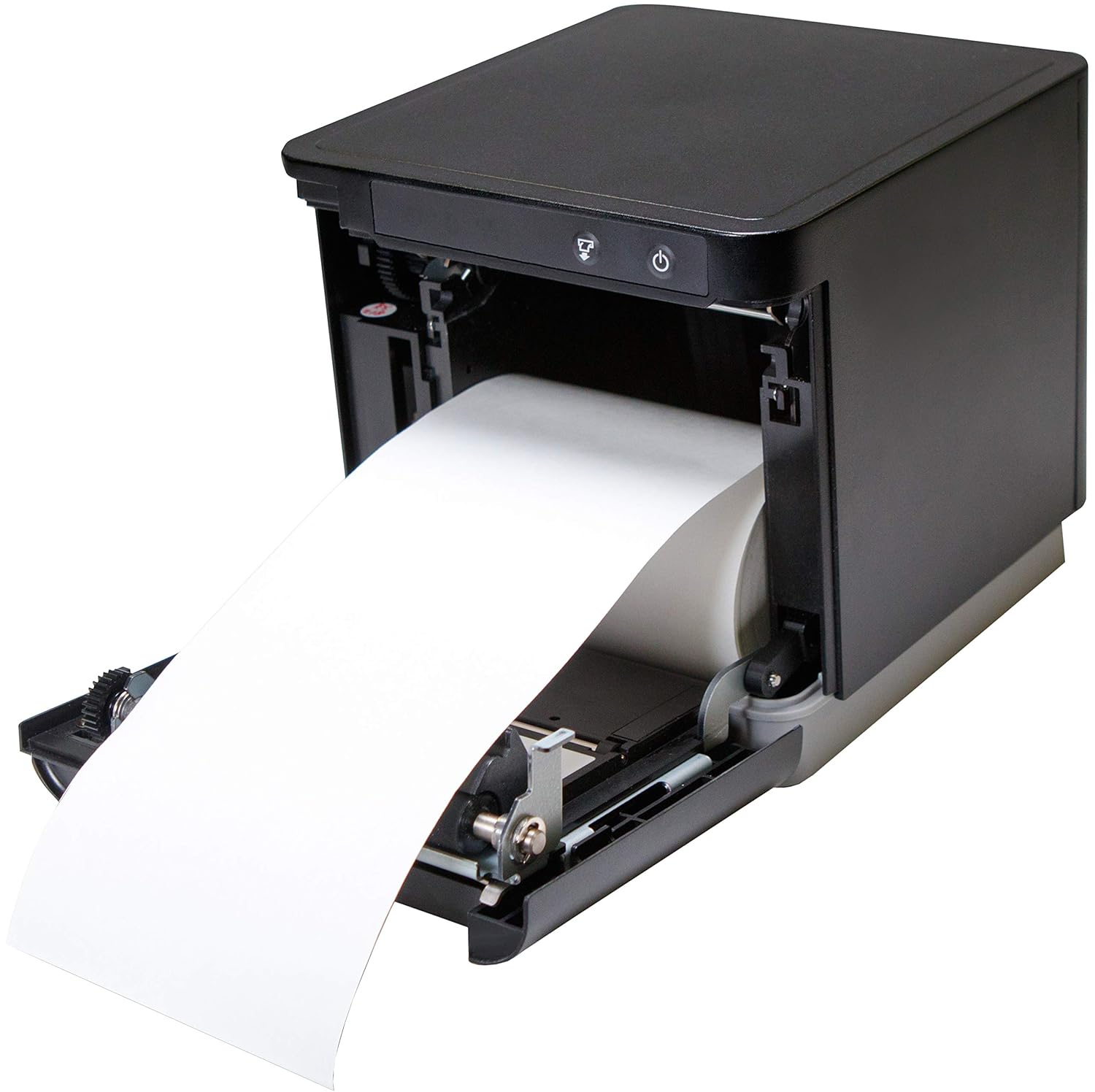
The mC-Print3 features a convenient front-loading paper mechanism.
- Åbn frontlågen på printeren.
- Insert the thermal paper roll, ensuring the paper feeds from the bottom of the roll.
- Pull a small amount of paper past the cutter and close the cover firmly until it clicks.
4.3. Tilslutningskabler
The mC-Print3 offers multiple connectivity options. Connect the power supply and your chosen interface cable (USB or Ethernet LAN) to the rear of the printer. The printer also features a peripheral hub for connecting other POS devices.


4.4. Software og driver installation
The mC-Print3 supports a wide range of operating systems including Windows, iOS, Android, web, and cloud environments. Drivers and SDKs are available from the Star Micronics website to facilitate integration with your POS system.
For iOS devices, the unique SteadyLAN™ technology allows for internet connection to the tablet via the USB cable, eliminating the need for Wi-Fi or Bluetooth for network access.
Video 4.1: This video demonstrates the SteadyLAN technology, showing how an iPad can receive internet connectivity and power directly through the printer's USB connection, simplifying POS setup.
5. Betjeningsvejledning
5.1. Grundlæggende udskrivning
Once connected and configured with your POS software, the printer will automatically receive print commands. The mC-Print3's fast printing speed of 250 mm/sec ensures quick transaction processing.

5.2. Peripheral Hub Functionality
The integrated peripheral hub allows you to connect various devices such as barcode scanners, customer displays, and RFID readers directly to the printer, streamlining your POS setup.
Video 5.1: This video highlights the mC-Print series' compact design and superior connectivity, including the peripheral hub that supports various POS devices like customer displays and barcode scanners.
6. Vedligeholdelse
6.1. Rengøring af printeren
Regelmæssig rengøring hjælper med at opretholde udskriftskvaliteten og forlænger printerens levetid.
- Turn off the printer and disconnect the power cable before cleaning.
- Brug en blød, fnugfri klud dampened with a mild, non-abrasive cleaner to wipe the exterior.
- For the thermal print head and platen roller, use an alcohol-based cleaning pen or a cotton swab lightly damprenset med isopropylalkohol. Lad det tørre helt før brug.
6.2. Paper Roll Replacement
Replace the paper roll as described in Section 4.2 when the paper low sensor is activated or print quality degrades.
7. Fejlfinding
This section addresses common issues you might encounter with your mC-Print3 printer.
| Problem | Mulig årsag | Løsning |
|---|---|---|
| Printeren tænder ikke | Power cable disconnected; faulty power supply. | Check power connections; try a different outlet; replace power supply if necessary. |
| Ingen udskrivning | Paper jam; out of paper; incorrect driver/software settings; connectivity issue. | Clear paper jam and reload paper; install correct drivers; verify USB/Ethernet connection. |
| Dårlig printkvalitet | Dirty print head; incorrect paper type; worn-out print head. | Clean the print head; ensure correct thermal paper is used; contact support if print head is worn. |
| Paper getting stuck/hole in receipt | Paper not loaded correctly; internal mechanism issue. | Ensure paper is loaded straight and cover is closed properly. If issue persists, contact Star Micronics support. |
8. Specifikationer
- Modelnavn: mC-Print3
- Produktdimensioner: 5.5 x 5.25 x 5 tommer
- Varens vægt: 2.8 pund
- Udskrivningsteknologi: Termisk
- Maksimal udskrivningshastighed: 250 mm/sec (Monochrome)
- Forbindelse teknologi: Wired Connectivity (USB, Ethernet LAN)
- Farve: Sort
- Fabrikant: Star Micronics America, Inc
- Speciel funktion: Ethernet, Peripheral Hub, CloudPRNT, SteadyLAN™
9. Garanti og support
The Star Micronics mC-Print3 printer typically comes with a manufacturer's limited warranty. For specific warranty terms and conditions, please refer to the documentation included with your purchase or visit the official Star Micronics webwebsted.
For technical support, driver downloads, and additional resources, please visit the Star Micronics Store on Amazon eller deres officielle supportportal.
Relaterede dokumenter - 39651110
 |
Star Micronics mC-Print3 Series Thermal Receipt Printers | Datasheet & Specifications Explore the Star Micronics mC-Print3 series thermal receipt printers, including the mC-Print31Ci, mC-Print31CBi, and mC-Print31CWBI models. Featuring high-speed 400mm/sec printing, versatile connectivity (USB-C, Ethernet, Bluetooth, WLAN), Ultra-C technology, and IP22 rating, these printers are ideal for retail and hospitality POS systems. Discover detailed specifications, model numbers, and eco-friendly features. |
 |
Star Micronics CUPS Driver Software Manual for Linux Comprehensive software manual for installing and configuring Star Micronics thermal, dot matrix, and kiosk printers on Linux systems using CUPS drivers. |
 |
Star CUPS Driver Software Manual til macOS This comprehensive software manual guides users through the installation, configuration, and operation of the Star CUPS driver for macOS. It covers setup procedures, printer function settings, network connectivity (Ethernet, Bluetooth), and command-line printing for Star Micronics' range of thermal, portable, dot matrix, and kiosk printers. Essential for optimizing POS and printing solutions. |
 |
Star Micronics Recommended Paper Roll List A comprehensive compatibility guide for recommended paper rolls for Star Micronics thermal and mobile printers, including specifications for thermal, label, and linerless paper. |
 |
StarPRNT-kommandospecifikationer - Star Micronics teknisk manual Omfattende kommandospecifikationer til StarPRNT-linjetermoprintere fra Star Micronics. Detaljeret beskrivelse af kommandoer til skrifttyper, udskrivningstilstande, stregkoder, grafik og understøttede modeller som mPOP-, SM-L-, SM-S- og mC-Print-serien. |
 |
Star CUPS Driver Software Manual til macOS Denne manual indeholder omfattende opsætningsprocedurer og funktionelle oversigter for Star CUPS-driveren på macOS. Den dækker installation, afinstallation, printerfunktioner, indstillinger for papirstørrelse, retningslinjer for Ethernet-miljø og brug af IP-kommandoer for forskellige Star-printere, herunder termiske, bærbare og matrixmodeller. |
Ask a question about this manual
Ask about setup, troubleshooting, compatibility, parts, safety, or missing instructions. Manuals+ will review the question and use this page’s manual context to help answer it.