
Indledning
The LogiLink UA0356 is a compact USB-C to 3.5mm TRRS audio adapter designed to provide high-fidelity audio output and microphone input for devices lacking a dedicated 3.5mm jack or requiring an audio upgrade. It features an integrated Digital-to-Analog Converter (DAC) to ensure clear and high-quality sound. This manual provides essential information for the proper setup, operation, and maintenance of your UA0356 sound card.
Sikkerhedsoplysninger
- Hold enheden tør. Udsæt den ikke for fugt eller ekstreme temperaturer.
- Forsøg ikke at skille enheden ad eller ændre den. Dette kan ugyldiggøre garantien og forårsage skade.
- Undgå at tabe eller udsætte enheden for kraftige stød.
- Opbevares utilgængeligt for børn.
- Dispose of the device according to local regulations for electronic waste.
Pakkens indhold
- 1 x LogiLink UA0356 USB-C Sound Card
Produkt overview
The LogiLink UA0356 is a compact adapter with a USB-C male connector on one end and a 3.5mm TRRS female jack on the other. It integrates a Digital-to-Analog Converter (DAC) for enhanced audio performance.

Figur 1: Forside view of the LogiLink UA0356, highlighting the 3.5mm TRRS audio jack.

Figur 2: Bagside view of the LogiLink UA0356, showing the USB-C male connector.
Opsætningsinstruktioner
- Identify USB-C Port: Locate an available USB-C port on your smartphone, tablet, laptop, or other compatible device.
- Connect UA0356: Insert the USB-C male connector of the LogiLink UA0356 into the USB-C port of your device. Ensure it is fully seated.
- Tilslut headset: Plug your 3.5mm TRRS headset (with or without an integrated microphone) into the 3.5mm female jack of the UA0356.
- Automatisk genkendelse: The device is plug-and-play and typically requires no additional drivers. Your operating system should automatically recognize the new audio device.
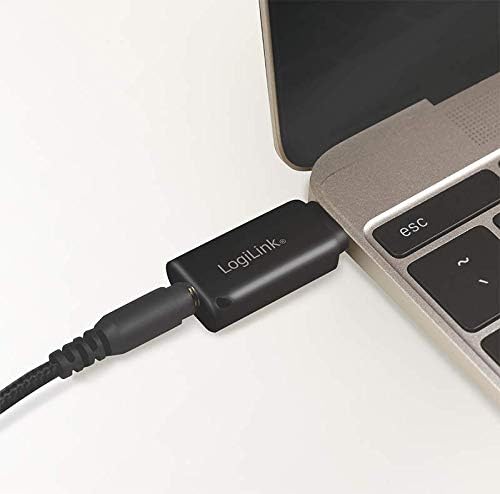
Figure 3: The UA0356 connected to a laptop, ready for use with a headset.
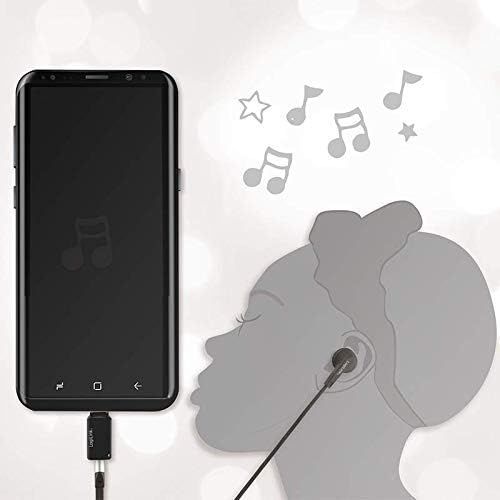
Figure 4: The UA0356 connected to a smartphone, enabling audio output to a headset.
Betjeningsvejledning
Once connected, the LogiLink UA0356 functions as your device's primary audio output and input. You can control volume and other audio settings directly from your connected device.
- Lydafspilning: Play any audio content (music, videos, calls) on your device. Sound will be routed through the UA0356 to your connected 3.5mm headset.
- Mikrofonindgang: If your headset has a built-in microphone, it will be enabled for voice calls, recordings, or voice commands through the UA0356. Ensure your device's audio settings recognize the external microphone.
- DAC Functionality: The integrated DAC processes digital audio signals from your device into high-quality analog sound for your headset, improving the overall audio experience.

Figure 5: Illustrates the connection of a 3.5mm TRRS headset to the UA0356.

Figure 6: The UA0356's integrated Digital-to-Analog Converter (DAC) enhances audio quality.
Opretholdelse
- Rensning: Brug en blød, tør klud til at rengøre enhedens yderside. Brug ikke flydende rengøringsmidler eller slibende materialer.
- Opbevaring: Store the UA0356 in a cool, dry place when not in use.
- Håndtering: Avoid bending or twisting the connectors excessively to prevent internal damage.
Fejlfinding
| Problem | Mulig årsag | Løsning |
|---|---|---|
| Ingen lydudgang |
|
|
| Mikrofon virker ikke |
|
|
| Dårlig lydkvalitet |
|
|
Specifikationer
| Feature | Detalje |
|---|---|
| Mærke | LogiLink |
| Modelnavn | UA0356 |
| Hardware-interface | USB-C (han) |
| Lydudgang | 3.5 mm TRRS (hun) |
| Lydudgangstilstand | Digital |
| Kompatible enheder | Headsets, Smartphones, Tablets, Laptops with USB-C |
| Surround Sound Kanalkonfiguration | 2.0 |
| Maksimum Sample Sats | 44.1 kHz |
| Signal-støj-forhold (SNR) | 120 dB |
| Farve | Sort |
Garanti og support
LogiLink products are designed for reliability and performance. This product is covered by a manufacturer's warranty. For specific warranty terms, technical support, or service inquiries, please refer to the warranty card included with your purchase or visit the official LogiLink webwebsted.
Gem venligst dit købsbevis for garantikrav.