
HUAWEI GT
HUAWEI Watch GT Smartwatch User Manual
Model: GT | Brand: HUAWEI
Indledning
This manual provides comprehensive instructions for the HUAWEI Watch GT smartwatch. It features a 1.39-inch AMOLED touchscreen, integrated GPS, and a heart rate monitor. This guide will assist you with initial setup, daily operation, maintenance, and understanding the device's capabilities.
The HUAWEI Watch GT is designed for users seeking a blend of style and advanced health and fitness tracking. Its robust build, including a ceramic case and silicone band, ensures durability for various activities.

Billede: Forside view of the HUAWEI Watch GT smartwatch with an orange silicone band.
Nøglefunktioner
- 1.39-inch AMOLED Touchscreen: Provides vibrant colors and clear visibility.
- Indbygget GPS: Accurate tracking for outdoor activities like running, cycling, and climbing.
- Pulsmåler: Continuously tracks heart rate for health insights.
- Søvnovervågning: Analyserer søvnmønstre for at forbedre søvnkvaliteten.
- Vandtæthed: Rated for 50 meters, suitable for swimming.
- Lang batterilevetid: Designed for extended use between charges.
- Flere sportstilstande: Supports various activities including triathlon, running, walking, cycling, swimming, and climbing.
- Holdbar konstruktion: Features a ceramic case and silicone band.
Opsætning
1. Udpakning og indledende inspektion
Carefully remove all components from the packaging. Verify that all items are present: the HUAWEI Watch GT, charging cable, and documentation.

Image: The HUAWEI Watch GT smartwatch as it appears when first unboxed.
2. Opladning af enheden
Before first use, fully charge your HUAWEI Watch GT. Connect the charging cable to the watch's charging port and plug the other end into a USB power adapter (not included) or a computer's USB port. The watch display will indicate charging status.

Billede: Bagside view of the HUAWEI Watch GT, highlighting the heart rate sensor and charging contacts.
3. Parring med din smartphone
- Download the HUAWEI Health app from your smartphone's app store (compatible with iOS and Android devices).
- Åbn appen og følg instruktionerne på skærmen for at oprette en konto eller logge ind.
- Sørg for, at Bluetooth er aktiveret på din smartphone.
- In the HUAWEI Health app, navigate to 'Devices' and select 'Add device'. Choose your HUAWEI Watch GT from the list of available devices.
- Bekræft parringsanmodningen på både dit ur og din smartphone.
Betjeningsvejledning
Grundlæggende navigation
- Stryg op/ned: Scroll through notifications and quick settings.
- Stryg til venstre/højre: Access different widgets like heart rate, weather, and activity data.
- Tryk på: Vælg et element, eller åbn et program.
- Tryk på den øverste knap: Access the app list or return to the home screen.
- Tryk på den nederste knap: Customizable shortcut, typically for workout modes.

Image: The HUAWEI Watch GT displaying a watch face with time and date.
Pulsovervågning
The HUAWEI Watch GT continuously monitors your heart rate. You can view your current heart rate and historical data through the heart rate widget or the HUAWEI Health app. Ensure the watch is snug on your wrist for accurate readings.

Image: A user wearing the HUAWEI Watch GT, which displays heart rate information on its screen.
GPS-sporing
The built-in GPS provides precise location tracking for outdoor workouts. Start an outdoor activity mode (e.g., Outdoor Run, Cycling) to activate GPS. The watch will record your route, distance, and pace.

Image: The HUAWEI Watch GT showing GPS signal acquisition, indicating readiness for outdoor tracking.
Træningstilstande
Select from various pre-installed workout modes to track your activities. Each mode is optimized to provide relevant metrics for that specific exercise. Examples include running, cycling, swimming, and triathlon.

Image: The HUAWEI Watch GT displaying a selection of workout icons, indicating different sport modes.
Søvnsporing
Wear your watch to bed to automatically track your sleep. The HUAWEI Health app will provide detailed analysis of your sleep stages (deep, light, REM) and offer suggestions for improvement.

Image: The HUAWEI Watch GT displaying sleep duration and quality metrics.
Opretholdelse
- Rensning: Regularly clean the watch and band with a soft, damp klæde. Undgå skrappe kemikalier.
- Vandtæthed: The watch is water resistant up to 50 meters. It is suitable for shallow-water activities like swimming in a pool or ocean. Do not use it for diving, hot showers, or saunas, as steam and hot water can compromise the seals.
- Opbevaring: Opbevar uret et køligt og tørt sted, når det ikke er i brug.
- Opladningskontakter: Hold opladningskontakterne på bagsiden af uret rene og tørre for at sikre korrekt opladning.
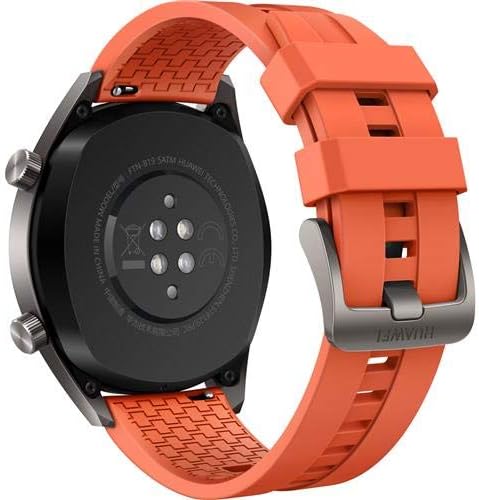
Billede: Bagside view of the HUAWEI Watch GT smartwatch, showing the heart rate sensor and charging pins, important for maintenance.
Fejlfinding
- Uret tænder ikke: Sørg for, at uret er fuldt opladet. Tilslut det til opladeren, og vent et par minutter, før du forsøger at tænde det.
- Kan ikke parres med smartphone:
- Sørg for, at Bluetooth er aktiveret på din telefon.
- Sørg for, at HUAWEI Health-appen er opdateret til den nyeste version.
- Genstart både dit ur og din smartphone.
- Prøv at ophæve parringen og parre enheden igen via appen.
- Inaccurate heart rate/GPS data: Ensure the watch is worn snugly on your wrist, not too loose or too tight. For GPS, ensure you are in an open area with a clear view af himlen.
- Kort batterilevetid: Check if features like always-on display or continuous heart rate monitoring are enabled, as these can consume more power. Adjust settings in the HUAWEI Health app to optimize battery life.
Specifikationer
| Feature | Detalje |
|---|---|
| Mærke | HUAWEI |
| Modelnavn | GT |
| Skærmstørrelse | 1.39 tommer |
| Display Type | AMOLED |
| Opløsning | 454 x 454 |
| Forbindelsesteknologi | Bluetooth, WiFi |
| GPS | Built-in GPS (Galileo, Glonass, GPS) |
| Særlige funktioner | GPS, pulsmåler |
| Operativsystem | Android (Compatible with iOS and Android devices) |
| Vandmodstandsdybde | 50 Meters (IP68) |
| Båndmaterialetype | Silikone |
| Etuimaterialetype | Keramisk |
| Human Interface Input | Touchskærm |
| Målte metrikker | Optisk pulssensor |
Garanti og support
This HUAWEI Watch GT includes a Canadian Warranty. For specific warranty terms and conditions, please refer to the warranty card included in your product packaging or visit the official HUAWEI support webwebsted.
For technical support, troubleshooting assistance, or service inquiries, please contact HUAWEI customer support. Manufacturer contact information: Plano, TX 75024, US.
Produktvideoer
MayuFit Fitness Tracker Overview
Video: Denne video giver et overblikview of the MayuFit Fitness Tracker, demonstrating its features and functionality. While not specifically the HUAWEI Watch GT, it illustrates general fitness tracker capabilities.