
1. Introduktion
This manual provides comprehensive instructions for the IMILAB CMSXJ16A Smart Home Security Camera, a product of XIAOMI. It covers setup, operation, maintenance, and troubleshooting to ensure optimal performance and security monitoring. Please read this manual carefully before using the product and retain it for future reference.
2. Produktet er slutview
2.1 Pakkens indhold
Bekræft at alle varer er til stede i pakken:
- IMILAB Home Security Camera Basic x 1
- Brugsanvisning x 1
- Strømkabel x 1
- Power Adapter (UK/EU/US) x 1
- Wall Mounting Package x 1 (includes screws and wall plugs)
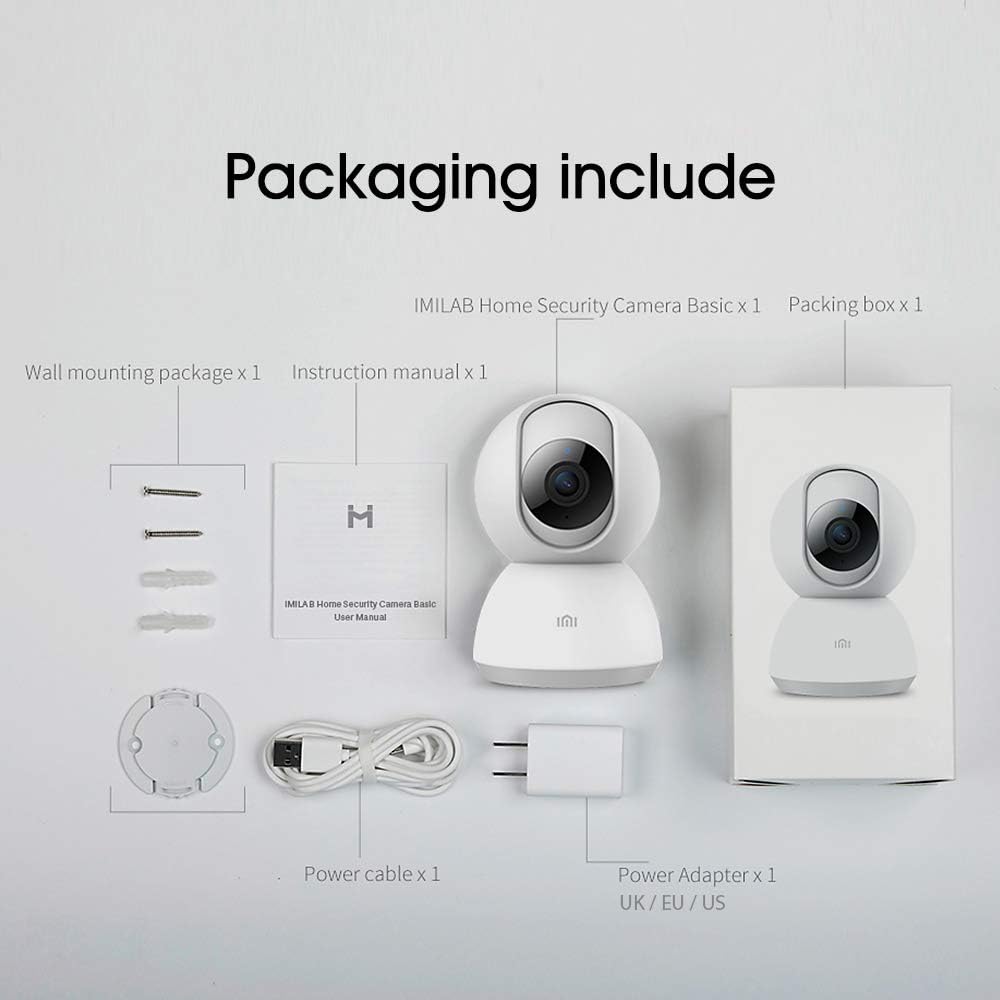
Image: Contents of the IMILAB CMSXJ16A camera package.
2.2 Kamerakomponenter
The IMILAB CMSXJ16A camera features a compact, spherical design with a rotating base for 360-degree coverage. Key components include the lens, microphone, speaker, status indicator light, and power port.

Billede: Forside view of the IMILAB CMSXJ16A camera.
2.3 Nøglefunktioner
- FHD (1080P) Resolution: Provides clear and detailed image quality.
- 360° rotation: Tilbyder panoramaudsigt viewing for comprehensive area coverage.
- Glare-Free Night Vision: Equipped with F2.1 aperture and 8x 940mm infrared LEDs for a visible distance of 10m.
- True Color Night Vision: Maintains full color in low light conditions, even at 100 lumens.
- AI menneskelig detektion: Advanced AI reduces unnecessary alerts by 70% for more accurate notifications.
- Crying Baby Notification: Alerts you to the sound of a crying baby.
- Flere opbevaringsmuligheder: Supports cloud storage, up to 64GB Micro TF card, and NAS storage.
- H.265 videokodning: Efficiently compresses video, saving storage space while maintaining quality.
3. Opsætning
3.1 Tænd
- Tilslut strømkablet til kameraets strømport.
- Sæt strømadapteren i en almindelig stikkontakt.
- The camera will power on, and the status indicator light will begin to flash, indicating it is ready for connection.
3.2 Appinstallation
Download the official IMILAB Home Security app from your smartphone's app store. The app is compatible with Android 4.4 and above, and iOS 8.0 and above.
- Søg efter "IMILAB Home Security" in the Google Play Store (for Android) or Apple App Store (for iOS).
- Download og installer appen.
- Åbn appen og følg instruktionerne på skærmen for at oprette en konto eller logge ind.
3.3 Tilslutning til Wi-Fi
Follow the in-app instructions to connect your camera to your home Wi-Fi network. This typically involves scanning a QR code generated by the app with the camera's lens.
3.4 Montering af kameraet
The camera supports wall mounting. Use the provided wall mounting package for secure installation.
- Vælg et passende monteringssted, og sørg for et frit felt view og adgang til en stikkontakt.
- Use the mounting base as a template to mark drill holes on the wall.
- Bor huller og isæt vægdyvlerne.
- Secure the mounting base to the wall with screws.
- Fastgør kameraet til monteringsbasen.
4. Betjeningsvejledning
4.1 Live View og fjernbetjening
Once connected, open the IMILAB Home Security app to access the live video feed from your camera. You can remotely control the camera's 360-degree rotation to view different areas of your space.

Billede: Live view of the camera feed on mobile devices, demonstrating H.265 encoding efficiency.
4.2 Nattesyn
The camera automatically switches to night vision mode in low light conditions. It features glare-free infrared night vision and true color night vision for clear visibility even in very dim environments.

Image: Demonstration of glare-free and true color night vision capabilities.
4.3 AI Human Detection and Notifications
The camera utilizes AI to detect human movement, significantly reducing false alarms from pets or other non-human movements. You will receive precise notifications on your smartphone when human activity is detected.

Image: AI movement notification interface in the mobile application.
4.4 Crying Baby Detection
Enable the crying baby detection feature in the app to receive alerts if the camera detects the sound of a baby crying, providing an additional layer of monitoring for nurseries.
4.5 Videooptagelse og -lagring
The camera supports real-time video recording with multiple storage options:
- Cloud Storage: Subscribe to cloud services for secure off-site storage of your recordings.
- Micro TF-kort: Insert a Micro TF card (up to 64GB, not included) into the camera for local storage.
- NAS-lagring: Connect the camera to a Network Attached Storage (NAS) device for expanded local storage capabilities.
4.6 H.265 videokodning
The camera uses H.265 video encoding, which allows for more efficient compression of video files. This means you can save the same quality video with approximately 50% less file size compared to H.264, optimizing storage and bandwidth usage.
5. Vedligeholdelse
For at sikre dit kameras levetid og optimale ydeevne skal du følge disse retningslinjer for vedligeholdelse:
- Rensning: Tør forsigtigt kameralinsen og huset af med en blød, tør klud. Brug ikke skrappe kemikalier eller slibende rengøringsmidler.
- Placering: Ensure the camera is placed in a stable environment, away from direct sunlight, extreme temperatures, and high humidity.
- Firmwareopdateringer: Tjek regelmæssigt appen for tilgængelige firmwareopdateringer for at sikre, at dit kamera har de nyeste funktioner og sikkerhedsforbedringer.
6. Fejlfinding
If you encounter issues with your IMILAB CMSXJ16A camera, refer to the following common solutions:
- Kameraet forbinder ikke: Ensure your Wi-Fi network is 2.4GHz (5GHz is not supported). Check Wi-Fi signal strength. Restart the camera and your router.
- Dårlig billedkvalitet: Clean the camera lens. Ensure adequate lighting in the environment. Check your internet connection speed.
- Ingen notifikationer: Verify that notifications are enabled in both the camera app settings and your smartphone's system settings. Check network connectivity.
- Kamera offline: Check the power connection. Ensure your Wi-Fi network is active and the camera is within range. Restart the camera.
- Micro TF Card Not Detected: Ensure the card is inserted correctly. Format the card through the app if it's new or has issues. Use a compatible Micro TF card (up to 64GB).
7. Specifikationer
| Feature | Specifikation |
|---|---|
| Modelnummer | CMSXJ16A |
| Dimensioner (L x B x H) | 10.8 x 7.6 x 7.6 cm |
| Vægt | 211 gram |
| Video opløsning | 1080p (FHD) |
| Felt af View / Angle of View | 360 grader |
| Nattesynsafstand | 10 meter |
| Infrarøde lysdioder | 8 x 940 mm |
| Blænde | F2.1 |
| Forbindelsesteknologi | Wired, Wireless (Wi-Fi 2.4GHz) |
| Strømkilde | Mains Powered (via 5V, 5W adapter) |
| Kompatible enheder | Smartphone (Android 4.4+, iOS 8.0+) |
| Opbevaringsmuligheder | Cloud, Micro TF Card (max 64GB), NAS |
| Videooptagelsesformat | MP4 (H.265 encoding) |
| Indendørs/Udendørs brug | Indendørs |
| Monteringstype | Vægmontering |
8. Garanti og support
For warranty information and technical support, please refer to the official IMILAB webwebstedet eller kontakt deres kundeservice. Gem din købskvittering som købsbevis i tilfælde af garantikrav.