
Awei A831BL
Awei A831BL In-Ear Bluetooth Headset User Manual
Model: A831BL
Indledning
This manual provides detailed instructions for the proper use and maintenance of your Awei A831BL In-Ear Bluetooth Headset. Please read this manual carefully before using the device to ensure optimal performance and longevity.
Produkt overview
The Awei A831BL is a wireless in-ear Bluetooth headset designed for mobile phone use, offering clear audio and a built-in microphone. It is suitable for various activities, including sports.
Nøglefunktioner:
- Trådløs Bluetooth-forbindelse
- In-ear design
- Integreret mikrofon til opkald
- Up to 8 hours of continuous talk/music time
- Pure bass and high-quality sound
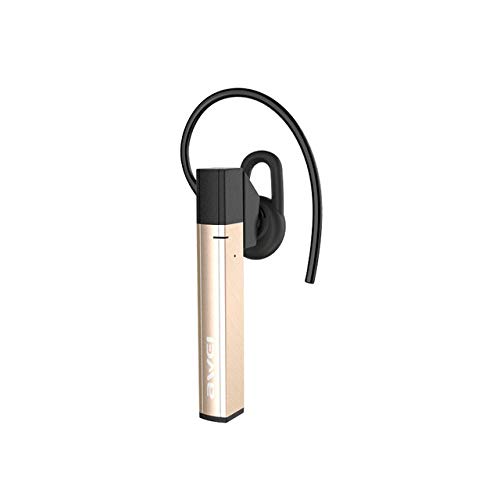
Figur 1: Awei A831BL In-Ear Bluetooth Headset. This image shows the compact design of the headset, highlighting its in-ear form factor and wireless nature.
Opsætning
1. Opladning af headsettet
Before first use, fully charge the headset. Connect the charging cable to the headset's charging port and the other end to a USB power source (e.g., computer, wall adapter). The indicator light will typically show red during charging and turn blue or off when fully charged.
2. Parring med en Bluetooth-enhed
- Sørg for, at headsettet er slukket.
- Press and hold the multi-function button (usually the power button) for approximately 5-7 seconds until the indicator light flashes red and blue alternately. This indicates pairing mode.
- On your mobile phone or Bluetooth-enabled device, go to the Bluetooth settings and enable Bluetooth.
- Søg efter available devices. The headset should appear as "Awei A831BL" or similar.
- Select the headset from the list to connect. If prompted for a password, enter "0000".
- Once successfully paired, the indicator light will typically flash blue slowly or turn off, and you may hear an audible confirmation.
Note: The headset will automatically attempt to reconnect to the last paired device when turned on, if the device's Bluetooth is active and within range.
Betjeningsvejledning
Tænd/sluk
- Tænd: Press and hold the multi-function button for about 3 seconds until the blue indicator light flashes and you hear a power-on prompt.
- Sluk: Press and hold the multi-function button for about 3-4 seconds until the red indicator light flashes and you hear a power-off prompt.
Musikafspilning
- Afspil/pause: Tryk én gang på multifunktionsknappen.
- Næste nummer: Tryk på knappen Lydstyrke op (+), og hold den nede.
- Forrige nummer: Tryk og hold nede på lydstyrke ned-knappen (-).
- Lydstyrke op: Tryk kort på knappen Lydstyrke op (+).
- Skrue ned for lyden: Tryk kort på lydstyrke ned-knappen (-).
Opkaldsstyring
- Besvar/afslut opkald: Tryk én gang på multifunktionsknappen.
- Afvis opkald: Press and hold the multi-function button for about 2 seconds.
- Genopkald sidste nummer: Dobbelttryk på multifunktionsknappen.
Opretholdelse
- Keep the headset dry. Avoid exposure to moisture or liquids.
- Clean the headset with a soft, dry cloth. Do not use abrasive cleaners.
- Opbevar headsettet et køligt og tørt sted væk fra ekstreme temperaturer.
- Undgå at tabe headsettet eller udsætte det for kraftige stød.
- Forsøg ikke at skille headsettet ad eller ændre det, da dette vil ugyldiggøre garantien.
Fejlfinding
| Problem | Løsning |
|---|---|
| Headsettet tænder ikke. | Sørg for, at headsettet er fuldt opladet. Tilslut det til en strømkilde, og prøv igen. |
| Kan ikke parres med enheden. |
|
| Ingen lyd eller lav lydstyrke. |
|
| Opkaldskvaliteten er dårlig. |
|
Specifikationer
| Feature | Detalje |
|---|---|
| Modelnummer | A831BL |
| Mærke | Awei |
| Farve | Guld |
| Forbindelsesteknologi | Trådløs (Bluetooth) |
| Hovedtelefonens formfaktor | In-Ear |
| Mikrofon | Ja |
| Støjreduktion | Ingen |
| Batterilevetid (tale/musik) | Op til 8 timer |
| Kontroltype | Lydstyrkekontrol |
| Materiale | Plast |
| Inkluderede komponenter | Ørepuder |
| Produktdimensioner | 16.8 x 10.4 x 3.6 cm; 150 gram |
Garanti og support
For warranty information or technical support, please refer to the documentation included with your purchase or contact the manufacturer directly. Keep your proof of purchase for warranty claims.