
1. Introduktion
Thank you for choosing the Impex THUNDER T4 Stereo System. This 2.1 channel speaker system is designed to provide high-quality audio for your entertainment needs. It features multiple connectivity options including USB, MMC, FM radio, and Bluetooth, along with karaoke functionality. This manual provides essential information for the safe and efficient operation of your device.
2. Sikkerhedsinstruktioner
- Read all instructions carefully before operating the system.
- Gem manualen til fremtidig reference.
- Udsæt ikke enheden for regn eller fugt for at forhindre brand eller elektrisk stød.
- Sørg for ordentlig ventilation; bloker ikke ventilationsåbninger.
- Placer enheden på en stabil, flad overflade.
- Åbn ikke c'enasing. Overlad al service til kvalificeret personale.
- Tag stikket ud af enheden under tordenvejr, eller når den ikke skal bruges i længere perioder.
- Undgå at placere enheden i nærheden af varmekilder såsom radiatorer, varmeapparater, komfurer eller andre apparater (herunder ampløftere), der producerer varme.
3. Pakkens indhold
Kontroller venligst, at følgende varer er inkluderet i din pakke:
- Impex THUNDER T4 Main Speaker Unit
- Satellithøjttalere (2 enheder)
- Remote Control (if applicable, not explicitly mentioned but common for stereo systems)
- Lydforbindelseskabler
- Brugervejledning (dette dokument)
- Microphone Set (for Karaoke)
4. Produktet er slutview
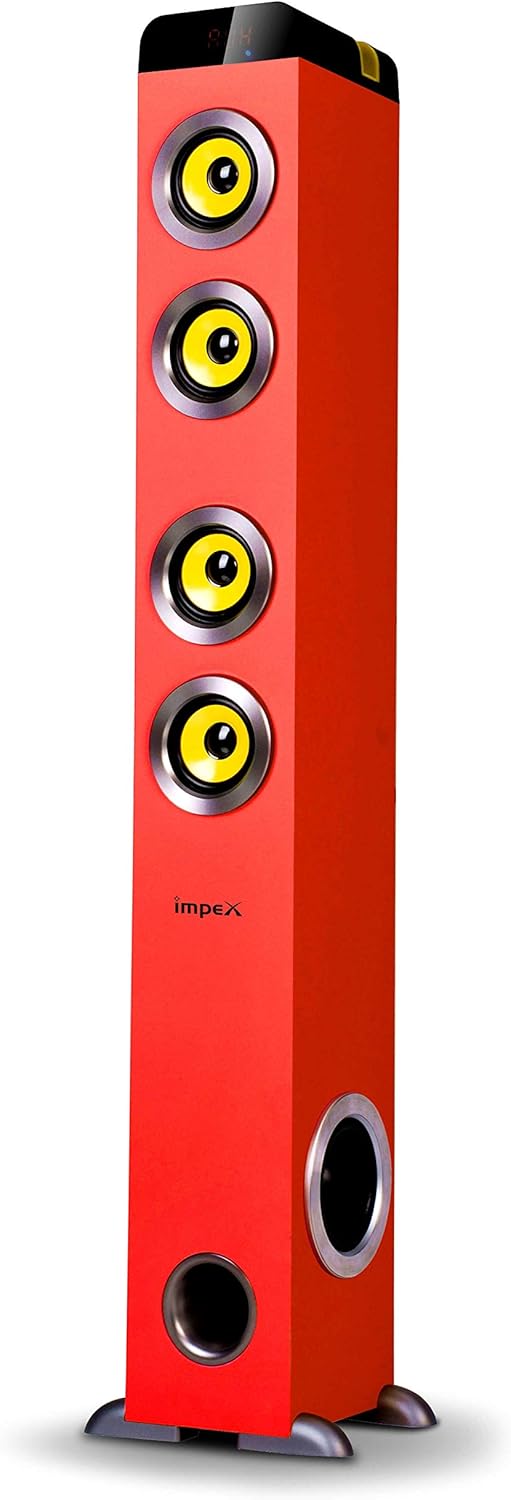
Figur 1: Impex THUNDER T4 Main Speaker Unit. This image displays the Impex THUNDER T4 stereo system, a tall, red tower speaker. It features four prominent yellow speaker cones arranged vertically on the front panel. Towards the bottom, there is a circular bass port. The 'Impex' logo is visible on the front. The speaker stands on a dark base with small feet.
The Impex THUNDER T4 is a 2.1 channel speaker system. The main unit (subwoofer and primary speakers) is a tower design, complemented by two satellite speakers (wooden satellite, speaker unit: 4"+3"*2+1"*2). The system integrates various input options and controls for a versatile audio experience.
5. Opsætning
- Placering: Position the main speaker unit and satellite speakers in your desired location. For optimal sound, ensure the main unit is on a stable surface.
- Tilslut satellithøjttalere: Connect the satellite speakers to the main unit using the provided audio cables. Ensure connections are secure.
- Strømtilslutning: Plug the power cord into the main speaker unit and then into a suitable wall outlet.
- Første gang tændt: Press the Power button on the main unit or remote control to turn on the system.
- Lydkildeforbindelse: Connect your desired audio source (e.g., TV, smartphone, computer) using the appropriate input method (Bluetooth, USB, AUX).
6. Betjeningsvejledning
6.1. Grundlæggende betjening
- Tænd/sluk: Use the Power button on the unit or remote.
- Lydstyrkekontrol: Adjust the master volume using the dedicated knob on the unit or volume buttons on the remote.
- Valg af tilstand: Press the "Mode" button to cycle through available input sources: Bluetooth, FM, USB, MMC, AUX.
6.2. Bluetooth-tilstand
- Switch the system to Bluetooth mode. The display will indicate "BT".
- Aktivér Bluetooth på din mobilenhed eller computer.
- Søg efter "THUNDER T4" in your device's Bluetooth settings and pair.
- Once connected, you can play audio from your device through the stereo system.
6.3. FM-radiotilstand
- Skift systemet til FM-tilstand.
- Press the "Scan" button (if available) to automatically search and save available radio stations.
- Brug knapperne "Forrige" og "Næste" til at navigere gennem gemte stationer.
6.4. USB/MMC Mode
- Insert a USB flash drive or MMC card into the respective slot.
- The system will automatically switch to USB/MMC mode and begin playing audio files.
- Use the play/pause, previous, and next buttons to control playback.
6.5. Karaoke-funktion
- Connect the microphone to the designated microphone input jack.
- Adjust the microphone volume and echo effects (if available) using the controls on the unit or remote.
- Play your desired karaoke track from any input source.
7. Vedligeholdelse
- Rensning: Brug en blød, tør klud til at rengøre enhedens yderside. Brug ikke flydende rengøringsmidler eller aerosoler.
- Ventilation: Sørg for, at ventilationsåbningerne ikke er blokeret af støv eller snavs.
- Opbevaring: Hvis enheden opbevares i længere tid, skal den tages ud af stikkontakten og opbevares et køligt og tørt sted.
8. Fejlfinding
| Problem | Mulig årsag | Løsning |
|---|---|---|
| Ingen strøm | Netledning ikke tilsluttet; stikkontakt defekt | Kontroller strømkablets forbindelse; prøv en anden stikkontakt |
| Ingen lyd | Volume too low; Incorrect input mode; Audio cables loose | Increase volume; Select correct input mode; Check audio cable connections |
| Bluetooth-parringsfejl | Device too far; Bluetooth not enabled on source; Incorrect pairing procedure | Move device closer; Enable Bluetooth; Refer to Bluetooth pairing instructions |
| USB/MMC not playing | Ikke understøttet file format; USB/MMC card faulty; Card not inserted correctly | Sikre files are compatible; Try a different USB/MMC card; Reinsert card |
9. Specifikationer
| Mærke | Impex |
| Modelnummer | THUNDER T4 |
| Type | Stereo System (2.1 Channel) |
| Udgangseffekt | 60 watt |
| Frekvensrespons | 40-20,000 Hz (Assumed from 40-20Hz in description, typically 20kHz) |
| Speaker Unit Configuration | Main: 4" Woofer; Satellites: 3" x 2 + 1" x 2 |
| Forbindelsesteknologi | USB, Bluetooth |
| Særlige funktioner | FM Tuner, MMC Card Slot, Karaoke Function (with Mic set) |
| Lydudgangstilstand | Stereoanlæg |
| Fabrikant | Impex |
| Varemodelnummer | THUNDER T4 Red |
| ASIN | B081TNH5SM |
| Pakkedimensioner | 6.97 x 5.33 x 3.01 cm; 1.1 g (Note: This dimension may refer to a component or packaging detail, not the full system.) |
Bemærk: Specifikationerne kan ændres uden forudgående varsel.
10. Garanti og support
For warranty information and customer support, please refer to the warranty card included with your product or visit the official Impex webwebstedet. Behold din købskvittering som købsbevis.