
KLIM NOVA
KLIM Nova RGB Laptop Kølepude Brugermanual
Model: NOVA
1. Introduktion
Thank you for choosing the KLIM Nova RGB Laptop Cooling Pad. This device is engineered to provide optimal cooling for your laptop, preventing overheating and extending its lifespan. It features a powerful multi-fan system, adjustable inclination levels for ergonomic comfort, and vibrant RGB lighting to enhance your setup. This manual provides essential information for setting up, operating, maintaining, and troubleshooting your new cooling pad.

Figure 1: KLIM Nova RGB Laptop Cooling Pad
The KLIM Nova RGB Laptop Cooling Pad is designed to effectively dissipate heat from your laptop, featuring a large central fan and four smaller fans, all with customizable RGB lighting. It includes an integrated phone holder for convenience and adjustable height settings for ergonomic use.
2. Opsætning
Follow these steps to set up your KLIM Nova RGB Laptop Cooling Pad:
- Pak kølepuden ud: Carefully remove the KLIM Nova from its packaging. Ensure all components are present: the cooling pad unit and the USB power cable.
- Placering: Placer kølepuden på en stabil, flad overflade, hvor du har til hensigt at bruge din bærbare computer.
- Adjust Inclination: The KLIM Nova features sturdy feet with multiple inclination levels. Adjust the stand to your preferred ergonomic height. This can help improve posture and airflow.
- Placer din bærbare computer: Carefully place your laptop on the cooling pad. The anti-skid pads and frontal stoppers are designed to keep your device securely in place, even at an incline. The pad is compatible with laptops up to 17 inches.
- Tilslut strøm: Connect the provided USB power cable from the cooling pad to an available USB port on your laptop or a USB wall adapter. The cooling pad is USB powered.
- Utilize Phone Holder: The integrated phone holder can be extended from the side of the cooling pad. Place your smartphone in the holder for convenient access.

Figure 2: Adjustable Inclination Levels
The cooling pad offers multiple adjustable inclination levels, allowing users to find a comfortable and ergonomic viewing and typing angle for their laptop.

Figure 3: Integrated Phone Holder
A convenient phone holder is integrated into the side of the cooling pad, providing easy access to your smartphone while using your laptop.
3. Betjeningsvejledning
Once connected, the KLIM Nova is ready for operation:
- Tænd/sluk: Locate the power button on the cooling pad. Press it to turn the fans and RGB lighting on or off.
- Ventilatorbetjening: The cooling pad features one large fan spinning at 1500 RPM and four smaller fans at 3500 RPM. These fans work in conjunction to create a powerful airflow, effectively dissipating heat from your laptop.
- RGB belysning: The cooling pad features integrated RGB lighting. The lighting will activate when the unit is powered on. Specific controls for RGB modes or colors may be available via dedicated buttons on the unit, if present. Refer to the product packaging or quick start guide for detailed RGB control instructions.
- Stille drift: The fans are designed for quiet operation, producing minimal noise, typically not exceeding 35 dB.
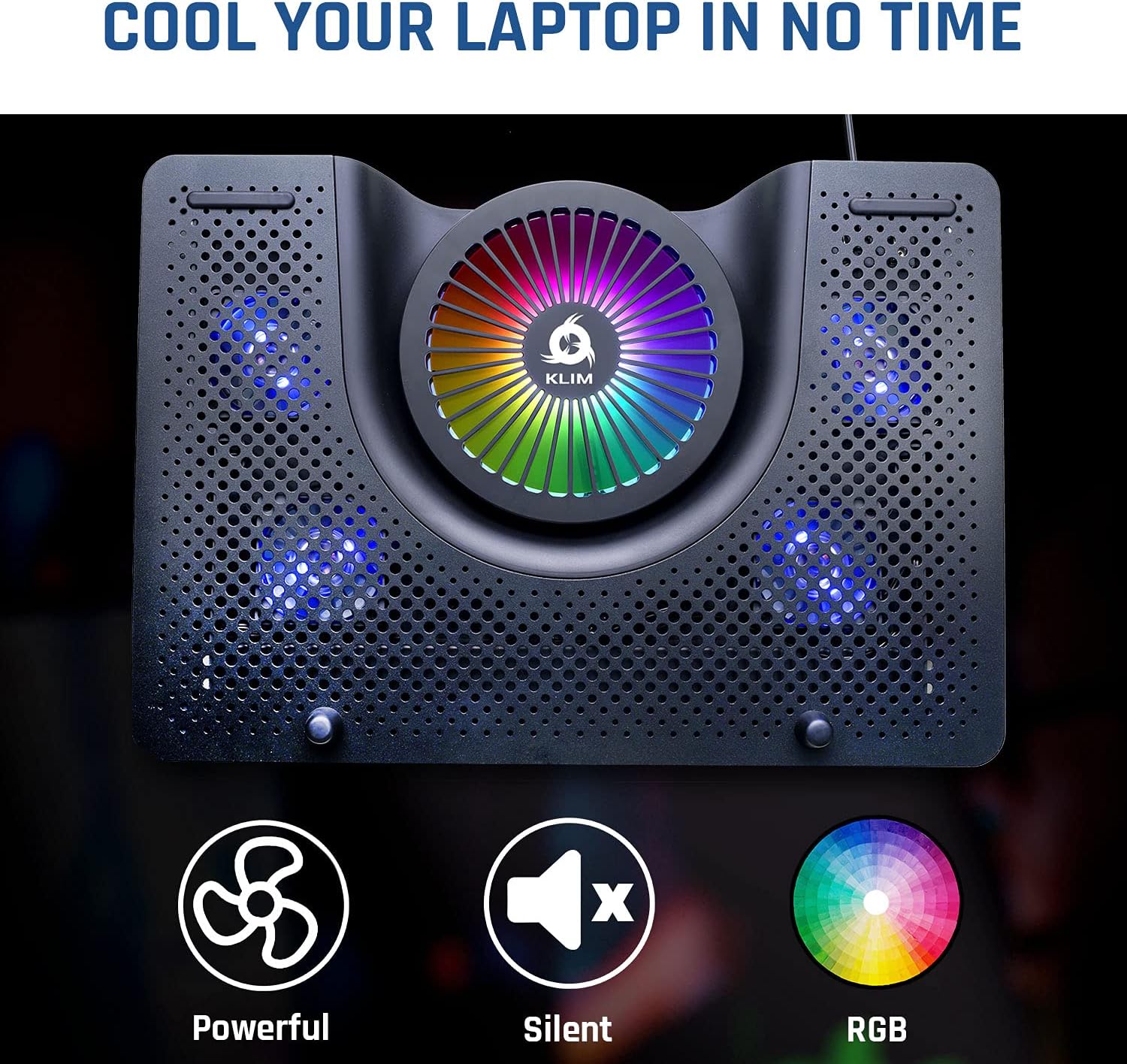
Figure 4: Fan Configuration and RGB Lighting
The KLIM Nova features a powerful cooling system with a large central fan and four auxiliary fans, all illuminated by dynamic RGB lighting.
Official Product Video: KLIM Nova RGB Laptop Cooling Stand
Video 1: Overståetview of KLIM Nova RGB Laptop Cooling Stand
This video provides a visual demonstration of the KLIM Nova RGB Laptop Cooling Stand, showcasing its features, design, and RGB lighting effects. It highlights the product's functionality and aesthetic appeal.
4. Vedligeholdelse
To ensure the longevity and optimal performance of your KLIM Nova, follow these maintenance guidelines:
- Rensning: Regularly clean the cooling pad to prevent dust buildup, which can impede airflow and reduce cooling efficiency. Use a soft, dry cloth to wipe down the surfaces. For stubborn dust, a can of compressed air can be used to clear the fan grilles.
- Undgå væsker: Do not use liquid cleaners or immerse the cooling pad in water. Liquids can damage the electronic components.
- Opbevaring: Når kølepuden ikke er i brug i længere perioder, skal den opbevares køligt og tørt, væk fra direkte sollys og ekstreme temperaturer.
- Håndteres med forsigtighed: While durable, avoid dropping the cooling pad or subjecting it to strong impacts, which could damage the internal components or external structure.
5. Fejlfinding
If you encounter issues with your KLIM Nova, refer to the following common problems and solutions:
| Problem | Mulig årsag | Løsning |
|---|---|---|
| Fans are not spinning or RGB lights are off. | Ingen strøm eller løs forbindelse. |
|
| Køleydelsen er dårlig. | Dust buildup or obstructed airflow. |
|
| Cooling pad is unstable or slides. | Improper placement or worn anti-skid pads. |
|
If the problem persists after attempting these solutions, please contact KLIM customer support for further assistance.
6. Specifikationer
| Feature | Detalje |
|---|---|
| Modelnummer | NOVA |
| Produktdimensioner | 11.02 x 1.97 x 15.75 tommer (eller 16" L x 11.2" B x 2" H) |
| Varens vægt | 1.98 pund (0.9 kilo) |
| Blæser konfiguration | 1 large fan (1500 RPM), 4 small fans (3500 RPM) |
| Støjniveau | Under 35 dB |
| Kompatibilitet | Laptops up to 17 inches, gaming consoles |
| Strømkilde | USB-drevet |
| Materiale | Aluminum, High Impact Polystyrene (HIPS) |
| Farve | RGB |
| Fabrikant | KLIM |
7. Garanti og support
The KLIM Nova RGB Laptop Cooling Pad comes with a comprehensive 5 års garanti. This warranty covers manufacturing defects and ensures long-term reliability of your product.
For any questions, technical assistance, or warranty claims, please contact KLIM customer support. Our specialists are available 24/7 to provide exceptional after-sales support.
You can find more information and contact details on the official KLIM webwebsted: www.klimtechs.com
Ask a question about this manual
Ask about setup, troubleshooting, compatibility, parts, safety, or missing instructions. Manuals+ will review the question and use this page’s manual context to help answer it.