
1. Introduktion
The EPEVER Tracer 3215BN is a 30A Maximum Power Point Tracking (MPPT) solar charge controller designed for 12V/24V battery systems. It efficiently converts solar energy to charge various battery types, including Sealed, Gel, and Flooded lead-acid batteries. This controller features an integrated LCD display for system monitoring and configuration, along with advanced protection functions to ensure system reliability.
2. Produktfunktioner
- Avanceret MPPT-teknologi: Ensures maximum power point tracking with an efficiency of no less than 99.5%, optimizing solar energy harvesting.
- Høj konverteringseffektivitet: Achieves a maximum conversion efficiency of 98%.
- Fast Tracking Speed: Ultra-fast tracking and accurate recognition of multiple power points.
- Robust design: Features a common negative design and die-cast aluminum construction for effective heat dissipation.
- Omfattende beskyttelse: Includes all-round electronic fault self-test and enhanced electronic protection functions to prevent system damage.
- Kommunikationsgrænseflade: Equipped with an RS-485 communication bus interface and Modbus communication protocol for expanded applications and monitoring via PC or external display units like MT52.
- Software Upgrade Support: Allows for future software enhancements.
- Brugervenlige indikatorer: LED indicators provide clear system status.
- Fleksibel belastningskontrol: Offers multiple load control modes including manual control, light ON/OFF, light On+Timer, and time control.
- Batterikompatibilitet: Supports Sealed, Gel, Flooded, and User-defined battery types.
- Temperaturkompensation: Includes a battery temperature compensation function.
- Energistatistik: Provides real-time energy statistics.
3. Opsætning og installation
Proper installation is crucial for the safe and efficient operation of your EPEVER Tracer 3215BN controller. Follow these steps carefully.
3.1 Komponentidentifikation

This image illustrates the various components and ports of the Tracer 3215BN controller, including the Heat Sink, RTS Port, Charging LED indicator, Solar Terminal, Battery LED indicator, Button, RS-485 Port, Battery Terminal, and Load Terminal.
3.2 Ledningsdiagram
Connect the components in the specified order to prevent damage to the controller and other system components.

This diagram shows the connection sequence: Solar Panel (PV) to the controller, controller to Battery, and controller to Load (e.g., lights, fan, TV, computer via inverter). Ensure correct polarity for all connections.
- Tilslut batteriet: First, connect the battery to the controller's battery terminals. Ensure correct polarity (+ to + and - to -). The controller requires battery power to operate.
- Tilslut solpanelerne: Next, connect the solar panels to the controller's PV terminals. Verify correct polarity.
- Tilslut belastningen: Finally, connect your DC loads to the controller's load terminals. If using AC loads, connect them through an inverter, which is then connected to the battery.
Vigtig sikkerhedsbemærkning: Always disconnect power from solar panels and battery before making or breaking any connections to the controller. Ensure all connections are tight to prevent loose contacts and overheating.
3.3 Kommunikationsporte

This image highlights the RTS (Remote Temperature Sensor) Port and the RS-485 Port, used for external temperature sensing and communication respectively.
- RTS-port: Connect the optional Remote Temperature Sensor (RTS) here for accurate battery temperature compensation.
- RS-485 port: Use this port for connecting to a PC, MT52 remote meter, or other monitoring devices via Modbus protocol.
4. Betjeningsvejledning
Once installed, the controller will automatically begin charging the battery from the solar panels. The LCD display provides real-time information about the system status.
4.1 LCD-skærm og knapper
The integrated LCD display shows various parameters such as battery voltage, charging current, load status, and error codes. Use the buttons adjacent to the display to navigate through menus and adjust settings.
4.2 Belastningsstyringstilstande
Styringen tilbyder flere belastningsstyringstilstande:
- Manuel kontrol: Turn the load ON or OFF manually.
- Lys ON/OFF: Belastningen tændes ved skumring og slukkes ved daggry.
- Lys tændt + timer: Load turns ON at dusk and stays ON for a set duration.
- Tidskontrol: Load operates during specific programmed times.
4.3 Remote Monitoring and Settings
The Tracer 3215BN supports remote monitoring and parameter adjustment through various accessories.
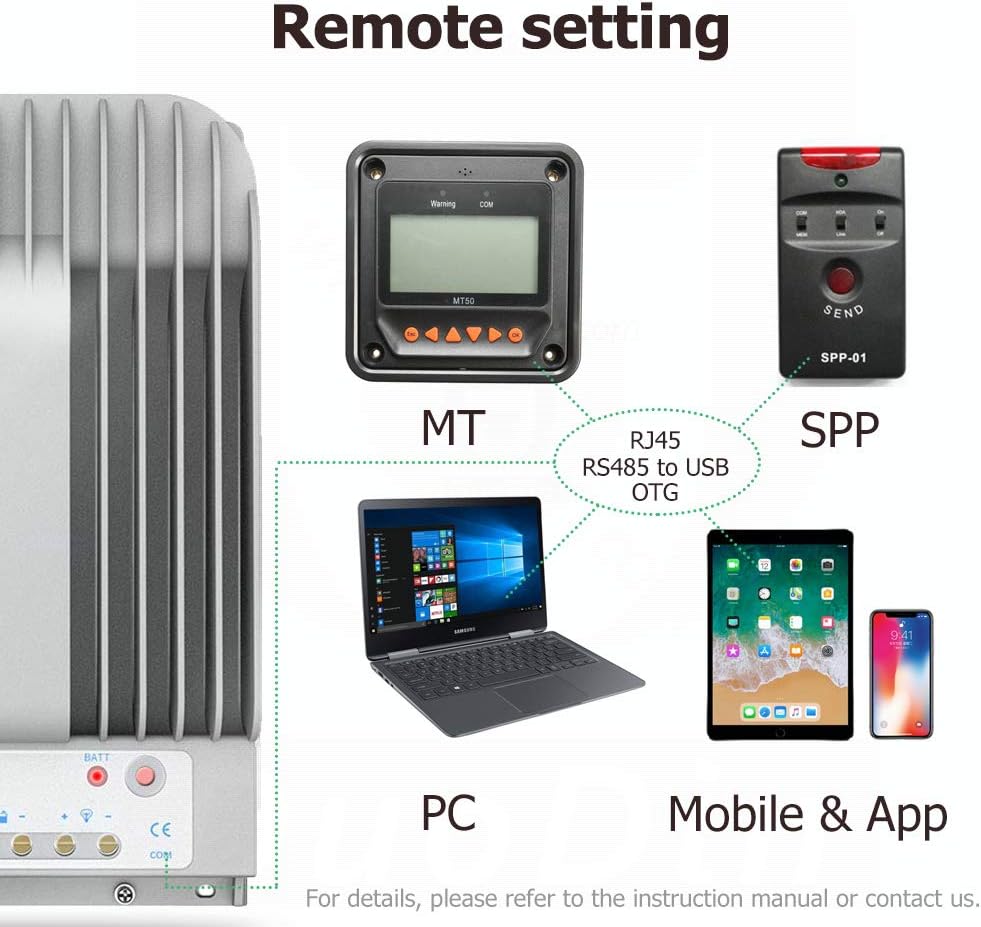
This image illustrates how the controller can be connected to an MT (remote meter), SPP (wireless module), PC, or mobile application for remote monitoring and configuration.
- MT Remote Meter: Connect an EPEVER MT series remote meter (e.g., MT52) to view real-time data and modify parameters from a distance.
- PC-software: Use EPEVER PC software by connecting the controller via an RS-485 to USB adapter for detailed monitoring, data logging, and advanced settings.
- Mobil app: Connect a compatible wireless module (e.g., Bluetooth or WiFi) to use the EPEVER mobile application for convenient monitoring and control via smartphone or tablet.
5. Vedligeholdelse
Regelmæssig vedligeholdelse sikrer din solcelleladeregulators levetid og optimale ydeevne.
- Undersøg forbindelser: Kontroller regelmæssigt alle ledningsforbindelser for tæthed og korrosion. Løse forbindelser kan forårsage volatilitet.tage-dråber og overophedning.
- Rengør controlleren: Keep the controller clean and free from dust and debris. Ensure the heat sink fins are not obstructed to allow for proper heat dissipation.
- Tjek batteristatus: Overvåg batteri voltage and health regularly. Ensure the battery type setting in the controller matches your installed battery.
- Miljøforhold: Sørg for, at controlleren er installeret på et tørt, godt ventileret sted, væk fra direkte sollys og ekstreme temperaturer.
6. Fejlfinding
This section addresses common issues you might encounter with your Tracer 3215BN controller.
6.1 Controlleren tænder ikke
- Tjek batteriforbindelse: The controller requires a minimum battery voltage to power on. Ensure the battery is properly connected and has sufficient charge. If the battery is completely discharged, the controller may not power on until an external 12V source or sufficient solar input is provided to raise the battery voltage.
- Bekræft polaritet: Confirm that the battery connections are made with correct polarity.
- Inspect Fuses/Breakers: Check any inline fuses or circuit breakers between the battery and the controller.
6.2 No Charging Indication
- Check Solar Panel Connection: Ensure solar panels are correctly connected to the PV terminals with proper polarity.
- Verify Solar Input Voltage: Mål det åbne kredsløb voltage of your solar panels to ensure it is within the controller's acceptable range (Max 150V).
- Sollysforhold: Ensure there is adequate sunlight reaching the solar panels.
6.3 Load Not Working
- Check Load Connection: Verify that the load is correctly connected to the load terminals.
- Belastningskontroltilstand: Ensure the load control mode is set appropriately (e.g., manual ON, or correct timer settings).
- Batteri Voltage: Hvis batteri voltage is too low, the controller may disconnect the load to protect the battery.
- Overbelastningsbeskyttelse: Check if the load current exceeds the controller's rated load current, triggering overload protection.
7. Specifikationer
Key technical specifications for the EPEVER Tracer 3215BN MPPT Solar Charge Controller:
| Parameter | Værdi |
|---|---|
| Model | Tracer3215BN |
| System Nominel Voltage | 12V / 24V Auto Work |
| Nominel ladestrøm | 30A |
| Nominel belastningsstrøm | 30A |
| Maks. PV Open Circuit Voltage | 150V (ved minimum driftsmiljøtemperatur) 138V (ved 25°C miljøtemperatur) |
| Maks. PV-indgangseffekt | 390W (12V) / 780W (24V) |
| MPP bindtagRækkevidde | Batteri voltage +2V ~ 108V |
| Batteritype | Forseglet, Gel, Oversvømmet, Bruger |
| Konverteringseffektivitet | ≤98 % |
| Sporingseffektivitet | ≥99.5 % |
| Meddelelse | RS-485 (RJ45 interface) |
| Driftstemperaturområde | -35°C til +55°C |
| Opbevaringstemperaturområde | -35°C til +80°C |
| Dimensioner (L x B x H) | 281 mm x 160 mm x 60 mm |

This table provides a comparison of key specifications between the Tracer-AN and Tracer-BN series, highlighting the superior heat dissipation and voltage ranges of the BN series.

This image details the physical dimensions of the Tracer 3215BN controller.
8. Garantioplysninger
Warranty terms and conditions for EPEVER products can vary. It is recommended to confirm the specific warranty period and coverage directly with your seller (SolaMr) or the manufacturer (EPEVER) at the time of purchase. Keep your proof of purchase for any warranty claims.
9. Support
For technical assistance, troubleshooting beyond this manual, or inquiries regarding product functionality, please contact the following:
- Sælgersupport: Contact SolaMr for assistance related to your purchase.
- Producentsupport: Visit the official EPEVER website for product documentation, FAQs, and contact information for direct manufacturer support.