
TiVo C00305
TiVo LUX Remote C00305 User Manual
For TiVo Edge and TiVo Bolt Series DVRs
1. Produktet er slutview
The TiVo LUX Remote (Model C00305) is a voice-controlled remote designed for seamless interaction with your TiVo Edge and TiVo Bolt series DVRs, including TiVo Mini VOX. It features a backlit keypad for visibility in low-light conditions and supports both IR and RF signals for flexible placement of your TiVo device.
Nøglefunktioner:
- Stemmestyring: Use voice commands to search for content across live TV, recordings, and streaming apps.
- Baggrundsbelyst tastatur: Keys illuminate for easy navigation in the dark.
- Universal kontrol: Manage power, input, volume, and mute functions for your TV and/or audio receiver.
- IR/RF Signal: Operates via both Infrared (IR) and Radio Frequency (RF) for line-of-sight or in-cabinet use.
- OnePass Integration: Easily line up every available episode of a series.
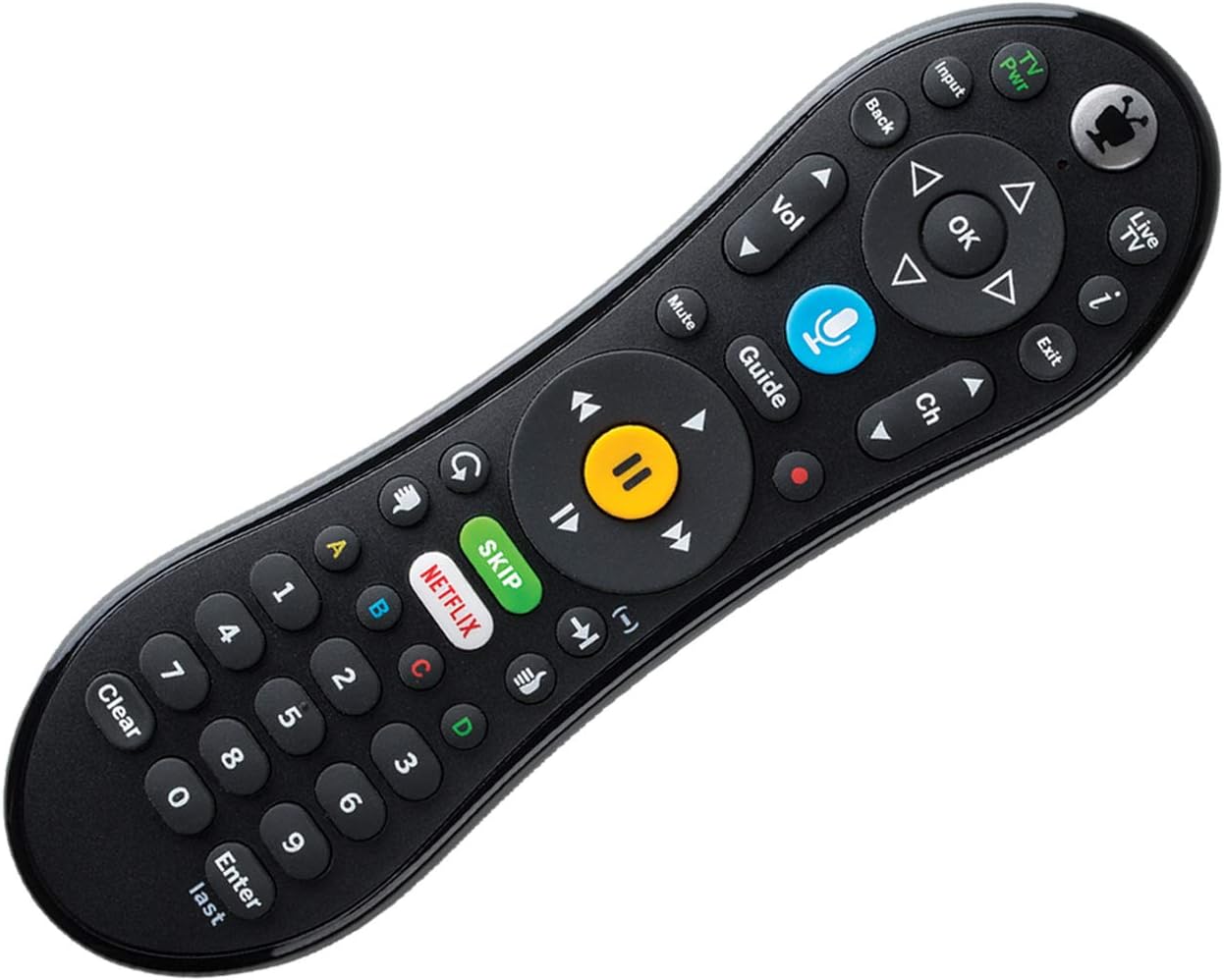
Figur 1: Forside view of the TiVo LUX Remote, highlighting the button layout.
2. Opsætningsvejledning
2.1. Batteriinstallation
The TiVo LUX Remote requires two (2) AA batteries (not included). To install:
- Find batterirummet på bagsiden af fjernbetjeningen.
- Skub batteridækslet af.
- Isæt to AA-batterier, og sørg for at polerne vender korrekt (+ og -).
- Sæt batteridækslet på igen.
2.2. Initial Pairing with TiVo Device
The TiVo LUX Remote typically pairs automatically with your TiVo device. If it does not, or if you are pairing a new remote, follow these steps:
- Ensure your TiVo device is powered on.
- Insert the USB dongle (if applicable) into an available USB port on your TiVo device.
- Press any button on the remote. The light at the top of the TiVo button should blink.
- The remote should automatically attempt to pair. Once successfully paired, the light will blink rapidly and then turn off.
Video 1: Instructions on how to pair your TiVo remote with the USB dongle.
3. Operating the TiVo LUX Remote
3.1. Grundlæggende navigation
- Retningstastatur (pile): Navigate menus and guides.
- OK knap: Vælg et element eller bekræft en handling.
- Tilbage knap: Vend tilbage til den forrige skærm.
- TiVo Button: Access the TiVo Central menu.
- Live TV-knap: Switch to live television.
- Guide knap: Open the program guide.
3.2. Medieafspilningskontroller
- Afspil/pause: Start eller sæt afspilning på pause.
- Hurtigt frem/tilbage: Control playback speed.
- Skip Button: Instantly skip commercial breaks (where available).
- Optag knap: Initiate recording of a program.
3.3. Stemmekontrol
The TiVo LUX Remote features a built-in microphone for voice commands:
- Tryk og hold på Voice (Microphone) button.
- Sig din kommando tydeligt ind i mikrofonen øverst på fjernbetjeningen.
- Release the Voice button when finished speaking.
Examples of voice commands include: "Find [Movie Title]", "Go to Netflix", "Change to Channel 7", "Record this show".

Figure 2: The TiVo LUX Remote's backlit keypad feature, enhancing visibility in low-light environments.
4. Vedligeholdelse
4.1. Udskiftning af batteri
Replace batteries when the remote's performance degrades or the backlight becomes dim. Refer to Section 2.1 for battery installation instructions. Always use fresh AA batteries.
4.2. Rensning
To clean your remote, gently wipe it with a soft, dry cloth. Avoid using liquid cleaners or abrasive materials, as these can damage the remote's surface or internal components.
5. Fejlfinding
5.1. Fjernbetjeningen svarer ikke
- Tjek batterier: Sørg for, at batterierne er korrekt installeret og har tilstrækkelig opladning. Udskift dem om nødvendigt.
- Line of Sight (IR Mode): If using IR mode, ensure there are no obstructions between the remote and your TiVo device.
- Genpar fjernbetjening: If the remote is blinking red at the top of the TiVo button, it may be in IR mode and needs to be re-paired for RF and voice functionality.
5.2. Re-pairing Your TiVo LUX Remote
If your remote is not functioning correctly or you need to re-establish an RF connection for voice control, follow these steps:
- Tryk og hold på TiVo knap og den TV Power button simultaneously until the red light at the top of the remote illuminates.
- Tryk hurtigt på Thumbs Down button three times, then press Indtast.
- The light at the top of the remote will blink slowly, then increase in speed as it attempts to re-pair.
- Once successfully re-paired, the light will blink rapidly and then turn off.
Video 2: Detailed guide on how to re-pair your TiVo Vox Remote (applicable to TiVo LUX Remote).
5.3. Kompatibilitetsproblemer
This remote is compatible with TiVo EDGE series and TiVo BOLT series DVRs, plus TiVo Mini VOX. Full RF functionality, including voice control, may require TiVo Experience 4 user interface. Older TiVo Experience versions (e.g., TiVo Experience 3 or Classic) may only support IR mode.
6. Specifikationer
| Feature | Detalje |
|---|---|
| Mærke | TiVo |
| Modelnummer | C00305 |
| Kompatible enheder | TiVo Bolt, TiVo Edge, TiVo Mini VOX |
| Forbindelsesteknologi | Infrarød (IR), radiofrekvens (RF) |
| Særlige funktioner | Baggrundsbelyst, Stemmesøgning |
| Farve | Sort |
| Varens vægt | 8.8 ounce |
| Produktdimensioner | 8.25 x 3.25 x 1.75 tommer |
| Batterier påkrævet | 2 AA batterier (medfølger ikke) |
7. Garantioplysninger
Please refer to the warranty documentation included with your TiVo LUX Remote or visit the official TiVo webwebstedet for detaljerede garantivilkår og -betingelser. Gem din købsbevis til garantikrav.
8. Kundesupport
For further assistance, technical support, or to purchase replacement parts, please visit the official TiVo support website or contact TiVo customer service directly. Contact information can typically be found on the TiVo webwebstedet eller i din produktemballage.
Ask a question about this manual
Ask about setup, troubleshooting, compatibility, parts, safety, or missing instructions. Manuals+ will review the question and use this page’s manual context to help answer it.