
Sporvogn TRAJOY46524
Tracer Roadster 4-i-1 rat brugermanual
Model: TRAJOY46524
Indledning
Tak, fordi du har valgt Tracer Roadster 4-i-1-rattet. Denne manual indeholder detaljerede instruktioner til opsætning, betjening, vedligeholdelse og fejlfinding af dit nye racerrat. Læs venligst denne manual grundigt inden brug for at sikre optimal ydeevne og levetid for din enhed.
Tracer Roadster 4-i-1-rattet er designet til en fordybende spiloplevelse og er kompatibelt med forskellige platforme, herunder PlayStation 4 og Windows PC. Det har et responsivt rat, integreret gearskifter og et pedalsæt for realistisk kontrol.
Pakkens indhold
- Tracer Roadster 4-i-1 rat
- Pedal sæt
- Brugervejledning (dette dokument)
Opsætningsvejledning
Forbindelse til PlayStation 4 (PS4)
- Tilslut rattets USB-kabel til en ledig USB-port på din PS4-konsol.
- Tænd din PS4-konsol. Den røde LED-lampe på rattet lyser, hvilket angiver, at den er tændt.
- Tilslut rattet til din PS4-controller med et microUSB-kabel (medfølger ikke). Dette trin er afgørende for godkendelse.
- Tryk på HJEM knappen på rattet. Den grønne LED lyser, hvilket angiver, at forbindelsen er oprettet, og at den er klar til brug.
Tilslutning til pc (Windows)
- Tilslut rattets USB-kabel til en ledig USB-port på din Windows-pc.
- Systemet burde automatisk registrere og installere de nødvendige drivere. Hvis ikke, henvises der til producentens webwebsted for download af drivere.
- Når driverne er installeret, vil rattet være klar til brug med kompatible pc-racerspil.

Figur 1: Tracer Roadster 4-i-1-rattet, inklusive hovedrattet, integreret gearskifter og separat pedalsæt. Dette billede viser den komplette opsætning klar til tilslutning.
Betjeningsvejledning
Ratbetjeninger
Rattet har et fuldt bevægelsesområde for præcis kontrol i racerspil. Det inkluderer forskellige knapper og en D-pad til navigation og handlinger i spillet, hvilket efterligner et standard spilcontrollerlayout.
- Retningstastatur (D-pad): Til menunavigation og specifikke kontroller i spillet.
- Handlingsknapper (X, Cirkel, Firkant, Trekant / A, B, X, Y): Standard gaming action-knapper.
- L1/R1, L2/R2 knapper: Skulderknapper, ofte brugt til at skifte gear eller andre handlinger.
- HJEM knap: Adgang til PS4-systemmenuen.
- PROG knap: For programmering af specifikke funktioner (se spilspecifikke instruktioner).
- Touchpad: Integreret touchpad for yderligere kontrolmuligheder, især på PS4.
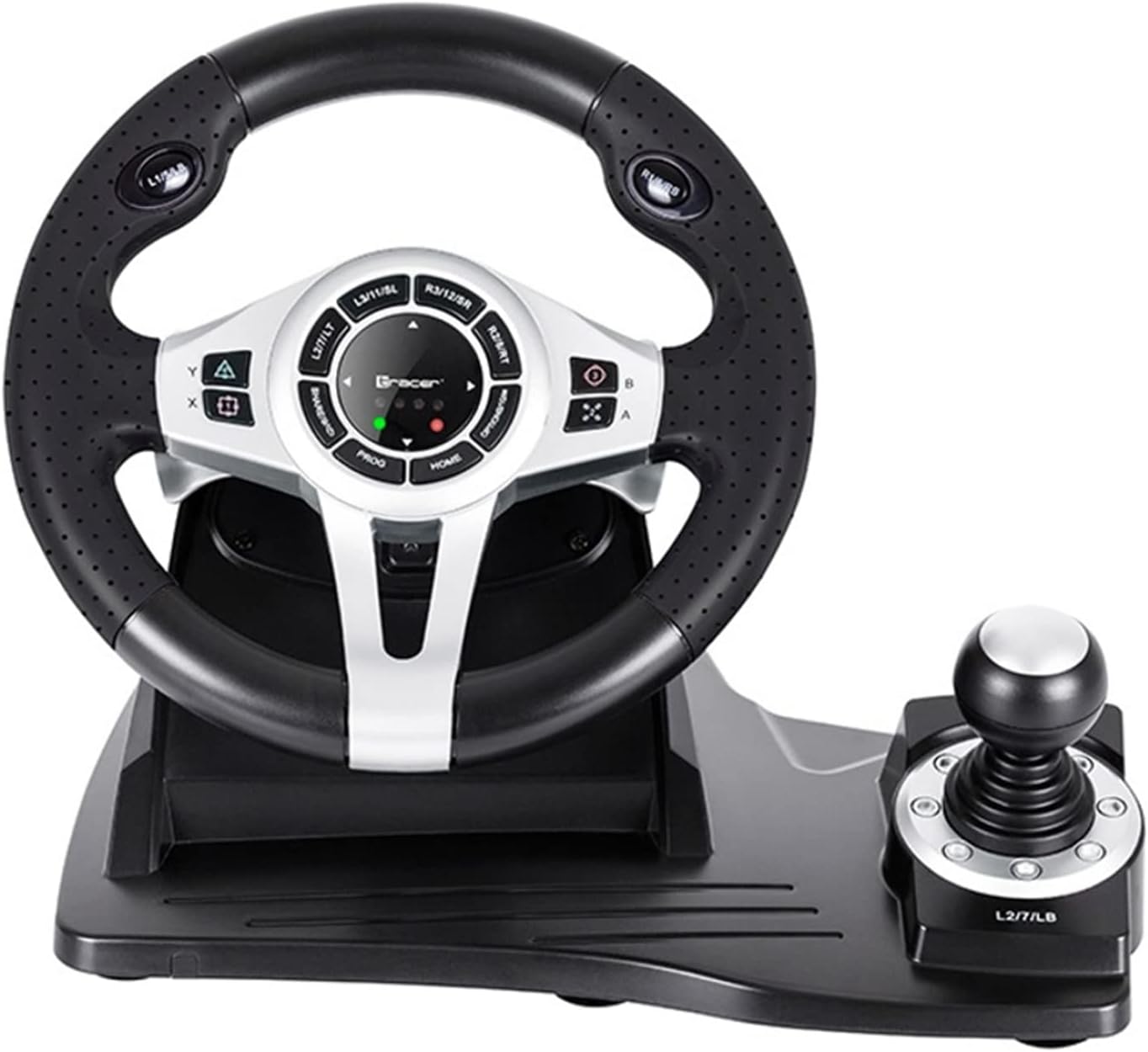
Figur 2: En detaljeret view af det centrale kontrolpanel på rattet, der viser de forskellige knapper, D-pad og indikatorlamper. Den integrerede gearstang er synlig til højre.
Pedal sæt
Det separate pedalsæt inkluderer en speeder- og bremsepedal til realistisk køresimulering. Sørg for, at pedalsættet er placeret på en stabil overflade for at forhindre glidning under intenst spil.

Figur 3: Den separate pedalenhed med både gaspedal og bremsepedal. Den teksturerede base giver greb for at forhindre bevægelse under brug.
Vedligeholdelse og pleje
- Rensning: Brug en blød, tør klud til at rengøre overfladen på rattet og pedalerne. Ved genstridigt snavs kan en let tør klud bruges.amp En klud kan bruges, men sørg for, at der ikke trænger fugt ind i de indvendige komponenter.
- Opbevaring: Når enheden ikke er i brug, skal den opbevares på et køligt, tørt sted væk fra direkte sollys og ekstreme temperaturer.
- Undgå væsker: Udsæt ikke enheden for vand eller andre væsker.
- Håndteres med forsigtighed: Undgå at tabe eller udsætte enheden for kraftige stød.
Fejlfinding
| Problem | Mulig årsag | Løsning |
|---|---|---|
| Rattet genkendes ikke af PS4. | Forkert forbindelse eller godkendelsesproblem. | Sørg for, at rattets USB-kabel er korrekt tilsluttet til PS4'en. Kontroller microUSB-kabelforbindelsen mellem rattet og PS4-controlleren. Tryk på HJEM knap på rattet. |
| Ingen reaktion fra rattet på pc'en. | Drivere er ikke installeret, eller der er et problem med USB-porten. | Prøv en anden USB-port. Tjek Enhedshåndtering for driverstatus. Geninstaller drivere om nødvendigt fra producentens webwebsted. |
| LED-indikatorerne lyser ikke. | Ingen problemer med strøm eller forbindelse. | Sørg for, at USB-kablet er korrekt tilsluttet konsollen/pc'en. Kontroller, om konsollen/pc'en er tændt. |
| Pedalerne reagerer ikke. | Løs forbindelse til rattet. | Kontroller, at pedalenhedens kabel er korrekt tilsluttet rattets base. |
Specifikationer
| Feature | Detalje |
|---|---|
| Mærke | Tracer |
| Modelnavn | Roadster 4 i 1 |
| Modelnummer | TRAJOY46524 |
| Forbindelsesteknologi | USB |
| Kompatible enheder | PlayStation 4, Windows-pc |
| Controller type | Rat |
| Farve | Sort |
| Speciel funktion | Touchpad |
| Antal knapper | 8 (eksklusive D-pad og gearskifter) |
| Varens vægt | 2 kilo |
| Produktmål (L x B x H) | 2.8 x 24.6 x 16.5 cm |
Garanti og support
For garantioplysninger og teknisk support henvises til den officielle Tracer-version. webwebstedet eller kontakt din forhandler. Gem din købsbevis i tilfælde af garantikrav.
For yderligere hjælp kan du besøge produktside på Amazon.com.be.
Ask a question about this manual
Ask about setup, troubleshooting, compatibility, parts, safety, or missing instructions. Manuals+ will review the question and use this page’s manual context to help answer it.