
Indledning
The Power Dynamics PDM25 is a compact and versatile 100V amplifier designed for small installations such as shops, restaurants, and offices. It offers easy operation, reliable performance, and a range of features including Bluetooth connectivity, an integrated MP3 player, USB input, AUX input, and a wireless remote control. This manual provides essential information for the safe and efficient use of your PDM25 amplivligere.
Sikkerhedsinstruktioner
- Læs denne manual grundigt, inden du bruger produktet.
- Gem denne vejledning til fremtidig reference.
- Overhold alle advarsler og følg alle instruktioner.
- Brug ikke dette apparat i nærheden af vand.
- Rengør kun med en tør klud.
- Bloker ikke ventilationsåbninger. Installer i overensstemmelse med producentens anvisninger.
- Må ikke installeres i nærheden af varmekilder såsom radiatorer, varmeapparater, komfurer eller andre apparater (inklusive ampløftere), der producerer varme.
- Undgå at omgå sikkerhedsformålet med det polariserede stik eller stik med jordforbindelse. Et polariseret stik har to knive, hvor den ene er bredere end den anden. Et stik med jordforbindelse har to knive og et tredje jordstik. Det brede blad eller det tredje ben er tilvejebragt for din sikkerhed. Hvis det medfølgende stik ikke passer i din stikkontakt, skal du kontakte en elektriker for at få udskiftet den forældede stikkontakt.
- Beskyt netledningen mod at blive trådt på eller klemt, især ved stik, stikkontakter og det sted, hvor de kommer ud af apparatet.
- Brug kun tilbehør/tilbehør specificeret af producenten.
- Træk stikket ud af dette apparat under tordenvejr, eller når det ikke skal bruges i længere perioder.
- Overlad al service til kvalificeret servicepersonale. Service er påkrævet, når apparatet er blevet beskadiget på nogen måde, såsom strømforsyningsledning eller stik er beskadiget, væske er blevet spildt, eller genstande er faldet ind i apparatet, apparatet har været udsat for regn eller fugt, ikke fungerer normalt , eller er blevet droppet.
- ADVARSEL: For at reducere risikoen for brand eller elektrisk stød må dette apparat ikke udsættes for regn eller fugt.
- FORSIGTIGHED: Do not open the cover. No user-serviceable parts inside. Refer servicing to qualified personnel only.
Produkt overview
The PDM25 amplifier features a user-friendly front panel with controls for various audio sources and volume adjustments, along with a clear digital display. The rear panel provides all necessary connections for speakers, external audio sources, and power.

Figur 1: Frontpanel overview of the PDM25 Amplivligere.

Figure 2: Rear Panel Connections of the PDM25 Amplivligere.
Opsætning
1. Udpakning
Fjern forsigtigt amplifier from its packaging. Inspect the unit for any signs of damage during transit. Retain the original packaging for future transport or storage.
2. Placering
Placer ampPlacer apparatet på en stabil, plan overflade. Sørg for tilstrækkelig ventilation omkring enheden for at forhindre overophedning. Undgå at placere den i nærheden af varmekilder eller i direkte sollys.
3. Højttalerforbindelse
The PDM25 supports both 100V line speakers and low impedance (4-16 Ohm) speakers.
- For 100V Line Speakers: Connect the positive (+) terminal of your 100V speaker system to the "100V" terminal on the amplifier's rear panel. Connect the negative (-) terminal to the "COM" terminal.
- For Low Impedance Speakers (4-16 Ohm): Connect the positive (+) terminal of your speaker to the "4-16 Ohm" terminal on the amplifier's rear panel. Connect the negative (-) terminal to the "COM" terminal.
Ensure correct polarity (+ to + and - to -) for optimal sound quality. Do not connect both 100V and low impedance speakers simultaneously to the same output.
4. Lydkildetilslutning
- AUX-indgang: Connect external audio devices (e.g., CD player, mixer) to the RCA "AUX" input jacks on the rear panel using an RCA cable.
- Mikrofonindgang: Connect a microphone to the 6.3mm jack on the front panel.
- USB-indgang: Indsæt et USB-flashdrev, der indeholder MP3 files i USB-porten på frontpanelet.
5. Strømtilslutning
Tilslut det medfølgende strømkabel til AC-indgangen på bagpanelet af amplifier and then to a suitable mains power outlet (230 Vac/50 Hz).
Betjeningsvejledning
1. Tænd/sluk
Press the "ON/OFF" switch on the front panel to power on or off the amplivligere.
2. Kildevalg
Use the "MODE" button on the front panel or the remote control to cycle through available input sources: Bluetooth, USB/MP3, AUX, and Radio. The selected mode will be displayed on the digital screen.

Figure 3: Front Panel Controls and USB Input.
3. Lydstyrkekontrol
- Hovedvolumen: Adjust the main output volume using the large "VOLUME" knob on the front panel.
- Individual Source Volume: Adjust the volume for MP3, AUX, and MIC inputs using their respective smaller "VOLUME" knobs.
4. Tonekontrol
Use the "TREBLE" and "BASS" knobs on the front panel to adjust the high and low frequencies of the audio output.
5. Bluetooth-betjening
- Select "Bluetooth" mode using the "MODE" button. The display will show "BLUE".
- On your Bluetooth-enabled device (smartphone, tablet, etc.), search for available devices and select "PDM25".
- Når den er parret, kan du streame lyd trådløst til amplivligere.
6. USB/MP3 Player Operation
- Insert a USB flash drive into the USB port. The amplifier will automatically switch to USB mode and begin playing MP3 files.
- Use the play/pause, next, and previous track buttons on the front panel or remote control to manage playback.
7. Radiobetjening
In Radio mode, use the control buttons to scan for and select radio stations.
8. Fjernbetjening
The included remote control provides convenient access to power, mode selection, volume, track control, and equalizer presets.
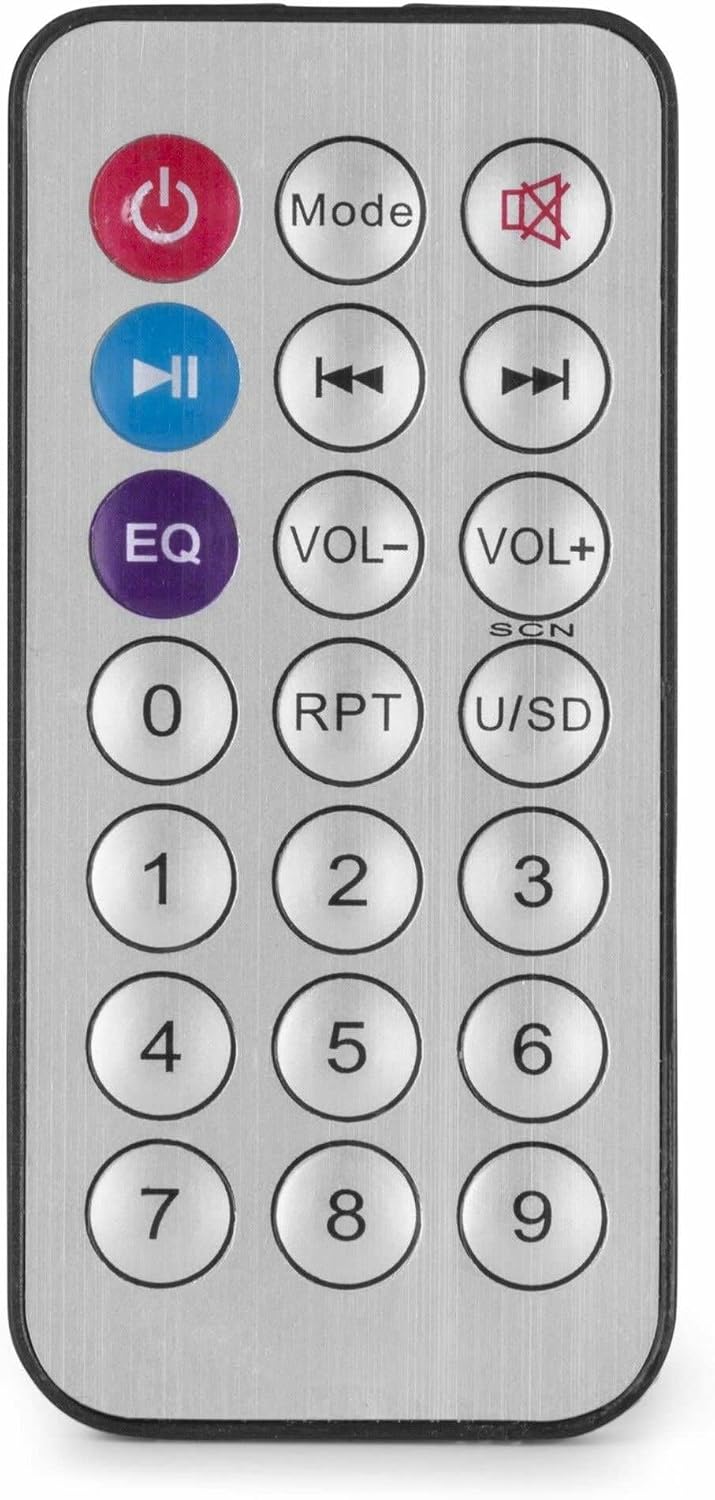
Figur 4: Trådløs fjernbetjening.
Opretholdelse
- Rensning: Afbryd strømmen før rengøring. Brug en blød, tør klud til at tørre ydersiden af ampBrug ikke flydende rengøringsmidler eller aerosoler.
- Ventilation: Sørg for, at ventilationsåbningerne er fri for støv og snavs for at opretholde korrekt luftgennemstrømning.
- Opbevaring: Hvis enheden opbevares i længere tid, skal den afbrydes til strømmen og opbevares et køligt og tørt sted, helst i originalemballagen.
Fejlfinding
| Problem | Mulig årsag | Løsning |
|---|---|---|
| Ingen strøm | Strømkabel ikke tilsluttet; Stikkontakt defekt; Ampafbrydning af lift. | Check power cable connection; Test power outlet; Ensure amplifier switch is ON. |
| Ingen lydudgang | Incorrect source selected; Volume too low; Speaker connections faulty; Mute activated. | Select correct input source; Increase master and source volume; Check speaker wiring; Deactivate mute function on remote. |
| Bluetooth forbinder ikke | AmpFjernbetjeningen er ikke i Bluetooth-tilstand; Enheden er for langt væk; Enheden er allerede parret med en anden enhed. | Sikre amplifier is in Bluetooth mode ("BLUE" displayed); Move device closer; Disconnect from other devices and try again. |
| Problemer med USB-afspilning | USB-drev er ikke formateret korrekt; Inkompatibelt file format; USB-drev defekt. | Sørg for, at USB-drevet er formateret til FAT32; brug MP3 files; Prøv et andet USB-drev. |
| Forvrænget lyd | Volume too high; Incorrect impedance matching for speakers; Faulty audio source. | Reducer lydstyrken; Kontroller, at højttalerimpedansen stemmer overens amplifier output; Test with a different audio source. |
Specifikationer
- Udgangseffekt: 25 W
- Højttaler output: 100V and 4-16 Ohm
- Frekvensområde: 50 Hz - 18 kHz
- Signal-til-støjforhold: >75 dB
- Tilslutning Voltage: 230 Vac/50 Hz
- Dimensioner (L x B x H): 205 x 285 x 65 mm
- Vægt: 1.5 kg
- Funktioner: Bluetooth, USB MP3 Player, Radio, AUX Input, Microphone Input, Bass/Treble Control, Integrated Equalizer, Remote Control
- Modelnummer: PDM25
- Fabrikant: Tronios BV
Garanti og support
For warranty information and technical support, please refer to the documentation provided with your purchase or visit the official Power Dynamics webwebsted. Gem din købsbevis i tilfælde af garantikrav.
Fabrikant: Tronios BV
Webwebsted: www.power-dynamics.eu