
1. Introduktion
This manual provides essential information for the installation, operation, and maintenance of your AMD Ryzen 9 3950X 16-Core, 32-Thread Unlocked Desktop Processor. The AMD Ryzen 9 3950X is designed for high-performance computing, offering advanced capabilities for demanding applications and gaming.

Figure 1: AMD Ryzen 9 3950X Processor Retail Box. This image displays the packaging for the AMD Ryzen 9 3950X processor, highlighting the Ryzen logo and product series.
2. Nøglefunktioner
- 16 kerner og 32 behandlingstråde: Offers exceptional multi-tasking and processing power for mainstream desktop applications.
- Høj ydeevne: Capable of delivering ultra-fast 100+ FPS performance in popular games.
- Ulåst til overclocking: Features a 4.7 GHz max Boost clock, allowing for performance tuning.
- Advanced Socket AM4 Platform: Compatible with the AM4 platform, supporting PCIe 4.0 on X570 motherboards.
- DDR4-3200-understøttelse: Optimized for high-speed DDR4 memory.
- 72 MB of Game Cache: Enhances gaming performance and responsiveness.
3. Specifikationer
| Feature | Detalje |
|---|---|
| Processorkerner | 16 |
| Behandling af tråde | 32 |
| Basisurhastighed | 3.5 GHz |
| Max Boost ur | Op til 4.7 GHz |
| Samlet L1-cache | 1 MB |
| Samlet L2-cache | 8 MB |
| Samlet L3-cache | 72 MB |
| CMOS | TSMC 7nm FinFET |
| PCI Express-version | PCIe 4.0 x16 |
| Stikkontakt | AM4 |
| Max driftstemperatur | 95°C |
| OS Support | Windows 10 - 64-Bit Edition, RHEL x86 64-Bit, Ubuntu x86 64-Bit (OS support may vary by manufacturer) |
| Kølere | Not included (Liquid cooler with 280mm or larger radiator recommended) |
4. Opsætning og installation
Proper installation is crucial for optimal performance and longevity of your AMD Ryzen 9 3950X processor. Please follow these steps carefully.
4.1. Tjekliste før installation
- Compatible AM4 motherboard (X570 recommended for PCIe 4.0).
- High-quality CPU cooler (liquid cooler with 280mm or larger radiator recommended).
- Thermal paste (if your cooler does not have it pre-applied).
- Anti-static wrist strap or ensure proper grounding to prevent electrostatic discharge (ESD).
- Screwdriver set.
4.2. Motherboard Compatibility
The Ryzen 9 3950X processor is designed for the AM4 socket. Ensure your motherboard has the latest BIOS update to support 3rd Gen Ryzen processors. For optimal performance, X570 motherboards are recommended to fully utilize PCIe 4.0 capabilities.
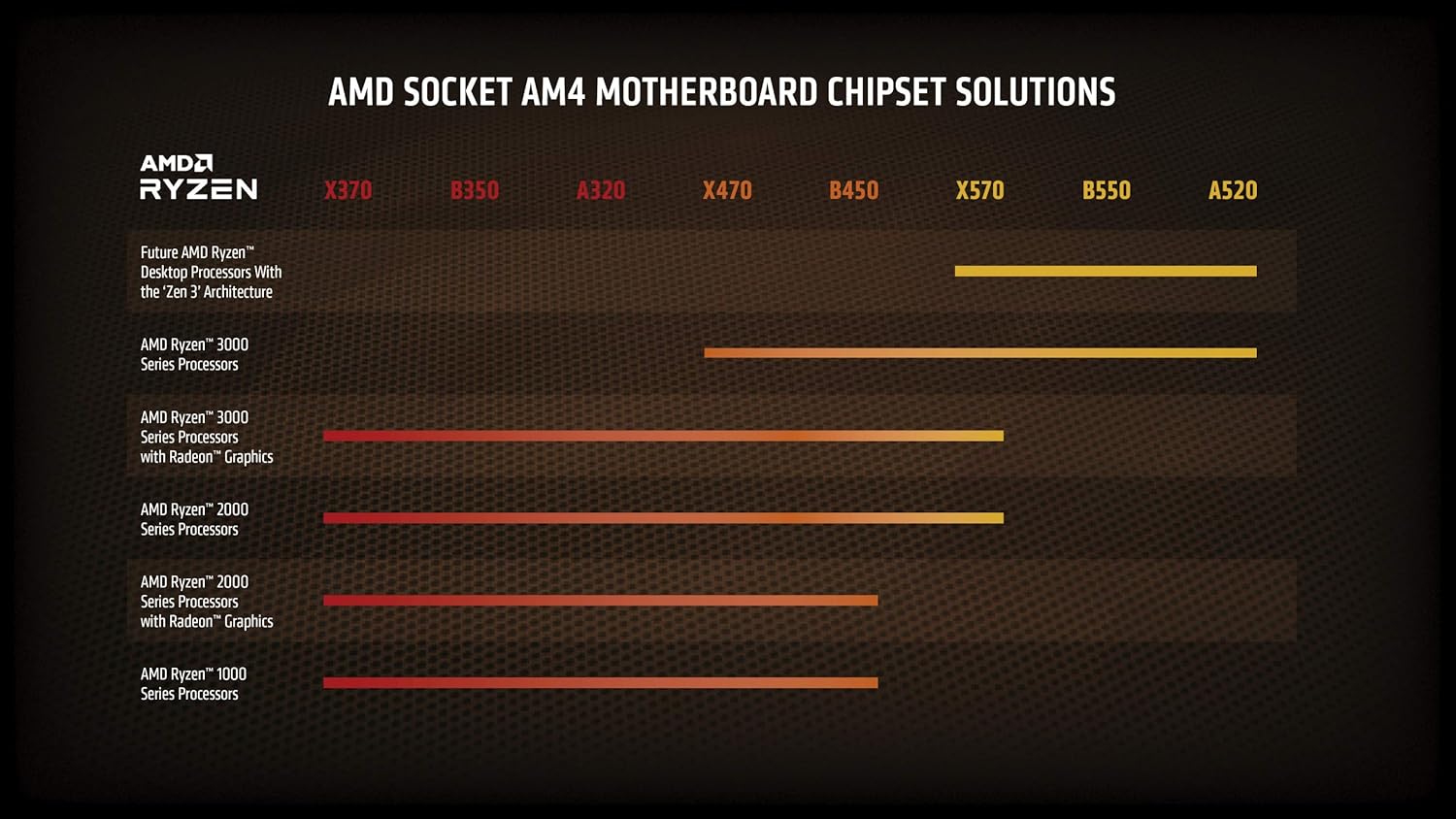
Figure 2: AMD Socket AM4 Motherboard Chipset Solutions. This chart illustrates compatibility of different AMD Ryzen processor generations with various AM4 motherboard chipsets (X370, B350, A320, X470, B450, X570, B550, A520).
4.3. Processorinstallation
- Forbered bundkortet:
- Åbn CPU-sokkelfastholdelsesarmen på dit AM4-bundkort.
- Carefully lift the metal load plate.
- Installer processoren:
- Align the gold triangle on the corner of the Ryzen 9 3950X processor with the triangle on the AM4 socket.
- Sænk forsigtigt processoren lige ned i soklen. Brug ikke magt. Hvis den ikke sidder let, skal du kontrollere justeringen igen.
- Once seated, close the metal load plate and secure it with the retention arm.
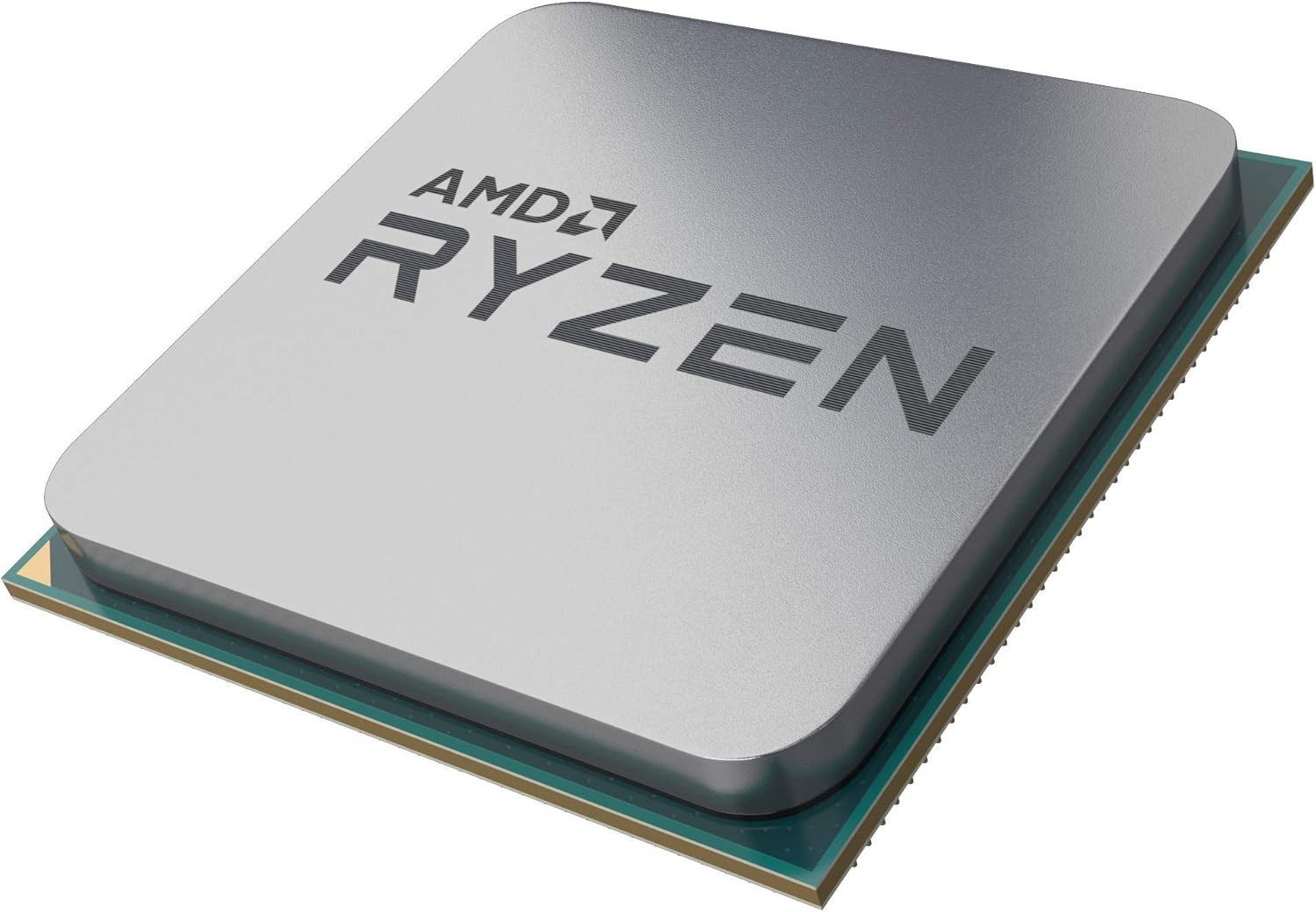
Figure 3: AMD Ryzen 9 3950X Processor. A close-up view of the AMD Ryzen 9 3950X processor, showing its integrated heat spreader (IHS) and pin grid array (PGA) design.
- Påfør termisk pasta (hvis nødvendigt):
- If your cooler does not have pre-applied thermal paste, apply a small, pea-sized dot of thermal paste to the center of the processor's Integrated Heat Spreader (IHS).
- Do not spread the paste manually; the pressure from the cooler will spread it evenly.
- Installer CPU-køleren:
- Follow the specific instructions provided with your CPU cooler for installation. Ensure it is securely mounted and makes firm contact with the processor's IHS.
- Connect the cooler's fan and pump cables to the appropriate headers on your motherboard (e.g., CPU_FAN, AIO_PUMP, USB headers for control software).
5. Betjening af din processor
Once installed, your AMD Ryzen 9 3950X processor will operate automatically within your system. Here are some general operating considerations:
- BIOS/UEFI-indstillinger: Access your motherboard's BIOS/UEFI to verify the processor is recognized correctly and to enable features like XMP/DOCP for memory.
- Driver installation: Installer de nyeste chipsetdrivere fra AMD webwebsted for optimal ydeevne og stabilitet.
- Overvågning: Use software utilities (e.g., AMD Ryzen Master, HWMonitor) to monitor CPU temperatures, clock speeds, and utilization. Maintain temperatures below 95°C for safe operation.
- Overclocking: The Ryzen 9 3950X is unlocked for overclocking. Refer to advanced guides and exercise caution if attempting to overclock, as it may affect system stability and warranty.
6. Vedligeholdelse
Regular maintenance helps ensure the longevity and performance of your processor.
- Fjernelse af støv: Periodically clean dust from your CPU cooler and case fans to maintain efficient airflow and cooling.
- Genanvendelse af termisk pasta: If you remove your CPU cooler for any reason, clean off the old thermal paste from both the CPU and cooler base using isopropyl alcohol and reapply fresh thermal paste before reinstallation.
- Softwareopdateringer: Keep your operating system, motherboard BIOS/UEFI, and AMD chipset drivers updated to benefit from performance improvements and bug fixes.
7. Fejlfinding
If you encounter issues, consider these common troubleshooting steps:
- Ingen skærm-/opstartsproblemer:
- Sørg for, at alle strømkabler (24-bens ATX, 8-bens CPU) er tilsluttet korrekt.
- Verify the CPU is correctly seated in the socket and the cooler is properly installed.
- Kontroller, at RAM-modulerne er helt på plads i deres slots.
- Confirm your motherboard BIOS/UEFI supports the Ryzen 9 3950X.
- Høje temperaturer:
- Check CPU cooler mounting pressure and thermal paste application.
- Ensure case airflow is adequate and fans are operating correctly.
- Verify pump and fan speeds are set appropriately in BIOS/UEFI or software.
- Systemustabilitet/nedbrud:
- Update motherboard BIOS/UEFI and chipset drivers.
- Test memory stability (e.g., with MemTest86).
- Hvis den er overclocket, skal du vende tilbage til standardindstillingerne for at kontrollere stabiliteten.
8. Garanti og support
AMD processors typically come with a limited warranty. For specific warranty terms, conditions, and duration, please refer to the official AMD website or the documentation included with your processor. For technical support, driver downloads, and further assistance, visit the AMD support webwebsted.