
Geemarc CL595
Geemarc CL595 AmpLificeret ledningstelefonbrugervejledning
Model: CL595
Indledning
Denne manual indeholder omfattende instruktioner til opsætning, betjening og vedligeholdelse af din Geemarc CL595 Amplified Corded Telephone. Designed for ease of use, particularly for seniors and individuals with moderate to severe hearing loss, the CL595 features amplified sound, large buttons, and specialized functions like photo memory keys and an SOS emergency call system. Please read this manual thoroughly to ensure proper use and to maximize the benefits of your telephone.
1. Opsætning
Follow these steps to set up your Geemarc CL595 telephone:
- Udpakning: Carefully remove all components from the packaging. Ensure you have the telephone base, handset, coiled handset cord, telephone line cord, and power adapter.
- Batteri installation: The telephone requires 3 AAA batteries (not included) for certain functions like memory retention during power outages. Open the battery compartment on the underside of the base and insert the batteries, observing polarity.
- Tilslut håndsættet: Sæt den ene ende af den spiralformede håndsætledning i håndsættet og den anden ende i den dertil indrettede port på venstre side af telefonbasen.
- Tilslut telefonlinjen: Plug one end of the telephone line cord into the "LINE" port on the back of the telephone base and the other end into your wall telephone jack.
- Tilslut strømadapteren: Plug the power adapter into the "DC IN" port on the back of the telephone base, then plug the adapter into a standard electrical outlet.
- Første gang tændt: The telephone display should light up. Follow any on-screen prompts to set the date, time, and language.

Billede 1: Forside view of the Geemarc CL595 telephone, showing the handset, large keypad, display, and photo memory buttons. This illustrates the overall design and key user interface elements.
2. Betjeningsvejledning
This section details the various functions and how to operate your CL595 telephone.
2.1 Grundlæggende opkaldsfunktioner
- Foretag et opkald: Lift the handset, wait for a dial tone, then dial the desired number using the large keypad.
- Modtagelse af et opkald: Når telefonen ringer, løft røret for at besvare.
- Afslutning af et opkald: Place the handset back on the base.
- Højttalertelefon: Tryk på HØJTTALER button to activate the speakerphone function. Press it again to deactivate.
2.2 Amplified Volume and Hearing Aid Compatibility
- Reception Volume: The telephone offers 6 levels of reception amplification. Adjust the volume during a call using the dedicated volume buttons.
- Boost funktion: Tryk på SOS/AMPLIV button during a call to instantly amplify the reception volume by up to 50dB. Press again to return to normal volume.
- Ringelydstyrke: The powerful ringer can reach up to 80dB. Adjust the ringer volume using the settings menu.
- Høreapparatkompatibilitet: If you use hearing aids, switch them to the "T" position for optimal sound quality during calls.
2.3 Fotohukommelsestaster
The CL595 features three customizable photo memory keys (M1, M2, M3) for quick dialing of frequently called numbers.
- Programmering:
- Løft håndsættet.
- Tryk på BUTIK button (if available, or refer to specific menu instructions).
- Ring til det telefonnummer, du vil gemme.
- Press the desired photo memory key (M1, M2, or M3).
- Læg håndsættet på igen.
- Foretag et opkald: Simply lift the handset and press the desired photo memory key (M1, M2, or M3) to dial the stored number.
- Customizing Photos: Lift the transparent cover on each photo key, insert a small photo of the contact, and replace the cover.
2.4 Telefonsvarer
Den integrerede telefonsvarer kan optage op til 30 minutters beskeder.
- Adgang til beskeder: Press the dedicated answering machine button on the base to play back messages.
- Langsom afspilning: If a message is spoken too quickly, activate the "slow playback" function (refer to the menu for specific steps) to listen at a reduced speed.
2.5 SOS-nødfunktion
Den røde SOS button on the base activates an emergency call sequence.
- Programmering af SOS-numre:
- Access the SOS settings in the telephone menu.
- Program up to four emergency contact numbers in the desired calling order.
- Aktivering af SOS: Tryk på det røde SOS button on the base. The telephone will automatically dial the pre-programmed numbers one after another until a connection is made.
2.6 VIP Directory and Call Blocking
- VIP Directory: You can store up to 50 trusted numbers in a special "VIP" directory. The telephone can be configured to only accept incoming calls from numbers listed in this directory.
- Opkaldsblokering: The CL595 allows you to block up to 100 unwanted numbers. Access the call blocking settings in the menu to add numbers to the block list.
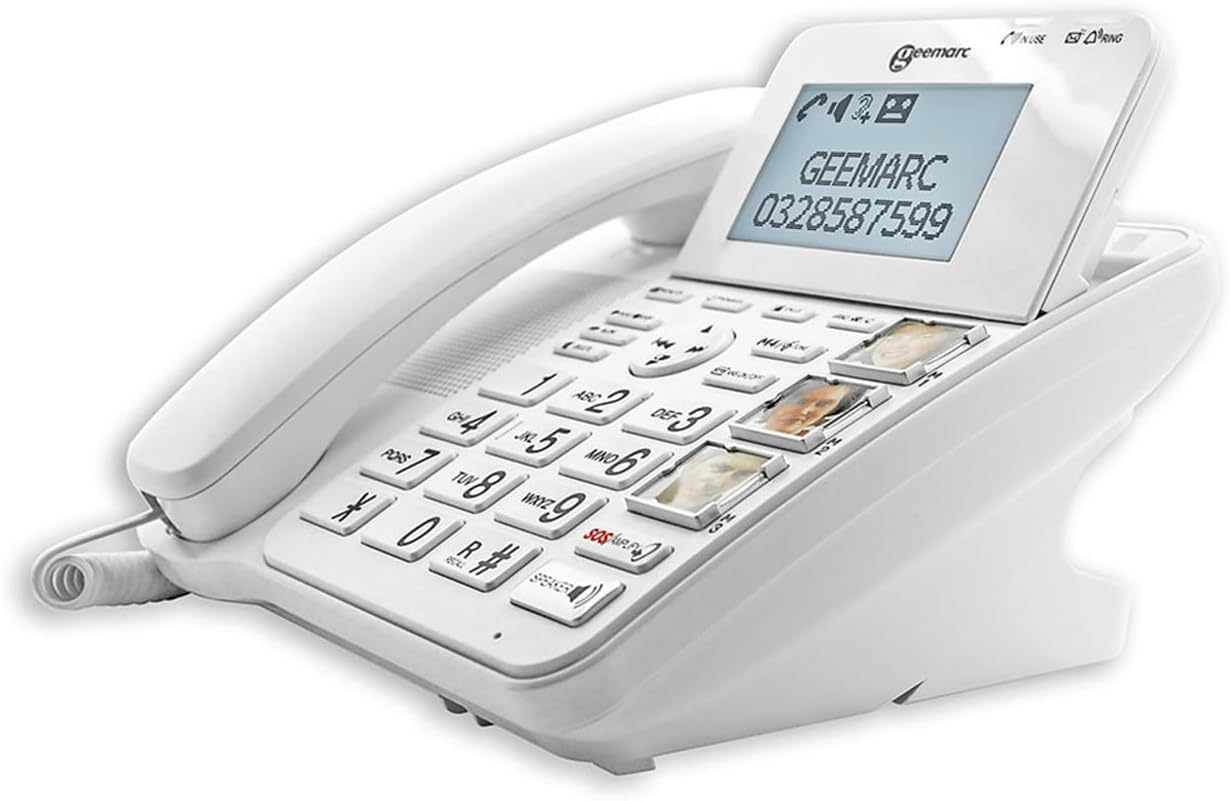
Billede 2: Vinklet view of the Geemarc CL595, highlighting the large, well-spaced buttons, the digital display, and the three photo memory keys. This image demonstrates the user-friendly interface for dialing and accessing features.
3. Vedligeholdelse
Proper maintenance ensures the longevity and optimal performance of your telephone.
- Rensning: Brug en blød, damp cloth to clean the telephone's exterior. Do not use abrasive cleaners or solvents. Ensure no liquid enters the telephone's openings.
- Udskiftning af batteri: If the telephone uses AAA batteries for backup, replace them periodically (e.g., annually) or if the low battery indicator appears.
- Opbevaring: Store the telephone in a cool, dry place away from direct sunlight and extreme temperatures when not in use for extended periods.
4. Fejlfinding
If you encounter issues with your Geemarc CL595, refer to the following common problems and solutions:
| Problem | Mulig årsag | Løsning |
|---|---|---|
| Ingen klartone | Telefonledningen er frakoblet eller defekt. | Sørg for, at telefonledningen er korrekt tilsluttet både telefonen og vægstikket. Test med en anden telefon, hvis det er muligt. |
| Kan ikke høre den, der ringer op / Den, der ringer op, kan ikke høre mig | Volume settings are too low; handset or line cord issue. | Adjust reception volume using the dedicated buttons or activate the Boost function. Check handset cord connection. |
| Telefonen ringer ikke | Ringer volume is off or set too low. | Check ringer volume settings in the menu. Ensure "Do Not Disturb" or similar features are not active. |
| Skærmen er tom | Power adapter is disconnected or power outage. | Ensure the power adapter is securely connected to the phone and a working electrical outlet. Check household power. |
If the problem persists after trying these solutions, please contact Geemarc customer support for further assistance.
5. Specifikationer
- Model: CL595
- Type: Kablet telefon
- Dimensioner (L x B x H): 19 x 20 x 27 cm (cirka)
- Vægt: 1 kilo
- Strømkilde: Elektrisk kabel
- Batterier: 3 x AAA (for backup, not included)
- Skærmstørrelse: 5 inches (display)
- Reception Ampliifikation: Up to +50dB (with Boost function)
- Ringelydstyrke: Op til 80dB
- Høreapparatkompatibilitet: Yes (T-position)
- Telefonsvarer: Digital, op til 30 minutters optagetid
- Photo Memory Keys: 3 direkte hukommelsestaster
- VIP Directory Capacity: Op til 50 numre
- Kapacitet for opkaldsblokering: Op til 100 numre
- Kompatible enheder: PSTN (Public Switched Telephone Network)
- Fabrikant: Geemarc Telecom
- Oprindelsesland: Kina
6. Garanti og support
Garanti: The Geemarc CL595 typically comes with a 1-year parts availability guarantee. For specific warranty terms and conditions, please refer to the documentation provided with your purchase or contact your retailer.
Kundesupport: For technical assistance, troubleshooting beyond this manual, or warranty inquiries, please contact Geemarc customer service. Contact details can usually be found on the manufacturer's webwebstedet eller i din produktemballage.
Ask a question about this manual
Ask about setup, troubleshooting, compatibility, parts, safety, or missing instructions. Manuals+ will review the question and use this page’s manual context to help answer it.