
EARISE M37
EARISE M37 Wooden Box PA System User Manual
Model: M37
1. Produktet er slutview
The EARISE M37 is a portable 100W PA system designed for various audio applications, including home parties, small events, and karaoke. It features a wooden cabinet for enhanced acoustics, built-in Bluetooth connectivity, and comes with two wireless microphones for immediate use. The system supports multiple audio inputs including AUX and USB, offering versatile playback options.

Image: The EARISE M37 PA system, showcasing its wooden box design and two included wireless microphones.
2. Sikkerhedsoplysninger
- Udsæt ikke enheden for regn eller fugt for at forhindre brand eller elektrisk stød.
- Åbn ikke kabinettet. Der er ingen dele indeni, som brugeren kan servicere. Overlad al service til kvalificeret personale.
- Sørg for tilstrækkelig ventilation omkring enheden. Bloker ikke ventilationsåbningerne.
- Undgå at placere enheden i nærheden af varmekilder såsom radiatorer, varmeapparater, komfurer eller andre apparater (herunder ampløftere), der producerer varme.
- Beskyt netledningen mod at blive trådt på eller klemt, især ved stik, stikkontakter og det sted, hvor de kommer ud af apparatet.
- Træk stikket ud af dette apparat under tordenvejr, eller når det ikke skal bruges i længere perioder.
3. Pakkens indhold
Tjek venligst pakken for følgende varer:
- EARISE M37 PA System Unit
- 2 x trådløse mikrofoner
- Fjernbetjening
- Strømadapter
- Brugervejledning (dette dokument)

Image: A visual representation of key features and included accessories: wireless microphone, Bluetooth 4.2, USB auto-play, and remote controller.
4. Produktfunktioner og komponenter
Familiarize yourself with the main components and controls of your EARISE M37 PA System.

Image: The control panel of the EARISE M37, showing various inputs and adjustment knobs. Key controls include: Mode, Previous/Next Track, Play/Pause, Record, EQ, Light, Mic 1/2 inputs, AUX In/Out, USB, TF card slot, DC Power In, ON/OFF switch, Charging indicator, ECHO, DELAY, MIC VOL, MASTER VOL, TREBLE, EXTRA BASS, and BASS.
Kontrolpanelets funktioner:
- KØRSELSVEJLEDNING: Switches between input modes (Bluetooth, AUX, USB, TF Card).
- Forrige/næste nummer: Navigates tracks during media playback.
- Afspil/pause: Styrer medieafspilning.
- Optage: Initiates or stops recording (requires USB/TF storage).
- EQ: Justerer equaliseringsindstillinger.
- Lys: Styrer den integrerede LED-belysning.
- MIC 1 / MIC 2: Inputs for wired microphones (if used).
- AUX IN / AUX OUT: Audio input and output jacks for external devices.
- USB: USB port for media playback or recording.
- TF: TF (MicroSD) card slot for media playback or recording.
- DC Power IN: Strømindgang til opladning og drift.
- TÆND SLUK: Afbryder til enheden.
- Opladningsindikator: Lys, der angiver opladningsstatus.
- EKKO: Justerer ekkoeffekten for mikrofoner.
- FORSINKE: Justerer forsinkelseseffekten for mikrofoner.
- MIC VOL: Justerer mikrofonernes lydstyrke.
- MASTER BIND: Controls the overall master volume of the system.
- DISKANT: Justerer højfrekvent lydudgang.
- EKSTRA BAS: Forbedrer lavfrekvent lydoutput.
- BAS: Justerer lavfrekvent lydudgang.
5. Opsætning
5.1 Charging the PA System
Before first use, fully charge the PA system. Connect the provided power adapter to the "DC Power IN" port on the unit and plug it into a standard wall outlet. The charging indicator light will show the charging status. A full charge provides up to 7 hours of play time.

Image: Illustration highlighting the 3600mAh battery capacity, providing up to 7 hours of continuous play time.
5.2 Opsætning af trådløs mikrofon
The two wireless microphones are pre-paired with the PA system. Insert AA batteries (not included) into each microphone. Turn on the microphones using their respective power switches. They should automatically connect to the PA system.
5.3 Tilslutning af lydkilder
Bluetooth-forbindelse:
- Turn on the EARISE M37 PA system.
- Tryk på MODE button until the display shows "Bluetooth" or a Bluetooth icon.
- Aktiver Bluetooth på din mobilenhed (smartphone, tablet osv.) og søg efter tilgængelige enheder.
- Select "EARISE M37" from the list. Once connected, you will hear a confirmation sound.

Image: A hand holding a smartphone displaying a Bluetooth connection screen, indicating the ease of pairing with the EARISE M37 PA system.
USB/TF-kortafspilning:
Indsæt et USB-flashdrev eller et TF-kort (MicroSD) med MP3-lyd files into the respective port. The system will automatically detect and begin playing music. Use the Previous/Next Track and Play/Pause buttons to control playback.
AUX-indgang:
Tilslut en ekstern lydenhed (f.eks. MP3-afspiller, computer) til AUX IN porten ved hjælp af et 3.5 mm lydkabel (medfølger ikke). Tryk på MODE button until AUX input is selected.
6. Betjeningsvejledning
6.1 Tænd/sluk
To turn the unit on or off, use the ON/OFF switch located on the control panel.
6.2 Justering af lydstyrke og effekter
- MASTER BIND: Rotate this knob to adjust the overall volume of the PA system.
- MIC VOL: Justerer lydstyrken på de tilsluttede mikrofoner.
- ECHO / DELAY: Use these knobs to add or reduce echo and delay effects to the microphone sound.
- TREBLE / BASS / EXTRA BASS: Adjust these knobs to fine-tune the high and low frequencies of the audio output.
6.3 Brug af mikrofoner
Once the wireless microphones are powered on and connected, speak into them. Adjust the MIC VOL, EKKO, og FORSINKE knobs on the PA system to achieve the desired sound. For optimal performance, hold the microphone a few inches from your mouth.

Image: Two individuals enjoying karaoke with the EARISE M37 PA system and its wireless microphones, demonstrating typical usage.
6.4 Optagefunktion
To record audio (e.g., microphone input or music playback), ensure a USB flash drive or TF card is inserted into the corresponding slot. Press the OPTAGE button to start recording. Press it again to stop. Recorded files vil blive gemt på den indsatte lagringsenhed.
7. Vedligeholdelse
- Rengør enheden med en blød, tør klud. Brug ikke slibende rengøringsmidler eller opløsningsmidler.
- Opbevar PA-systemet et køligt, tørt sted væk fra direkte sollys og ekstreme temperaturer.
- If the unit will not be used for an extended period, fully charge the battery before storage and recharge it every few months to maintain battery health.
8. Fejlfinding
| Problem | Mulig årsag | Løsning |
|---|---|---|
| Ingen strøm | Batteriet er afladet; Strømkabel ikke tilsluttet. | Oplad enheden; Sørg for, at strømkablet er korrekt tilsluttet. |
| Ingen lyd fra mikrofoner | Microphones off; Batteries low/dead; MIC VOL too low. | Turn on microphones; Replace batteries; Increase MIC VOL. |
| Bluetooth forbinder ikke | PA system not in Bluetooth mode; Device too far; Interference. | Press MODE button to select Bluetooth; Move device closer; Restart both devices. |
| USB/TF-kort afspiller ikke | Ukorrekt file formatering; Kort/drev ikke isat korrekt; Beskadiget files. | Sikre files are MP3; Reinsert card/drive; Try different files/device. |
9. Specifikationer
| Feature | Detalje |
|---|---|
| Mærke | EARISE |
| Model | M37 |
| Output Wattage | 100 watt |
| Strømkilde | Batteridrevet |
| Forbindelsesteknologi | Bluetooth, USB, AUX |
| Bluetooth version | 4.2 (from image) |
| Lydindgang | Trådløs mikrofon, AUX |
| Antal kanaler | 2 |
| Varens vægt | 11.62 pund |
| Pakkedimensioner | 18.7 x 12 x 11.9 tommer |
| Produktmål (ca.) | 32.5 cm (12.8 tommer) H x 25.5 cm (10 tommer) B x 23.8 cm (9.4 tommer) D |
| Farve | Sort |
| Monteringstype | Bordplade |
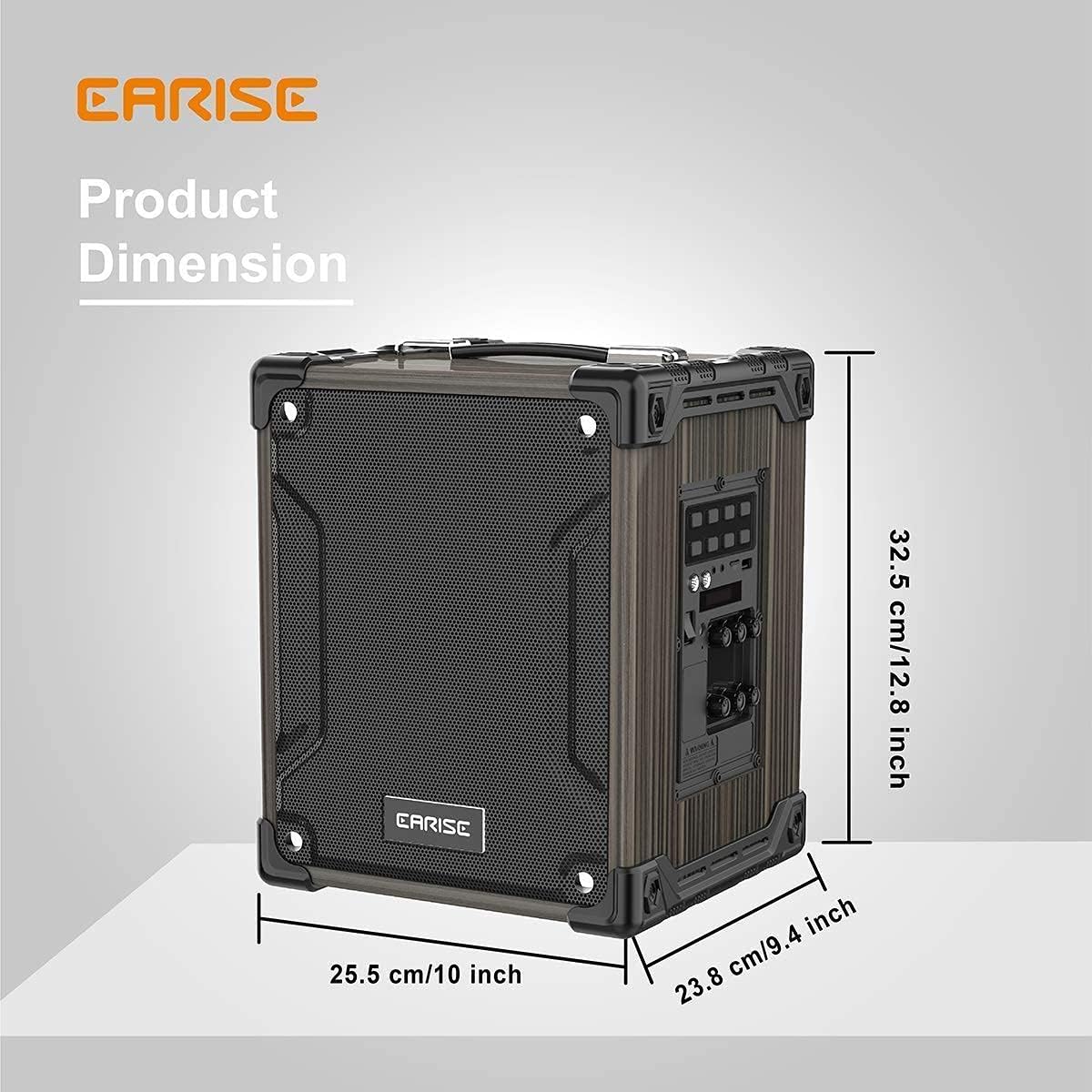
Image: Product dimensions of the EARISE M37, measuring approximately 32.5 cm (12.8 inches) in height, 25.5 cm (10 inches) in width, and 23.8 cm (9.4 inches) in depth.
10. Garanti og support
For warranty information or technical support, please refer to the contact details provided with your purchase or visit the official EARISE webwebsted. Gem din købsbevis til garantikrav.
Ask a question about this manual
Ask about setup, troubleshooting, compatibility, parts, safety, or missing instructions. Manuals+ will review the question and use this page’s manual context to help answer it.