
1. Introduktion
This manual provides essential information for the safe and efficient operation of your ProfiCook PC-MWG 1176 H microwave oven. Please read these instructions thoroughly before using the appliance and retain them for future reference. This appliance combines microwave, grill, and hot air functions, offering versatile cooking options.
2. Vigtige sikkerhedsinstruktioner
Følg altid grundlæggende sikkerhedsforanstaltninger, når du bruger elektriske apparater, for at reducere risikoen for brand, elektrisk stød, personskade eller eksponering for for meget mikrobølgeenergi.
- Læs alle instruktioner før brug.
- Do not operate the oven if the door or door seals are damaged. Contact qualified service personnel for repair.
- Opvarm ikke væsker eller andre fødevarer i lukkede beholdere, da de er tilbøjelige til at eksplodere.
- Brug kun redskaber, der er egnede til mikrobølgeovne.
- Ved opvarmning af mad i plast- eller papirbeholdere skal du holde øje med ovnen på grund af muligheden for antændelse.
- Hvis der observeres røg, sluk eller tag stikket ud af stikkontakten og hold døren lukket for at kvæle eventuelle flammer.
- Lad være med at overkoge mad.
- Rengør ovnen regelmæssigt og fjern eventuelle madrester.
- Manglende vedligeholdelse af ovnen i ren tilstand kan føre til forringelse af overfladen, hvilket kan påvirke apparatets levetid negativt og muligvis resultere i en farlig situation.
- Brug ikke skrappe slibende rengøringsmidler eller skarpe metalskrabere til at rengøre ovnlågens glas, da de kan ridse overfladen, hvilket kan resultere i, at glasset knuses.
- Dette apparat er kun beregnet til husholdningsbrug.
- Sørg for, at apparatet er korrekt jordet.
- Hold børn væk fra apparatet under drift.
3. Produktet er slutview
The ProfiCook PC-MWG 1176 H is a versatile 3-in-1 appliance featuring microwave, grill, and hot air convection functions. It has a 23-liter cooking capacity and an interior made of stainless steel.
3.1 Komponenter
- Mikrobølgeovnsenhed
- Glass Turntable (approx. Ø 27.0 cm)
- Ring til drejeskive
- Drejeskiveaksel
- Grill Rack (approx. Ø 22.0 cm)
3.2 Kontrolpanel og funktioner
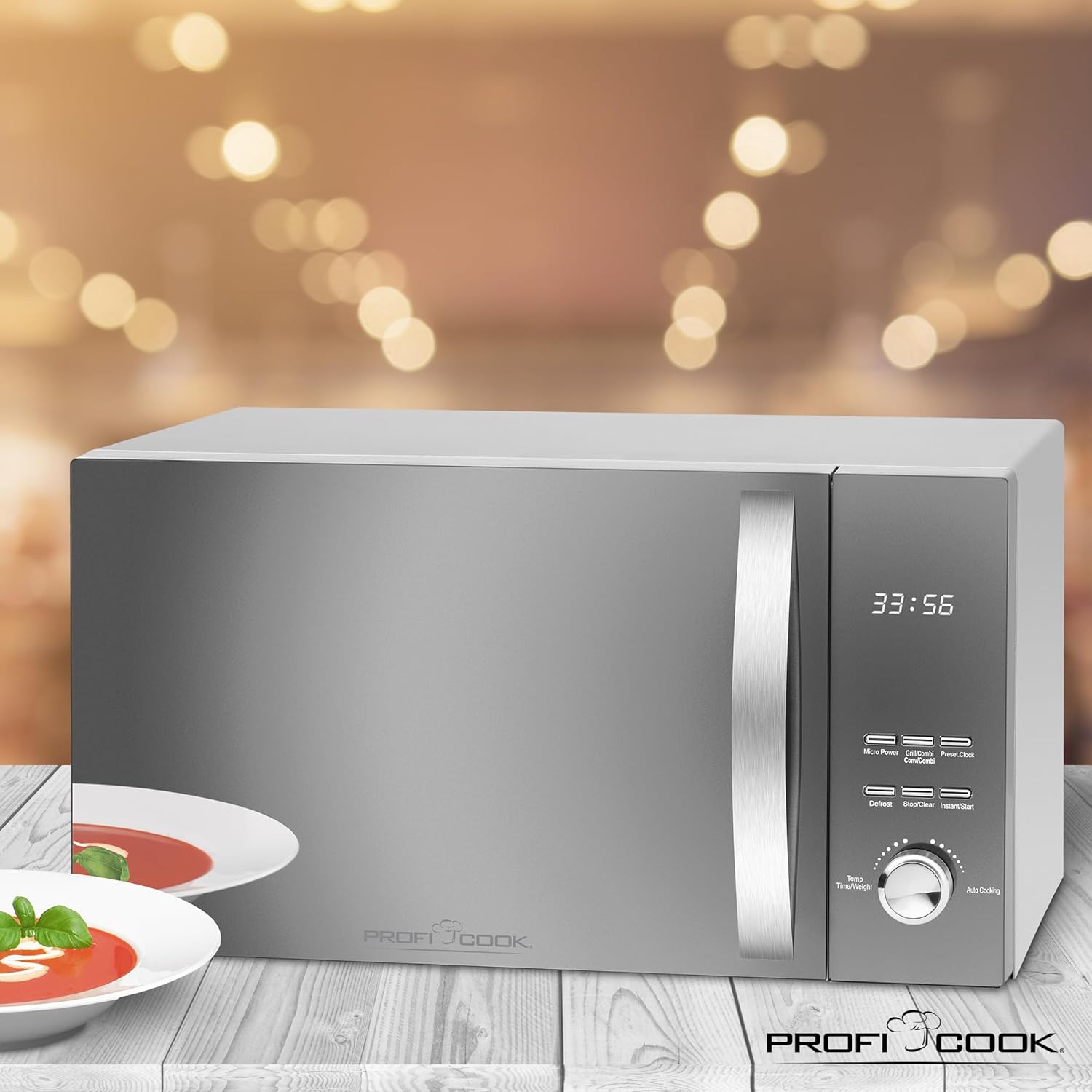
The appliance features a reflective glass front, a multi-function display with a digital clock, and various control buttons and a rotary knob for settings.

Billede 1: Front view of the ProfiCook PC-MWG 1176 H microwave oven, showing the reflective glass door, control panel, and handle. Insets highlight the reflective glass, the interior with the turntable, and the digital display with clock.

Billede 2: Overview of key features including 800W microwave power, 1300W grill power, 2300W hot air power, 23-liter cooking space, 9 automatic programs (including defrost), 60-minute timer with end signal, and interior lighting.
- Vise: Shows time, cooking settings, and program status.
- Knapper: For Micro Power, Grill/Combi, Hot Air, Defrost, Stop/Clear, Instant/Start, Preset/Clock.
- Drejeknap: Used for adjusting time, weight, and auto cooking programs.
4. Opsætning og installation
4.1 Udpakning
Carefully remove the microwave oven and all packaging materials. Check for any damage. Do not operate the appliance if it is damaged. Keep packaging materials away from children.
4.2 Placering
- Place the oven on a stable, level surface that can support its weight.
- Ensure adequate ventilation. Maintain a minimum clearance of 20 cm above the oven, 10 cm at the rear, and 5 cm on both sides.
- Bloker ikke nogen ventilationsåbninger.
- Hold ovnen væk fra varmekilder, stærke magnetfelter og områder med høj luftfugtighed.
Billede 3: Diagram showing the approximate overall dimensions of the ProfiCook PC-MWG 1176 H microwave oven: 542 mm width, 322 mm height, and 400 mm depth.
4.3 Elektrisk tilslutning
- Plug the appliance into a properly installed and grounded wall socket (230 V, 50 Hz).
- Do not use extension cords or adapters unless absolutely necessary and only if they are rated for the appliance's power requirements.
4.4 Førstegangsbrug
Inden første brug rengøres indvendigt med adamp cloth. Operate the oven empty on hot air mode for approximately 10 minutes to burn off any manufacturing residues. Some odor or smoke may be present during this initial operation; this is normal.
5. Betjeningsvejledning
5.1 Indstilling af uret
- Tryk på Forudindstillet/ur én gang. Timecifrene blinker.
- Turn the rotary knob to set the hour (0-23).
- Trykke Forudindstillet/ur igen. Minuttifrene vil blinke.
- Turn the rotary knob to set the minutes (0-59).
- Trykke Forudindstillet/ur for at bekræfte. Uret er nu indstillet.
5.2 Mikrobølgetilberedning
This appliance offers 5 microwave power levels.
- Placer maden i en mikrobølgeovnssikker beholder på glasdrejetallerkenen.
- Tryk på Micro Power knappen gentagne gange for at vælge det ønskede effektniveau (P100, P80, P50, P30, P10).
- Drej på drejeknappen for at indstille tilberedningstiden (op til 60 minutter).
- Trykke Øjeblikkelig/Start at begynde at lave mad.
5.3 Grilltilberedning
Use the grill function for browning and crisping food. The appliance has 1 grill power level.
- Placer maden på grillristen.
- Tryk på Grill/kombi button once to select the grill function (G-1).
- Drej på drejeknappen for at indstille tilberedningstiden.
- Trykke Øjeblikkelig/Start at begynde.
5.4 Hot Air (Convection) Cooking
The hot air function allows for baking and roasting. There are 7 temperature settings for hot air.
- Place food in a heat-resistant dish on the turntable or grill rack.
- Tryk på Varm luft button repeatedly to select the desired temperature (110°C to 200°C).
- Drej på drejeknappen for at indstille tilberedningstiden.
- Trykke Øjeblikkelig/Start at begynde.
5.5 Kombination madlavning
The appliance offers combined grill/microwave and microwave/hot air functions.
- Grill/Microwave: Trykke Grill/kombi twice for C-1 (Grill 30% / Microwave 70%) or three times for C-2 (Grill 50% / Microwave 50%).
- Microwave/Hot Air: Trykke Varm luft repeatedly to cycle through C-3 (Microwave 30% / Hot Air 70%) and C-4 (Microwave 50% / Hot Air 50%).
- After selecting the combination mode, turn the rotary knob to set the cooking time and press Øjeblikkelig/Start.
5.6 Afrimningsfunktion
The defrost function allows thawing food based on weight.
- Placer den frosne mad i ovnen.
- Tryk på Optøning button. The display will show "dEF1" or "dEF2".
- Turn the rotary knob to select the weight (e.g., 100g to 2000g for dEF1, 100g to 1000g for dEF2).
- Trykke Øjeblikkelig/Start for at begynde optøningen.
5.7 automatiske programmer
The oven features 9 automatic cooking programs for various food types.
- Turn the rotary knob to select an auto cooking program (A-1 to A-9).
- Trykke Øjeblikkelig/Start. The display will show the default weight.
- Turn the rotary knob to adjust the weight if necessary.
- Trykke Øjeblikkelig/Start at begynde.
5.8 Hurtigstartfunktion
Trykke Øjeblikkelig/Start to immediately start cooking at full microwave power for 30 seconds. Each subsequent press adds 30 seconds to the cooking time.
5.9 Børnesikkerhedslås
For at aktivere børnesikringen skal du trykke på og holde Stop/Slet button for 3 seconds. The display will show a lock icon. To deactivate, press and hold Stop/Slet igen i 3 sekunder.
6. Vedligeholdelse og rengøring
Regelmæssig rengøring sikrer optimal ydeevne og forlænger apparatets levetid.
- Tag altid stikket ud af ovnen før rengøring.
- Rengør indvendige og udvendige overflader med adamp klud og mildt rengøringsmiddel. Brug ikke slibende rengøringsmidler eller skuresvampe.
- Glasdrejetallerkenen og drejetallerkenringen kan vaskes i varmt sæbevand eller i opvaskemaskinen.
- For stubborn food residues, place a bowl of water with lemon juice inside the oven and heat on high microwave power for 5-10 minutes. This will loosen the residues for easier cleaning.
- Tør dørpakningerne og tilstødende dele omhyggeligt af for at fjerne eventuelle spild eller stænk.
- Ensure all parts are dry before plugging the oven back in.
7. Fejlfinding
If you encounter issues with your microwave oven, refer to the following table before contacting service.
| Problem | Mulig årsag | Løsning |
|---|---|---|
| Ovnen starter ikke |
|
|
| Maden tilberedes ikke jævnt |
|
|
| Light inside oven not working | Pæren skal udskiftes. | Kontakt kvalificeret servicepersonale for udskiftning af pæren. Forsøg ikke at udskifte den selv. |
| Usædvanlig støj under drift | Turntable not correctly positioned. | Ensure the turntable and ring are correctly seated on the shaft. |
8. Tekniske specifikationer
| Modelnummer | PC-MWG 1176 H |
| Strømforsyning | 230 V, 50 Hz |
| Mikrobølgeeffekt | 800 watt |
| Grilleffekt | 1300 watt |
| Hot Air Power Output | 2300 watt |
| Samlet strømforbrug | 2300 Watt (Max) |
| Kapacitet | 23 liter |
| Diameter af drejeskive | Ca. 27 cm |
| Produktmål (L x H x D) | 49 x 27.6 x 39.5 cm |
| Approximate Overall Dimensions (W x H x D) | 54.2 x 32.2 x 40 cm |
| Vægt | 12.7 kg |
| Indvendigt materiale | Rustfrit stål |
| Antal effektniveauer | 5 (Microwave) |
| Number of Auto Programs | 9 |
9. Garanti og support
ProfiCook appliances are manufactured with care and undergo strict quality controls. This product is covered by a manufacturer's warranty in accordance with the legal provisions of your country of purchase.
- Garantiperiode: Typically 2 years from the date of purchase, but may vary by region. Please refer to your purchase documentation for specific terms.
- Ekskluderinger: The warranty does not cover damage caused by improper use, normal wear and tear, unauthorized repairs, or failure to follow the instructions in this manual.
- Kundeservice: For warranty claims, technical support, or spare parts, please contact your retailer or the official ProfiCook customer service in your region. Contact information can usually be found on the ProfiCook webwebstedet eller på din produktemballage.
- Always have your proof of purchase (receipt or invoice) and the product model number (PC-MWG 1176 H) ready when contacting support.