
GJ JGA ELECTRONICS 12 INCH
GJ JGA ELECTRONICS 12-Inch PA Speaker System User Manual
Model: 12 INCH
Indledning
Thank you for choosing the GJ JGA ELECTRONICS 12-Inch PA Speaker System. This manual provides essential information for the safe and efficient operation of your new audio equipment. Please read it thoroughly before use and retain it for future reference.
Vigtige sikkerhedsoplysninger
WARNING: To prevent fire or shock hazard, do not expose this appliance to rain or moisture.
- Læs disse instruktioner.
- Gem disse instruktioner.
- Overhold alle advarsler.
- Følg alle instruktioner.
- Brug ikke dette apparat i nærheden af vand.
- Rengør kun med en tør klud.
- Bloker ikke ventilationsåbninger. Installer i overensstemmelse med producentens anvisninger.
- Må ikke installeres i nærheden af varmekilder såsom radiatorer, varmeapparater, komfurer eller andre apparater (inklusive ampløftere), der producerer varme.
- Beskyt netledningen mod at blive trådt på eller klemt, især ved stik, stikkontakter og det sted, hvor de kommer ud af apparatet.
- Brug kun tilbehør/tilbehør specificeret af producenten.
- Træk stikket ud af dette apparat under tordenvejr, eller når det ikke skal bruges i længere perioder.
- Overlad al service til kvalificeret servicepersonale. Service er påkrævet, når apparatet er blevet beskadiget på nogen måde, såsom strømforsyningsledning eller stik er beskadiget, væske er blevet spildt, eller genstande er faldet ind i apparatet, apparatet har været udsat for regn eller fugt, ikke fungerer normalt , eller er blevet droppet.
Pakkens indhold
Bekræft, at alle nedenstående varer er inkluderet i din pakke:
- 1 x Active PA Speaker
- 1 x Passive PA Speaker
- 2 x højttalerstativer
- 1 x kablet mikrofon
- 1 x fjernbetjening
- 2 x støvposer
- Speaker Connection Cables
- Strømkabel
- USB kabel

Image: All components included in the GJ JGA ELECTRONICS PA Speaker System package.
Produkt overview
The GJ JGA ELECTRONICS PA Speaker System features a 12-inch full-range woofer and a 25mm voice coil titanium horn driver for high-quality sound. The active speaker includes a multifunctional amplifier panel for various connections and controls.

Billede: Overview of the PA Speaker System, showing both speakers and stands.
Active Speaker Rear Panel Controls and Connections

Billede: Detaljeret view of the multifunctional amplifier panel on the active speaker.
- MP3 Player Display: Viser den aktuelle tilstand og sporoplysninger.
- USB ind: Til tilslutning af USB-drev.
- SD-kort: Til isætning af SD-hukommelseskort.
- Mode knap: Switches between input modes (Bluetooth, USB, SD, AUX).
- Niveaukontrol: Adjust input levels for Microphone, Line In, and MP3/Bluetooth.
- Mic In (6.35mm/XLR): Connect wired microphones.
- Line In (RCA/XLR): Connect external audio sources like mixers or instruments.
- Line Out (XLR): Connect to other speakers or audio equipment.
- Diskantkontrol: Adjusts high-frequency sound.
- Baskontrol: Adjusts low-frequency sound.
- Hovedvolumen: Styrer den overordnede udgangslydstyrke.
- Afbryderen: Tænder/slukker højttaleren.
- Speaker Out (8 Ohm): Tilsluttes den passive højttaler.
Bærbarhedsfunktioner
The speakers are designed with humanized handles for easy transport and can be mounted on retractable speaker stands.

Image: Ergonomic handle for convenient portability.
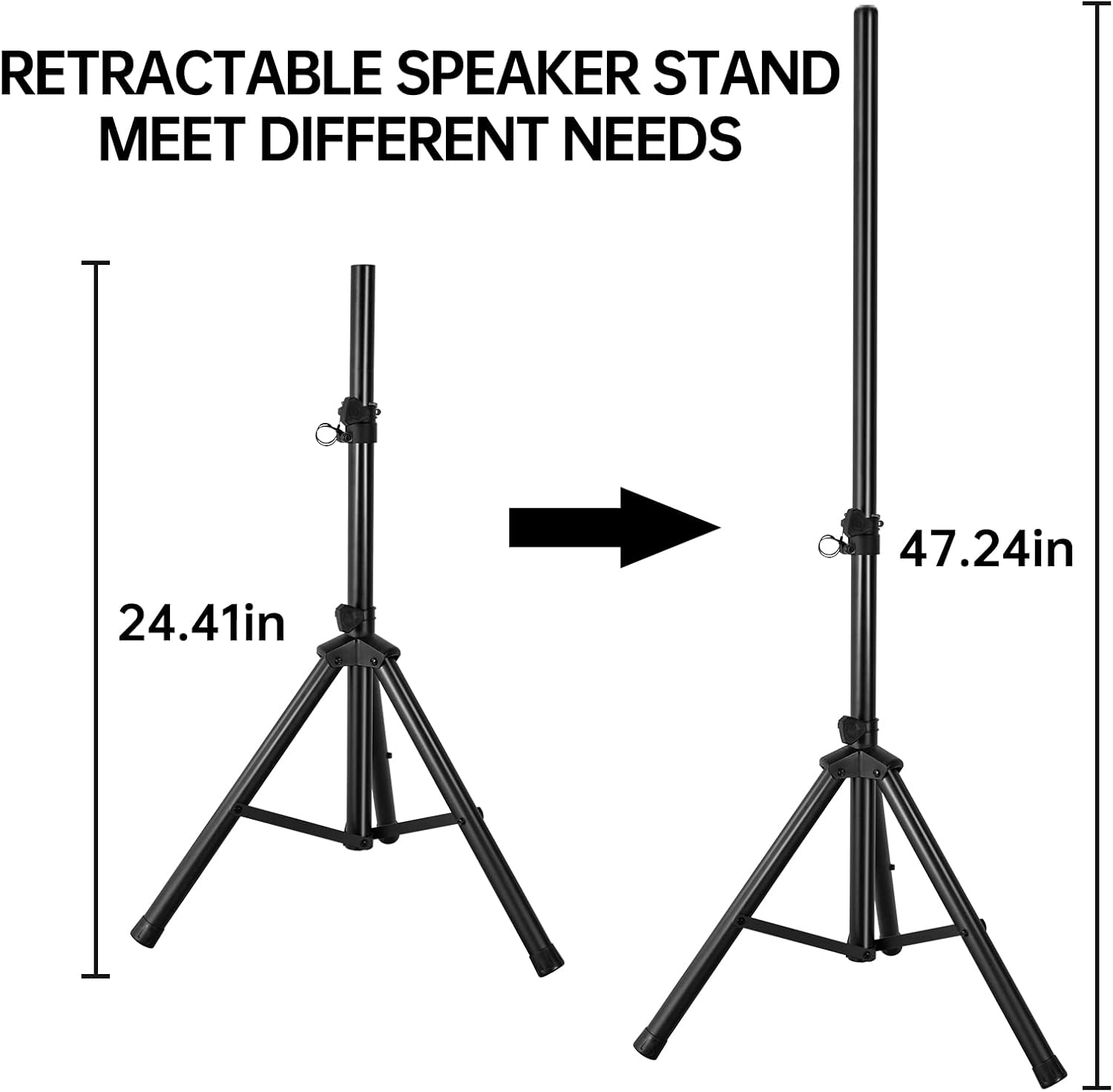
Image: Retractable speaker stand with adjustable height for various needs.
Opsætning
- Udpakning: Fjern forsigtigt alle komponenter fra emballagen. Gem emballagen til senere transport eller opbevaring.
- Højttalerstativmontering:
- Extend the legs of the speaker stands to form a stable base.
- Adjust the height of the stands using the locking pin and knob to your desired level (up to 47.24 inches). Ensure the stand is securely locked before placing a speaker on it.
- Højttalerplacering:
- Place the active speaker (with the control panel) and the passive speaker on the assembled stands or a stable, flat surface.
- Ensure speakers are positioned to provide optimal sound coverage for your intended area.
- Tilslutning af højttalere:
- Connect the passive speaker to the "SPEAKER OUT 8 OHM" port on the active speaker using the provided speaker cable. Ensure a secure connection.
- Strømtilslutning:
- Ensure the power switch on the active speaker is in the "OFF" position.
- Connect the power cable to the active speaker's power input and then to a suitable power outlet (AC115V-60Hz or AC230V-50Hz).
Betjeningsvejledning
Tænd/sluk
- To turn on, flip the "POWER" switch on the rear panel of the active speaker to the "ON" position. The MP3 Player Display will illuminate.
- To turn off, flip the "POWER" switch to the "OFF" position.
Bluetooth-forbindelse
- Sørg for, at højttaleren er tændt.
- Press the "MODE" button on the active speaker's control panel until "Bluetooth" is displayed.
- Aktiver Bluetooth på din mobilenhed (smartphone, tablet, computer) og søg efter tilgængelige enheder.
- Select "GJ JGA ELECTRONICS" (or similar name) from the list to pair.
- Once paired, you can play audio from your device through the speakers. Adjust the "MP3 Bluetooth" level knob and "Master" volume as needed.
USB/SD-kortafspilning
- Insert a USB drive into the "USB In" port or an SD card into the "SD CARD" slot.
- The speaker should automatically switch to USB or SD mode. If not, press the "MODE" button until the correct mode is displayed.
- Use the playback controls (Play/Pause, Next, Previous) on the panel or remote control to manage your audio.
- Adjust the "MP3 Bluetooth" level knob and "Master" volume.
AUX-indgang (Line In)
- Connect your external audio source (e.g., mixer, instrument, CD player) to the "LINE IN" (RCA or XLR) ports on the active speaker.
- Press the "MODE" button until the display indicates AUX or Line In mode.
- Adjust the "LEVEL" knob for "LINE IN" and the "Master" volume to achieve desired sound.
Mikrofonbrug
- Connect the wired microphone to the "MIC IN" (6.35mm or XLR) port on the active speaker.
- Adjust the "LEVEL" knob for "MIC IN" to control the microphone volume.
- Use the "Treble" and "Bass" controls to fine-tune the microphone's sound.
Sound Adjustment (Treble, Bass, Master Volume)
- Diskant: Rotate the "TREBLE" knob to increase or decrease high frequencies for brighter or softer sound.
- Bas: Rotate the "BASS" knob to increase or decrease low frequencies for deeper or lighter bass.
- Hovedvolumen: Use the "MASTER" knob to control the overall output volume of the entire system. Start with a low volume and gradually increase to avoid sudden loud sounds.

Image: The PA speaker system in a typical usage scenario, suitable for various events.
Opretholdelse
- Rensning: Brug en blød, tør klud til at rengøre højttalerkabinetterne. Brug ikke slibende rengøringsmidler, voks eller opløsningsmidler.
- Opbevaring: When not in use for extended periods, store the speakers in a cool, dry place, preferably in their dust bags to protect them from dust and moisture.
- Ventilation: Ensure the ventilation grilles on the rear of the active speaker are clear of obstructions to prevent overheating.
- Kabler: Kontrollér regelmæssigt alle kabler for skader. Udskift straks eventuelle flossede eller beskadigede kabler.
Fejlfinding
| Problem | Mulig årsag | Løsning |
|---|---|---|
| Ingen strøm | Strømkabel ikke tilsluttet; Strømafbryder slukket; Strømstik defekt. | Sørg for, at strømkablet er korrekt tilsluttet. Tænd for strømmen. Test stikkontakten med en anden enhed. |
| Ingen lyd fra højttalerne | Master volume too low; Input level too low; Incorrect input mode selected; Passive speaker not connected. | Increase Master volume. Increase input level for selected source. Press MODE button to select correct input. Ensure passive speaker is connected to active speaker's SPEAKER OUT. |
| Bluetooth-parring mislykkedes | Speaker not in Bluetooth mode; Device too far; Interference. | Press MODE button to select Bluetooth. Move device closer to speaker. Avoid strong electromagnetic interference. |
| Forvrænget lyd | Volume too high (clipping); Input signal too strong; Damaged cable. | Reduce Master volume or input level. Check input source for excessive signal. Replace audio cables if damaged. |
| Mikrofon virker ikke | Microphone not connected; Mic level too low; Microphone faulty. | Ensure microphone is securely plugged into MIC IN. Increase MIC IN level. Test with another microphone if available. |
Specifikationer
| Feature | Detalje |
|---|---|
| Mærke | GJ JGA ELEKTRONIK |
| Modelnummer | 12 TOMME |
| Højttaler type | PA Speaker System (Active & Passive) |
| Bashøjttaler diameter | 12 tommer |
| Horn Driver | 25mm Voice Coil Titanium Horn Driver 4 Oz, 4 Ohm |
| Højttaler Maksimal udgangseffekt | 80 watt |
| Frekvensrespons | 60Hz-18KHz |
| Forbindelsesteknologi | Auxiliary, Bluetooth, USB, SD Card |
| Indgange | MP3/USB/SD, Bluetooth, 3.5mm/6.35mm Mic In, RCA/XLR Line In |
| Kontrolmetode | Remote, On-board controls |
| Strømkilde | Corded Electric (AC115V-60Hz / AC230V-50Hz) |
| Produktmål (hver højttaler) | 14.6" D x 22.8" B x 12.4" H |
| Varens vægt (i alt) | 85 pund |
| UPC | 722765421394 |

Image: Internal components of the speaker, illustrating the woofer and horn driver.
Garanti og support
GJ JGA ELECTRONICS products are designed for reliability and performance. For warranty information, please refer to the warranty card included with your product or contact our customer support.
If you encounter any issues or have questions regarding your PA Speaker System, please contact GJ JGA ELECTRONICS Customer Support:
- Online support: Besøg GJ JGA ELECTRONICS Store on Amazon for ofte stillede spørgsmål og kontaktmuligheder.
- E-mail: Se produktemballagen eller den medfølgende dokumentation for direkte e-mailsupport.
Please have your model number (12 INCH) and purchase details ready when contacting support.