
1. Introduktion
Thank you for choosing the Antec NX800 Mid Tower Gaming Case. This manual provides detailed instructions for the proper installation, operation, and maintenance of your new PC case. The NX800 is designed to offer excellent compatibility, cooling performance, and aesthetic appeal for your gaming and high-performance computing needs.
Key features include USB 3.0 connectivity, extensive storage drive bays, and support for large expansion cards and liquid cooling solutions. It comes equipped with two 200mm ARGB fans in the front and one 120mm ARGB fan in the rear, along with a built-in LED controller for customizable lighting.
2. Produktfunktioner
- Bundkort support: Accommodates motherboards up to E-ATX size.
- Included ARGB Fans: Features 2 x 200 mm ARGB fans in the front and 1 x 120 mm ARGB fan in the rear for optimal airflow and customizable lighting.
- Radiatorstøtte: Ready for liquid cooling radiators up to 360 mm in the front, 280 mm on top, and 140 mm in the rear.
- ARGB-synkronisering: Supports synchronization of up to 6 ARGB fans simultaneously for unified lighting effects.
- Flexible Storage Potential: Offers versatile storage options with support for up to 3 x 3.5" HDDs and 4 x 2.5" SSDs.
- Hærdet glas sidepanel: A clear tempered glass side panel showcases your internal components and ARGB lighting.

Figure 2.1: Antec NX800 Mid Tower Gaming Case with illuminated ARGB fans.

Figure 2.2: Illustration of the included 2x 200mm ARGB fans for the front and 1x 120mm ARGB fan for the rear.
3. Komponent overview
Familiarize yourself with the various parts and connectors of the Antec NX800 case before beginning installation.
3.1 Forreste I/O-porte
- Power knap: For at tænde/slukke systemet.
- Nulstil knap: For at genstarte systemet.
- LED-kontrolknap: To cycle through ARGB lighting modes or sync with motherboard.
- MIC/AUDIO Jacks: For microphone input and audio output.
- USB 2.0-porte (x2): Til tilslutning af USB 2.0-enheder.
- USB 3.0-port (x1): Til tilslutning af USB 3.0-enheder med høj hastighed.

Figur 3.1: Detaljeret view of the front I/O ports on the Antec NX800 case.
3.2 Intern indretning
The NX800 provides a spacious interior for easy component installation and efficient cable management.

Figure 3.2: Internal layout highlighting component compatibility, including E-ATX motherboard, CPU cooler (max 180mm), GPU (max 350mm), 3.5" HDDs/2.5" SSDs, and PSU (max 200mm).
4. Installationsvejledning
Follow these steps for a smooth and successful build process.
4.1 Forberedelse af sagen
- Carefully remove the tempered glass side panel by unscrewing the thumb screws and gently pulling it away.
- Fjern bagpanelet for at få adgang til kabelhåndteringsområdet.
4.2 Installation af bundkort
- Installer I/O-skjoldet (hvis det ikke er forudinstalleret på dit bundkort).
- Align your motherboard with the standoffs inside the case. Ensure the standoffs match your motherboard's form factor (ATX, Micro-ATX, E-ATX).
- Fastgør bundkortet med de medfølgende skruer.
4.3 Installation af lagerdrev
- 3.5" harddiske: Locate the HDD cage at the bottom of the case. Slide the HDD into the drive tray and secure it with screws.
- 2.5" SSD'er: Mount SSDs to the dedicated SSD trays located behind the motherboard tray or on the PSU shroud. Secure with screws.
4.4 Installation af strømforsyning
- Place your ATX power supply unit (PSU) into the PSU shroud at the bottom rear of the case.
- Fastgør strømforsyningen til kabinettet med skruer bagfra.
4.5 Installation af ventilator og radiator
The NX800 supports various fan and radiator configurations:
- Front: 3 x 120mm / 3 x 140mm fans or 1 x 360mm / 1 x 280mm radiator. (2 x 200mm ARGB fans pre-installed)
- Top: 2 x 120mm / 2 x 140mm fans or 1 x 280mm radiator.
- Bag: 1 x 120mm / 1 x 140mm fan or 1 x 140mm radiator. (1 x 120mm ARGB fan pre-installed)

Figure 4.1: Diagram illustrating fan and radiator mounting options in the Antec NX800 case.
4.6 Kabelstyring
Brug den ample space behind the motherboard tray and the cable routing cutouts to manage your cables. This improves airflow and aesthetics.
5. ARGB-lysstyring
The Antec NX800 features a built-in ARGB LED controller that supports up to 6 ARGB fans. You can control the lighting effects via the dedicated LED control button on the front I/O panel or synchronize it with your motherboard's ARGB software.
- Using the LED Button: Press the LED button to cycle through various pre-set lighting modes.
- Bundkort synkronisering: Press and hold the LED button for 3 seconds to switch control to your motherboard's ARGB software. Ensure the controller's motherboard sync cable is connected to your motherboard's 3-pin 5V ARGB header.

Figure 5.1: Diagram showing the built-in LED controller with 6-pin ARGB fan connectors and motherboard sync connector.
6. Vedligeholdelse
Regelmæssig vedligeholdelse sikrer optimal ydeevne og levetid for dine pc-komponenter.
- Støvfiltre: The NX800 includes removable dust filters on the top and front. Periodically remove and clean these filters with compressed air or water (ensure they are completely dry before re-installing).
- Generel rengøring: Use a soft, dry cloth to wipe down the exterior of the case. For the tempered glass panel, use a glass cleaner and a microfiber cloth.
- Internt støv: Every few months, open the case and use compressed air to remove dust from internal components and fans.
7. Fejlfinding
If you encounter issues with your Antec NX800 case, refer to the following common problems and solutions:
| Problem | Mulig årsag | Løsning |
|---|---|---|
| Fans not spinning / LEDs not lighting up | Loose power connection to fans or controller; Controller not connected to PSU; Motherboard sync issue. | Check all fan and controller power connections. Ensure the controller is powered. If using motherboard sync, verify the 3-pin 5V ARGB cable is correctly connected and try cycling the LED button. |
| Front I/O-porte virker ikke | Frontpanelkabler er ikke forbundet til bundkortet. | Ensure all front panel cables (USB, Audio, Power SW, Reset SW, HDD LED, Power LED) are securely connected to the correct headers on your motherboard. Refer to your motherboard manual for header locations. |
| Poor airflow / High temperatures | Dust buildup on filters or fans; Incorrect fan orientation; Poor cable management. | Clean dust filters and fans. Ensure fans are oriented correctly for optimal intake/exhaust. Improve cable management to reduce airflow obstruction. |
8. Tekniske specifikationer
Detailed specifications for the Antec NX800 Mid Tower Gaming Case:
| Feature | Specifikation |
|---|---|
| Modelnavn | NX800 |
| Sagstype | Mid Tower |
| Bundkort kompatibilitet | E-ATX, ATX, Micro-ATX, ITX |
| Dimensioner (LxBxH) | 21.75 x 11.75 x 22 tommer (ca. 552 x 298 x 559 mm) |
| Vægt | 17.38 pund (ca. 7.9 kg) |
| Materiale | Legeret stål, plastik, hærdet glas |
| Udvidelsesslots | 7 Vandret |
| 3.5" drevbåse | 3 (convertible with 2.5" SSDs) |
| 2.5" drevbåse | 4 |
| Front I / O-porte | Power, Reset, LED Control, MIC/AUDIO, 2x USB 2.0, 1x USB 3.0 |
| Forudinstallerede ventilatorer | Front: 2 x 200mm ARGB; Rear: 1 x 120mm ARGB |
| Max CPU kølerhøjde | 180 mm |
| Max GPU-længde | 350 mm |
| Max PSU-længde | 200 mm |
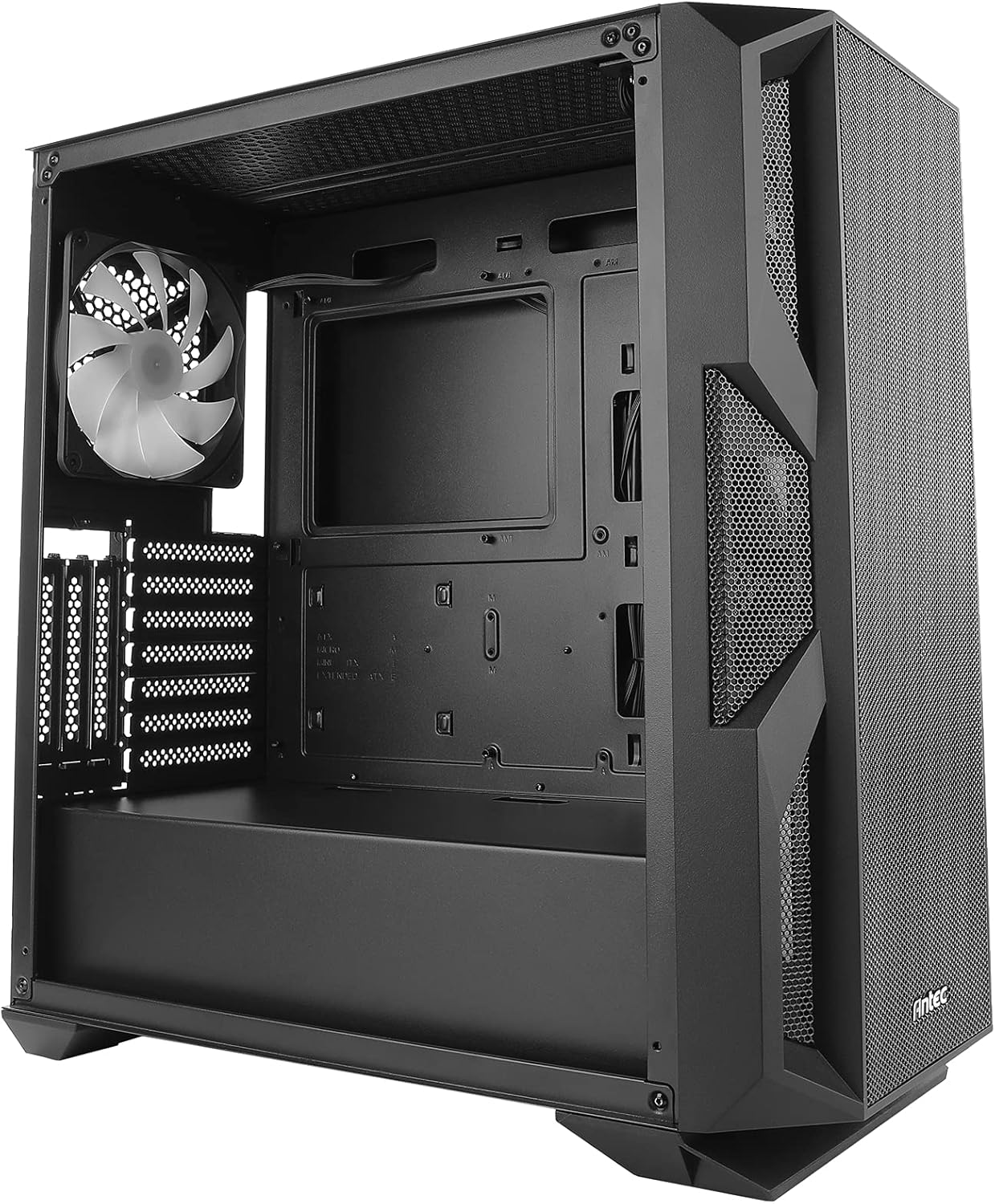
Figure 8.1: Antec NX800 case dimensions: 500mm (height), 230mm (width), 470mm (depth).
9. Garanti og support
Antec products are designed and manufactured to the highest standards. For warranty information and technical support, please visit the official Antec webwebstedet eller kontakt deres kundeserviceafdeling. Gem din købsbevis til garantikrav.
Antec Officiel Webwebsted: www.antec.com