
TNS-1867
Instruction Manual: Generic DOBE TNS-1867 Video Game Drum Sticks Controller
Model: TNS-1867 | Brand: Generic DOBE
Indledning
This manual provides essential information for the proper setup, operation, and maintenance of your Generic DOBE TNS-1867 Video Game Drum Sticks Controller. Designed for use with the Nintendo Switch, this accessory enhances your gaming experience, particularly for rhythm games like Taiko Drum Master. Please read this manual thoroughly before use to ensure optimal performance and longevity of your device.
Opsætning
Follow these steps to connect your drum sticks controller to your Nintendo Switch console:
- Udpak komponenter: Carefully remove the drum controller, drum sticks, and USB connection cable from the packaging.
- Connect Drum Controller: Locate the USB port on the drum controller. Insert one end of the provided USB cable into this port.
- Tilslut til Nintendo Switch: Insert the other end of the USB cable into an available USB port on your Nintendo Switch dock. If playing in handheld mode, connect directly to the console's USB-C port using an appropriate adapter (not included).
- Attach Drum Sticks: Securely attach the drum sticks to the designated holders on the drum controller. Ensure they are firmly in place to prevent accidental detachment during gameplay.
- Tænd konsollen: Turn on your Nintendo Switch console. The system should automatically recognize the drum controller.
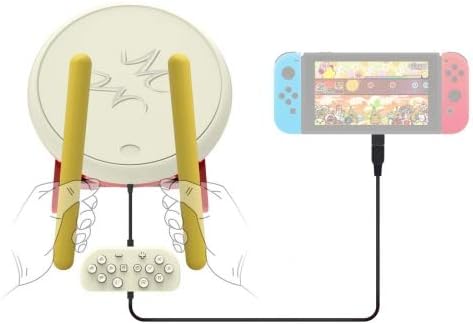
Figure 1: Connection Diagram for TNS-1867 Drum Controller
This image illustrates the complete setup. On the left, the white drum controller with two yellow drum sticks attached is shown. Below the drum, a small white control pad is connected, and a black USB cable extends from it to the right. On the right, a Nintendo Switch console (with blue and red Joy-Cons) is depicted, with the USB cable plugged into its bottom port. This setup allows for direct wired play with the console.
Betjeningsvejledning
Once connected, the drum controller is ready for use with compatible games, primarily rhythm games like Taiko Drum Master.
- Spilkompatibilitet: Ensure the game you intend to play supports external drum controllers. Refer to your game's manual or settings for controller compatibility.
- Holding the Sticks: Hold the drum sticks firmly but comfortably. The design allows for a natural drumming motion.
- Spil på tromme:
- Center Hits (Don): Strike the center of the drum surface to register "Don" notes in Taiko games.
- Rim Hits (Ka): Strike the outer edge or rim of the drum surface to register "Ka" notes.
- Using the Control Pad: The small control pad connected to the drum provides standard Nintendo Switch button inputs (directional pad, A/B/X/Y buttons, L/R, ZL/ZR, Home, Capture, Plus, Minus). Use these for menu navigation, selecting options, and other in-game actions not related to drumming.
- Følsomhedsjustering: Some games may offer in-game sensitivity settings for drum controllers. Adjust these to match your playing style and ensure accurate hit detection.
Opretholdelse
Proper care will extend the life of your drum sticks controller:
- Rensning: Use a soft, dry cloth to wipe down the drum surface and sticks. For stubborn marks, a slightly damp En klud kan bruges, men sørg for, at der ikke trænger fugt ind i de indvendige komponenter. Brug ikke skrappe kemikalier eller slibende rengøringsmidler.
- Opbevaring: When not in use, store the controller in a cool, dry place away from direct sunlight and extreme temperatures. Detach the drum sticks if preferred for compact storage.
- Håndtering: Avoid dropping the controller or applying excessive force to the drum surface or sticks, as this can damage internal sensors or structural integrity.
- Kabelpleje: Do not bend or crimp the USB cable excessively. Always pull from the plug, not the cable itself, when disconnecting.
Fejlfinding
If you encounter issues with your drum sticks controller, try the following solutions:
- Controlleren genkendes ikke:
- Ensure the USB cable is securely connected to both the drum controller and the Nintendo Switch dock/console.
- Try connecting to a different USB port on the dock.
- Genstart din Nintendo Switch-konsol.
- Verify that your console's system software is up to date.
- Inputs Not Registering / Lag:
- Check for any obstructions on the drum surface.
- Ensure you are striking the correct areas (center for "Don", rim for "Ka").
- If playing in a brightly lit room, excessive glare might interfere with optical sensors (if applicable). Try adjusting lighting.
- Check in-game settings for controller calibration or sensitivity adjustments.
- Buttons on Control Pad Not Working:
- Ensure the small control pad is properly connected to the drum unit.
- Test the buttons in the Nintendo Switch's controller calibration settings.
If problems persist after attempting these solutions, please contact the seller or manufacturer for further assistance.
Specifikationer
| Modelnummer | TNS-1867 |
| Mærke | Generic DOBE |
| Kompatibilitet | Nintendo Switch |
| Forbindelse | Kablet (USB) |
| Materiale | ABS-plast, elektroniske komponenter |
| ASIN | B07YBBTMDL |
Garanti og support
Warranty terms and conditions for the Generic DOBE TNS-1867 Video Game Drum Sticks Controller are provided by the seller or manufacturer at the time of purchase. Please retain your proof of purchase for any warranty claims.
For technical support, troubleshooting assistance beyond what is covered in this manual, or warranty inquiries, please contact the retailer or the manufacturer directly using the contact information provided with your purchase.